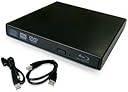
๐ฟ Unlock cinematic storage power anywhere, anytime!
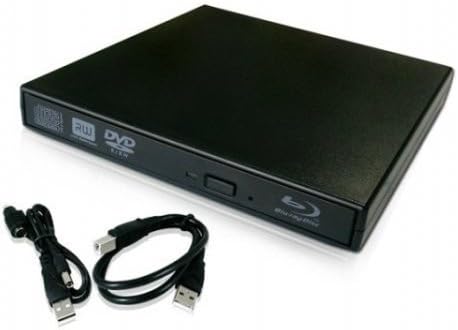
This external USB Blu-ray/DVD burner drive features Panasonicโs UJ-120 BD-ROM combo drive, delivering 5 to 10 times the storage capacity of DVDs. Its slim, lightweight design supports plug & play via USB 2.0, compatible with a broad range of Windows operating systems. Ideal for professionals needing portable, high-capacity optical media access with reliable OEM quality and a 6-month warranty.
| ASIN | B009661Y8G |
| Additional Features | Blu-Ray Disc |
| Brand | Electronics World |
| Cache Memory Installed Size | 2 MB |
| Color | Black |
| Customer Package Type | Standard Packaging |
| Customer Reviews | 3.5 out of 5 stars 199 Reviews |
| Enclosure Material | Panasonic |
| Hardware Interface | USB, USB 1.1, USB 2.0 |
| Hardware Platform | Laptop |
| Item Dimensions L x W x H | 6.3"L x 5.39"W x 0.75"H |
| Item Weight | 0.9 Pounds |
| Manufacturer | sunvalleytek |
| Mfr Part Number | SC-141-01 |
| Model Number | SC-141-01 |
| Operating System | Windows 2000, Windows 98, Windows Me, Windows Vista, Windows XP |
| Optical Storage Read Speed | 6X Blu-ray |
| Optical Storage Write Speed | 6x (BD-R), 8x (BD-RE) |
| Special Feature | Blu-Ray Disc |
| Specific Uses For Product | personal |
| UPC | 069550805992 705105991597 |
M**O
Exceptional Value - Mac and PC Tested
I just received this Blu-Ray player today and I just finished testing it out. Here are the results: 1) I have a Gateway laptop (PC) running Windows 7. This Blu-Ray player came with some software on a CD including the TotalMedia Theatre 3 software which allowed my PC to decode and play Blu-Ray movies. The only catch is that the registration serial number and the general information file were in garbled Chinese. But don't worry, the actual serial number is at the top of Serial text file and it worked fine. This drive requires two USB slots to run, but it works great on a PC. 2) I have a one year old iMac running OS X 10.6.8. The drive was recognized and could be controlled by my Mac, but the Mac OS does not include any software to decode or play Blu-Rays and the included software is only for a PC. So my solution after some minimal amount of research was to download and pay for 'Mac Blu-ray Player' which is currently offered on discount for about $44 total. With this software, Blu-Rays are now playing on my iMac also.
J**Y
Worked only the first time
Updated. May 4 2015 So at first I gave this product a 5 star, cause it worked out of the box. But after i put away and tried to use it again, it stopped working. It said on my Mac, that it was drawing too much power. So it wouldn't even read or turn on. I tried and tried, reformatted my cpu, even bought separate adapters power cables, it still would not work. It really did turn out to be a piece of junk. It has been sitting idle since the day I bought it. I would pull it out to see if it would randomly work, on all my pcs laptops and desktops, still not working. So that rules out the computers being at fault.Complete garbage. Maybe you will have better luck but I wouldn't get it again. Review for Mac Alright let's make this quick, and let you in on my experience. When i opened the package, it was sleek small, and not clutted with a bunch of books. Yes the oddest thing is, there are no logos brands, branding packaging none of that, just a black generic box,which is a double edged sword, we don't know which company to complain to. But then again, since it isn't part of any brand, this is DIRT CHEAP! 1. Program disc. Popped in my art/video game software to see if it reads. Yes, it reads, pop in and go, no drivers nothing. NOT FOR MAC anyway. 2. DVD works like a charm. CHECK! 3 Blu Ray, first off, if you need a free blue ray player for MAC there is a popular one available called FREE MAC BLU RAY PLAYER! I don't know why people have such a hard time doiong a quick search, i knew there had to be one available, and there was. Heres the link. http://download.cnet.com/Free-Mac-Blu-ray-Player/3000-13632_4-75891746.html (if you are reading this 10 years from now, it may not be up anymore) So for the blu ray, that was kind of tricky. I popped in the disc, it read the title, but when i tried to play the disc, it failed. THREE TIMES. Tried searching within the disc and folders, still no luck. I said, guess it wasn't meant to be. OR i need to purchase a "REAL" BR player. I put the disc away and did some internet searching. Maybe i was loading the video wrong. All of the sites says to do what i did. I said, what the hek, let's give it another shot. THIS TIME, i wiped the information side of the disc with a clean towel, and popped it in. IT WORKS!!!!!!!!!!!!! I re tested it over and over and over, it just works This is a 40$ blu ray / dvd player that WORKS! (i didn't check the burning, but i'm confident it'll work =)
A**A
Exactly what I wanted.
This item was a lot cheaper than many other external blue ray player and it works just fine for me considering the price difference between this item and the other players. I use it frequently on my Mac and Windows desktops as well as my ultra book has not failed me yet. It does pause a little during play but that might be due to the program that I run Blu-Rays with. Overall the stops are negligible and this was a great buy.
F**D
Excellent Hardware and Good Value, But Poor Instructions and Software
The good thing about this unit is the hardware, it's compact and works flawlessly. I especially appreciate the extra power supply jack that allows users to run a second USB power feed or a 5-volt external power source. The bad things are the lack of a useable users' guide (a virtually unreadable 3-page pamphlet) and the failure to mention that Macs require third-party software to run the Blu-Ray function. Amazon Customer Service provided invaluable help in directing me to third-party software vendors (I ultimately chose MacGo, because of the free trial download, which brought the unit to life on my MacBook Pro). Resolution is excellent on my non-Retina screen for both Blu-Ray discs and DVDs.
M**R
Decent hardware; works with Linux; iffy USB-SATA bridge
The hardware works perfectly well, but it may not provide software for handling Blu-ray discs. (A disc with what seems to a Nero release for Windows was included, but I can't and didn't test that.) Noobs may be wary. Third-party software should work fine with it. Works with several modern Linux distributions. The manual is chock-full of intelligible but amusingly broken English. An additional USB power cable included, but I have not needed it yet (appx. 1 week moderate use). Overall, a decent little bit of hardware for the price, provided you aren't intimidated by finding and installing some additional software for playback and/or decryption on your own. EDIT, 2015-12-05: USB-to-SATA bridge failed. Drive appears dead unless you pull the standard SATA drive out of the case. THe drive itself is now happily resident in my larger laptop, but it's no longer a USB drive. Still well worth the price even as an internal upgrade, but beware the spotty USB-SATA bridge. Dropping off another star for this, as it's offered specifically as a USB drive.
Q**L
the little box packs a punch
Yes, you must provide your own bluray software for this nifty item. It outshined my fancy $180 Toshiba player by playing "Spartacus Blood and Sand" for me through my laptop and onto my 55" LED LCD TV via HDMI with the superb quality of a blu ray player you would expect. The hookup is plug and play and on my windows 7 laptop it worked great! For some reason it won't work on my Vista computer. :( I haven't had time to troubleshoot yet, but hopefully will get it working. I would definitely recommend this to someone who wants a portable drive for a couple machines you own that need blu ray.
T**T
Lasted 30 minutes
I purchased this Blu-ray drive based on the reviews of other Mac users. I was skeptical that it would work because I've had bad luck with devices that use a second USB cable for power. At first, I thought the drive worked, but after about half-an-hour, it was dead. If you're going to buy this drive, I strongly recommend that you purchase it from a seller that offers free shipping and free return shipping. There's a high probability that you will return it. Using a USB port for auxiliary power is, in my opinion, a bad idea. I know it works for some people, but it's just too unreliable. At first, I tried the drive with only one USB cable. That worked until I started getting errors ripping some Blu-ray tracks. The error messages were typical of drives that were not getting enough power. Then I tried plugging in the second USB cable for power. I tried every combination of cables, hubs, and USB ports. Nothing worked. I think I eventually shorted something out in the drive because after a while, the drive was pretty much dead. I returned this drive and purchased an Samsung Electronics Optical Drives SE-506CB/RSBD instead. Although it costs almost twice as much, it only uses one USB cable. And it works great! I don't understand why this drive needs twice as much power as the Samsung drive.
B**N
BLUE-RAY HELP
1 On the disc there is software for ArcSoft TotalMedia Theater 3. This is BluRay Player Software. 2 Run the disc and click on ArcSoft TotalMedia Theater 3 3 Open the text doc and see the product key on the top line. 4 I did a copy of just the letters & numbers on the top line, not any other Chinese text. Should look look something like this. 900sfae-980610498gsdfja-kasjfdhalkfh824y-a;fdkh etc. 5 I ran the setup file next and pasted the key in the proper place on the name ad key entry page. 6 Where it says name, I typed the letter C, next, and off it went. ArcSoft TotalMedia Theater 3 installed just fine. 7 After the install you will need to do a patch / or update. It's necessary for ArcSoft TotalMedia Theater to work properly Other than that to get blue ray it is a great deal!! Hope this helps
Trustpilot
2 weeks ago
3 weeks ago