Desertcart purchases this item on your behalf and handles shipping, customs, and support to Seychelles.
🎧 Elevate your sound, own your studio vibe.
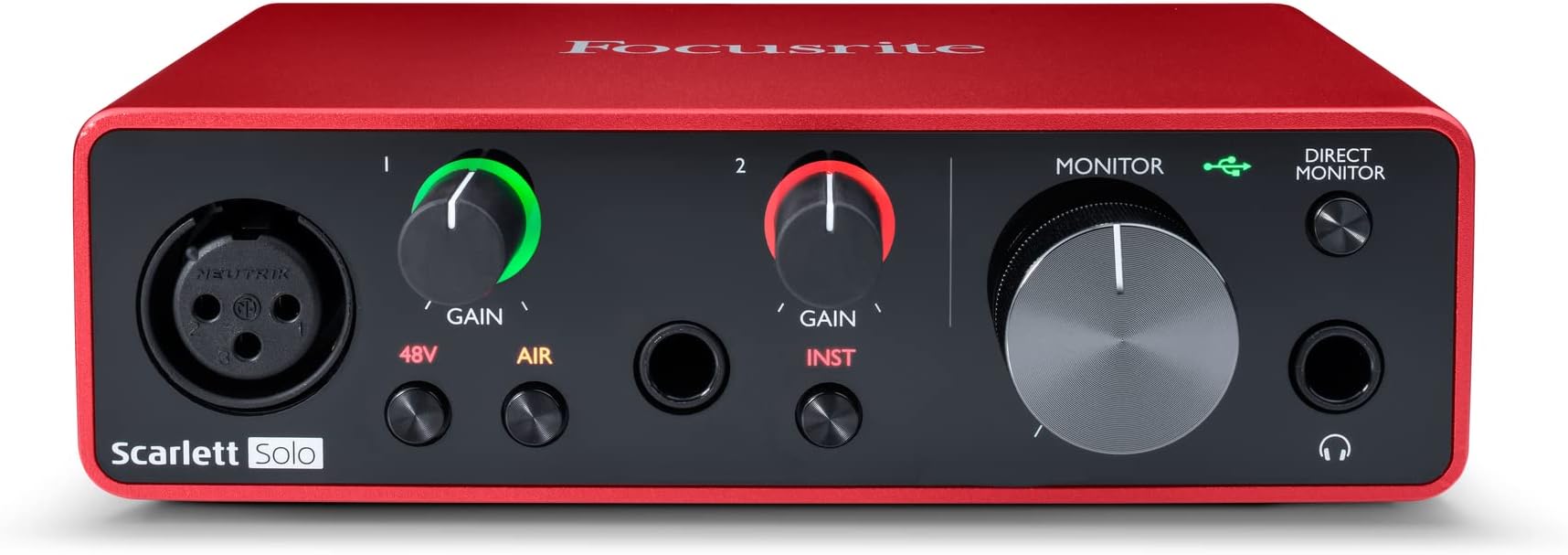
The Focusrite Scarlett Solo 3rd Gen is a compact, USB-C powered audio interface designed for singer-songwriters and solo musicians. Featuring Focusrite’s best-ever 3rd Gen mic preamp with Air mode, a high headroom instrument input, and studio-quality 24-bit/192kHz converters, it delivers pristine recordings with zero latency monitoring. Compatible with major DAWs and powered via USB, it’s the ultimate plug-and-play solution for professional-grade home recording.


| ASIN | B07QR6Z1JB |
| Audio Input | XLR, Instrument |
| Best Sellers Rank | 70 in Musical Instruments & DJ ( See Top 100 in Musical Instruments & DJ ) 2 in Computer Audio Interfaces |
| Brand | Focusrite |
| Brand Name | Focusrite |
| Compatible Devices | Computer, Digital Audio Workstation (DAW) |
| Compatible devices | Computer, Digital Audio Workstation (DAW) |
| Connectivity Technology | USB |
| Connectivity technology | USB |
| Country of Origin | China |
| Customer Reviews | 4.7 out of 5 stars 28,902 Reviews |
| EU Spare Part Availability Duration | 3 Years |
| Frequency Response | 192 KHz |
| Frequency response | 192 KHz |
| Global Trade Identification Number | 00815301005179 |
| Item Dimensions D x W x H | 9.6D x 14.4W x 4.3H centimetres |
| Item Type Name | Scarlett Solo 3rd Gen |
| Item Weight | 349 g |
| Manufacturer | Focusrite |
| Manufacturer Part Number | MOSC0024 |
| Maximum Sample Rate | 192 KHz |
| Model Number | AMS-SCARLETT-SOLO-3G |
| Number of Channels | 2 |
| Number of Items | 1 |
| Number of channels | 2 |
| Operating System | Linux, macOS |
| Product Warranty | 3 year warranty. |
| Supported Software | Ja |
| Supported software | Ja |
| UPC | 815301005179 |
A**G
The only interface you should get - no crackles at all while recording!
The only music interface you should ever get! It is worth paying for, even if it is more expensive than other brands. I initially bought another brand at half the price, and it transmitted crackles every time I recorded a phrase. I returned that one, bought this one, and have had no issues whatsoever. A very lovely red colour, with enough ports to record vocals and instrumentals simultaneously. The ports also light up green when it detects sound, making sound-testing easier. Easy to connect up to a PC, and comes with the right cable already. The monitor dial is a useful addition - the burn turns smoothly, and makes adjusting volume a lot easier than doing it on the PC using a mouse or keys.
M**O
Hard to fault
I won't bury the lede here, this is an amazing piece of kit. With gain at maximum the level of background noise from the digitiser is effectively inaudible even when supplying 48V DC to drive a "phantom" powered microphone. I'm using mine to develop a new microphone adapter to upgrade those cheap Chinese imported microphones that make decent donor bodies. I won't ask Amazon to link to the project as it's off-site and you can't buy the board here (yet) but it's on the DIY Perks projects so it's easy to find if you're in a rush. Why would I do this? Well the problem with Phantom power is that a lot of (early) stage mixers are noisy... and I mean really noisy. Studio gear is a lot quieter (live performances are have so much background noise that no one can hear the background hiss). In the studio (or perhaps, outside recording something like birdsong when every dB counts) that hiss is going to get in the way of the really quiet stuff. I paired mine with DT990 Pro headphones and it sounds delicious. The 990's 4.5 rating on Amazon's >15,000 reviews speak for themselves. They're very, very good. While they don't seem sufficiently robust to take the abuse I'd expect in a professional studio, sound-wise, they'd be right at home. And this is where the Scarlett shines. Focusrite produces some of the world's top quality studio gear and that heritage has trickled down to the Solo. When I was into this stuff in a big way, the idea that I could get a studio-quality setup for under a couple of hundred quid (headphones, mic and digitiser) was laughable. And yet, here we are in 2025 and it's not just practical, it's here - and fully portable too! Just add a laptop (Windows, as per usual, is preferred) but it does work with Debian Linux and Audacity albeit with more limited features. And that is the only real "gotcha" that I've noticed. You really have to use a computer to power this little fella or you won't get full functionality - including 48V phantom which is... odd but Waveshare clearly knows what its doing so I'll forgive it that. Getting 48V at up to 12mA (the P48 standard is limiting and demanding) from 5V is no mean feat I can tell you but Focusrite has achieved that without the hideous squeal from a simple Schmitt-trigger inverter and voltage multiplier. (That's technical detail of course, but there ARE cheaper 48V pre-amps that run from little wall warts from the Chinese that add a lovely background whine, replete with harmonics up the wazoo to every recording you make.) So ... bad. Yes. It's details like this that make the Focusrite an absolute MUST BUY for anyone serious about their recording particularly where that instruments like acoustic guitars and human voice is concerned. For rock where volume is the name of the game, a cheaper unit will suffice but most people would outgrow it. But there's more! The Focusrite is beautiful to use too. It just "feels" like a quality product that's going to last. The ability to monitor what you've recorded while recording a new track is an essential for many solo musicians but it's baked in! And better yet (for duffers like me who don't pay anywhere near as much attention to the level meters as I should) the gain control has a VU meter built in. You just set the level by running a test and setting it so the average is just flashing a green ring and you're good. As the level exceeds 3dB the ring goes amber and then red - which means the recording is clipping. A feature that doesn't make sense to me (but will to others) is "Air" which appears to be a treble boost. Something that former Rode chief designer Doug Ford calls "whoohoo" - for "flat" microphones. Focusrite has an excellent reputation and if the rest of its products are as good as this *budget* model that's clearly well-deserved.
A**X
Brilliant first audio interface for guitar recording
Bought this in 2022 and it's been a great little audio interface. I mainly use it for guitar recording and it has been reliable and easy to use. The sound quality is excellent for the price, and it makes recording guitars, vocals or instruments much easier than trying to use a computer's built-in audio. Setup was straightforward and it has worked reliably over the years. The build quality feels solid and it has everything you need to start recording without spending a fortune. A great choice for anyone getting into home recording.
A**R
USB Driver Installation Not Simple
I'm an IT professional and even I struggled to install the software. My mistake was to plug in the Scarlett Solo to USB before installing the software. DO NOT DO THIS because Windows will then search Windows Updates for drivers and then get into into mess which won't be solved when you go to install the downloaded Focusrite Control software and USB driver. That will hang for a very long time and maybe not complete at all. Follow these steps: 1. Download the FocusRite Control software 2. Right click and Run as Administrator 3. Select either Full Installation or one of the specific USB/Thunderbolt options 4. Accept to install each of the the USB and/or Thunderbolt driver. This might seem to take a long time installing the drivers but leave it to get on with it. 5. Reboot your computer and wait for the Focusrite Control window to come up saying "Hardware Not Connected". 6. Now plus in the Scarlett Solo and WAIT while Windows goes off and searches Windows Updates. This may also seem to take a long time but be patient. 7. If all is well, Windows will come back saying device is ready, having linked the driver to your Solo and Focusrite Control will show the Solo configuration options. 8. Lastly, it is advisable to go to your Windows Playback Devices, and in the Properties of the Focusrite Usb Audio, go to the Advanced tab and untick the option to "Allow applications to take eclusive control of this device". Having gone through this learning curve for a couple of hours, I'm very happy with the sound quality. The earth hum and other unwanted noises I was getting from my older 1st generation Scarlett is no longer present.
S**N
Wonderful and Easy.
Two initial disclaimers before I go onto my review: Firstly, that I have nothing added additionally to the interface (such as a cloud lifter) other than the XLR cables which connect my Shure SM7B, to my interface and into my computer. Secondly, it should be know that although I do like to consider myself to be relatively 'tech savvy', this won't be the most technical review but more so my experience with the affordable interface and the little bits and bobs that could be beneficial to you having understood. Hardware: As expected, there is a rather niche amount of hardware within this product, especially when you're comparing it to the later editions such as the 4th gen. With this said, it still consists of everything that you need and expect to get started as a beginner using an XLR microphone! -XLR input (corresponding gain dial besides it) -phantom power and air mode on the XLR input -TRS input (corresponding gain dial besides it) -0.25 inch headphone jack (large corresponding gain dial besides it) -direct monitoring button Audio Quality: The headphone output within the Solo delivers a quite significant amount of power and allows for good recording capabilities; offering a flat frequency response and having an ultra-low noise from the mic preamp, along with the 'air mode' allowing for an easier high-frequency boost that could be beneficial to some people. Overall, the product is definitely on the more affordable side and although it does slightly show, the demographic being on the beginner end, the product is wonderfully fitting. The product offers a wide array of different technical features that are greatly beneficial to you as a user and, once used, it becomes really self-explanatory why this is used amongst many independent musicians and YouTube/Twitch live streamers to get the most out of their microphones. I hope this helps!
M**S
Does what it says on the box!
They say good things come in small packages, where the Scarlett Solo is concerned, they are not wrong. Up to now I've been recording by feeding output from my Xenyx mixer into the line in of my computer sound card and decided to risk buying a dedicated interface. I had seen a lot of the focusrite interfaces in use so, though not the cheapest interface by any means, I thought I'd opt for the Solo as I only really need a mic & gtr input. After putting it through it's paces over the last couple of days, I am very impressed, the noise floor is so much better than I have been used to and even without and adjustment in my DAW (Reaper), the latency was pretty good. Did a quick loop-back test and set the latency to 'reported' plus 16 samples and it is spot on for everything, operating at 48K samples and a 128K buffer. The direct monitoring is great, the build quality is rock solid and feels sturdy, the controls are smooth and feel "expensive". I now understand why these interfaces are so popular, you truly do get what you pay for. I wasn't sure at first about leaving it plugged in, having no on/off switch, but having done a quick search it seems many people leave it on permanently with their system and some have done so for quite literally, years. Though given your on-board soundcard are permanently "on", it's only logical that it would not be an issue. One thing to mention, the USB connector on the cable isn't very clearly 'flat' on one side, if the cable doesn't go in smoothly all the way, you have it the wrong way around. That said, it's USB, so the '3 tries' rule applies anyway! ;-) As regards setup, I'm not sure why people are having the issues described, it is super straight-forward and I was up and running in no time at all. Plug it in, it's seen as a 'drive', click on the URL mentioned in the quick start guide, follow the on-screen instructions. Once you have run the control software and your system is rebooted, it is seen in it's true form as an audio interface. Setup the required input/output in your DAW and job done. You can set it up as your default audio for your system as well, I did not initially, but I have done now as I like having the headphone volume control. Looking forward to more recording with this little beauty, very happy indeed.
A**E
The best little audio interface out there
If you’re looking for a quality, no-nonsense audio interface then the Focusrite Scarlett absolutely has to be at the top of your list. This is a handy little audio interface that feels well built, has 48v phantom power for condenser microphones, an instrument input jack and a monitoring section to plug your headphones into. It’s bus powered, too, so you can just plug it straight into your laptop and get cracking. It’s best used with a Digital Audio Workstation like Pro Tools, Ableton or GarageBand (for Mac users) but it’s brilliant when used with video conferencing software like Zoom. As a guitar tutor I’ve had to move all of my lessons to an online format, and using this little Scarlett has been fantastic. I plug my Rode NT1A and guitar into their respective inputs and change the preferences on Zoom to utilise the Scarlett and the sound is perfect. It’s crystal clear for vocals and guitar, and allows my students to hear exactly what I’m trying to teach without Zoom’s noise suppression software drowning out the music. In this Solo form, it’s the perfect size for portability and life on the road, and doesn’t take up a lot of space on your desk or in your studio space. The controls are really easy to use and it’s easy to get plugged in and start using it right away; if you’re using it in your DAW, however, you’ll need to do a few extra things. These are detailed by Focusrite on their website and once it’s done, you’re set up for recording music with your interface. Focusrite have pioneered the home recording revolution over the last few years and have made it accessible to so many people, and as an industry professional I can highly recommend this Scarlett Solo. It’s a neat, tidy and intuitive little interface that opens up a whole world of recording possibilities and makes sure your instruments, vocals and equipment sound their best in whatever context you’re working in.
A**E
Decent starting interface for anyone starting out/traveling
This is a perfect interface for someone who needs something small and light, easy to use, and gets the job done, this is the perfect audio interface for them. Its on the cheaper side of interfaces, if you are on a tight budget this does the job but if you have a few quid more, I recommend buying a newer version. It has 48v (Phantom Power) for condenser microphones, one XLR input and one Jack input with 2 jack outputs on the back. There is a headphone jack input however can be a big difficult to use if you have monitors (speakers) plugged into the back as the volume is controlled by the same volume dial. The LEDs can be customised on the focusrite app on computer (if you actually care) Its very easy to set up - it comes with a USB c to USB A cable. It is a good starting interface for the price, but I would recommend spending a bit more to get a newer version as this has some cons (not suitable to use headphones and monitors at the same time) That function isn't built into your interface. You'll need to incorporate an external monitor controller that has I/O switching or a mute function, you can find passive ones for fairly cheap. Google passive monitor controller
H**Y
Well made - easy to use and set up
Works well sending signals into a DAW using an ASIO driver. Good input volume control and the option to add gain. Overall a very useful product at a nice price.
O**.
Everything
Brilliant
O**Ğ
Tavsiye ederim. Benzer seviyede olan ses kartları arasında en sıcak sese sahip olan bu markadır.
Kayıt teknolojilerinde orta segment sayılan bir model. Benzerleri arasında en sıcak ses kalitesine sahiptir. Yıllardır kullanıyorum. Bunu da arkadaşıma aldım. Çok uzun zamandır sorun olmadan kullanıyoruz.
A**A
Scarlett Solo 3rd Gen
La Focusrite Scarlett Solo (3rd Gen) è stata una svolta per il mio setup: semplice, solida e con qualità sonora sorprendente per una scheda entry-level. La preamp offre un gain pulito e dinamico, la latenza è praticamente inesistente e la costruzione è robusta ma compatta, ideale per voce e chitarra. Collegata alle PreSonus Eris 3.5 (2nd Gen) crea una coppia efficiente per produzione casalinga: il segnale è chiaro e bilanciato, i monitor rispondono bene ai dettagli che escono dalla Scarlett, così posso mixare demo e arrangiamenti con fiducia. La uso ogni giorno per sessioni veloci e mi ha fatto ottenere risultati molto migliori rispetto al setup precedente.
G**H
Good sounding
Excellent product. High quality preamps
Trustpilot
2 weeks ago
5 days ago