Desertcart purchases this item on your behalf and handles shipping, customs, and support to Seychelles.
🎮 Power Your Play, Light Your Way!
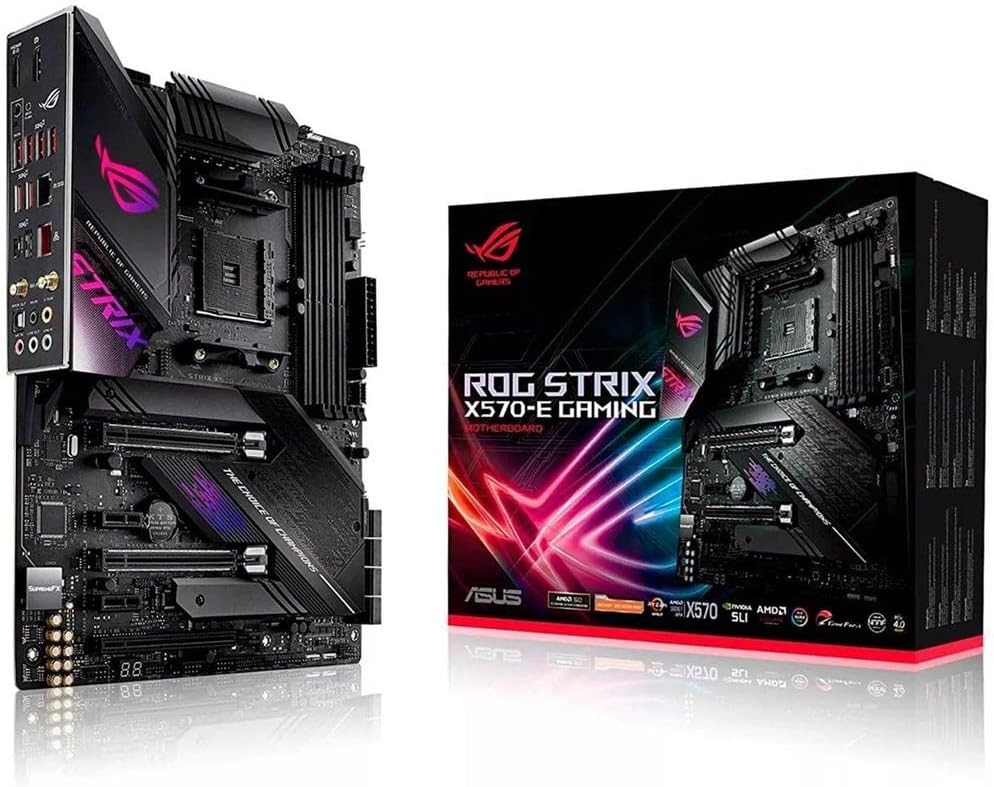
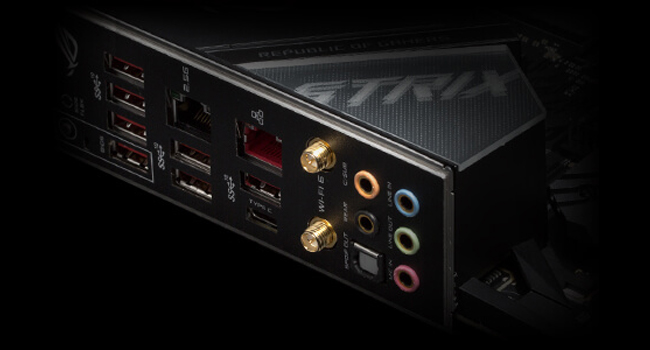
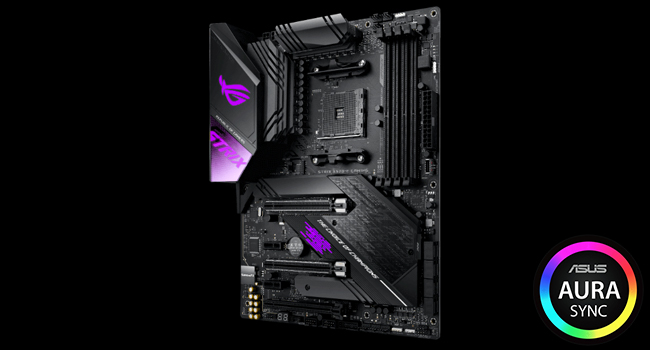
The ASUS ROG Strix X570-E Gaming ATX motherboard is engineered for AMD Ryzen 3rd Gen processors, featuring PCIe 4.0 support, Aura Sync RGB lighting, advanced cooling solutions, and next-level networking with WiFi 6 and dual LAN ports. Designed for gamers and creators seeking high performance, it offers comprehensive connectivity, superior audio, and automated system tuning for an optimized experience.


| ASIN | B07SW8DQVL |
| Best Sellers Rank | #408 in Computer Motherboards |
| Brand | ASUS |
| CPU Model | Others |
| CPU Socket | Socket AM4 |
| Chipset Type | AMD 570X |
| Compatible Devices | Gaming Console |
| Compatible Processors | AMD 3rd Generation Ryzen |
| Customer Reviews | 4.6 out of 5 stars 2,714 Reviews |
| Global Trade Identification Number | 00192876380512 |
| Graphics Card Interface | PCI Express |
| Item Dimensions L x W x H | 10.75"L x 3.03"W x 13.5"H |
| Item Type Name | ASUS ROG Strix X570-E Gaming ATX motherboard with PCIe 4.0, Aura Sync RGB lighting, 2.5 Gbps and Intel Gigabit LAN, WiFi 6 (802.11ax), dual M.2 with heatsinks, SATA 6Gb/s and USB 3.2 Gen 2 |
| Item Weight | 2.5 pounds |
| Main Power Connector Type | 24-Pin |
| Manufacturer | Asus |
| Memory Clock Speed | 2133 MHz |
| Memory Slots Available | 4 |
| Memory Storage Capacity | 128 GB |
| Mfr Part Number | ROG STRIX X570-E GAMING |
| Model Name | ROG STRIX X570-E GAMING |
| Model Number | ROG STRIX X570-E GAMING |
| Number of Ethernet Ports | 2 |
| Number of Items | 1 |
| Number of Ports | 19 |
| Platform | Windows 10 |
| Processor Socket | Socket AM4 |
| RAM Memory Technology | DIMM |
| Ram Memory Maximum Size | 128 GB |
| S/PDIF Connector Type | Optical |
| System Bus Standard Supported | SATA 3 |
| Total Number of HDMI Ports | 1 |
| Total PCIe Ports | 3 |
| Total SATA Ports | 2 |
| Total Usb Ports | 8 |
| UPC | 192876380512 |
| USB 2.0 | 2 |
| Warranty Description | 3 years |
J**E
Working perfectly for me - a first-time builder
As the title says this is my very first build even though I'm 29 yrs old. I have a good working knowledge of pc hardware and software, I've just not had the means to build a pc the way I want to build it until now. Since I was able to do just that, I told myself I wanted to get the best mobo I could find and this board is definitely delivering. It has a good instruction manual which I just made sure to follow very closely. The manual has a very good detailed diagram of the mobo with all of the inputs and headers clearly labeled and in the instances where there are multiple similar headers or slots (for instance it has 3 pcie slots for multiple graphics cards support) it details which slots are recommended for particular setups. I POSTed first try with no problems at all and got it booted up and running with only 1 minor issue (it was detecting that my cpu fan was not running, which is correct because I'm using a corsair water cooler instead) and wouldn't let me boot because of that. A simple fix - just rebooted to the BIOS menu and disabled the cpu fan and all was good after that....which leads me to my next point. The BIOS software is very easy to navigate and use. Once again the manual is up to par here...detailing what each of the options in the BIOS controls. I was able to set all of my preferences exactly how I wanted (fan control, boot priorites, cpu and memory control etc.). I've never messed around with overclocking before, but was able to figure out how to slightly OC my Ryzen 9 cpu and my G.Skill Trident Z RAM pretty easily. The BIOS is an absolute star for this product in my opinion. The one thing I say is an absolute *must-do" in my opinion is go to the Asus website after you're all booted and connected to the internet and download all of the latest drivers and bios software. After my first boot I was not able to get my system to produce any sound at all or connect any bluetooth devices (like my wireless earbuds and wireless keyboard). A quick check of the BIOS version showed I had version 1005 and the latest version (1405) had just been released a few days prior. So I updated the BIOS via the ex bios update tool that is in the BIOS software itself (the mobo also has a bios flash USB header but from what I understand using this improperly can lead to a completely crashed system). After updating to the newest version and downloading a the driver updates for that version from Asus, everything is now working at 100%. Also a small side note that could be very important for some or many, the RGB lighting control software by ASUS, known as Aura Sync, works very well. It's run by a program called Amory Crate and gives you very nice control over the lighting scheme you want to set up in your case. I used the Aura Creator to make my own lighting effects, which allows you to take control of specific colors and effects for each of your individual rgb devices, and I'm very happy with the result. My Build: This board (obviously) Ryzen 9 3900x CPU Radeon RX 5700 GPU G.Skill TridentZ 32BG RAM Seasonic Focus Gold 750w PSU WD Blue 1TB SSD Seagate Firecuda 2TB SSHD Corsair H150i Water Cooler Phanteks Eclipse P600s case w/ fans
M**A
Great feature filled board with decent overclocking options.
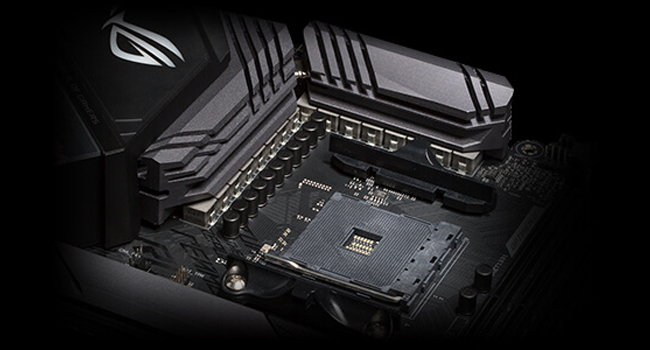
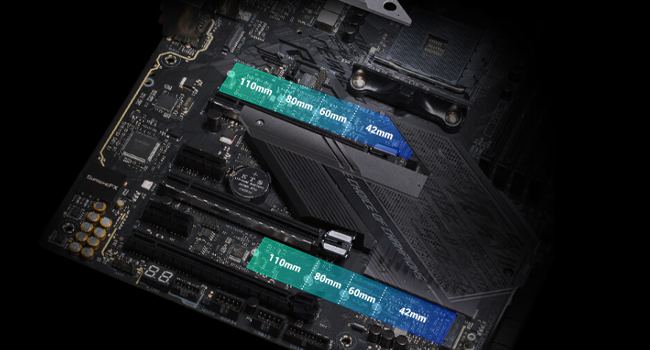
After using the board for the past 8 months, I feel confident in saying that it is one of the best AM4 boards when it comes to featurset and value. While it is fairly expensive (nearly $300 at the time or purchase), the money is going to more of the utilitarian parts that impact performance and usability. Since all of the PCIe slots have PCIe switches on them, the board is very flexibility in how the various ports can be used without running into issues such as some ports being unusable when others are populated. As the board is laid out and connected, the first PCIe X16 slot is connected directly to the CPU, and has a switcher to send 8 lanes to the second PCIe X16 slot (this slot is wired only for X8) if a device is installed in that slot. The first m.2 slot is wired directly to the CPU as well (has 4 PCIe 4.0 lanes that is not shared with anything else). The remaining slots make use of the PCIe 4.0 lanes from the chipset, and best of all, all of them can be used at the same time, including the 2nd m.2 slot. The only catch here is if the 2nd PCIe X1 slot is populated, then the 3rd full length slot that is wired for X4, will run at X2 speeds instead. The board comes with a built in Intel AX200 WiFi adapter. The WiFi adapter and the Bluetooth feature can be enabled or disabled individually, thus if you do not need WiFi, you can disable it at the bios level, while keeping the Bluetooth part of the AX200 enabled. For Ethernet, the motherboard uses the Realtek RTL 8125 which performs as expedited for a 2.5GbE connection. When connected to a multi-gig switch. A throughput test using TCP between 2 2.5GbE clients, gets a sustained speed of 2380.952Mbps after the TCP overhead, thus it is effectively providing the full throughput of the standard. The Intel AX200 performs as expected, and identically to that of laptops equipped with it. When connected to an 802.11ax AP in a urban environment with some congestion on the 5GHz band; at 160MHz channel width, the AX200 provides a real world throughput hovering around 1.8 to 2Gbps. The VRMs remain relatively cool during heavy operation when used with a Ryzen 7 5800x. At full load, the CPU pulls 147 watts which is being powered via a 16 phase 12+4 config that uses 60 amp power stages for each phase (International Rectifier IR3555). Every 2 phases share a signal from the controller, thus in practice, it behaves more like a 6+2 phase, but with twice the current handling capability. Aside from the standard 24 pin ATX power connector, the EPS 12V connector near the CPU area uses an 8+4 pin connector. a single 8 pin EPS 12V cable will run the board just fine, but if you use multiple PCIe slots at once, especially with SLI, then the 4 pin is also needed. Aside from the above mentioned aspects, everything else performs similarly to any other X570 board, since everything else performance related is tightly controlled by AMD. The board also has a number of RGB LEDs along with 4 RGB headers for addressable RGB strips, but thankfully, all of the RGB can be turned off. -------------------- Pros: Great VRM design with good transient response. Good set of bios options. First PCIe X16 slot is spaced low enough to allow ample room for an NH-D15 cooler. Good use of PCIe switchers, allows for all PCIe slots (including the m.2 ones) to be used at the same time, along with every SATA port with nothing being disabled. Intel AX200 WiFi module can be disabled in bios while keeping its Bluetooth 5.2 module enabled. ------------------ Cons: It has many RGB LEDs that are enabled by default, thus adding an extra setup step to disable them. The 2 coax cables for the WiFi/ Bluetooth antenna are longer than I would like. Ideally it is best to keep any cable carrying RF to be as short as possible for where you would like to place the antenna, as RF is gradually attenuated as it travels to more and more length of cable. While the range is still great for WiFi and Bluetooth, in terms of Bluetooth, the range is a little shorter than on my laptop which uses the same WiFi adapter. The 2 screws holding on the cover for the chipset heatsink needs to be removed before you can remove the 2 m.2 slot heatsinks. --------- As a final overall rating, I am still giving it 5 stars as the cons that personally effected me are not major, and the RGB one can be easily solved (for those of us who do not like having RGB lighting on our builds. Beyond that, since my use cases are more utilitarian, it meets those needs without issue.
L**S
Great Motherboard with plenty of options.
20201004 update: I have contacted AMD and await an RMA to ship my Ryzen 7 back to the company. I purchased a Ryzen 3 3200G at best buy to test my system while I wait for another processor and was correct. My processor failed. My CPU would pass the motherboard test according to the codes/alarm lights on the motherboard, then shutdown when the VGA light turned on. So, my final verdict as of now: The motherboard is absolutely awesome, leaves plenty of room for future upgrades and I expect to have this for the next 5 years if possible. I will recommend to anyone who ask. FYI, the return service was fast and effortless on Amazon's part. 20200918 Update: I have installed my new power supply and I still have that issue with the motherboards VGA light locking up my PC. I have checked all q-codes, which refer to codes not yet defined for consumers. I have replaced the power supply, changed the RAM (5x), reinstalled the processor (3x), change the cooling fan from air to liquid and back (2x), removed all devices from the motherboard to include PCIE boards, SATA drives, and M.2 modules (3x). This was supposed to be the perfect board for me. I want to believe that there is no way I received a bad board twice… 20200916 Update: after further testing my power supply, I discovered it's still good but its rather archaic by today's standards. My current supply may show good on one rail but fluctuations might exist on another. I've upgraded to an ASUS 1200w with the LCD screen on the side. I'm Pumped!!! The previous motherboard needed to go back anyways because the bios flash button was broken upon arrival. It would not depress as designed. If all works well, I will increase the rating. I'm still not happy with the Q-codes that do not have a reference "reserved for future use". A power Q-code ref would be awesome! Original: All was fine for the first week and running great. I went to work and then came home only to find out that my computer shut down, which means my transfer failed, and I could not power it back with a display. I would get Q-Code 94,95, and The VGA light would show steady on the board. I have gone to many forums on TOM's Hardware, ASUS, and many other sites. I am A+, Net+, Sec+, with many years of CISCO, Client Systems, and Server experience. I have removed all parts down to the basics and now get Q Code 44. I think the board has a power management issue. My 1000W Power Supply worked on my ASUS TUF board so I don't think it's that. I will continue to troubleshot this board until my replacement arrives and I will provide updates.
C**Y
Top quality motherboard, easy to install, lots of extras
ASUS makes a great motherboard, they have for many years. I bought the X570-E to replace a 12-yr old ASUS Rampage Formula (LGA 775 Intel board) that was still working, never had any issues with it, other than the cpu/board combo was starting to show its age in slowness. I went with ASUS again because their boards tend to be priced better than comparable boards manufactured by competitors (such as Gigabyte), and they use high quality components that last and don't easily corrode. I used an AMD Ryzen 3700x as the CPU on this board. The board was easy to install. The included instruction manual makes everything fairly straight forward...the different parts of the board were clearly labeled. ASUS also includes other important bits of info that someone who only "builds" a desktop PC once in a great while might forget about over the years. The only thing I didn't like (and this is splitting hairs) is that ASUS didn't include a quick & easy "header pin" that allows easy attachment of the case wiring to an easy-to-read block that plugs into the header on the motherboard. This was something the Rampage Formula had that made swapping cases a bit easier. Despite that one minor detail, I have no other complaints about the board. The other advantage with ASUS - their BIOS support is quite good as well as their tech support. ASUS does provide utilities, such as Armoury Crate, that make it easier to keep software and drivers current, if you're not sure where to look yourself. After installing the motherboard into my PC with all of the necessary hardware connected, it fired right up along with all the included LED lighting onboard. I don't really care much about LED lighting, performance and reliability are far more important to me than lighting, but it does look sharp inside a windowed PC case. Overall, the ROG Strix X570-E is a well-made and well-presented motherboard. 5 stars for this one for overall quality and user friendliness.
C**R
Third Board Fixed the problems
Received first board and it had a pin missing from the USB 3.1 header, replacement board arrives box was not sealed, had tear indicating it had been opened and serial number on box did not match serial number on board. Board won't post, freezes at 0d during boot. Update - Working with customer service a 3rd board was sent next day, Was able to install, update board bios via USB, and get back up and running in under two hours. Amazon came thru with Sunday delivery, in time for me to have the PC up and running before my classes started. This Mother board is awesome as long as you don't have the 0D boot problems. 3rd board is very stable, Over clocking memory, and auto overclocking cpu, a Ryzen 7 3800x. NO PROBLEMS at all, boot times with M2 NVME boot drive is under 1 minute into win 10. Great audio, lots of USB. Only dislike, ASUS doesn't have a windows 10 compatible fan control or board monitoring program, you have to do it all from the BIOS. I shifted all my fans over to a corsair commander and use icue for fan control. I'm Pleased with that setup, something more integrated from ASUS would be useful. I'm not a big RGB guy, but I do like the ability to set it to show cpu temp.
F**R
Nice board, but doesn't cool the two "covered" M.2 NVMe drives well
I've been building PC's for about 15 years, and I always buy ASUS motherboards. I've used others (Gigabyte once) but I've always been pleased with ASUS boards, and once one gets used to the way a given brand does things it's just easier to stick with them. This was my first AMD/Ryzen build (I've always used Intel) and I figured that while this seems a little over priced for what it is, given what's happening with CPU and graphics card prices, this is only mildly overpriced. I should say clearly here that I am not a gamer so there are features on this board that aren't as important to me as they would be to gamers (like power handling and the like; what is important to me is lots of SSD connectors that can be used without limiting use of PCIe slots. What I liked most: 1) I have always hated putting in the I/O plate into the case and then sliding the motherboard in so that the connectors meet the I/O plate correctly. I don't know why I'm so bad at it (I assume it's me as I don't hear that many other people complain about it) but I was determined to get a board this time (even if it means buying "more board" than I need). This one has an integrated I/O plate and that works great. 2) It has MB slots for 2 M2.2280 (or smaller) SSD gumsticks. Some competitive boards have 3, but I can live with two. This board supports PCIe 4, but only for one of the two 2280 slots, but again that was OK with me. 3) In addition to the two 2280 slots, it has 8 SATA connectors and that's great for me. I need lots of storage and wanted to build a no-spinning-hard-drive system and since large SSD's are very expensive, all of these connectors let me use 1TB and 2TB drives. Importantly, you can use all of these without messing up your PCIe slot usage. 4) There are two methods by which this board tells you if there's a problem. First, and easiest, is a set of different color LED's that indicate a problem (one for RAM, one for video, etc), so that all you have to do is see the color and you know what's up. There is also a 2-character LED display that can show much more specific indication. (Hold onto the manual as they are all documented in there, though not necessarily very well.) 5) As has been the case with ASUS as long as I've built with them, their BIOS interface is terrific and the multiple BIOS update methods are nice. 6) I can't imagine spending the money for this MB, and an appropriate CPU, and using the free included Ryzen fan/cooler. First, it's obviously going to have to work hard and is clearly too small to be all that effective. I used the new Cooler Master EVO 212 V2, which is a DELIGHT to install compared to the previous generations (where you really needed 3 hands). BUT, if you do use the included free cooler, the backplate on this board is incredibly tough and strong. I felt bad taking it off to replace it with the plastic one that the CM cooler requires. 7) There are a number of FAN headers, and while I usually don't use the MB fan controls for my case fans (just the two CPU fans on the cooler), I like having them. What I don't like: 1) There is a "cover" that conceals the two 2280 drives and under it is a very small fan. That fan is clearly not very effective, as even when the computer is idling, my high-end Samsung 2280's run warmer than they should. They don't run warm enough to worry me, but I'm wondering if I might be better off removing that cover and putting large heat sinks on those two 2280's. 2) When I first booted up the system, I noticed (as expected) that the two fans attached to the cooler (I liked the fan that comes with the cooler and bought a second identical one) and which were attached to the two CPU fan headers on the board, were showing similar but slightly different, speeds. That's what I expect to see. However, I did upgrade the BIOS, and I noticed that they've screwed up something: Whereas the original BIOS (along with the HWMonitor program I always use) called the fans CPU and CPUAUX (I think I'm getting the second name right), after the update, the second fan is now called "CPUFANIN" and always shows the exact same speed as the primary CPU fan. I am certain that they messed up and it's just repeating the info from the primary CPU fan. This doesn't matter to me UNLESS something happens to one of the fans as I won't easily know which it is. Would I buy this board again? Almost certainly, because other than have 2 rather than 3 2280 connections, the SSD capability seems terrific and I've never had an ASUS board fail. (The computer this new one is replacing has run for 10 years on an ASUS board with zero MB-related issues.) However, were I a gamer, I might have looked harder.
C**S
Great Board, but Check What You Get
So straight off my box ended up kinda beat up, not closed properly and the contents were kinda put back in a different order than how any unboxing videos on YouTube showed. Beat up I can sort of understand due to how it's shipped in the motherboard's own box! The other points though? The motherboard I got is clean, no signs of prior use or repairs. A few reviews before me showed boards that looked used, so it makes me wonder... As to the motherboard, it's running BIOS version 1408 (dated 04/01/2020) and running happily along with a Ryzen 3600XT and RAM @ 3600MHz. I'm having a hard time digging up complaints for it, other than maybe the mouse cursor lag when in the BIOS and I feel that's somewhat nit-picky as the BIOS is responsive otherwise. Could argue the BIOS is too much of a maze of menus and submenus. One recurring complaint I've read that I don't hope to deal with is the M.2 cover screws are torqued down too tight. Beyond that, it's feature rich, an abundance of options, has a POST code reader, nice range of option headers. The VRM side of things impressed me for what I got for the price. I am fairly excited to try out some mild overclocking, not sure why it took me buying a new motherboard to feel that, but whatever. Great board for $300 and very happy with what I got, but I have to wonder where Amazon found it and what they did to it to get it to me.
J**G
Great Motherboard. All the features I wanted and it is a work of engineering art.
This motherboard is beautifully crafted. I had several moments of awe at the design. Some things not super well explained. Like the goo strips for the m2 heatsink (leave them on, remove the plastic covers). I had an issue updating the bios. I used legacy boot - non-uefi and after bios update it didn't post. Kept getting stuck at error code A2. I used the usb flash drive slot and button, and loaded the bios. The instructions in the manual are slightly off. If the light keeps blinking it is actually loading the bios, and it will shutdown and turn off when it's done. After that, still no post. Then I did a bios reset, and reseated all components except the cpu, and that got me to the bios. Changed the boot options, and it's good to go. It comes with great software, works great after the update, and looks amazing inside my smoked glass case. Really loving it so far (other than the 2 hour tech hurdle of getting it updated). Oh and one other thing, the USB 3.2 doesn't come with any cables or converters, but there is a 3.0 slot on the board if your case is from last year or doesn't have 3.2 USB. It would have been nice if they gave you a 3.2 USB slot cover with cables, but these are not included.
S**P
Expected better quality from asus
Product look wise its was great but had issue with dual channel memory giving 0d error.
A**B
Superbe carte mère, fiabilité ASUS
C'est une superbe carte mère ultra stable et d'aspect solide. On sent la qualité de fabrication, et que tout est conçu pour durer. Couplé avec un Ryzen 3900X et 64Go de DDR4 à 3200, dans un boitier Evolv X, RAS. Le Bios est très bien fait, tout est clair et facile à configurer. Aucun problème de stabilité, tout fonctionne. Je recommande vivement cette carte mère ASUS. X570-E Gaming. Préférez la à la version F même si vous ne comptez pas utiliser le Wi-Fi car elle a le port ethernet 2.5Gb/s en plus.
B**N
10/10
Esta placa base tiene un diseño precioso, en un principio no me convencía, pero después de verla en vídeos y más imágenes, me enamoré. Tiene todo lo que necesitaba, ya venía actualizada para la 3ra generación de AMD, por lo que no me hizo falta comprar un procesador de 2da generación para actualizarla. La calidad de la placa se siente muy premium y los puntos de iluminación RGB que tiene, estéticamente son muy bonitos y precisos, llaman la atención, pero no son ese tipo de RGB que destaca más que otros componentes. Por último quería añadir que es compatible con el sofware ICUE de Corsair, por lo que si tienes más periféricos de la marca, podrás sincronizar la iluminación de la placa con los demás periféricos de Corsair. No es algo que aporte al uso o al rendimiento de la placa, pero es algo que se agradece.
S**U
Good product
Product is good, first it was not working properly but seller explain us on video call and after that it is working smoothly.
V**A
Ottimo
Asus una garanzia
Trustpilot
3 weeks ago
1 month ago