⚡ Unleash Ryzen power in a compact form — dominate your workspace with style and speed!
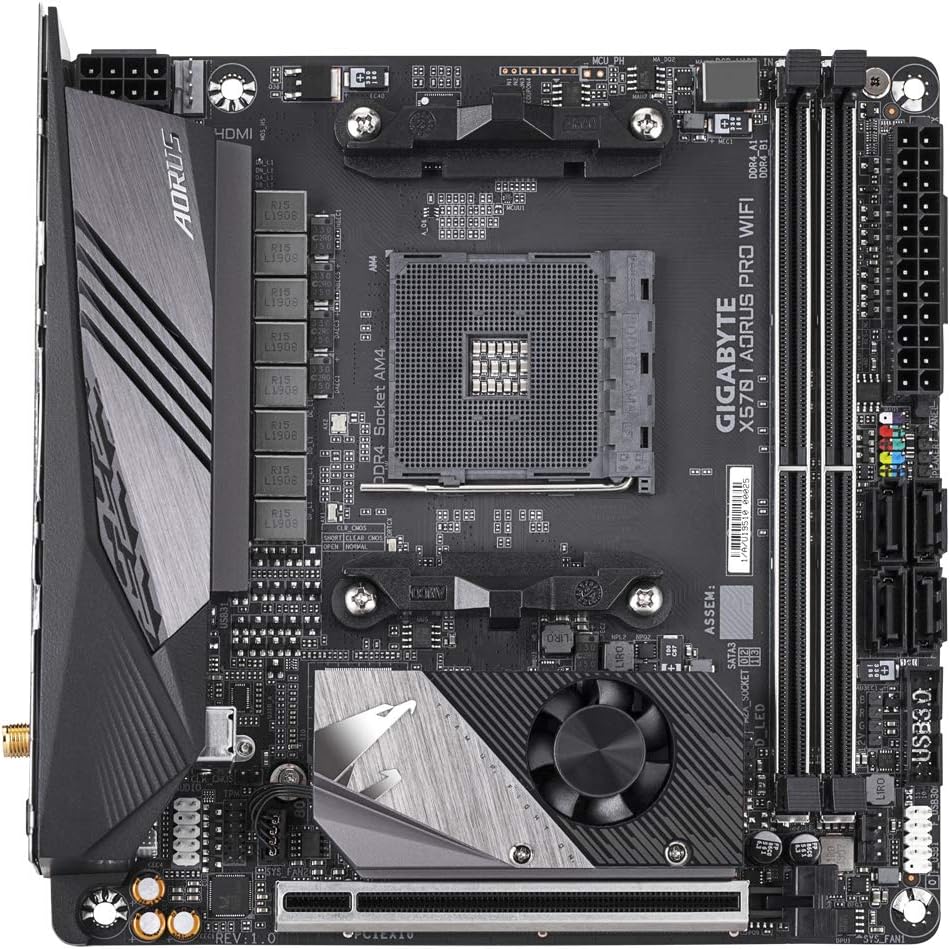
The Aorus X570 I AORUS PRO WIFI is a Mini-ITX motherboard designed for AMD Ryzen 2nd and 3rd Gen processors, featuring a robust 16-phase digital VRM with 70A power stages for stable overclocking. It supports dual-channel DDR4 memory across 4 DIMMs and offers triple PCIe 4.0 M.2 slots with advanced thermal guards for ultra-fast storage. Its Thermal Reactive Armor with fins-array heatsink and nanocarbon baseplate ensures optimal cooling. Integrated Wi-Fi and multiple USB ports provide versatile connectivity, all packed into a compact 17x17 cm form factor ideal for high-performance small builds.


| ASIN | B07TTP74XR |
| Available Memory Slots | 4 |
| Best Sellers Rank | 278,632 in Computers & Accessories ( See Top 100 in Computers & Accessories ) 2,793 in Motherboards |
| Brand | Gigabyte |
| Brand Name | Gigabyte |
| CPU socket | Socket AM4 |
| Chipset Family | AMD X570 |
| Chipset Type | AMD X570 |
| Chipset type | AMD X570 |
| Compatible Devices | Personal Computer |
| Compatible Processors | AMD 3rd |
| Compatible devices | Personal Computer |
| Compatible processors | AMD 3rd |
| Customer Reviews | 4.4 out of 5 stars 459 Reviews |
| Global Trade Identification Number | 04719331806408 |
| Graphics Card Interface | PCI Express |
| Item Type Name | GIGABYTE X570 I AORUS PRO WIFI |
| Item Weight | 1 Kilograms |
| Main Power Connector Type | 24-Pin |
| Manufacturer | Gigabyte |
| Manufacturer Part Number | GIGABYTE X570 I AORUS PRO WIFI |
| Memory Clock Speed | 4400 MHz |
| Memory Storage Capacity | 64 GB |
| Model Name | X570 I AORUS PRO WIFI |
| Model Number | X570 I AORUS PRO WIFI |
| Number of Ethernet Ports | 1 |
| Number of Items | 1 |
| Number of Packs | 1 |
| Number of Ports | 16 |
| Platform | Windows |
| Processor Socket | Socket AM4 |
| Product Warranty | 1 year manufacturer |
| RAM Memory Technology | DDR4 |
| RAM memory technology | DDR4 |
| Ram Memory Maximum Size | 128 GB |
| System Bus Standard Supported | PCIe |
| Total HDMI Port | 1 |
| Total PCIe Ports | 1 |
| Total SATA Ports | 4 |
| Total USB Ports | 8 |
| UPC | 889523018040 |
| USB 2.0 | 4 |
| Unit Count | 1.0 count |
C**W
Great itx board for small build.
Great work by gigabyte to launch this board with Ryzen 3000 and still the only x570 itx board available to buy at the moment. Good quality board, feel very solid. Easy to setup, will try to overclocking the ram later. Also nice to have 2x m.2 slots for itx board and the mb chipset fan help to cool down the front m.2 slot.
J**H
Probably the best value X570 board
I've paired the board with a Ryzen 3700X and 32GB of Crucial Ballistix LT 3200c16 RAM - the board makes overclocking the RAM a doddle, and I've managed to get the RAM working at 3600c16 by changing 2 bios settings. Nowadays, most end-users will only have one add-in card...the GPU, so being ITX sized, one can build a powerhouse with a very small footprint, which is what I intend to do - forgive the pictures of the test bench (work-in-progress) GOOD: 1) The board has very beefy VRMs with a 6 phase 70A setup - which is better than a large majority of the X570 range even when compared to other board manufacturers 2) Intel WIFI and Intel GbE ethernet connections, and a decent WIFI antenna - surprising how many manufacturers cheap out on this! 3) Top of the range Realtek ALC 1220-VB audio codec 4) USB type C port 5) Now I'm not one for RGB bling bling, but the board has tastefully done the RGB lighting and it's not too garish/in-your-face 6) For an ITX board, it also has all the features of its larger ATX brethren, such as support for two NVMe M.2 drives, which is always a bonus 7) The board also has CPU-less BIOS flashing which is always a big help should one feel the need to upgrade to the next generation of Ryzen processors in future 8) Lastly, and also most importantly, Gigabyte has a UK based RMA service with a very good reputation within the overclocking community, so if it ever goes wrong, I know it shouldn't be a hassle to get it sorted (unlike ASUS). 9) (Support for PCIE 4.0) MEDIOCRE: 1) The X570 chipset has a fan - but basically all of the X570 range except the halo-tier boards have a chipset fan. Initially, I had reservations about it, but it is honestly not that noisy, and I cannot hear it spinning above my Gentle Typhoon fans. But that being said, it is an extra potential point of failure. BAD: 1) The price. Yes it is expensive compared to the X470/B450 range, but X570 is meant to be a tier above. Essentially, you get what you pay for. Some will see this as a negative, some won't. My thoughts: I personally think that the Aorus X570I PRO WIFI is the best value X570 board available. I did consider getting the MSI B450 I gaming plus AC to pair with my 3700x, but in the end decided to get the Aorus X570I instead. The MSI B450I is around £90 cheaper, but, in comparison to the Aorus X570I: 1) The MSI has weaker VRMs and VRM cooling. This is important if one is going to run a high end CPU like the Ryzen 3900X or the soon to be released Ryzen 3950X. Aorus therefore gives greater upgrade flexibility 2) Lack of CPU-less BIOS flash on the MSI B450I 3) Lower end audio codec on the MSI B450I 4) No USB type C port on the MSI B450I 5) Only support for one NVMe M.2 drive on the MSI B450I, vs two on the Aorus X570I 6) Intel LAN on the Aorus X570I vs Realtek LAN on the MSI B450I - most people will know that Intel GbE ethernet connections are faster and more stable than their Realtek equivalent 7) Slower WIFI (AC) on the MSI B450I vs WIFI (AX) on the Aorus X570I 8) With the newer X570 chipset, the Aorus X570I supports PCIE 4.0. The MSI B450I only supports PCIE 3.0. This may not be an advantage currently, as there's limited number of NVMe SSDs (and graphics cards) that take advantage of PCIE 4.0, however, if one is going to keep the board with an eye for the next few years, then this is a good way to future-proof oneself. TL;DR - Avoid, Consider, Shortlist or Buy? Just go ahead and buy. :)
A**1
Aorus X570 I mini itx - easy to install.
Very easy to install very impressed, the only downside is that they have no usb type C 3.0 which I guess would be hard to integrate with such a small motherboard, but never the less it’s a really good board. I really like that they added a shield at the back of the motherboard, I think all motherboards should have this. I also really like the aesthetics of the board. 5/5
M**N
Quality product
I installed this in a DAN A4 case. It was really easy to install and with all the heatsinks it's perfect for a case with less airflow. The fan on the chipset/m.2 doesn't turn up to mid load and is inaudible, which was a small concern I had. Sadly it only has one extra fan header which is just not enough. I expected at least 2 extra headers. It does come with cpu/chipset and sys1. The on board usb-header is only 3.0 not 3.1 which is odd, having 3.1 on the back. It has LEDs everywhere but I turned them all off with the software. The software package is generally really good and surprised me. Including FanControl. The pcb is very sturdy with multiple layers, hence it feels like a high quality product and nothing pointed in another direction so far.
M**7
Solid ITX X570 Motherboard
Solid X570 ITX board. There only 2 fan headers, 1 CPU and 1 Chassis fan. The chipset fan uses those mini 4 pin headers found on GPU's. I just used a Noctua Y adapter. Good motherboard overall.
F**R
Great product
Great value proposition, easy to use, nice implementation to cool both chipset and nvme drive, I do wish it had a few more USB ports but still an amazing product
O**Z
Will fail after a few years
Few years later this boards sensors all fail and fries your CPU. Avoid this brand like the plague. The issue is well documented. Plus recently there have also been countless vulnerabilities discovered which have also been ignored by gigabyte.
J**N
Excellent for home NAS
Small form factor, supports ECC memory and has four SATA ports and two m.2 ports - excellent for a NAS
A**E
Cheap itx motherboard
Avoid the itx tax and join the golden land of SFF pc gaming for cheap (140 USD at the time of purchase) with this motherboard. Gigabyte gets a bad rep but having used two of their X570 motherboards (this one and the X570 UD) it seems they've gotten their act together; both have been rock solid and killer value. I'm using this itx board with a ryzen 5 5600 and 32gb of ddr4 3200 MTS ram. Q-flash was a breeze and allowed me to flash the bios to the latest version without a cpu or ram installed, and the ram loaded up XMP just fine, although I wasn't able to push past 3200 CL18 on either the timings or the frequency. Overall a great value itx board, especially given that it uses the premium X570 chipset yet still is under 150 USD.
R**A
Parfait !
Achetée pour une migration d'un Intel 7700K vers un Ryzen 3700X. Le package livré est bon, juste l'essentiel. Attention au DVD de drivers livré avec, certains pilotes je sont pas à jour pour la dernière MAJ 2004 de Windows. Il faut pour cela se tourner vers le site de Gigabyte qui propose des versions à jour. La qualité de fabrication est excellente, la carte est propre, lourde avec son renfort arrière et suffisante en terme de fonctionnalité. Premier démarrage assez long du BIOS à cause des premiers contrôles effectués la premier fois juste après la pose. La suite est en accord avec les technologies actuelle. Je boote sans problèmes sur Windows 10 en une dizaine de secondes. Lors du démarrage certaines courbes de ventilation ne sont pas ajustées de suite, ne vous étonnez donc pas si votre PC se transforme en avion de chasse quelques secondes après le démarrage du PC. Tout redevient normal une fois la séquence d'initialisation de Windows lancé. Un excellent produit avec un bon rapport qualité/prix !
A**A
Davvero TOP, ma se monti un Ryzen serie 5000 devi aggiornare il BIOS!
Scrivo questa recensione appena risolto il problema (e sono ancora un po' elettrizzato perché sono giorni che cercavo una soluzione). Monto un Ryzen 5 5600x sulla mia bella scheda madre X570i Pro WIFI, ram, scheda video, ssd, premo il tasto di accensione, tutto si illumina ma lo schermo non si accende. Buio. Morto. Ok, scopro che la madre non monta una GPU e quindi devo collegare il cavo HDMI alla scheda video, ci sta, errore mio. Niente. Ventole, led, alimentatore, radiatore, tutto funziona ma lo schermo rimane nero. Tripli check dei cavi, contatti, verifica dei componenti, notti insonne a cercare una soluzione e in qualche forum sperduto leggo che in questo tipo di scheda madre deve essere aggiornato il BIOS perché nella versione 1.0 non rileva i Ryzen 5000. COME AGGIORNARE IL BIOS? Formatto una chiavetta in FAT32, scarico lo zip relativo alla scheda dal sito di Gigabyte, copio solo il file più grande (circa 15mb) nella root e lo rinomino con questo esatto nome: gigabyte.bin Spengo tutto, stacco ogni cavo eccetto per l'alimentazione. Inserisco la chiavetta nell'usb bianca (quella per flashare la scheda madre) e premo il bottone vicino (non premete il tasto accensione). Dopo qualche secondo si accende il pc, inizia a lampeggiare il led di stato di aggiornamento della scheda madre e dopo 5 minuti (ho letto che l'aggiornamento dura dai 4 ai 7 minuti massimo) la scheda madre si illumina di arancione. Il pc si riavvia in automatico e finalmente posso entrare nel BIOS. EUREKA!!! La scheda è davvero fenomenale. Personalmente avrei messo qualche usb 3.0 e 3.1 sulla scheda ma nulla che non si possa risolvere con uno sdoppiatore! Idem per le ventole!
D**D
Good VRM's, Ryzen ready!
Excellent Mini-itx motherboard, Stable lan, good sound. The Idle and load temps on this board are great and handle the Ryzen 9 3900x with ease. Good VRM's ensure that you can install any Ryzen 7 & 9 cpu without a hassle. The chipset fan can be set to low if needed and is hardly noticeable. Bios is an improvement over earlier chipset models. RGB lights are sufficient if you prefer such a function. These and additional features like PCIE4 and WIFI6 complete the already well rounded board.
J**O
Perfecta si quieres poner una torre pequeña
Va bien, la antena wifi tiene imames por lo que la puedes poner pegada a la torre que no se moverá
Trustpilot
2 weeks ago
1 week ago