


📸 Capture. Print. Share. Instantly iconic memories in your palm.
The Polaroid ZIP Wireless Mobile Photo Mini Printer is a compact, rechargeable device that prints vibrant 2x3” photos directly from iOS and Android smartphones via Bluetooth or NFC. Featuring ZINK technology, it delivers smudge-proof, full-color prints with 300 dpi resolution. Lightweight and portable, it offers up to 25 prints per 1.5-hour charge, making it perfect for social gatherings, travel, and instant sharing of your best moments.
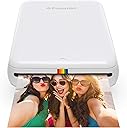
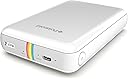



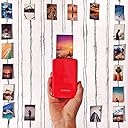


| ASIN | B00TE8XKIS |
| Additional Printer Functions | Print Only |
| B&W Pages per Minute | 1 pages_per_minute |
| Best Sellers Rank | #194,432 in Electronics ( See Top 100 in Electronics ) #228 in Portable Photo Printers |
| Brand | Zink |
| Built-In Media | Printer and accessories |
| Color | White Snow |
| Color Depth | 24 bits_per_pixel |
| Color Pages per Minute | 1 pages_per_minute |
| Compatible Devices | smartphone or tablet |
| Connectivity Technology | Wi-Fi |
| Control Method | App |
| Controller Type | Android, Vera, iOS |
| Customer Reviews | 4.4 out of 5 stars 5,853 Reviews |
| Duplex | Manual |
| Global Trade Identification Number | 00840102108965 |
| Hardware Interface | USB |
| Ink Color | Color |
| Item Dimensions D x W x H | 0.34"D x 1.15"W x 1.86"H |
| Item Type Name | Portable photo printer. |
| Item Weight | 6.56 ounces |
| Manufacturer | C&A Marketing, (Inc) |
| Maximum Copy Resolution Color | 300 dpi |
| Maximum Copy Speed Black and White | 1 pages_per_minute |
| Maximum Media Size | 2x3 |
| Maximum Print Resolution Black and White | 300 dots_per_inch |
| Maximum Sheet Capacity | 50 |
| Model Name | Polaroid Zip Wireless Mobile Photo Mini Printer |
| Model Number | POLMP01W |
| Model Series | Zip |
| Number of Licenses | 1 |
| Number of Trays | 1 |
| Other Special Features of the Product | Bluetooth,Wireless |
| Output sheet capacity | 25 |
| Paper Size | 2x3 |
| Print media | Glossy photo paper, Paper (plain) |
| Printer Connectivity Type | Wi-Fi |
| Printer Output Type | Color |
| Printer Type | Zink Technology |
| Printing Technology | Zink Technology |
| Processor Count | 1 |
| Resolution | 300 x 300 |
| Scanner Type | Photo |
| Series Number | 1 |
| Special Feature | Bluetooth,Wireless |
| Specific Uses For Product | parties, gatherings, vacations, DIY projects, and everyday social media sharing |
| Total USB 2.0 Ports | 1 |
| Total Usb Ports | 1 |
| UPC | 840102108965 |
| Unit Count | 1 Count |
| Warranty Description | 1 year warranty |
| Warranty Type | limited warranty |
| Wattage | 500 milliamp_hours |
J**N
Pretty good device but skip the app
This is perfect for printing wallet sized photos. The app it suggests you use, don't even bother. It's not user friendly, needs to update before EVERY use (even tho I've already spent 15 min installing the update), and it just doesn't work. The DEVICE however works fairly well although the pics come out a little dark (think of classic Polaroid pics). I have a Google Pixel 3 so I choose my pic from my camera roll, use a filter that makes the pic brighter (almost washed out but not losing any details), click open the options to send the pic (usually used when I'm attaching the pic to a text message), and click Blutooth. Make sure the device is on, then you can send the pic from your phone via Bluetooth without needing to use their worthless app. PRO TIP: These are wallet size photos so if you have a large detailed photo you're trying to print, keep in mind it's only going to print the center most area of the photo (cutting off edges). You can modify this by screenshotting your pic, editing it to make it zoomed out a bit which creates a thick black border around your original pic, then printing. Since the photo on your phone is more centralized, when it prints, it'll pull more of the image since the black edges will be cut off. Hope this helps!!
L**O
Perfect for Journaling
I must have read a few hundred reviews and a dozen articles on these portable printers before deciding on this one and I am very pleased with my decision. I've included a photo for reference; in it the top is a picture of the printed photo, bottom is the original from my phone. As you can tell it does come out a little less bright and not as clear as the original however for a 2x3 photo you can't really be too picky. Likes: - Charges very quickly via included cable - No ink to worry about - Stick back photo paper is fun for adding to journals, letters or anything else - Prints quickly and quietly - Good quality for the size - Economically priced paper refills I have no dislikes however I did want to mention I had a slight issue when trying to print for the first time. I was excited and tried to do it while it was charging as I read you could. Not even sure that caused the problem or not but after the initial pairing I couldn't get the phone and the printer to connect to print until I took it off the charger. Since then however no issues. Could have just been a fluke. I'm still so happy with this printer though.
A**W
Wonderful little thing
So far I have gone through about thirty sheets of paper, and I'll say that I really love this thing. The quality of the photograph isn't great, but these aren't meant to be gallery photos. These are keepsake treasures you can make for people on the go, for an inexpensive cost. Everyone I've made prints for really do treasure them. I'm a professional photographer, and last weekend I was hired to photograph a guy proposing to his girlfriend. During the shoot, I used the wifi on my camera to move one of the best shots of the actual proposal to my phone, and then printed two copies of the shot right then and there, and gave one to each of them. They loved it! They were so excited to be able to walk away from the photoshoot with an actual print to show off to friends and family that day. It even helped me get a better yelp review! The only criticisms I have of this thing is that the white model seems to scuff easily, it wont automatically connect to my phone through bluetooth - I need to go through the settings menu every time, and lastly I can only see the battery life when it is connected to my phone, so it's pretty inconvenient if you just want to see if you need to charge it or not. Still, it's an amazing device, and my friends and family love these little prints, and are usually blown away by the device when I show it off.
M**I
FUN!
I received my ZIP today (30 minutes ago to be exact lol). I think it is so cute and fun! PLUS, it's extremely easy to use. Connect it to bluetooth, click print in the app and done. It doesn't get much simpler than that. Like pretty much everyone else has noted, I do wish the pics were bigger. If theres a lot of small detail in the photos, you'll be squinting to find them because the pictures are teeny weeny. Other than that, I love it. It might seem pricey but I think its worth it. Buying 3 makeup highlighters from Sephora is about the same price if you think about it. I've seen a lot of complaints about the color quality being poor or the pics being pixelated. That hasn't been an issue for me. Make sure that you have the blue smart sheet faced down in the paper compartment before printing to ensure best quality. If you still have an issue, maybe you need to send it back? If you really enjoy being able to take things with you when you're traveling, like me, this is what you want. Yes, other printers may give you larger, better quality pics but you can't carry them wherever you go. And I assure you that those other printers won't be as easy to use.
H**N
Print Quality is Great!
I bought this for my husband for Christmas. We were very pleased with the print quality, which I was happy to hear that my husband thought it was pretty good too, considering he is an advertising photographer. I guess it is really all about what you EXPECT to get compared to what you ACTUALLY get. Some people set themselves up to be disappointed. We had no preconceived notions about this device, nor did we get our hopes up for the prints to come out amazing. Really, for $100, it just seemed like a fun little gadget to have that hopefully would print halfway decent. And THAT it does! I was very happy with how these first two photos printed. I added a sepia filter (there are filters, stickers, borders, etc. you can add from the ZIP printer) to the photo of my dog and I, as well as a couple of stickers. The other one, of my husband and I, was printed as-is from my phone. The printer does come with a few photo sheets to get you started, but I didn’t count them before I put them into the printer. (Although I read on another review that it comes with 10.) I highly recommend the ZIP printer. It’s a relatively inexpensive way to bring the nostalgia back to taking photos and actually holding one in your hands, rather than just looking at a bright screen. Oh, the photo paper has a sticky back too, should you want to slap the photo you just printed onto someone’s forehead or something. 🤪 I’m going to bring this with me to work tomorrow to show some of my awesome coworkers!
M**I
Perfect product for on the go printing
I've used this for roughly 3 months now and I absolutely love this product! I have a journal that I do daily, and am an art major so I loved my old polaroids. However the photo paper was too expensive for me so I bought this. Pros: -Holds a charge for a LONG time, haven't charged it once yet -Prints fast -The software is great for repositioning your picture -The paper is inexpensive compared to other printing methods Cons: -The paper is a bit small -The paper needs to stay out of the heat (not bad as long as you don't keep it in a car or something) Overall, I would recommend this product. The fact that you print photos from your phone camera eliminates the ability to mess up, and you know exactly what you're going to get. The colors come out amazing in the pictures, but they still maintain that polaroid vintage look. Also the back of the paper is a sticker, so if you want to you can stick them to anything!! (Like a journal!)
G**3
Pleasantly surprised!
I own a few compact printers who's sole purpose is printing photos. I haven't been satisfied with any of them. All I wanted was something SIMPLE that I could print nice pictures from my iPhone out on. After doing research & reading as many reviews & comparisons as possible, I purchased this printer. It arrived very quickly. I was excited to test it out right away. The first picture I printed was directly from my iPhone (it hadn't been edited at all). The set up was super simple, the photo printed easily & quickly and right away I knew I made a good choice. The photo itself wasn't the best picture. This was NO fault of the printer! After opening the same photo in one of my editing apps & making adjustments to make the picture look MUCH better, I then reprinted it. AMAZING! Lesson learned, edit my photos before I print them! Very happy I made this purchase.
A**R
Great at First
So I initially purchased this plus two other units for my brothers when it was on sale a few years back. I remember it being great and running smoothly for the most part when I initially used it. However, after a year or so I decided to print some more on it. I updated the firmware, and downloaded the new app. It initially used a different app but they created one specifically for the ZIP (zero ink printer). So now, I have several problems with my ZIP. The main problem is that when I click to print a picture, the Printer will shut down in the middle of printing. It'll take me 3 or 4 tries to produce one good picture, which effectively ruins 3 or 4 of the ZINK sheets. If it shuts down, I have to turn it back on. Mind you, this is while the unit is plugged in and I try to verify it's at 100% charge in the Device Info tab but the % the app gives me varies. It'll give me 100%, I'll check after the first ruined picture to see 57%, to see it spike to 80% to dropping to 34%. So all in all, the App for the device sucks, and the actual printer sucks now too. I've yet to try a hard reset, but I'll try it the next time I decide to print anything. As of now, my total ruined ZINK sheets are about 15 sheets.
M**E
Gadget de luxe
J'avais déjà cette imprimante depuis des années et elle vient de me lâcher, j'en ai donc racheté une. Presque 10 ans plus tard, la technologie n'a pas vraiment changé à vrai dire. Je vois que le logiciel associé s'occupe d'éclairer un peu les photos pour compenser le fait que certaines impressions étaient sombres. La qualité n'est pas meilleure, mais en même temps, cela reste un gadget, de petites photos instantanées à partager et qui de plus sont des "stickers", donc c'est très sympa. La technique est simple : la machine n'a pas de cartouches d'encre, car l'encre est dans le papier, c'est la technologie Polaroïd que nous connaissons tous. C'est à dire que l'imprimante chauffe à des températures différentes à différents endroits du papier lorsqu'il passe dans le rouleau, ce qui affiche des couleurs différentes. On en déduit plusieurs choses, l'une, la résolution, c'est à dire la netteté de l'image, n'est pas parfaite : la machine ne peut pas faire des températures très différentes de façon très précise sur de tout petits points. D'autre part, les couleurs sont "lissées" c'est à dire peu de contrastes, lorsqu'une image est plutôt bleue, tout est un peu bleu, c'est dû à cette technologie. Certains endroits dont les couleurs sont très semblables, exemple un caillou plutôt marron, sortiront un peu lissés, donc le caillou fera plutôt une "tache marron" que montrer beaucoup de reliefs. Enfin, au démarrage, des "lignes" peuvent apparaître si on a pas un peu chauffé la machine avant, c'est à dire passer au moins 2 fois la feuille bleue de calibrage dedans, pour que les rouleaux chauffent. Et si on fait une pause de deux trois minutes il faut la re-chauffer en repassant deux fois la feuille. Et toute dernière précision, les photos prendront mal la chaleur, le soleil : si vous voulez la mettre dans un endroit souvent éclairé, mettez la dans un petit sachet en plastique, ne repassez pas à chaud l'image, encore moins laminée à chaud. Sinon les couleurs disparaitront. Une fois que tout cela est OK pour vous, c'est un gadget formidable. Pour des photos souvenir en soirée. Pour afficher des petites choses sur des carnets, par exemple scrapbooking, carnets de vacances. Pour faire des stickers simples et rapides. L'autocollant tient bien, et la qualité, tant qu'on ne demande pas trop de détails, reste très correcte. A chaque fois que vous la sortirez, vous ferez sensation ! Bref, je reste une cliente fidèle à ce produit, qui, en espérant qu'il soit aussi robuste que les précédentes versions, reste "increvable" : la mienne a duré très longtemps pour quelque chose d'aussi petit, ce n'est pas fragile du tout.
T**.
Product was great but the box came smashed up and it was for an Xmas gift!
Person I gifted this loves the product. Gives great flexibility in editing the photo before finalising and printing. I used it myself. I would have given this item a 5 star but the box it came it was pretty smashed up. It was quite upsetting and I can't remember the number of times I had to apologised to the receiver. I tried contacting the seller but it was just radio silence. What if the product was damaged?? Bottom line is good product, bad seller.
S**A
Fout gegaan
Doordat alleen mijn voornaam op het pakje stond, heb ik de printer nooit op kunnen halen. Geen idee of het item goed is. Ik wacht nog op de financiële afhandeling!
K**S
Tut was er soll! Gutes Produkt.
Habe ihn mir hier bei ElekShop bestellt. 1A Versand über UPS... in einem Tag von London nach Deutschland!? Hut ab! Zum Gerät selber: sehr schneller Druck, auch sehr sauber. Allerdings hatte ich beim ersten Foto einen helleren Streifen auf dem letzten Stück dass raus kommt. Das lässt sich aber umgehen, wenn man die Fotos ganz schnell nach Druck herauszieht. Hat wohl mit dem erhitzen zu tun...könnte Polaroid beim nächsten Modell in Angriff nehmen. Die App zum Drucker läuft auf meinem S4 flüssig und fehlerfrei und hat saukomische Features zum bearbeiten. Von Scherzbrille und Schnurrbart bis zum schönen Rahmen. Praktisch, wenn Fotos mal das falsche Format haben, man nicht zuschneiden möchte und ein Rand bleiben würde! Bei der Fotoqualität würde ich immer drauf achten, dass die Bilder in der App lieber etwas zu hell als zu dunkel an den Drucker gegeben werden! Ich bin zufrieden und sind wir mal ehrlich....so ein kleiner Drucker macht auf nem Abend mit Freunden echt was her und man hat endlich mal wieder Fotos zum ANFASSEN. LG, Kurtiis
A**ー
レトロな写真に。
画面はiPhone7。画質は充分に良い。青・緑系が暗くなる。専用紙が開封して2週間ほどで黄ばんでくるので、その影響も加わる。海・空の青や植物の緑を重視するユーザーには不向き。人物も顔を明るくするモードが良い。専用のアプリや無料の写真加工アプリで足りる。いっそレトロな写真にすると最適。モノクロームは問題ない。最後に、ランニングコストが大変高い。
Trustpilot
4 days ago
2 weeks ago