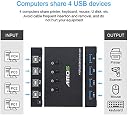
🔄 Switch It Up: Effortless USB Sharing for the Modern Workspace!
The AIMOS USB 2.0 Switch Selector is a versatile 4-in-4-out USB hub designed for seamless sharing of peripherals among multiple PCs. With an innovative external switch for easy control, it supports a wide range of operating systems and requires no additional drivers. Perfect for both home and office use, this plug-and-play device comes with four cables and a 12-month warranty, ensuring reliable performance and user satisfaction.
| ASIN | B07T2J57GY |
| Best Sellers Rank | 141,079 in Computers & Accessories ( See Top 100 in Computers & Accessories ) 491 in KVM Switches |
| Colour | Black |
| Customer Reviews | 3.8 3.8 out of 5 stars (640) |
| Date First Available | 13 Jun. 2019 |
| Item Weight | 380 g |
| Item model number | AIMOSDYGXQ-AIMOS |
| OS | Chrome OS, Linux, Windows 10, Windows Vista, Windows XP |
| Other display features | Wireless |
| Package Dimensions | 15.2 x 15.2 x 5.2 cm; 380 g |
| Special features | Plug and Play |
C**N
MUST HAVE 5 Star
IF YOU HAVE MORE THAN 1 PC YOU NEED THIS! My partner got this for me as a birthday present and I've been using it for the past two or three weeks and I am loving it! I have 3/4 computers on my desk (Window PC, Ubuntu PC, Jetson NX, sometime Raspberry Pi 4). I used to have 2 keyboards and mouses on my desk sometimes even 3. I often had to unplug the mouse and keyboard temporary and connect to another computer and that was a pain, until I got this. This USB switcher is absolutely perfect. I have it connected to 3 machines with different operating systems and it works with no hassle. As a result I've been able to connect 1 wireless mouse 1 wireless keboard 1 USB sound card with microphone and speaker output + a flash drive that I can put files on and move between different computers! Thanks to the USB sound card I can use 1 Mic and speaker for all these computers. I tried connecting a USB switch to one of the ports of the switcher, to my surprise it worked and I was able to connect up to 4 USB flash memories to just 1 port of this USB switcher! So with a relatively cheap USB switch (10$) you can even more USB ports out of this. I love the controller that comes with the device. It connects with a microusb to the back of the switcher and is small enough that does not take any space on my desk and I can very easily switch between the computers. I never had any issue with devices not getting recognized or getting disconnected randomly (which I've seen on many reviews from other similar devices from different manufacture). The built quality is 5 star, functionaliy 5 star. Swithcing is relatively fast it takes just about a second or maybe even less from the moment you press the button till it's connected to the next PC, totally seemles. There is only just 1 downside you MUST BE AWARE OF BEFORE GETTING THIS, your experience may be different but for me, when I connected an external harddrive (SSD) it did not turn on, there is not enough power provided by this switcher to tunr on the external hard drives, that' the only thing to be aware of. I have the unit hidden behind my monitor and I only have the remote switch visible and switch between my windows, ubuntu and Jetson machine several several times a day and absolutely loving it.
9**0
Simple to use, works great
This USB switch works well, allowing me to use 3 computers at one desk, all with one Keyboard and mouse. Installation takes seconds, there are no drivers required and the switch works great with my Mac, my Windows 10 work computer and even my ipad (via a lightning to USB converter). When switching between devices it takes 2 beats and then both my mouse and keyboard work on the new device. I've had no issues with my mouse, keyboard or Skype headset and I've also tested this with a webcam too; all devices work well. I'd recommend this for anyone who wishes to use one set of USB devices with multiple computers.
G**S
Update number 3 - Has a fault\incompatibility with powered always on USB but supplier very helpful
Felt sturdy and was working fine, and then like one other users ha sreported its just stopped working one morning It froze after 3 days and again after 14, seems to be related to always on USB power. If you disable USB always on in the bios of your computer does appear to work. Supplier agreed to a return as not compatible or agrees it may be faulty. Now Twice, it has frozen, each time I've had to disconnect and reconnect all cables as it was frozen, LED lights would move, nothing would connect. If it happens again I shall be returning it. Its a shame as when it works its generally really good, but the having to unplug the cables each week defeats the point in having it. Appears to be linked to powered USB ports that remain on when the laptop is off, as if I disable it, it keeps working. Additionally, when scrolling using the wheel sometimes when detected the screen scrolls a whole page rather than 3 lines, something that never happened when the wireless dongle was directly in the computer as opposed to in here. So if you have a simple setup with non always on USB, (the option that allows things like your phone to charge whilst a laptop is off as the USB port stays live) I think you'll be fine. If you want something that works with an always on USB port, maybe you'll have better luck than me, but if you have the same issue, try switching the feature off.
S**4
Was good while it lasted...
I bought this product just 8 weeks ago and at first it was brilliant. I am a software developer and need to switch rapidly between my PC, tablet and a RaspberryPi for my day-to-day job so this switch saved me the hassle of using multiple peripherals / pulling plugs constantly (and the wired remote was great for keeping all the cables tidy). I deliberately went for an un-powered switch due to a lack of electrical outlets but reasoned that this shouldn't be an issue seeing as it just has a single keyboard/mouse dongle plugged in. The switch has been working fine up until about 2 weeks ago where I noticed that my PC was no longer detecting a mouse/keyboard at start up (despite being selected on the switch) - not a major issue as about a minute later it would generally be picked up. However - over the past week, even this is no longer the case. Physically removing all the cables from the switch and reconnecting them usually works for a short period of time, but as soon as the PC is shut down and later rebooted - the switch fails to work again. This is a real pain as the switch is wired up in a hard to reach location behind my desk - and it also kind of defies the purpose of having a switch as instead of switching a single dongle between devices, I now have to pull 5 cables and reconnect them every time I start the PC. Unfortunately all I can say at this point is that you're probably better off not getting this switch if you need something reliable. As for me, I'm back to moving the dongle between devices again for now :(
R**R
Mostly works well
This mostly works well, although it can play up sometimes and not register the keyboard or mouse on a system that you've switched over to, if you've powered those up without having switched over first. If everything is powered up and running, then it works flawlessly, and makes it easier to use multiple machines with limited desk space. Despite the intermittent problem, it's still a valuable piece of kit - and cheap too!
A**R
Works but not reliable
TLDR: worked ok out of the box, but after 2y, it started to randomly disconnect Out of the box, everything looks just ok, granted solid metal case on the main unit but somewhat thin cables, but I'll only use this for peripherals that are not power-hungry anyway, so it was fine. Then the connectors on the box grabbed the squared USB, to the point that I couldn't disconnect it and the plastic cover came out of the cable... So I gave up and just used another port. The remote control works, but it doesn't show witch one is active, it only shows a green LED somewhere, when you click a button. Then, I noticed that it doesn't always come up correctly when powering up the computer for some reason, I need to do the old "turn it off and on again" to get it back to life. This was rare, so not enough to request a refund. Recently, it started to disconnect/connect at random times. Since I use it with a headset and use it for work calls, this is unacceptable, so I'm buying a similar device from a different brand. This would probably disqualify it for gaming as the keyboard and mouse are also connected to it and a disconnect at the wrong time will be painful (hence the 1 star for gaming)
U**R
Works great as a KM switch
Bought this to replace a big old HP fan-cooled rack-mountable KVM switch which is great but noisy. Set it up today which was simple, the unit is tiny and the supplied USB cables seem fine (they're 1.5m long). I got the 4-in/4-out model, and am currently using it to control 2 PCs - just for keyboard & mouse so can't comment on shared USB drives, screens or printers etc. Both PCs (running Windows 10) recognised the keyboard/mouse seamlessly & were usable immediately. The button to switch between inputs is a little harsh, but for seventeen quid that's acceptable & it works OK so far. No issues switching between PCs - neither has lost sight of the devices or re-discovered etc. Early days but at this point I'm impressed & would recommend. Only downside is that without the noise from my old HP fans I keep thinking I've gone deaf.
A**T
Does what it says on the tin.
Three computers being used for different tasks, sometimes simultaneously, but not needing continuous use of keyboard or mouse meant potentially a lot of clutter with three keyboards and mice to keep moving around or taking up desk space. A bluetooth keyboard that could be switched between computers did reduce the clutter significantly but kept disconnecting itself when not used for a few minutes, resulting in a delay while being reselected or missing text if the disconnection wasn't noticed. This switch solves the problem as it allows a single wired keyboard and mouse/trackball to be switched quickly between the computers, and then remains connected until the selection is changed. It can also switch external drives but you have to remember to unmount the drive before switching, although that is still easier than unplugging a drive from one computer before pugging it into the next, if you should really need that. My only complaint is that as there are sockets front and back, you really have to use the little remote selector which is rather small and wouldn't be needed if all the sockets were at the back.
K**N
Work as it should.
Work like a charm. Now after 3 month any glitch any wrong behaviour. The price is also super for the 4 PC switch. It's also capable to switch USB soundcard, witch was surprise for me. Also it helps when my kid come to my keyboard and starts randomly press the keys, with one click I can detach mouse and keyboard, so I'm using this option couple times per day. Two things that I want to mention: 1) input and output sockets located on different side, so hidden mount with cable management little bit tricky. I mount it behind monitor with a kid's sucker :) 2) the remotes' buttons are small, but I've got used to them
P**K
polecam
działa szybko i bezproblemowo z windowsem, linuxem i mac os.
A**R
Kaliteli
Malzeme metal ve çok kaliteli, fonksiyonunu da tam görüyor.
R**O
De momento funciona maravillosamente
Ojo, los "inputs" (USB1, USB2, keyboard/mouse) no me funcionaron al conectarlos si hay algún PC conectado del otro lado. Es decir, primero tuve que conectar los dispositivos al switch y luego conectarlo a uno o más PC para que me funcionasen bien. ¡¡Por lo demás, de maravilla!!
A**D
Kapot na 10 maanden.
Helaas werkt mijn unit niet meer na 10 maanden.
Trustpilot
1 month ago
2 days ago