Buy anything from 5,000+ international stores. One checkout price. No surprise fees. Join 2M+ shoppers on Desertcart.
Desertcart purchases this item on your behalf and handles shipping, customs, and support to Seychelles.
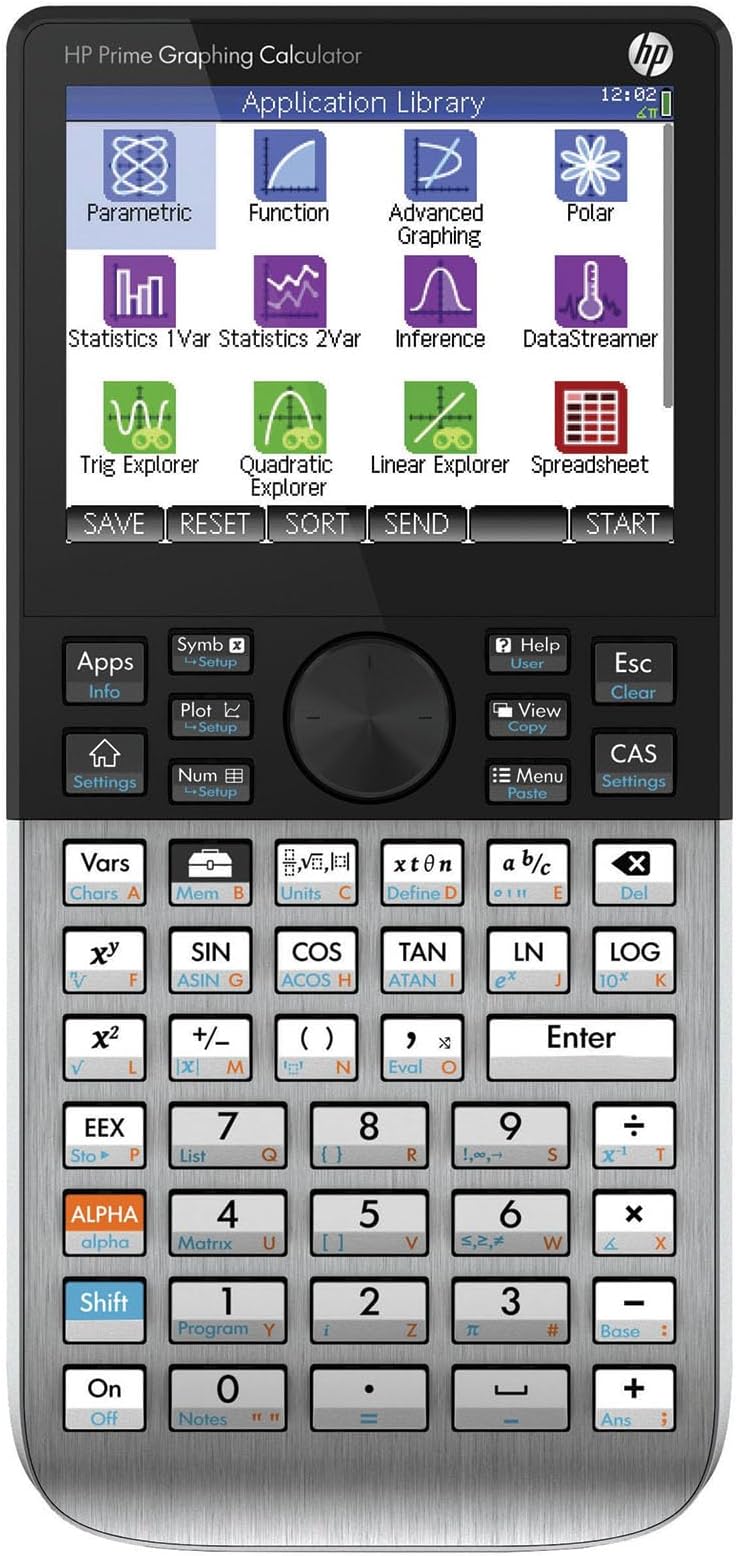
📈 Elevate your math game with HP Prime — the ultimate graphing calculator for pros who refuse to fall behind.
The HP Prime Graphing Calculator features a vibrant 3.5-inch multi-touch color display and a powerful Computer Algebra System (CAS) that supports symbolic, graphical, and numerical math views. Designed for professionals and students alike, it offers dual calculator modes, seamless connectivity with Windows and Mac virtual versions, and extensive programming capabilities. Its intuitive textbook-style interface and preloaded advanced math applications make it an indispensable tool for mastering everything from algebra to calculus.

| ASIN | B07HF6RXGG |
| Best Sellers Rank | #18,815 in Office Products ( See Top 100 in Office Products ) #176 in Basic Office Calculators |
| Brand | HP |
| Calculator Type | Graphing |
| Color | Silver |
| Customer Reviews | 4.5 out of 5 stars 1,877 Reviews |
| Display Type | LCD |
| Enclosure Material | Plastic |
| Global Trade Identification Number | 00191628030088, 00191628030118, 00191628030149 |
| Item Dimensions L x W | 7.25"L x 3.66"W |
| Item Weight | 8 Ounces |
| Manufacturer | HP Inc. |
| Mfr Part Number | 2AP18AA#B1S |
| Model Name | Prime Graphic Calculator |
| Model Number | 2AP18AA#B1S |
| Number of Batteries | 1 CR2032 batteries required. (included) |
| Power Source | Battery Powered |
| Screen Size | 3.5 Inches |
| UPC | 191628030156 191628030125 191628030101 191628030163 191628030088 191628030132 193424872961 191628030095 191628030149 191628030118 |
| Unit Count | 1.0 Count |
| Warranty Description | limited warranty |
A**R
Unlock Your Calculator’s Power
Set Amazon search category to Books. Type “HP Prime Calculator”. Find textbook quality Arithmetic, Algebra, and College Math resources for the cost of a fast-food meal. Don’t let the inexpensive prices fool you. These are great resources that help you unlock your calculator’s power. Best Math Tool in Today’s Classroom. Most powerful Math assistant allowed in today’s classroom. With phones and other Internet electronic devices being banned, the HP Prime Calculator will give you a virtual assistance that allows to acquire and become proficient with any math skill from arithmetic to advanced calculus. HP Prime Calculator is a real sleeper, the usefulness of Matlab or Wolfram Mathmatica in a tool that is easy to use. Textbook style input by templates with vibrant color touch screen allow for easy entry of math problem, plus flyout popup menus and soft key tabs make work a pleasure. Its textbook output with built-in power functions and applications is easy augmented by your functions. Start your understanding of your calculator by using your familiarity with Arithmetic to concentrate on the Prime’s interface and textbook style input and output feature. After the quick review of your Arithmetic, use the Algebra and College Math textbooks to learn advanced features of your calculator be viewing their hundreds of applications. The same applications can serve as invaluable aid for High School Algebra, Advanced Algebra, and Statistic courses. Let the eBook listed serve as a handy reference. It can be viewed on your phone, tablet, or computer. Note that the Arithmetic and College Math paperbacks found includes references to YouTube videos using screenshots and virtual emulator. These screenshots and emulator allow you to see your calculator in action. A web reference is given in the paperbacks for free parallel web-based material that is digital linked to all the paperbacks’ references and their YouTube videos. See Amazon Book HP Prime Calculator. Search listing for explanations of the shown screens in this review. HP Prime Calculator has a download identical virtual version for Windows and Mac and plus HP connectivity program that allows you to use your computer for work at home and then easily transfer your work to your handheld HP Prime Calculator for classroom use. To augment your HP Prime handheld classroom Calculator, there is a free/lite version of the HP Prime Calculator for iPhone and Android phones and tablets. Plus, a paid Pro version with programming. The phone and tablet free/lite and Pro version allow you to have a HP Prime with you at all times. Using variables for functions and nested functions you can accomplish limited programming but extremely powerful programming tasks on any versions of HP Prime, free/lite, Pro, virtual, or physical calculator. Below, we give you some possible starting points for variable creations in math courses. We like programming through variables as it works for handheld, virtual, pro, and free/lite versions. Search the internet for text and video instructions on how to use these powerful variables. You can easily add these variables to your handheld. Using copy and paste highlight the desired collections of functions you wish to add. Transfer them to your virtual Window or Mac HP Prime Calculator. Next backup the virtual and use this backup to restore your handheld HP Prime Calculator. Remember to rename handheld as it now has virtual name. Note for copy and paste are in computer form but will show in calculator in textbook form. College Algebra Plus Algebra of Calculus Lines slopeln(x1,y1,x2,y2):=((y2-y1)/(x2-x1)) lineptm(x1,y1,m):=(m*('x'-x1)+y1) linept1pt2(x1,y1,x2,y2):=lineptm(x1,y1,slopeln(x1,y1,x2,y2)) (line for two, points, linept1pt1, requires slopeln and lineptm) Rational Expressions - Algebra of Calculus msec(a,h):=((F1(a+h)-F1(a))/h) mtan(a):=limit(simplify((F1(a+h)-F1(a))/h),h,0) mtan2(a):=limit(simplify((F1(x)-F1(a))/(x-a)),x,a) secline(x1,h):=simplify(lineptm(x1,F1(x1),msec(x1,h)))) tanline(x1):=simplify(lineptm(x1,F1(x1),mtan(x1))) (all functions use F1) (secline requires slope of secline, msec) (tanline requires slope of tanline, mtan) (secline and tanline requires Finite Math line point slope, lineptm) Algebra Absolute Value and Distance distrnl(a,b):=ABS(b-a) dist(d,r,t):=solve(d=r*t,x) arithn(d,f,n):=(f+(n-1)*d) arithsum(f,l,n):=(n/2*(f+l)) arithsum1(d,f,n):=(n/2*(f+arithn(d,f,n))) Trigonometry Complex Numbers P_to_R(r,a):= (r*COS(a)+r*SIN(a)*i) R_to_P(x,y):=(CAS(collect(ABS(x+y*i)))+"∡"+CAS(collect(ARG(x+y*i)))) Finite Math Finance sint(a,p,r,t):=ROUND(solve(a=p*(1+r*t),x),2) cpint(fv,pv,r,m,t):=ROUND(solve(fv=pv*(1+r/m)^(m*t),x),2) loan(pv,pmt,r,m,t):=ROUND(solve(pv=pmt*((1-(1+r/m)^(-m*t))/(r/m)),x),2) ira(fv,pmt,r,m,t):=ROUND(solve(fv=pmt*(((1+r/m)^(m*t)-1)/(r/m)),x),2) Linear Programming - Step by Step to check manual work pivmat(m,r,c):=CAS(pivot(CAS(mRow(1/m(r,c),m,r)),r,c)) Sets and Probabilities prsubL1(a,b):=DIFFERENCE(a,b) prsubL2(a,b):=DIFFERENCE(a,b) complement(a,b):=DIFFERENCE(a,b) For these added powerful programming examples, there are free text/screenshot webpages and YouTube videos with emulator instructions to get you started with these. The internet search function is your friend. Lastly, we not that the HP Prime Calculator is two calculators in one. A quick startup would be to use the simpler HOME calculator arithmetic side. The other calculator is the CAS, Computer Algebra System, an algebraic, calculus, and advanced math calculator that requires more time and resources to master. With Covid-19 and the use of virtual schooling students have fallen behind. As there are two calculators in one with the HP Prime Calculator the HP Prime HOME side can be used to learn the calculator for students in Algebra and Advanced Math courses but can also be used as a bridge to help upper elementary middle school student with gaps in their arithmetic knowledge. Search Amazon and the web for resources on using the HOME HP Prime Calculator side for these younger students. Giving them a crutch to temporarily plug their gaps while preventing them from falling further behind is valuable use of the HP Prime physical Calculator.
P**R
Quality Calculator, but use third party sellers at your own risk.
I am in college for engineering and needed a calculator for complex math and calculus. So far I only used some basic functions like the linear equation solver and the graphing function. I also tried CAS mode but found it easier to plot my function and find the intercepts on the graph. It's nice that the screen is a touch screen and the processor keeps up when you pan and pinch to zoom in and out of the graph view. This is a really powerful tool. It's like basically having a baby version of Matlab or Wolfram Mathmatica on you at all times. My professor even complimented me on my calculator. All the other students in my class have either the ancient Ti-84 or Ti-83 with the black and white screen and AAA batteries or the Ti-84 plus ce with color screen and rechargable battery in compact size and the HP Prime helps me to stand out from the crowd and gives me capabilities on par with some of my computational computer programs. I also have some experience with the Ti-Nspire which is one of the comparable models from a competing calculator company. I'd say the Prime is alot easier to use than the Nspire becasue of stuff like the touch screen, the better processor, and the nicer build quality. The build quality is also really nice. The buttons are basically hardened rubber and the faceplate is made of brushed metal. The device feels dense and sturdy. The footprint is also a nice size. It will easily stow away in a book bag or a desk drawer. I had a problem however with the right arrow button and the 1 button being unresponsive to clicks. I would feel the button actuate and hear a click but the calculator didn't register the input. I would then have to go back and push th ebutton again harder this time to get the button to register. Hopefully this is something that will resolve itself after I break in the keypad. The battery life is okay and will easily last a day or two. I do wish that the calculator had usb type C instead of micro B but it isn't that big of a deal. I heard that the calculator also takes the same batteries as an old Samsung Galaxy phone so maybe I'll look for some replacement batteries to hotswap them when they die. This might also be a good plan for test taking becasue you dson't want your calculator battery to suddenly die so it might be good to get a few backups. I bought this from a third party seller becasue they offered the fastest prime shipping. However when I recieved my the transparent plastic blister packaging was already opened. However the product and accessories looked brand new. The protective plastic film was still on the screen. This might have something to do with the unresponsive button issue I brought up earlier.
F**3
The BEST calculator I've ever used!
I am attending grad school and needed a good scientific calculator. This was rated as the most powerful out there, but I thought I would need to learn HP's reverse Polish Notation, so I got comfortable with that before making this purchase. It turned out I not only didn't need to use reverse Polish, but it is somewhat discouraged because of the way this can handle equations. You simply type the equation you want, and it makes it absolutely simple to complete the equation on a large screen. Far easier than any other calculator I've tried. I also read there is a huge learning curve for this, but that's only for the advanced features, and the ones I've tried have been incredibly easy to learn. Easily the best calculator I've ever used.
J**N
Wonderful CAS Graphing Calculator
I used TI calculators my whole life, so this was quite the learning curve for me. As an Engineering student in college, this calculator has been a great help for helping me check my work, as well as get numerical answers. The touchscreen helps a lot with graphing, as you can just swipe around rather than slowly move around with a cursor, or arrow keys. The battery life is far worse than my TI-84 Plus CE, but the processing power and the touchscreen will do that. It does charge relatively quickly. The only issue I've had with this calculator, is registering the SN for warranty. I had to call HP, and get transferred multiple times, as the online registration would not take the SN. The person on the phone did say that the warranty was manually registered for me, so I'm assuming all is well with that. Also, the SN will scratch off of the back, so I would take a picture of it before it inevitably becomes unreadable. Another slight issue was with charging while asleep. When you plug the calculator in, it automatically powers on. If you turn it off, then turn it right back on, the charging symbol take a couple seconds to show up, as if it's not charging while powered off. However I have figured out that it will in fact charge, it just takes it a second to register that it actually did charge. I also wish they would be on USB-C by now, but I can forgive that.
N**L
Unbelievable capabilities, but prepare for *MAJOR* battles prior to first use.
Unbelievable capabilities, but prepare for *MAJOR* battles prior to first use. Opening the packaging literally required power tools. After cracking the clear plastic safe that they call "packaging," I almost broke it trying to get it out of the plastic case. Good luck finding a screwdriver tiny enough to access the battery compartment. I have lots of tools, but many people don't. Upon starting for the first time, it presents a "Slide to unlock" screen, with no instructions for what that even means. "Slide to unlock" would not work; sliding did absolutely nothing. Had to do a factory reset. That worked. Operation of HP calculators has always been counterintuitive and confusing, and this one is no different. But once you master it, the device is rewarding and amazing. Would be a 6-star except for the exhausting battles prior to first use.
E**A
Excelente
Excelente producto.
J**B
The One Calculator to Rule Them All
After doing a hell of a lot of research on graphing calculators, and also having a bit of experience with Wolfram Mathematica and Desmos, I decided to purchase this calculator. I'm not going to lie, I was very nervous in making such a large investment in a graphing calculator. And it wasn't exactly aided by the fact that a desktop (with the right software) and the Desmos mobile app could do everything a TI calculator could do and so much more and so much faster. Would this graphing calculator also be a waste of money, even with its CAS? Well, after using it for about a month, let me just put it this way. Mathematica may be a mathematical beast, but learning it is VERY akin to learning an entire programming language, so the learning curve is very steep. The freeform input makes it better for sure, but even then, that won't handle everything, and sooner or later, you're going to have to take the time to really learn the language. Desmos is light and powerful. It will graph anything in a second and do simple calculations as well. It's also dead easy to use. Type in a function or list and boom, you got a graph. It will of course also tell you precise x and y intercept locations and other intercept locations (with one or two exceptions). But... Therein lies the issue. That's all it really does. No CAS. No anything else. Oh, and no saving functions or really anything whatsoever without an online account. (Booo... ) This is why, at the end of the day, the HP Prime (especially the G2) is still worth its weight in gold, even though graphing calculators are quickly becoming obsolete. Not only can it do almost everything Mathematica does (seriously, in terms of features, it's like having Mathematica Lite in your pocket), it's also very intuitive. You don't need to learn an entire language to use it. Unless you want to! The HP Prime is also completely programmable just like the TI calculators. And even further, it even allows you to write in super quick functions without ever having to touch the editor, and it will check the code for you right on the calculator. I could go on and on and on, but I don't want to sound like some television commercial so I'm just gonna stop here, but I really can't say enough how impressed I am with this piece of tech, not only as just another graphing calculator, but as a general mathematical tool, period. HP KNEW their stuff when they made this calculator. So is there anything bad about it at all? Unfortunately, yes. The biggest issue by far is that, if you mistype in a command or equation for it to work on, more often than not, it will fail and NOT EVEN TELL YOU WHY. Even the TI calculators will tell you where it went wrong. Now don't get me wrong. Sometimes the error message is descriptive and there's no issue, but it seems like a 50/50 thing. In that vein, it also has an idiosyncrasy of sometimes needing "4*x" instead of just allowing you to put in "4x". The (very) good news is that the HP Prime has a built in Help system that, most of the time, will get you out of your particular issue. Beyond all that though, if you're going into any sort of advanced math subject at all or if you really need a light and easy-to-use version of Mathematica, then get this calculator. Hands down. It's definitely nuclear overkill for anything in High School or lower, but anything else... Worth it.
T**S
What's in the Box is False and Misleading
I just bought this calculator direct thru the HP Online store in Amazon. Upon arrival I was very excited to use this beauty (I love HP calculators and have used many throughout my career), however, I quickly discovered that NO AC wall adapter is provided for proper battery charging. Yes, a USB cable is provided and they tell you that you can alternatively charge the calculator battery by connecting to the USB port on your PC. That's all fine and dandy IF you have a PC. What if you don't or don't have ready access to one when you need it most? Now, some of you might question this logic and tell me, "So what! just use any other wall adapter!" I might agree but here's the deal: the packaging clearly states 2 things: (1) that the adapter is included, and (2) that to prevent fires and/or overcharging damage, "ONLY use the AC adapter provided." I've been burned (no pun intended) in the past by using so called "compatible" devices w/ my electronics only to learn after-the-fact that doing so violates the manufacturer's warranty. Note, I also purchased a 3 year extended warranty for this calculator. So...I contact HP Support direct and they promptly tell me that the AC adapter is NOT included despite what the packaging says (see photos). They don't even seem to sell an AC adapter from their store! Next I contact Amazon for support. They in turn tell me to contact HP Support. Yes, they will refund me and/or replace the calculator but what good is that given that the AC adapter will still not be provided? The solution is very simple: Send me a fully compatible and warranted AC adapter! Thus far the hamster wheel is still turning on this, so I may return and update my review, but be forewarned: The required AC wall adapter is NOT included despite what all the packaging / labeling states, AND if you use any other so-called "compatible" adapter you will violate and negate any warranty.
Trustpilot
2 weeks ago
3 weeks ago