Buy anything from 5,000+ international stores. One checkout price. No surprise fees. Join 2M+ shoppers on Desertcart.
Desertcart purchases this item on your behalf and handles shipping, customs, and support to Seychelles.
♻️ Plan, erase, repeat — the future of smart organization is here!
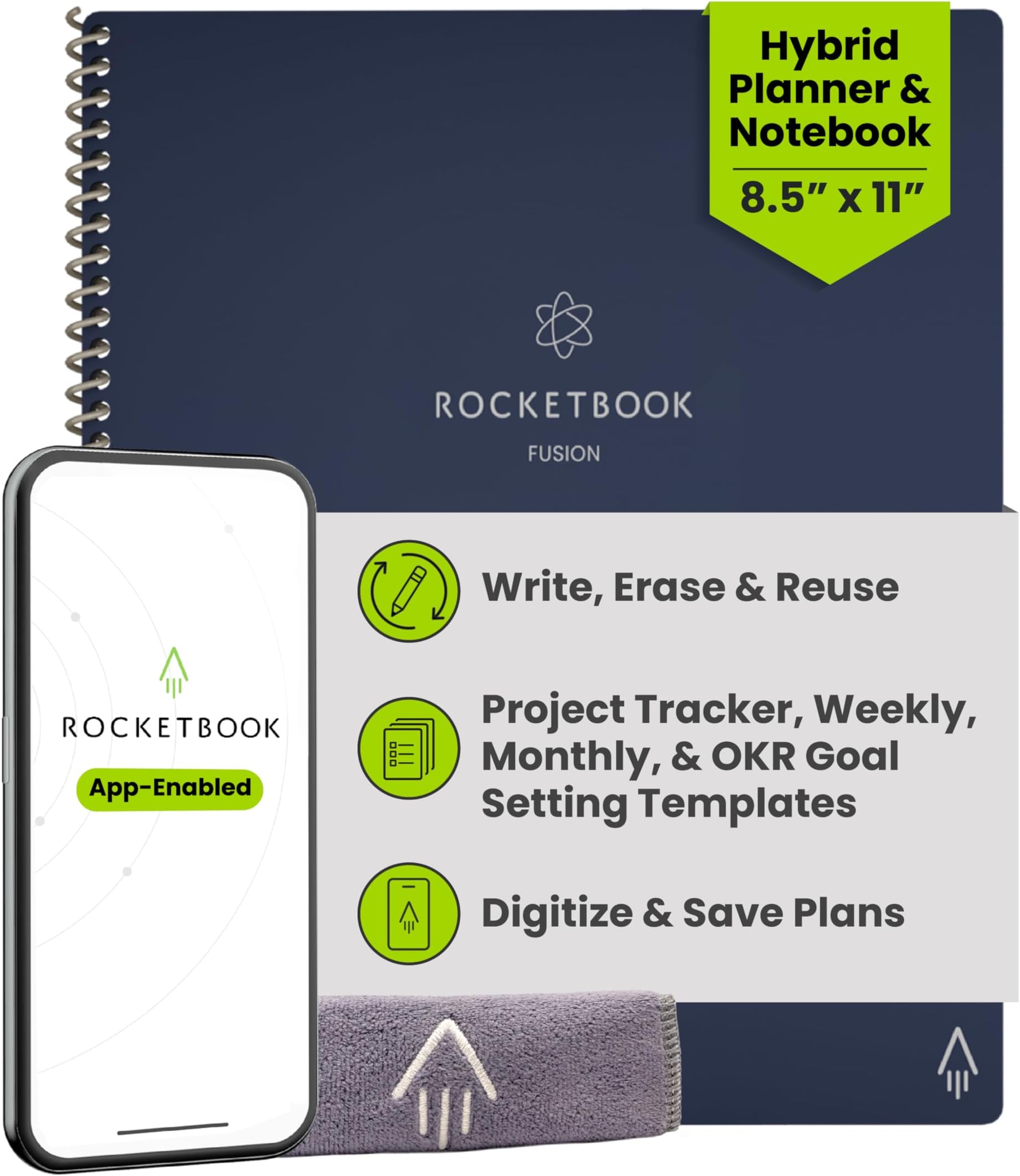
The Rocketbook Fusion Hybrid Planner combines 7 reusable page templates with app-enabled digitization, allowing professionals and students to write, scan, and erase notes effortlessly. Its durable faux leather cover and spiral binding provide a premium, flat-lay writing experience, while cloud syncing ensures your plans and ideas are always at your fingertips. Eco-friendly and versatile, this undated letter-size planner is designed to streamline productivity and reduce paper waste.


| ASIN | B07ZHZFZGB |
| Best Sellers Rank | #14,696 in Office Products ( See Top 100 in Office Products ) #278 in Planners (Office Products) |
| Binding | Office Product |
| Brand | Rocketbook |
| Brand Name | Rocketbook |
| Color | Navy Blue |
| Cover Material | Faux Leather |
| Customer Reviews | 4.6 out of 5 stars 26,558 Reviews |
| Global Trade Identification Number | 00850007403577 |
| Item Dimensions L x W | 11"L x 8.5"W |
| Item Dimensions L x W x Thickness | 8.5"L x 11"W x 0.4"Th |
| Item Weight | 11.36 ounces |
| Manufacturer | Rocketbook |
| Number of Items | 1 |
| Number of Sections | 7 |
| Pages | 42 |
| Paper Size | 8.5 x 11 inches |
| Pattern | Blank Book |
| Ruling Type | Dotted |
| Sheet Size | 8.5 x 11 inches |
| Special Features | Soft Cover |
| Style | Notebook |
| Theme | Book |
| UPC | 850007403577 |
| Unit Count | 1.0 Count |
A**R
Indispensable Tool for Teachers and Students!
I absolutely love my Rocketbook Fusion! As a current student and future teacher candidate, I not only have notes from my college courses, but also have preliminary lesson plans and observational notes that are critical to my field preparation which means I am taking countless handwritten notes. As someone who cares about the environment, it matters to me that I am utilizing products that lessen that environmental impact, since you can reuse the pages. Oftentimes I don't even need to print the pages because I can view them in the easy-to-use Rocketbook App, and just print out what I need which is why the Rocketbook works for me. Additionally, some of my teachers in my college courses don't allow laptop use in the classroom. The Rocketbook is my #1 go to in these courses! I can just write out my notes, scan them after class, and still have a high tech solution for note taking while following the expectations for my courses. The Fusion is such a timesaver as it is so convenient to send my notes to my email so I can review them at my convenience. This has come into handy often. Case in point, I left my Rocketbook at home and I needed my notes for a school project, but couldn't drive two hours to go home, pick up my Rocketbook, and drive back with it because I needed them to collaborate with my colleagues. (Honestly it was embarrassing to admit that I left my notes at home too!) But because I had my notes both in my Rocketbook App and in my email, I could just could retrieve them them, print them out on a wireless printer, and my colleagues could view them right away and start work on the project not wasting any valuable planning time. Rocketbook saves the day! Of course you never want that to happen, but it is nice peace of mind knowing that once you scan your notes, your notes are with you at all times, via your Rocketbook phone app and/or email. The Rocketbook app is so easy to set up and use, permitting me more time to focus on my schoolwork or planning. I am not super computer savvy but basically you download the Rocketbook App, assign where you want your documents to go, write away, check off where you want it sent at the bottom of the page, and scan your QR code on each page. Super easy. (I also like that it will sort anything by name if you enclose the title into two hashtags before and after the title like this ##title## at the top of the page. This means I don't even have to think about how to file it, and will know how to find it!) When you get into the app, there are also some free pages you can download and print out for one use purposes that can also work with the app. These are awesome! There are more lined pages, music pages, and graph paper for math students. Why is this amazing you ask? These are nice for taking notes in if you are working in groups in class and have to turn in your work. Normally you wouldn't be able to keep a copy because you have to turn it in, but fear not! Because you have preprinted out pages beforehand and scanned them, you can now turn them in, and even email them later to the whole group! You can have a copy to refer to for studying for a future test! The possibilities with Rocketbook are endless! I prefer the Letter-size version since typically my notes should be on standard-sized paper. I find the 7 different template styles included in my Rocketbook very useful for my purposes. The planning pages help me view what "to do" items I have scheduled, the agenda helps me plan 2 weeks at a time, which is invaluable as a student, the calendar template helps me plan out a whole semester with assignments, idea planning template helps me with planning ideas for future lesson plans for teaching, blank pages help me map out and diagram lesson planning webs or visuals to work out projects. The lined paper is my favorite template since it helps keep my writing looking neat and organized. I love too that all my notes which are colored coded, actually scan in color, continually helping me to stay organized as sometimes I use different colors for different subjects and can tell at a glance which subject I am looking at without reading all the text. Just a few notes. I have only used Frixion brand products in my Rocketbook. I have never had any issues with not being able to erase notes or notes disappearing on me, however I am careful not to leave my Rocketbook Fusion in my car. I recommend using only Frixion brand just because it seems to work really well with these pages. The ink does need a sec to dry before turning pages because it can smear on occasion, but then I just erase it and rewrite it again, not an issue at all. Lasly, I like the thickness of the pages and quality of my Rocketbook. It is extremely durable. It also reduces the need for me to carry a number of notebooks to class, since now I just bring the one. I am extremely satisfied with my Rocketbook Fusion and highly recommend it as an indispensable tool for any student or teacher for all these reasons and more! Hope you give a try, as I am happy I did! I love it!!!
A**.
Extremely Satisfied.
I found this product line by accident at Walmart and bought the first one, the regular Rocketbook which just had a dot journal. Looked online and found the Fusion notebook with a lot more pages available to store different kind of contact. But the letter size and the executive were still kinda bulky to carry. This product, the Rocketbook Mini, solved that problem. I use the Frixion pen that came with the Rocketbook Fusion: Frixion Clicker 0.05. I guard this pen with my life, as I can use it on other surfaces as well, but just so that I have the something to use with the Mini. I've read the negative reviews and had a very hearty laugh at the problems other people had. A lot of stemmed from the pen issues or that the design is wrong/weak. In my enthusiastic state where I was able to save on wasted paper, and be able to find old notes that were written on scrap paper, I went and bought many color pens and color markers of the Frixion line. I did not need any of the extras, but I bought them anyway. Yes, some of them weren't as good as my favorite: Frixion Clicker, but they still worked. If you decide to go cheap and buy knock offs or a generic brand, you're on your own. The Frixion pens work great with the pens that are recommended. In terms of design, yes it's annoying that there's no attachment for the pen, but you can totally buy a stick on thing to attach, or honestly keep it together. It's like whining that you have to carry a phone, keys and wallet and complaining that they aren't together. "Oh no, my first world dilemma of having to carry too many things. Whatever will I do?" If it's such a problem, get a purse or bag. If that's too much for you. Skip this product altogether and just use your phone. The design is not stiff, kinda bendy, but I don't use it for anything crazy. I bring it in my pocket and yes it's one more thing I have to carry. Also it's important to notice realistic expectations. The goal of this notebook is to be able to take notes, without waste. So no paper. And then you can scan the notes to the cloud/email/etc to save it for future reference. It's not designed to replace your phone/tablet/computer, it's not a smart tablet that recall the image or note that you took on the notebook. It saves paper and saves your notes. I've been using my notebook mini for a couple of months now. My friends saw it and I gave them this exact review and told them to manage realistic expectations. And they still bought it. TL;DR I love this product. I saved so much paper, and I have saved my notes that I took for later viewing.
S**H
Exactly What We Were Looking For
If you are like me, you use a notebook for everything. I have stacks of paper notebooks sitting around that I now have no idea what to do with, as it feels wasteful throwing them away. As soon as my Rocketbook was delivered, it eliminated my need for these paper notebooks! It is so easy to take notes and organize them in a way that I know I can actually go back and review the important notes/thoughts/ideas I have recorded. I love the included templates in the Fushion, as it helps me organize several of my projects! It is so light weight that I can easily throw it in my purse (I have the Letter Size) and take it with me wherever I need to work. The pages are surprisingly flexible and light (I think I was expecting more of a laminated type feel and it definitely feels closer to just great quality paper). The cover feels like it will protect from basic every day wear and tear. After using it for a couple of weeks, I have easily taken notes, uploaded, and erased the contents of each page. I have touted Rocketbook's praises to nearly everyone I meet. My only con: I am having some issues with the microfiber cloth leaving behind a few fibers on the page. I am hoping when I put them in the wash it clears up this issue. Right now, I am using a regular kitchen tea towel to dry the pages. Tips: - I definitely recommend getting additional Pilot Frixion pens to go with your Rocketbook. The one it comes with feels a little thicker than the other pens I purchased (therefore takes a little longer to dry). Plus, I just love having multiple colors to work with. You can actually change your upload settings to make it "Best for Color Ink!" - If you do use color pens, I wouldn't leave the writing on your page as long as you would black ink. The red pigments within my purple ink seem a little more difficult to come off. - I plan to get a second microfiber cloth. To make cleaning and drying a little easier. The cloth it comes with is excellent quality. We now have plans to buy a second Rocketbook for my husband, as seeing it in action, he knows it will be a perfect addition to his work desk! This really is a must buy!
K**A
I love this notebook!
My feedback is as follows: 1. It only comes with 1 pen. It's the Pilot Erasable FriXion Ballpoint Gel Pen. The ink is definitely wetter and it takes awhile for it to dry compared to the other types of pens Pilot offers. Because the ink is wetter, it definitely smear much easier. It would be nice if when you buy the notebook, the company would send you more than one type of pen for you test. 2. You will need more than 1 pen, I suggest buying the Pilot Erasable FriXion Clicker Gel Pens. They write more like regular pens and dry much faster than the ballpoint pens. DO NOT buy the Marker pens unless you plan to use them on the calendar or the bullet journal aspect of the notebook. The Marker pens are not meant to be note taking pens. Learn from my mistakes! 3. I wish the lined pages were in the front instead of the back. I think that might be more of a personal preference though. 4. Be careful with the pages when you're wiping your writing off. I was not careful and creased several pages because I was applying to much pressure. Before you use the notebook, purchase a travel size spray bottle to keep water in. Spraying the water is much easier than wetting the microfiber cloth and wiping it away. 5. This is probably the biggest issue I have with the RocketBook is that the pages aren't transfer proof. If you plan on using the lined pages, you will definitely need to skip pages OR have a regular piece of notebook paper in between pages. I ruined a couple pages of notes because I didn't realize my writing would transfer. Again, what I mentioned, hasn't stopped me from me from using my Rocket Book daily. It's a wonderful notebook! The app is really easy to use. All you have to do is sign up using your email address. When you're ready to upload all you do is open the app, scan the page, review your scan and send it on it's way.
J**S
Best Product in 2020
I was sitting with my friends during lunch and I noticed two of my friends were writing in this unique, thin green notebook. At first, I was so confused, thinking they would run out of paper very quickly. However, when I asked them about their notebooks, they explained that Rocketbook is a reusable notebook! I was intrigued, and that night I bought the Rocketbook myself. I've never been more impressed with a product. I have been using it in class for about a month now and I absolutely love it! The sleekness of the design is amazing and it's so useful having 10 pages solely dedicated for letters. I never run out of space. I also have put the notebook in my backpack, and it's really durable! I accidentally found my notebook bent in my backpack, however, after 3 days, it was perfectly normal and good as new! I've been uploading all my notes onto my Google Drive. One time I was out at dinner and explaining to my parents what I learned in Econ class that day, however, I forgot a term. No worries. I pulled out my phone, went on Google Drive, and on my Rocketbook folder, there were my notes I had uploaded from that day! It's so useful. Now that my school has fully transferred online due to Coronavirus, I have never been more thankful that I have Rocketbook. I can do my math homework in the notebook and scan it. It stays as a PDF file which is exactly how my teachers want my homework/notes submitted! I'm so excited! Now, every product is not perfect, however, Rocketbook is pretty close! When I got the reusable notebook, one page fell out immediately. I think it might have been due to not being sealed, however, none of my other pages have fallen out yet, so I think it might have just been an accident. I am righthanded, so it is a little annoying that I constantly smudge my writing. And yet, I am obsessed with how tidy my work looks! Since I have so much space, I utilize it all! I've started showing all my work for my math class, which has gotten my grades to improve! I also bought about 12 different color erasable pens for the notebook and I've never been so proud of my neatness! I would ideally like them to release a highlighter that could work with this notebook, however, I am fine with using different color pens to make certain terms stand out. I have shared Rocketbook with my friends and family because I think the best thing about this notebook is that we are saving paper. Climate change is a problem that we need to combat now, and by simply switching to this notebook, I think we will be saving the Earth one tree at a time. On top of which, my classes are solely online now, and it's so beneficial to have a book that scans directly to my computer, making my life so much easier. I am so glad that my friends introduced me to this product because I don't know what I would do without my Rocketbook :)
A**A
Perfect Notebook for College Students
I really wanted an iPad for the convince of note taking a problem solving with the ability to attach digital files directly to assignments. As a college student, an iPad was way out of my price range. I found the Rocketbook Fusion and it was the perfect substitute. I really needed something to complete homework assignments, math and chemistry problems and note for chemistry labs that I could later submit onto canvas for grading and the Rocketbook did just that, in my own handwriting too!!! It is a great tool, as handwriting notes and problems helps you remember them better, and so easy to use. In addition, it has weekly and monthly calendar spreads as well as planning pages and tracking pages to keep organized with ideas, projects and upcoming events. It is the all in one notebook for me and is perfect for any college kid. I spent so much money running through notebooks when i took notes and used scrap paper before the Rocketbook, now i can scribble down thoughts, work or problem solutions and simply erase them with water when I am done. Saves me so much paper and money as well as the environment by creating less waste. Anytime I am using my Rocketbook, all my friends love it and want to try it out. I could not think of a better recommendation to any of my college classmates, or friends in the work environment, this product is AUH-MAZING.
A**S
Best solution for paper clutter
I take a lot of notes during my personal Bible Study time. I reorganized my desk and found that I needed four large three-ring-binders to keep my notes in from these past 12 or so years. To save on paper and for my sanity I started researching other ways to keep notes. This Rocketbook Fusion is super easy to use and though I’ve only used it once this far (just received it) I am super psyched. I love the planning section, which is a bonus for me because I have thrown away so many used planners...this I don’t throw away I just erase! Saved dates and info are directly saved to my google drive and I also have my email set up to share special dates and events with family...super neat and an added bonus! I love the dotted paper. I’m a doodler and have done some bullet journaling. These pages are great for my creativity! There are actually a lot of lined pages! Super psyched about this. I’ve already started taking notes and can’t wait to see how this turns out. Though reviews say it’s not the same as writing on actual paper I haven’t noted much difference. You do have to let the ink dry to avoid smudges but I’ve smudged ink on paper hundreds of times. No biggie. I do have one blank page in my rocket book. I believe it was a mistake for I cannot save anything I write on that blank page onto the Rocketbook app however, I can use this page for my verse mapping and save my finished work to Evernote. The page wipes clean after using, so it still works for me. You do have to use the special FriXion pens for the notebook, the one I received came with the notebook already and I researched it...I’m ordering an 8-pack of colored FriXion pens for under $14. I truly don’t think this is a bad price for erasable pens. And the one I already have writes smoothly and is easy to grip. Though I have had only one day of using this notebook. I made project plans and two full pages of note writing completed. They have been saved in digital files and cleaned off. This is probably one of the best birthday gifts I have gotten myself in 8+ years! (And I get myself some really nice gifts.)
S**K
Brilliant and simple, now made inconvenient.
I loved the Rocketbook Wave (The original) but it seems like they are trying to out-do themselves with the Fusion and the other versions that are now available. This is the perfect example of how a simple and very functional concept has been over-tweaked and upgraded to the point of complication. I loved how the original wave notebook felt like pages from a traditional notebook. It looked like a notebook, and I could erase (using the Friction Pen) like a real notebook WITHOUT SMUDGES or having to "wait" 15 seconds to let ink dry before I try and erase my mistake. Which is what happens now if I use the Rocketbook Fusion. The Rocketbook Fusion feels like a dry erase board, that smudges and smears and (in my opinion) prevents me from quickly jotting down notes and flowing because if I do, I have to wait for each word to dry, and that becomes bothersome. Plus, the Fusion has way fewer pages then the Wave did, and is far more expensive. Annoying!! The original Wave writes and erases quickly and easily with nothing more than your Frixion pen. No fade, no smudge. Quickly upload your pages in their app, pop in the microwave and you have a new book! Brilliant!! BUT NOW, if I buy the new updated Rocketbook Fusion notebook, I not only have to carry the pen but now I have to carry a cloth and a spray bottle too if I want to erase the pages. What??? Really?? Or, what should I do if I'm in a meeting and I don't have a spray bottle with me, and I want to clean up my page errors before I send it to my group? Should I spit on the page? Ugh! Not only that, but the upload app is way slower now. Before I could power-upload all my pages in succession, NOW, I have to stop at every page and tap, tap, tap, this or that, before I can even upload a single page. 3x as long to upload simple pages than before. This is supposed to save time, and allow for consistent communication. The updated app and re-designed Fusion notebook as changed the simple functionality of their original and brilliant idea. The Rocketbook Fusion is an over-priced notebook that includes a more complicated workflow for its users. I will stick to the original Wave if I can still get it, and I will just scan the pages using an easier and less complicated phone scanner. You guys messed up a good thing.
E**Z
Great item
Great idea reusable no paper perfect
N**N
Beklentiye Uygun
Kaliteli ve sağlam paketliydi.. Hızlı gönderim 👍🏻
A**N
Excelente producto!!
Me encanto esta libreta! Súper fácil de usar, secado rápido y súper sencillo de pasar tus documentos a cualquier aplicación que tu desees. Recomiendo muchísimo ya que contribuyes a dejar de utilizar tanto papel y ayudas al medio ambiente. Las plumas frixion están increíbles se pueden borrar y la punta es finísima.
S**Y
I love this product
I really like this idea (saving the environment) so I got one. So easy to write on and wipe off. Uploading is easy to wherever you want. The OCR featire works really well with my handwriting too. However, the pens can be expensive to replace. The back should be hard so you can use it on your knee (I just bought a cheap clipboard to overcome that problem). You also need a pencil case for your pens, cloth and water! Love it though
H**O
Tenha cuidado com a vida útil do Rocketbook.
Para quem quer utilizar o caderno no dia a dia, para fazer suas anotações, sem o uso constante, ele é incrível. Mas, para quem quer usá-lo todos os dias, é necessário ter mais cuidados. Eu comprei o Rocketbook vai fazer um ano, com o intuito de estudar e escrever nele todos os dias, e há alguns detalhes que gostaria de destacar: Se você usar a parte de fricção da caneta para apagar no papel, a folha pode ficar mais difícil de ser reutilizada. Na segunda vez que você tentar escrever na mesma página, a tinta não vai sair como da primeira vez, na parte em que você usou a borracha da caneta. Bom, eu percebi isso, então comecei a borrifar um pouco de água diretamente na folha e depois esperava secar para reutilizar, mas não adiantou. A folha, depois de um tempo, vai ficando mais difícil de escrever, mesmo com tinta na caneta. Então, comecei a borrifar água no pano, e não diretamente na folha. Isso ajuda muito a manter a qualidade da folha, mas, independente do método de limpeza, a folha vai se desgastando. As folhas vão se desgastando porque eu sempre gostava de usar as mesmas. Então, quando for utilizar, sempre tente alternar as páginas, evite usar as mesmas para prolongar a vida útil do caderno. Também, sempre mantenha o seu caderno limpo. Não deixe a tinta da caneta na folha por muitos dias, pois isso pode deixar a folha manchada. Sobre a caneta, quando você comprar o caderno, já virá com uma. Mas, como qualquer outra caneta, essa também acaba. A diferença é que você não vai encontrar em qualquer lugar. Eu moro em uma região muito próxima de tudo, e não encontrei em nenhuma papelaria, só consegui achar no shopping ou online. Ela é mais cara do que uma convencional. Por exemplo: uma caneta esferográfica comum custa em torno de R$1,50, enquanto a caneta Pilot Frixion custa em torno de R$20,00. Aconselho você a usar somente a Pilot Frixion no Rocketbook, pois outros tipos de caneta podem danificar o papel. Em torno de 1 ano, comprei 8 canetas Pilot Frixion. Também vendem o refil, mas não consegui encontrar um lugar para comprar. Já vi gringos utilizando canetas permanentes nele, para ficar com um padrão personalizado na hora da digitalização; isso também funciona! Sobre a escrita, não faça muita força com a caneta, utilize-a suavemente. A tinta dela é de boa qualidade, não precisa de tanta força, até porque, se usar com força, pode danificar a folha. Eu não achei muito diferente do papel comum, você se acostuma rápido a escrever nele. Bom, a consideração final é que é um excelente caderno. Ele é mais caro, mas vale o investimento! Já digitalizei diversas coisas nele, e a premissa é que ele seja "infinito", mas o termo mais adequado seria "duradouro". Nada é para sempre. Ele dura mais que um caderno comum com certeza, e, se você cuidar bem dele, pode utilizá-lo por anos, mesmo usando todos os dias. Eu estava em dúvida entre um caderno inteligente ou um tablet. Comprei esse caderno porque, para mim, a retenção de conhecimento escrevendo no papel é melhor do que em uma tela, e, claro, ele é mais "barato" que um tablet. Pesquise bem antes de comprar, talvez você prefira um tablet, que tem muitas vantagens, ou prefira o papel, mas de uma forma mais moderna, que permita digitalizar e armazenar na nuvem. O Rocketbook é uma boa opção para isso.
Trustpilot
2 weeks ago
1 week ago