

Desertcart purchases this item on your behalf and handles shipping, customs, and support to Seychelles.
🔗 Keep your screens locked, synced, and stress-free — the HDMI fix you didn’t know you needed!
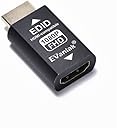
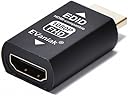
The EVanlak HDMI EDID Emulator Passthrough 3rd Generation is a premium aluminum adapter designed to maintain stable HDMI connections by locking EDID data. Supporting Full HD 1920x1080@60Hz resolution and advanced pixel formats, it eliminates display sync issues across multi-monitor setups, works seamlessly with Mac Thunderbolt to HDMI adapters, and ensures uninterrupted audio-video performance for professional and remote management environments.


| ASIN | B07YMS18T7 |
| Best Sellers Rank | #6,948 in Electronics ( See Top 100 in Electronics ) #1,147 in Home Cinema Cables |
| Brand | EVanlak |
| Color | HDMI EDID 1080-1P |
| Compatible Devices | PC |
| Connector Type | HDMI |
| Current Rating | 1 A |
| Customer Reviews | 4.1 out of 5 stars 297 Reviews |
| Finish | Aluminum |
| Item Dimensions | 1.6 x 0.8 x 0.5 inches |
| Item dimensions L x W x H | 1.6 x 0.8 x 0.5 inches |
| Manufacturer | Evanlak |
| Mfr Part Number | E1080P-1PC |
| Model Number | E1080P-1PC |
| Nominal Power | 5 watts |
| Number of Items | 1 |
| Number of Ports | 2 |
| Package Quantity | 1 |
| Power Plug Type | No Plug |
| Specific Uses For Product | TV |
| UPC | 752498099690 |
| Unit Count | 1 Count |
| Warranty Type | Limited |
R**E
Great for remotely managed PC for a senior.
Working great so far (a week) with a remotely managed Linux Mint PC I set up for my 80-year old mother. The M715q needs to be ON 24/7, so I can remotely manage it (VNC through ssh tunnel), and my mother uses it to watch streaming videos and what not. As part of remote management, I need to be able to reboot it remotely. Even without that, it simply will not behave correctly if an active display isn't connected to it. In my case, the display is just a basic 1080p 60Hz (59.94Hz) TV, so I chose the 1080p version. My mother simply turns the TV ON/OFF as needed. My M715q doesn't have HDMI output option, so I'm using a basic (passive) Benfei Displayport to HDMI adapter on top of this device, and it hasn't negatively affected its function. Even the audio through HDMI has been working perfectly, through multiple ON/OFF cycles each day.
E**H
Finally. Steam Deck on My TV Again
This thing rocks. Really saved my bacon. I was losing my mind with my steam deck connection issues while docked. It made TV gaming impossible. IMMEDIATELY, this fixed the problem. Maybe a premature review since since it’s only been about 30 minutes of gaming but not a single issue. I’m very happy with this. Gonna have to grab a couple more to see if it fixes my soundbar connection issues as well.
X**N
Says What It Does - Does What It Says. Very Easy!!
Not bad for the cost and very easy to use. Just plug it in and use it. I was looking for some kind of instructions. Plug it in line with the HDMI output of your computer and that's it. This fixed my desktop rearrangement when turning off my surround sound receiver. Computer stays on as it's running Windows 8.1 with Media Center. Worked great! I have been having an issue with watching NBC/Comcast content on my Sharp Aquos TV. This product did not resolve that issue. I think that's a video drivers or TV firmware issue. So for the price, definitely worth having my desktop look the same with icons where I want them every time. This can, I believe, also be used as a dummy plug. Just plug a monitor into it once and the remove that monitor. Should work fine for that.
T**E
Compresses the Image from an mClassic going into a 4K Gamer Pro, and removes LPCM 5.1ch Audio.
Not recommended if you use a 4K Gamer Pro. It’ll compress the mClassic’s contextual processing, making the resulting image from the 4K Gamer Pro look jagged. Better to just get an mCable Gaming Edition and an HDMI coupler, and forget about both this and an mClassic, especially if you own a 4K TV that supports 1440p. It’s important to note that I haven’t tried placing this between an mClassic and mCable Gaming Edition, with the mClassic at the beginning of the daisy chain. If I ever get the budget to try it, I’ll update the community on such a setup. Unfortunately, no EDID emulator supports LPCM 5.1ch audio, and I need such audio for my sound bar, so it’s impossible to achieve an ideal setup with one at this time.
C**R
NOT THE ANSWER for Steam Deck
Valve Steam Deck users - this will not resolve the issue with external display not detected on HDMI if you are experiencing inconsistent external display detection (if detects some times but not always) this device will ensure that your external display is never detected, the opposite of the desired behavior. Build quality seems good so I can't no star it as it might help other people with other devices but this is NOT THE ANSWER for Steam Deck users despite what AI assistants recommend.
A**.
Just works. Keeps video signal active when display is turned off.
Bought this to resolve an issue with certain monitors dropping the video signal when they were turned off or went to sleep. I needed the display in Windows to remain active to prevent applications from moving to the wrong window AND so that the displays were shown correctly when remoting in between services. No apparent issues with compatibility nor negative affects to picture quality and remains connected. Easy to use, just plug in between the cable and source and that's it. Definately a better value over costly EDID emulators or video switchers. Plan to order a few more.
R**M
It does what it's supposed to
The item works just fine but I'd suggest getting this on sale since it's a bit pricey for what it does (there are plenty of cheaper alternatives). Overall no complaints on the product itself, it fulfills a simple task for problematic devices.
W**P
Solution for projector backward compatibility
Used this device to get an old projector with an HDMI input to work with a modern Mac. It handles the negotiation at the HDMI port that the old projector is incapable of, then passes the signal through to the projector.
A**H
It is not working as mentioned.
M**N
Solved Android Box Handshaking Issue
I was having issues with a Nokia Android box stuttering on playback through a receiver to a projector. This was happening intermittently on a number of different apps and occurred whether streaming or playing a file from my server. It did not happen using my Firestick. For a long time I assumed the Nokia box was suspect, however, with the help of ChatGPT I narrowed it down to an issue with my receiver. For some reason, the correct info was not being passed through from the Nokia box, and this caused the playback issue. ChatGPT suggested forcing the format using an EDID device. Considering the box only cost £50, spending nearly £20 made me think twice, but I thought I could send the EDID adaptor back if it didn't work. No need! It did work and all the videos that had previously stuttered now play perfectly. Assuming the device lasts, it was money well spent.
B**E
Gut bei Verwendung von KVM-Switch
Ich verwende einen KVM-Switch zum umschalten zwischen zwei Rechnern. Ohne den Adapter muss der PC nach dem Umschalten immer die Bildschirmauflösung anpassen. Dabei gehen Fenster- und Icon-Positionen oft verloren. Mit dem Adapter geht das einwandfrei.
M**T
Does its job!
This is the perfect companion to the Yolobox, as it makes it accept a lot more signals :) It does what it says on the tin, so if you need to force a source to send in 1080p, this is your guy
J**.
Perfecto para mi NUC
Tenía un problema con mi Intel NUC (J5005). Parace que no se llevaba bien con el TV Samsung 4K y sufría problemas de pérdidas aleatorias de sonido al regresar de stand-by. Además al ajustar la tasa de refresco (en KODI) algunas veces se me quedaba la pantalla en negro y sólo lo podía solucionar apagando/enciendo la TV varias veces, o a las malas reincialdo el PC. Pues bien, tras buscar información sobre cual podría ser la causa de mis problemas decidí probar con este aparatito, a pesar de que no era barato. Y se acabaron todos mis problemas. Ahora siempre funciona como debe. Básicamente tiene 2 funciones. Por una parte hace que el PC no se entere de cuando se enciende/apaga la TV (siempre la detecta como encendida), y por otra me fuerza la resolución máxima a 1080p, que parece que a mi NUC le mola más.
Trustpilot
2 weeks ago
2 months ago