Desertcart purchases this item on your behalf and handles shipping, customs, and support to Seychelles.
🚀 Upgrade your workflow, not your budget!
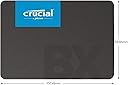
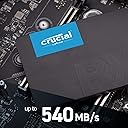
The Crucial BX500 2TB SSD delivers up to 540MB/s read speeds with energy-efficient Micron 3D NAND technology, offering a massive storage boost and faster system responsiveness. Designed for professionals and gamers alike, it’s a reliable, dust-resistant internal SATA drive that transforms any compatible laptop or desktop into a powerhouse with a 3-year limited warranty.


| ASIN | B07YD5F561 |
| Additional Features | Dust Resistant |
| Best Sellers Rank | #15 in Internal Solid State Drives |
| Brand | Crucial |
| Built-In Media | Internal Solid State Drive |
| Cache Memory Installed Size | 2 TB |
| Color | Clear |
| Compatible Devices | This drive is compatible with desktops and laptops that accept 2.5" 7mm SATA drives |
| Connectivity Technology | SATA |
| Customer Package Type | Frustration-Free Packaging |
| Customer Reviews | 4.5 out of 5 stars 7,477 Reviews |
| Data Transfer Rate | 6 Gigabits Per Second |
| Digital Storage Capacity | 2 TB |
| EU Spare Part Availability Duration | 3 Years |
| Enclosure Material | Information Not Available |
| Form Factor | 2.5-inch |
| Global Trade Identification Number | 00649528821584 |
| Hard Disk Description | Solid State Hard Drive |
| Hard Disk Interface | SATA 6 GB/s |
| Hard-Drive Size | 2 TB |
| Hardware Connectivity | SATA 6.0 Gb/s |
| Hardware Platform | Linux, Mac, PC |
| Installation Type | Internal Hard Drive |
| Item Dimensions L x W x Thickness | 3.95"L x 2.75"W x 0.27"Th |
| Item Type Name | 3D NAND SATA 2.5-Inch Internal SSD |
| Item Weight | 0.04 Kilograms |
| Manufacturer | Crucial |
| Media Speed | 500 Megabytes Per Second |
| Mfr Part Number | CT2000BX500SSD1 |
| Model Name | Crucial BX500 SSD |
| Model Number | CT2000BX500SSD1 |
| Number of Items | 1 |
| Read Speed | 540 Megabytes Per Second |
| Special Feature | Dust Resistant |
| Specific Uses For Product | Business, Gaming, Personal |
| UPC | 649528821584 |
| Unit Count | 1.0 Count |
| Warranty Description | 3-year limited warranty |
G**O
Far outperforms the original hard drive in my laptop workstation! FAST!
Excellent item! It far outperforms the original hard drive in my laptop workstation. It's a lot smaller too, so it's a good thing the workstation supports two internal drives. This 2 terabyte drive gives me enough space to do my video processing (meaning huge files) as long as remember to move files to permanent storage on a hard drive. How fast is it? On a transfer beteen this drive and an externas SSD drive I saw as high as 323 gigabytes per second. For ME? That's blazing fast! My computer starts up in seconds where it used to start up in minutes. Excellent buy!
S**T
Great Upgrade for Xbox One X!!
Worked like a champ to repair and upgrade my Xbox one x. Performance was noticeably improved over the stock hard drive. Original drive started flaking out, so I did some googling and ordered this beast. All good now! Be careful removing the ribbon cable from the power button board. Some of the upgrade videos don’t show how to properly disconnect that cable from the board flip tab lock style connector on that board. I wound up breaking the lock tab connector and ordering a new $13ish dollar board replacement. Took a few days to get that in. I’d probably suggest you order the board as well, just in case. The locking tab is very small and fragile. Probably got even more fragile with age…
C**S
Whoa! So far so good
This is a very unscientific review, with comparisons that may not be useful to most people but long story short, this definitely appears to be a good value. I purchased this 2TB Crucial BX500 to replace a 1 TB Samsung 850 EVO on an old MacBook from 2007. This is not a good use of one's money and I'd advise normal people against it. I just really like this computer and I dual boot an old Mac OS for certain programs I use as well as Linux, and I just wanted to have a lot of storage for each operating system as they're housing some music/video libraries. Anyway. I was concerned that the Crucial would be noticeably slower than the Samsung, because it is so inexpensive. It starts up just as fast in MacOS (about 12 seconds) and Linux (i'm guessing it's about the same in Linux since the startup process is a little different and I went from Mint 19.2 to Mint 20 in the course of this upgrade so did not make an apples-to-apples comparison). Cloning the data was pretty slow admittedly. Cloning 400 GB of data took about 2 hours to the Samsung vs about 4 hours on the Crucial over USB 2.0. I probably won't have to do this clone again so I don't really care, but worth noting. If I'm not mistaken the Samsungs have more cache which speed up the transfer rate of the first 100 GB or so, and the Crucial being cheaper has less cache and only the first 50 GB or so get the faster transfer rate. Otherwise I haven't noticed any other speed differences in the tasks I use it for: web browsing, viewing and storing photos, music, video. If you really just want storage capacity, faster than HDD performance, better than HDD reliability (knock-on-wood) and you don't need the absolute fastest thing, this is a safe way to go. The Samsung is still wonderful and I will be handing it down to my dad for his 2012 MacBook Pro to hopefully get another year or two of use out of it.
S**!
Exactly what I needed.
I recently purchased this hard drive to Replace my Old one, and it fits perfectly. Mount it on perfectly and quickly, excellent metal material perfectly compatible. Makes everything work like brand new exactly is advertised.Functional.What an upgrade this is four times larger than my previous one! Great value for the price. Thank you so much.
A**T
Slow cache
Love the drive but runs out of cache quite quickly installing games compared to my other sata ssds
S**S
Excellent
Been roughly a year or so since I've installed it, and I'm glad to say that it was worth the expenditure. Certainly not the swiftest of drives, but as an upgrade from old-school hard disk, this is the cream.
J**A
Fast, quiet and surprisingly easy to install
Rarely is my experience with a new product exactly as advertised. This 2TB Crucial BX500 SSD drive is! First off, I have a PC setup slightly more complex than usual. I built this desktop computer myself several years ago, setting it up with a dual-boot config: Windows 10 64-bit on my main hard drive for application development work; Windows 7 32-bit on another, for compatibility with older music recording software and hardware interface. After all these years, I was concerned my two original 2TB Seagate drives would be reaching end-of-life. Plus, they were getting slower each year with more and more data on them. Now, this was my first replacement drive to see how it went--and my first SSD experience. I popped the new Crucial drive into an Icy Dock 2.5 to 3.5 inch adapter case, installed it in an open drive bay, connecting it to an open Serial ATA slot in my motherboard with an extra SATA cable I had lying around (Note: the drive doesn't come with any cables), plugged it into an open SATA power connector connector, closed the case and powered up the PC. I then followed the Crucial online instructions downloading the Crucial Storage Executive drive info app and Acronis cloning app. I was pleased to see that the SSD drive was now recognized by Windows 10 and it was apparently functioning correctly. I then fired up the Acronis True Image app, selected my "C:" drive to clone and selecting "Manual" as a partition option and then, "As Is" instead of "Proportional", since both old and new drives are the same size. Cloning my Windows 10 boot drive took a good couple of hours and completed successfully. Now for the big test. I turned off the PC, opened the case again and disconnected the old boot drive and turned the PC back on. I now expected the usual option to boot from either the Windows 10 or Windows 7 drive. Instead, I got the ugly DOS message: "Reboot and select proper boot device." Uh oh... However, this was an easy fix. I rebooted and this time selected the option to open the BIOS software. From it's "BOOT" menu, I found my new Crucial SSD drive was listed with it's serial number beginning with "CTxxx...", instead of the Seagate drive "ST" prefix. It turned out my disconnecting the old primary Seagate drive had apparently confused the BIOS and caused it to move my empty DVD drive into the first boot position. I simply moved the new Crucial drive to that first position, saved the BIOS setting and rebooted again. This time I given the expected option to select my default Windows 10 drive, or my old Windows 7 music recording drive. The cloning process had NOT wiped my custom boot config! I selected the Windows 10 boot option to my new SSD drive and was AMAZED at how fast Windows 10 loaded--and then, how fast bulky programs like Microsoft Visual Studio now load. Awesome! I'm thrilled. I'm now ready to try replacing the other Seagate hard drive. Since this one has old, end-of-life Windows 7, we'll see how that goes. I'll let you know!
S**N
Three year warranty, good name company
2.5" SSD Drive, over the years I've developed preferences for which storage products I buy and memory products too. This is essentially a memory product after all even if it does function more as permanent storage than RAM. I tend to stick to samsung or Corsair or Crucial. For the price two TB is quite a lot of storage. It's a fair number of games or other stuff you want to keep and this will last a lot longer than an old spinning platter tech drive ever would. I've got one TB drives in my system that are easily over five years old and still running strong with no errors on them. Very easy to setup. One power connector one data connector, using this in an external cabinet so had to install it in the cabinet tray not a biggie at all. Installed it easily first time just put it in the cabinet then entered drive administration via the right button over the start menu in windows 11 to partition/format/and assign a drive letter took minute. A 2TB is not the biggest you can get by any means these days, 4TB cost about twice as much as this one and there are bigger ones available if your pocketbook can handle the load. These have a three year warranty but in truth they should last much longer than that, most articles say you should easily get ten years from a solid state product most of the time. The advantage to SSD's is it handles it's own error correction and other side jobs to protect the data stored on them, no more need to run defragmentation (in fact it's bad to do that to an ssd) and only rarely should there ever be errors on it for various reasons.
M**D
Love Crucial SSDs
So I have been using a mechanical 2TB hard drive in my bench PC for backing up people's files and storing images for clients until I can restore them. It's been working OK, but a few weeks ago I had to back up files for a client and they had about 500GB of files and pictures and backups on their storage drive. I started doing the backup from a USB 3 dock, and it crawled. It was getting about 40MB/s and varying around that value up and down. Later I tested moving a large amount of data from my boot SSD using the same method and it was in the hundreds of MB/s. So I purchased this Crucial 2TB SSD (for $150) to replace the mechanical drive. (it's gone up $30) I work in a shop, and we sell a lot of SSDs. I have had the best luck with Crucial, Kingston (budget drives), Samsung and Western Digital. We purchased some ADATA 2.5" SSDs, but almost all of them went bad. ADATA replaced them with a different model, and one of those went bad as well (out of ten drives). We stopped purchasing that brand. Western Digital drives have been good too, but my personal 1TB Western Digital drive went bad. It will no longer get SSD speeds, but only transfers files at very slow speeds (slower than USB 2) even after reformatting. Crucial makes excellent drives, and I can rely on them. Highly recommended. I would not hesitate to purchase any of the drives I have mentioned other than maybe ADATA, but I am sure they will correct the problem they were having if they haven't already. I am using a 500GB ADATA NVMe drive in my gaming PC as my Windows drive. I've had it for about 3 or 4 years now and it's been very reliable.
R**N
CRUXIAL MOI J'aime bien!!!
J'en ai plusieurs, les gris Suse moi vite mais le rapport qualité prix du Mx est top!!!
W**H
Wielokrotnie się wywalał, teraz już koniec.
Kilkukrotnie z niewyjaśnionych przyczyn przestał być widoczny dla systemu. 3 razy już go formatowałem, gdyż nic się nie dało zrobić, a system wykrywał jako zupełnie nowy dysk... Teraz to już w ogóle. Podczas pracy komputer przestał działać, okazało się, że przez ten dysk. W systemie brak partycji z tym dyskiem. Gdy próbuję go dodać w systemie i przypisać literę, to nie ma takiej możliwości... Nie polecam, zmarnowany czas i pieniądze.
T**I
Easy to install.
Product work very well, no problem setting it up.
R**S
Excelente!
Excelente!! Como qualquer produto da Crucial.
Trustpilot
3 weeks ago
2 weeks ago