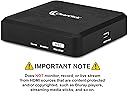
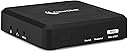
🎥 Capture Every Moment, Stream Every Story — Stay Ahead of the Content Curve!
The ClearClickHD Capture Box Platinum is a versatile video capture and streaming device that supports HD 1080p/720p recording from HDMI sources and SD capture from a wide range of legacy inputs including RCA, VGA, and VHS. It enables direct recording to USB drives without a PC, supports live streaming via PC/OBS, and comes with a 2-year warranty and US-based tech support, making it an essential tool for content creators and professionals preserving or streaming diverse video formats.


| ASIN | B0854698LN |
| Best Sellers Rank | #1,143 in Video Converters |
| Brand | ClearClick |
| Compatible Devices | PC |
| Connectivity Technology | HDMI, VGA, AV, RCA |
| Customer Reviews | 4.0 out of 5 stars 154 Reviews |
| Global Trade Identification Number | 00850012969006 |
| Item Weight | 4 Ounces |
| Manufacturer | ClearClick |
| Mfr Part Number | HD Video Capture Box Platinum Edition |
| Model Number | HD Video Capture Box Platinum Edition |
| UPC | 850012969006 |
| Unit Count | 1 Count |
B**6
A Box of Awesome!
Honestly, one of the best things I ever bought. This thing does exactly what I wanted it to do. My fear was I would buy this and it would work just OK with some glitchy issues, but it has been great. This is one of those rare times when I bought something and it works exactly like the company promised and I hoped it would. Details: As a note, I did not have the need to contact their customer service, so I cannot speak to the quality of their reps. I bought this box to convert my digital 8 mm tapes to mp4 format. I was looking for a device that allowed for recording directly to a flash drive, Why? Well, I am not keen on downloading software from some questionable website or using software that claims to work on Windows 10, but really doesn't. A vast majority of video converters seem to have these issues from the reviews I read. So far I have converted 25+ tapes to mp4-format with no issue, I have also done several home movies that were on both VHS and DVD - again, worked perfectly. So the box is pretty easy to use. As a disclaimer, I am using this only to convert videos. I am not recording game play, playing videos on it or using it as a pseudo-DVR, so I cannot speak to those uses. The manual could be a little better, but it does the job as it really is not that complicated to get going. The box has two video input ports and one output port. The output is HDMI, so you can connect this to a TV, monitor or other device so that you can view what you are recording (one relatively short HDMI cable is included). I have mine connected to a extra monitor. As far as input ports go, one is HDMI. The other port is MMI, and is used with an included cable. The MMI cable is split and allows you to input from VGA (does anybody still have a VGA output around? If so, respect man!), RCA jacks or digital component jacks. For my use, I have been using only HDMI and RCA jack input. For ease of use and given the cables are not super long, I have my whole set up is on a table: Clearlick box, monitor, laptop, camcorder, VCR and DVD player. This lets me switch things around quickly and transfer/back up files often. As far as using the remote, it can be a little wonky, but not too bad. I find this more than acceptable given the box is functioning perfectly. The only buttons I really use are power, input source, record, stop, aspect ratio and 720p/1080p. I believe some reviewer were not thrilled with playback buttons, but since I am not using those I cannot speak to that. As far as my use is concerned the remote is functionally good. However, as others mention, you need to point this remote right in front of the box. It is picky, but since I have my whole set-up on a table, I literally have the remote 6 inches from the box, so it is not an issue for me. The menu is a little bit goofy as others have noted. It is easy to navigate, but at times you press the arrow that signifies back or return and you are taken out of the whole menu instead of back to the last menu screen. Then you have to press the menu button to get back into the menu. I found this to be slightly annoying, but not really a big deal. I have not had to go into the menu too much. I have been OK with the default settings. Speaking of settings, let's talk about those. I did set the clock on the box, however, despite having the right time, my mp4 files have weird times on them (in the file names) that correlate to nothing. While odd, this is irrelevant as I rename the files anyway. The important thing to know is that the files will be named such that they will appear in the chronological order in which they were recorded (more on storage shortly). As far as resolution goes, as other have mentioned, you cannot record in standard definition (SD, 480). Apparently you can do this if you download their software and record right to your computer, but since I was trying to avoid that I used 1280x720 (720p at 60 Hz). when recording my 8 mm tapes that were in SD. This was the default setting when using the RCA jack input. Again, as others have noted, the result is you are recording your SD video in 720 p, so the video file is bigger than it needs to be. I find this to be a non-issue. In the day of USB 3 and large flash drives, slightly bigger files are not a hurdle. Typically, my one hour 8 mm tapes had files sizes of 4 to 4.25 GB. It is important to note here that you want to use the aspect ratio of 4:3 for SD video. Otherwise, everything gets stretched. This can look almost normal to goofy depending on your video. So yes, these videos will be letter boxed on the sides of your wide screen, like when watching an old tv show on wide screen. When using HDMI input, the default resolution was set to 1920x1080 (1080p) and an aspect ratio of 16:9. This is what I used for home videos that were on DVD, and it worked fine. In my hands, the difference in file sizes between recording in 720 p and 1080p were not noticeable for the same length of video. Once nice feature is that while you are recording, the REC button on the from of the unit (power button) flashes. It flashes green for 720 p and blue for 1080p. It is a nice way to verify recording resolution. Now, on to storage. The manual tells you not to go bigger than 32 GB for a drive. Other have pointed out that you can go much larger and not have an issue. The key is you want a USB 3 drive. You need the extra transfer speed to write the video file to the drive quickly enough. I am using a 32 GB USB 3.0 drive (you can buy these for around $10). How I have been transferring my videos is to press record on the remote, then play on the source device. When the video is done, I have been manually hitting stop on the remote. Once you hit stop, you will see an indicator on the screen that stays up for several seconds while the file is being closed. I have checked every file I have done, and they all work perfectly. There has been no issue with files not being properly closed like those described on some of Clear Click's earlier devices. So, I know what you are thinking, you manually hit stop? So you have to sit through all your videos? Well not really. First, the box does have a timer setting which some reviewers describe using. I chose to do this manually as I had no idea how long some of my 8 mm or VHS tapes were. My whole set-up is in my home office, so I have it going on the side where I can keep an eye on it, or I set a timer on my phone to come back and check on it. It works for me. If not for you, then see other reviews or try out the timer. Once complete and the box has fully stopped (no stop indicator on the screen), you can pull out the flash drive and connect it to your computer. You can of course do multiple videos as well. Given I am using a 32 GB flash drive, I was comfortable doing 5 to 6 videos at a time between transfers. One thing to note here is there is no way to pause the recording on the box while you start another source video - like if you wanted to merge two videos together into one mp4 file. There is only record and stop. Now, you can certainly keep the box recording while you switch or start another video, but keep in mind any screen images like when a VCR shows "Play", time remaining, etc will be captured on the box recording. As far as value for the money goes, well I see some reviewers bought the device much earlier than me and paid something like $100-$110. I paid around $150. I guess you could argue that the device is simple and should be much cheaper. I could not argue with that point of view. However, this box has worked flawlessly, and I could not find anything else on the market that allows me to record right to flash storage without downloading some kind of software. That fact, combined with the value in perfectly converting all my old videos to mp4, makes me feel like it was well worth it. No regrets, very happy!
B**N
Product works good
It took some testing but once I worked out the formatting for my USB drives I'm off and running. For a 6 hour VHS tape the files are to big to fit on a 16 GIG USB drive if it is formatted NTFS. The recording will fill up the drive and the recording will fail. Once the drive was formatted to FAT32 the recordings were segmented into approximately 2 GIG sections (Which I Prefer) I tried a 1 TB USB drive that did not have the FAT32 formatting option, only exFAT and that would not work. I will try again later to format the 1TB drive NTFS and see if it records to one large file. Since I like the 2 GIG segments I haven tried that yet. I suspect it will work as long as there is adequate space. In the mean using the 16 GIG drive for a 6 hour tape I start the recording and let it go for about 2 -3 hours. I stop the recording and copy the segments to a laptop and then reformat the 16 GIG Drive to FAT32 reconnect and pick back up from where I stopped. So you can stop the recording anytime, insert a FAT32 formatted drive and keep recording. I recommend cleaning the heads of your VCR (these old tapes need all the help they can get) Depending on how long the tapes have been sitting around I would also recommend fast forwarding and rewinding a couple of times before starting to record. Lots of details in this long review but if you follow these guidelines this unit so far has worked great.
J**K
Exact same as Cloner Alliance Pro with faults
I had this box for about 1 week. It worked decent, but then started giving me small issues. If you get a 1x2 HDMI splitter, you can bypass HDCP protection and record anything fom an HDMI source. The problem was this box would start freezing up. Sometimes after recording, it would not stop recording, if you hit the stop button it would just hang on the "stop recording" screen forever. The only way to get off that was to unplug the box but then you just lost whatever you recorded. Sometimes the box would not respond to the remote at all. Even the direct buttons on the box didn't respond. All in all, it's OK and works most of the time. There's really nothing else out there that can do this (if you want to record cable movies, netflix, prime etc). I wanted something more reliable so I purchased the Cloner Alliance Box Pro. Although the 2 boxes look different, they are exactly the same. Right down to the firmware/software. Even the remote controls are identical. So if you're thinking about Cloner Alliance or this, go with which is ever cheaper. They are identical. If you go to the ClonerAlliance site and order it direct, do the free shipping because it arrives in 2 days (site says 15-20 days).
G**R
Works well, when it works (updated)
Using the device to dub some material from another recorder. Most recordings are about an hour. Produces good recordings but has some problems. Though it started out as working nearly all the time, now, after a couple of weeks, it will only successfully record about half of the time. Recording to a new 2 TB Seagate drive that I fully formatted with NTFS in order to handle the longer recording times. The unit sometimes starts to record and then just stops, with no indication why. I just notice that the red recording indicator goes away. I think it might have to do with it not being able to allocate space on the hard drive in time for the bit stream, even though I frequently defrag the disk. Other times, less often, the recording appears to finish OK but the resulting file shows up as Unsupported File and cannot be played. The user interface software appears to have been adapted from some other device, with the result that it is rather clunky to use in this configuration. [Update] Since the issues with failure to record became more frequent as files were added and deleted, I copied all the good files from the drive to another and then did a full reformat on the drive. Am able to record again, so I assume the problem lies with how the unit handles file adds and deletes on large hard drives. Seems like a lot of hassle, but it works.
S**T
I love ClearClick
ClearClick HD capture boxes are very easy to setup and use. Just grab a suitable NTFS USB drive and plug it in to the side, plug in the video cables and the power and you are ready to roll. I am a long time user of ClearClick products. I had the old HD Capture box and after 7 years of use it has seen better days and needed to be replaced. I was excited to get the Platinum version because of its extra functionality including a remote! The thing I liked the least about the old capture box was that I had to run up to push the button to start or stop "recording". The Platinum removes that issue with an infrared remote. The remote is very light and almost feels a little cheap - but it serves the purpose. Like all infrared remotes this one is very directional, and maybe more finicky than some when it comes to pointing it at the right spot to get it to work. None the less I love having that capability. Another advantage of the Platinum is that you get an onscreen display where you can see that you are recording and how long you have been recording, as well as gain access to a setup menu. In the setup menu you can make a lot of configuration changes including the bitrate that you record at. I found that the medium bitrate gave about the same quality and file size as my old HD capture box did (about 10MB/s). In my testing the high bitrate went up to 17MB/s, creating notably larger files. Important warning - the largest file size this box supports is 16GB. If you want to use the high bitrate that will mean about 2 hours of video. This can be a major limitation so please note this. If you use the medium bitrate you can probably get closer to 3 hours of video. All video is captured in 60fps (the old HD capture box only supported 30fps). I also like that the Platinum supports many other kinds of connections if needed. I currently only need HDMI, so I haven't really tried the rest although its good to know they are available. Additionally I like that you can visibly see the light blinking on the front of the capture box, letting you know that it is recording. The old model had the light on top and you needed to have the correct angle to see it. I also need to mention how exceptional ClearClick technical support is. If you are on the fence with whether you should purchase this device or a competitor, I would say purchase the ClearClick for technical support alone. They are very knowledgable and helpful. The only other complaint I have about this box is there is no way to remotely turn it off - you basically need to unplug it. In any case, I highly recommend ClearClick and the Platinum HD capture box.
H**I
Works intermittently, less and less so over time
When I first installed it, it worked perfectly for an entire USB capacity (16gb). Yippee!! However, the when the 2nd USB drive (32gb) was installed while I was downloading the first's content, while RECORD was displayed at the start and STOP RECORDING at the end, NONE of the recordings were saved; the USB drive was completely empty. Messed around with that for about a day, disconnecting and reconnecting, etc. Roughly a day and half later, it just started working. And, even then multiple recording events were skipped. Roughly 4 days later, it did it again - after some basic checking of connections, I decided to download the current USB content and try another another USB (16gb). This drive wasn't even recognized, and I couldn't ever get it to be recognized (I know the drive was good as I tested directly on PC with copying, moving, playing, etc). I tried the USB I'd used first - now, it wasn't even recognized. It had been before and all I'd done after removing before was to download the content to the PC (no formatting, etc). No matter what I did, it was never recognized - so, that's 2 working USB drives which were not usable only on this device. I then inserted a 64gb unit, which according to the specs, wasn't compatible. Viola! That was instantly recognized. It also appeared to be recording, but only 75% of the time. It was able to save over 50gb of recorded content. I was able to remove, download, and re-insert this device multiple times without any issues. It's been 31 days (just past return period) and you guessed it - successful recording has dropped to 30 or 40% of the time, and I can't figure out any patter to why some events are recorded, and other's aren't. Worse, the only way to really tell is to finish the recording(s), disconnect and download content to a a PC and scan the content (hopefully you remember what should be there). Using the built-in media access software, which could be a very useful tool, is cumbersome at best, very tedious and slow. Another issue is that when you press record, a "Recording" word is displayed for @5 seconds. When it goes away, there is no way to tell if the recorder is on (which makes it very difficult to know if this is one of the no-record saved times). My previous recorded left a red dot in the upper left corner to indicate a recording in progress). The only way to tell if it's recording is to press the Stop, which displays STOP RECORDING and then check the device content. If you're intent (as mine is) to record events for permanent record., I'd look elsewhere. If you intend to record for "fun," where the lack of a specific recording is of no import, you could consider this unit. However, a much less expensive unit would be more cost effecting anyway and probably more reliable.
S**R
Easy to use, works great!
I'm using this to convert a couple dozen VHS tapes to digital. I bought this after trying a cheaper model that just didn't work -- the other one would never create a file on the usb drive (tried different usb drives, different format, etc.). This one works. It's as simple as that. NOTE: I'm using an external upscaler, so I'm using the HDMI In port. I'm also using a 32 GB thumb drive, which holds 2-3 VHS tapes. I do have one tip - after I transfer the files from my usb thumb drive to my mac, deleting the files doesn't seem to actually free up the space on the thumb drive, so I just reformat the thumb drive (exFat quick format, on a pc) before reusing it. I've done 20 tapes so far with no further issue. Not going to deduct a star, because I suspect the issue is with the mac and the thumb drive, not the device. I'm very happy with how easy this is to use, especially the fact that it doesn't tie up my computer. I'm also VERY pleased with the picture quality -- I don't see any loss of quality compared to playing the tape directly.
L**S
Pretty Nice Device
I like ALMOST everything about this recording and playback device. The only complaint that I have is, it has a sorry remote control. My remote control, only works when I am closer than 10 feet to the unit. I changed the batteries, cleaned the pickup on the remote and the unit, but I still had to be right in front of the unit within 10 feet before I could get it to pickup. Other than that, I Love it. I had this recorder/player for almost 4 years now, and that is the only thing I dislike about it.
R**L
Nunca funciono
Muy deficiente el equipo, no funcionó , no pude grabar videos de mis hijos, ya programe la devolución, se siente un equipo muy malito, no lo recomiendo.
A**S
feels a little cheap
I ordered this for the reason that I have all the video input in one device. But it doesn't come without it's problems. 1) you require a powerful PC to record to if you decide to record from your PC. 2) the UI feels dated like an mid 2000's Blu-Ray player. 3) if you have a Roku TV there is a chance the unit will cause interference. (the remote for the Capture box controls my Roku in weird ways) 4) the wires they provide are not the greatest and i would recommend using better cables eh it works
D**H
Didn't work at all
I am a computer programmer, so i don't count myself as technologically challenged. But i couldn't make head nor tail of the instructions, and couldn't get this to work. 3 hours of my life i'll never get back! Returned for refund. At least the return shipping was prepaid!
Trustpilot
3 weeks ago
4 days ago