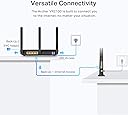
⚡ Unlock lightning-fast Wi-Fi that keeps your whole home connected and ahead of the curve
The TP-Link Archer VR2100 is a high-performance dual-band VDSL/ADSL modem router delivering combined wireless speeds up to 2.1 Gbps. Featuring advanced 4×4 MU-MIMO technology, OneMesh™ support for seamless whole-home coverage, and versatile connectivity with 4 Gigabit Ethernet ports plus a USB 3.0 port, it ensures ultra-fast, reliable internet for multiple devices. Easy to set up and manage via the Tether app, it’s designed for professionals seeking stable, high-speed networking with future-proof flexibility.


| ASIN | B0851D1MF3 |
| Antenna Location | Home |
| Antenna Type | Fixed |
| Best Sellers Rank | 2,238 in Computers & Accessories ( See Top 100 in Computers & Accessories ) 21 in Routers |
| Box Contents | Archer VR2100 |
| Brand | TP-Link |
| Brand Name | TP-Link |
| Colour | Black |
| Compatible Devices | Laptop, Personal Computer, Smart Television, Smartphone, Tablet |
| Compatible devices | Laptop, Personal Computer, Smart Television, Smartphone, Tablet |
| Connectivity Protocol | Wi-Fi, Ethernet, USB |
| Connectivity Technology | Ethernet, USB, Wi-Fi |
| Control Method | App |
| Coverage | Whole house |
| Customer Reviews | 4.2 out of 5 stars 2,800 Reviews |
| Data Transfer Rate | 350 Megabits Per Second |
| Frequency | 5 GHz |
| Frequency Band Class | Dual-Band |
| Frequency band class | Dual-Band |
| Has Internet Connectivity | Yes |
| Has Security Updates | Yes |
| Is Modem Compatible | Yes |
| Item Dimensions L x W x H | 21.6L x 16.4W x 3.7H centimetres |
| Item Weight | 1.13 Kilograms |
| LAN Port Bandwidth | 1000 Mbps |
| Manufacturer | TP-Link |
| Manufacturer Part Number | Archer VR2100 |
| Maximum Upstream Data Transfer Rate | 350 Megabits Per Second |
| Model Name | Archer VR2100 |
| Model Number | Archer VR2100 |
| Model name | Archer VR2100 |
| Number of Antennas | 2 |
| Number of Ports | 4 |
| Operating System | Windows |
| Other Special Features of the Product | Access Point Mode |
| Product Warranty | 3 Years |
| Router Firewall Security Level | High |
| Router Network Type | DSL and Wireless |
| Security Protocol | WPS |
| Special feature | Access Point Mode |
| Unit Count | 1.0 count |
| Voltage | 12 Volts |
| Wi-Fi Generation | Wi-Fi 5 |
| Wireless Compability | 802.11ac |
| Wireless communication standard | 802.11ac |
W**Y
Great router for those on a budget.
I got this TP-Link Archer VX1800v to replace a Draytek unit that had been in for around 10 years and was dropping the wifi network every few days. Out of the box it feels a lot cheaper than the Draytek unit, but then it was over £150 cheaper so that's to be expected. The unit itself is pretty simple to setup. Just set a password, select your broadband provider from the list, enter the username and passwrd for the circuit and set your wifi to either bridge 2.4Ghz and 5Ghz, or run them as 2 seperate networks. I ran the firmware upgrade as out of the box it's a few upgrades shy of where it needs to be. I've also changed the WIFI network, LAN address and tweaked another couple of elements, but I configure these as part of my job so I know them very well. In terms of WIFI speed, it's very good, and has better coverage than the old router. Comparable speeds have increased for the furthest away devices from around 20Mb to 70Mb download, so pretty much full download and upload speeds. The 4 ethernet ports are handy to have, although I'm only using one for a printer. Good throughput so no issues there. Only thing I've found slow is configuration changes, which can take a couple of minutes to do the reboot, then another 90 seconds to pick up the DSL connection, so a reboot is really around 4 minutes compared to the Draytek which was 90 seconds. Overall, it's a great router on a budget. Supports all ADSL connections, including G-FAST, simple to use, really simple to setup and so far so good. No dropouts at all after 4 days. Happy to recommend
P**R
Great product and easy to set up
I needed to replace my old router, which had become temperamental and needed regular re-starting. I twinned this new router with the TP-Link AC1750 dual band extender, as the router is located in a loft conversion, two floors up and as far away as it is possible to get from the Fire TV receiver. It's also an old house with solid walls. The previous wifi set-up (Netgear DGN2200 router and a Netgear N300 extender) struggled to provide a consistent and adequate signal on the ground floor, so TV programmes would often freeze and glitch (especially on BBC iPlayer), and web access on phones and tablets would often be frustratingly slow. The router takes up a fair bit of room: it is 26x23cm and sits flat on the desk. There is an array of LED indicators on top, which can be switched off when not needed. All the connections are on the back - 4 Ethernet ports and a single line-in for the phone connection. WPS button on the side. The whole thing feels solid and appears well made. Set-up was incredibly easy. The only reason it took me more than 5 minutes was that I had forgotten my ISP password (Doh!). Once I had sorted that out, it was a piece of cake. Connect it all up and attach the aerials; turn on the computer and router; reassure the anti-virus that the new network is safe; launch the browser and tap in the URL provided; follow the wizard, which includes options to name your network(s) and set your own password(s); there is a drop-down list of ISPs so you just have to select your own, put in user name and password, and you're there. Another 2 minutes to set up and position the extender and I had 5 bar wifi all over the house. The Fire TV now runs without a hitch, and web speeds have visibly improved. The great feature of this is the dual band. If you use both, you can choose which band each device connects to. That means I can use the 5GHz band exclusively for the TV and the 2.4 GHz for everything else. Now we can have good internet access and TV at the same time. It isn't the cheapest device, but it is well worth it for the quality and the ease of use (even for a total non-techie like me).
M**L
Good Modem, worth the money, but most "extra features" are pointless.
This review is for the VR-600 type 2 (aka AC1600 II). I should also say that I got this quite cheap from a third party sale, £60 plus £1.92 postage, for an opened box. When I tried to set it up, it demanded a password, but first time it should have prompted me for one of my choosing. It had clearly been used, and I had to press the "reset" button, and after that I was able to set it up. I have to say it's fairly solid in operation. One feature I couldn't use is the "5G" wireless, the internal walls in our flat totally defeated the 5G signal. However, the 2.4G signal was much better, and we can now get a reasonable signal in our bedroom, we couldn't with our previous router. It an old brick-built maisonette, and the signal has to pass through 2 brick-built walls and a solid concrete ceiling to get from the router to the bedroom, so that's a plus. Even though the "signal strength" seems to drop on its indicator, it still continues to work, with our previous modem it would keep dropping. Setting it up was straightforward. Later I was able to locate, amongst the "Advanced Settings" a place to allocate all our domestic stuff, including TV, phone, computer, a fixed IP address. It tends to keep connections more stable, and means that you can do more within the network. I've not been able to work out what this TP-Link Cloud is all about yet, seems that a lot of pointless nonsense, I've not been able to find a use for it at all. I was hoping that maybe I could download files from the USB drive plugged in, or use the wirelessly connected printer, but no. All in all, a good modem, does the job, but the so-called "Extras" are mostly a waste of time and effort for me. Loses a star because the signal strength isn't quite what was expected from reviews (though better than the ISP router), and the 5G connection, for me, caused more problems than it was worth, so I disabled it, and for the hype. Glad I bought it though.
A**Y
Replaced BT Smart Hub 2 - don’t follow BT advice!
For anyone replacing a Smart Hub 2 who’s not on full fibre. I’ve done so many Google searches and not found an answer for someone in the situation I found myself in, so here goes. You’ll need the username for your account to switch (usually first [email protected]) and then it’s straightforward enough following the instructions in the box. Should have taken minutes but for the fact that BT gave me instructions (see picture) to select ADSL and PPoA when I really needed to select VDSL and PPoEL. TP-link queried this advice but BT re-confirmed the settings after another long session with their Technical team. On the unit itself - great price, a bit ugly with its Freddie Kruger antennae, its turbo charged the upload and download speeds (fourfold in the case of upload, double for download), good strength signal nearby but quick drop off in a house with solid walls (I’ll need to investigate mesh extenders), and a very user-friendly app. Some nice features including guest wi-fi (the reason I had to abandon the BT Smart Hub). Now it’s set up I’m very pleased, and still disappointed with BT. 1hr 38m onto Technical help trying to talk me through setting up a guest wi-if before they gave up and sent an engineer who told me within 2 minutes that the Smart Hub 2 doesn’t support Guest wi-fi and I needed to buy a third party router. Then the whole PPoA saga. TP-link feels like a fresh start with an app interface I can understand and settings I can change easily from my phone, and those better speeds coming at a time when the Smart Hub speeds were starting to cause issues for TV watching and device overload.
S**T
Sloppy Android Apps, Terrible set up, poor TPLINK help desk
(Update 28/11/2020). Working continuously for two or so weeks. Since I re-configured (factory reset) the router via my lap top and ethernet connection, the system has been stable with about 20 devices on it. There remains an interoperability problem between the two apps that set up the S4's and separately, the Vr2100. Why two are needed I really don't know. It looks like we now have a system that is fit for the purpose I spent £300 on. But the process was too hit and miss, disgracefully time consuming and buggy. TPLINK support was and is very poor when I went through their support channels. While not giving out any meaningful advice, they kept asking for more and more granular detail - without any response when I did. Rude. Ironically, this kit and the larger Deco mesh system is likely to prove to be really very good, but one star reflects a non-resiliant set up process, crappy apps and a non-existent support function. So here is the rest of the painful history....... (Update 12/11/2020). Mesh network hung with 4 devices and light surf workload. The previously perfect login page to the router (direct connect via ethernet) flashed up the login background page but no user or password fields. Tether app didn't work (never has actually). So the utterly clumsy solution was to factory reset and plug the parameters back in. Needed three power cycles to get the modem to link with the primary (connected) S4. The apps are total crap for diagnostics and seem to be designed for one hit perfect config every time. I bought this VR 2100 to accompany three Deco S4's to create a wifi mesh system. It hasn't been plain sailing so I have had to use the "tether" android app for the modem/router and the separate "Deco" app for the mesh system. Now that an app seems the only way to set tplink kit up (certainly the S4's) these apps need to be bombproof. THEY ARE NOT. Configuring a new network can be challenging. To configure with new technology is doubly so. Configuring for a customer with little downtime available is utterly nerve racking. Here is my root problem. If I am logged in to the router I cannot log into the tether app. And vice versa. I go to the TPLINK cloud to get a new password, and it came to pass that I am now locked out the router. Repeat ad nauseum. This is a known problem from at least this summer and not a finger has been lifted. UTTERLY DISGRACEFUL & LAZY. The router was bought so that absolute compatibility was ensured between the components. So £250 down the road we have this absurd problem. (Apparently you have to factory reset the router and plug the info in again. Not all folk say this works). So this gets the 1 star. The kit so far is working fine and I really was hoping that we would have a true app-driven plug and play as TPLINK make a big deal of. Right now undertaking diagnostics or remedial actions on the network is a nightmare. In this day and age we should not be pioneers at the bleeding edge of technology. An interoperability defect in recently released kit from the same manufacturer is contemptuous. The router is, I'm sure very good but the ecosystem I'm forced into by the manufacturer is not fit for purpose
N**J
Easy set up for TalkTalk and other ISPs.
Received it a few days ago, watched a few YouTubes on how to set it for TalkTalk before it came, they mention contact the provider for username etc. No need to the settings are all in the router, you go through the basic set up and when it comes to select your ISP just click TalkTalk and the router puts all the settings in. Carry on and enter your wireless SSID and password and your good to go. Other settings are self explanatory. You can even set the LEDs to go off and on at certain times. I would recommend this as a versatile and great ADSL Modem router. If you have a fibre modem there is a WAN/LAN dedicated port for that to use it just as a router. Just position the antennae as shown in the manual with the outer two at thirty degrees and the two inner ones straight up. Good speed and decent WI-FI coverage its a great modem/router.
P**K
Replacing SKY or NOW TV Broadband's router
Bought to replace the horrendous NOW TV Broadband router. This can also replace the Sky Broadband router. It is able to because it allows for a less common login method called MER or Option 61. I'm going to write this review in two parts - first, how to configure to replace Sky/Now broadband router - second, my thoughts on the router itself after a couple of weeks in place. FIRST. I'm writing this on the day of purchase. It took me about an hour to set up the router to substitute the god-awful NOW TV broadband router. It should have taken 10 minutes max. It took that long because I tried to use the mobile 'Tether' app supplied by TP Link. You can't do all the steps on it and therefore it was a waste of time. To save you the pain here are the steps... Quickest method - Plug in the new router to the microfilter that Sky/Now provided, plug an ethernet lead from LAN1 into your PC or laptop (you can use powerlines in between the two if the PC is too far from the router - I did) and navigate to 192.168.1.1 Use the login details from the sticker on the router to access. Under Internet Connection menu, select Sky(MER)_VDSL, vlan enabled, vlan id 101. Select Dynamic IP. (Here's the bit the phone app cannot do) Enter username 123456789012@skydsl - password 1234567890abcdef (they're irrelevant but you need to put something in there with @skydsl at the end) And hit save - that's it, you are now Internet accessible in the replacement router. You can then change other settings around the router admin as you please. Now there is a step that I preferred to do that I believe might stop future issues but it will add time. I used the Broadband MAC address from the NOW router as the start of the address - so 1a:2b:3c:4d:5e:6f became 1a2b3c4d5e6f@skydsl - as I read something on a forum suggesting it may be better for users who don't reboot their router regularly (for the geeky, the lease time on the connection being longer means it may fail a validation checks should one be run). I went this route but feel free to go the generic address route - just bear it in mind if you get unexplained disconnections. I hope all that helps. As for the router itself, it was easy enough to setup. It seems to be much better at doing IP address ports than the NOW router and I've been able to use uPnP instead of a dozen port forwards, at this time anyway. Also the speed is better. My speedtest.net results went from (18Mbps/2. 5 to 19.5/3.5). WiFi is stronger than the NOW router on both 2.4 and 5 likely thanks to the two directional antennas. UPDATE 10/2. Very stable and it has replaced the Now TV Broadband router completely. The WiFi strength is better and having more ethernet ports is a bonus. I'd like the ability to determine bandwidth control on a per-device basis. The firmware allows for QoS and prioritisation of device groups. However in these days of COVID homeworking I would like to be able give the important pc number one status. And my plex/kodi server the lowest. Smartphones doing their updates doesn't need high priority at the expense of a zoom call for instance. I'm very happy overall and would happily recommend to anyone looking to replace the awful Sky/Now routers.
A**H
A Good Router, but display LED failed after 18 Months
Edit after 18 months The unit has developed a fault where it appears to turns itself off as it goes through the boot sequence - although it does not in reality - it goes into night LED mode where the leds turn off. Following an exchange of emails with TP link support they suggested I tried to log into router and check the LED control function. Enabling the LED control function (advanced tab | System tools) and then disabling it restored the LEDs to life; although if you reboot, then the LEDs go blank again. Looking at the LEDs, it appears that one has failed as there is no light where these should be light and I believe this failed LED is causing the problem. This is not a show stopper - yet - unless it is a failure that is the first of many. Original review This was bought to replace a Talk Talk D-Link Modem Router. The Talk Talk router is not a bad router, but it was limited, esp on the 5g wireless range, which would not cover the whole house. As others have said, it is very easy to set up and does not take long. Interesting enough, unlike most other routers which I would configure off line, it is probably best to plug it into your ADSL/VDSL line when you start configuring it. The Modem/Router will lead you through a series of screens in setting it up and at the end of this you should have an operational wireless network with internet access. Before you start, ensure you have your ISP username & password (often domestic VDSL does not have one being tied to the phone line) and I would decide on a couple of things before you start: (A) the names and passwords of the 2.4/5g wireless networks and (b) an Email address and password that you will use to log into the router after doing the basic setup. The one thing that has taken me time before in setting up a new router and home network has been printers - where I have been pressing the WPS button on the router and running to the printer to press the button there. This router has an online WPS button, so you can put your laptop by the printer, log into the router, press the online WPS button, reach over to the printer and press the WPS button and see if it connects. This saved me a lot of time, given my printers past reluctance to connect first time. Within the router screens there is potentially a lot of options with basic and advanced options. I have used some of the advanced options - the number and variations of the options reminds me of Draytek routers presented in rather more user friendly manner. If you need rock sold reliability and need to maintain VPNs between fixed ip addresses, buy a Draytek - it is what they are really good at. So far I have fixed the IP addresses of the printers from the router, and am planning to look at the parental controls module - which from a cursory look allows you to restrict the times that a specified device can access the internet, and also to operate blacklisting or white listing if you so wish. Bear in mind this is not a small router. - it is 27cm wide and 22cm deep and needs 17cm of height. You can fix it to a wall as the bottom cover has screw indentations, but all the ports and aerials are at the back, so would be at the top if set up this way. One issue you might have here is the length of the cable from the powerblock - it is only about 1m in length Operationally the router has done everything I have wanted it to, primarily extending the range of the 5g network to cover the whole house and then some. I know I could have set up a mesh wireless network to achieve the same results, but I prefer one box, not the multiple boxes that this would need - however a much bigger house, or a building with a lot of steel in it might need this solution. Overall I am pleased with this. Time will tell as to its longevity and reliability.
M**Z
Faulty product with no Warranty or Return options!
Perhaps I should have paid more attention to the origin of this product, sold by Amazon.Au. It came from U.K. and had a U.K. plug on the power transformer ( for delivery to Australia? Not any advice to the customer?). However; no problem; I had an Aust. compatible unit. Plugged it in; it powered up. Plugged in the DSL cord; WiFi symbols came on; but the DSL "handshake" failed; also turning off the unit. Changed to an Aust. DSL cord; similar result. Cautionary Tale: buying International Products via Amazon.Au gives the purchaser no avenue of Warranty cover; and if you don't test the product within 1 week of Delivery: no avenue to return the item to Amazon.Au BUYERS BEWARE!
M**D
Top Leistung & klasse Support!
Der Router hält, was er verspricht. Schnelles, stabiles WLAN auf beiden Frequenzen .alles läuft einwandfrei. Die Einrichtung über die Tether-App ging super einfach, auch für technisch weniger Versierte. Besonders positiv: Der Verkäufer war sehr nett und hilfsbereit. So wünscht man sich das! Klare Kaufempfehlung für alle, die einen zuverlässigen Router mit starker Ausstattung suchen.
L**Y
Für uns ein Fehlkauf
Leider nicht kompatibel obwohl es in der Beschreibung stand
G**S
The product is good
I used it as an internet connection between my computer destop and the modem.
J**W
Adapter
Happy with item, but the power adapter in the packet is not suitable for Australia, If I know this early, I won’t buy that product.
Trustpilot
2 weeks ago
2 days ago