
Desertcart purchases this item on your behalf and handles shipping, customs, and support to Seychelles.
⚡ Power your home network like a pro—fast, secure, and effortlessly wired!
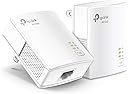
The TP-Link AV1000 Powerline Ethernet Adapter KIT (TL-PA7017) delivers gigabit-speed wired internet through your home's electrical wiring, extending connectivity up to 750 feet. Its nano-sized design plugs directly into wall outlets for easy setup without new cables. Ideal for overcoming Wi-Fi dead zones in multi-story homes, it features energy-saving technology and robust security, making it a top-rated solution for seamless, high-speed home networking.


| ASIN | B084CZMYNM |
| Best Sellers Rank | #1 in Powerline Network Adapters |
| Brand | TP-Link |
| Built-In Media | 6.5 ft. (2 m) Ethernet cable (RJ45), Powerline Ethernet Adapter, Quick Installation Guide |
| Color | white |
| Compatible Devices | Desktop, Laptop |
| Customer Reviews | 4.2 out of 5 stars 7,752 Reviews |
| Data Link Protocol | Ethernet |
| Data Transfer Rate | 1000 megabits_per_second |
| Hardware Interface | Ethernet |
| Item Dimensions L x W x H | 2.56"L x 2.05"W x 1.12"H |
| Item Highlight | Plug Pair &Play, Ethernet Over Power, Power Saving Mode, Network Adapter (TL-PA7017 KIT) |
| Item Weight | 13.6 ounces |
| Manufacturer | TP-LINK |
| Mfr Part Number | TL-PA7017 KIT |
| Model Number | TL-PA7017 KIT |
| Number of Items | 1 |
| Number of Packs | 2 |
| Product Dimensions | 2.56"L x 2.05"W x 1.12"H |
| UPC | 845973089054 840460605908 |
| Unit Count | 1 Count |
| Warranty Description | 2 year manufacturer |
I**N
Solves the wired connection problem, just know these two things first
I needed a reliable wired connection in a room too far from the router to run a long ethernet cable, and this handled it well. Setup was simple, plug one adapter into the outlet near your router and connect it with an ethernet cable, then plug the second adapter into an outlet in the other room and run a cable to your device. No pairing needed, it connected on its own within a minute. Once it was running, a speed test on the wired connection showed 26.3 Mbps download, 16.7 Mbps upload, and 26 ms latency, which matched what my internet plan allows. The only downside was the first outlet I tried was on a different circuit than the router, and it simply wouldn't connect until I moved it to an outlet on the same circuit. Once I did that, it worked without issue. Two things to know before buying. First, this is ethernet only, it will not boost or extend your wifi, so it's not the fix if weak wireless signal is your problem. Second, both adapters need to be plugged straight into the wall on the same electrical circuit, never into a power strip or surge protector, or they won't communicate properly. If you need a stable wired line for a TV, console, or work setup and don't want to run cable through your walls, this gets the job done.
B**N
Decent alternative to ethernet
Simple solution between wifi and ethernet. Rather than running wires, you plug 1 unit into the wall and your router, then the other unit to your computer/console. Since these are single port units I'll explain this: 2 units will provide internet to 1 device, 3 units will provide for 2 devices. If you get a 2 port unit it WILL work with these. As for use, downloads will be slower, but the ping is faster. For example the game 'street fighter' runs better. But a larger game like battlefield you won't feel a difference, but the consistency of ping will be better.
B**N
Good for a wired solution
Keep in mind that any powerline adapter is ETHERNET ONLY. You cannot use a powerline adapter to extend your wifi or mesh. This is really good for somebody who really really needs a wired Ethernet connection but is too far from the router and doesn’t want to run a 100 plus foot cable onto the wall/floor and around things with a possible signal loss due to cable length. Disclaimer: Our ISP is coaxial only. We can’t get fiber at our house and cable is the next best option. My review is based on that type of connection. Here’s how it worked for me: I also ordered a couple of cat8 Ethernet cables (overkill maybe but I want the best speed and latency possible at any given time no compromises and the cat8’s were about 5 bucks each so why not go all in?) and this system. They also came with their own Ethernet cables I had no idea they would but the stock ones I’m not using. I was surprised to find that it actually worked on its own without any paring needed. At first I had the router end plugged into the far corner of the living room on its own outlet but that one was too far and the speed was pretty low. I moved it to a busier outlet that was a bit closer to my room from the living room and still managed to get it plugged in on its own and the speed jumped right back up. The other end goes to my console, and while my in-game performance was doing pretty well over wifi, there would be occasional spikes. This seems to have eliminated that but at first when i had it on the far outlet the latency seemed much much worse than wifi. In game latency at first setup jumped from 32 (over wifi) to over 70-80 with this system but then after a few days it came back down. I also do remote play sometimes so this helps a little on the sending end with stability. The consoles NATIVE speed test now shows around 28-36ms ping (I was getting that over wifi too) and about 40 or so in game. Interesting enough my in-game used to stay around 30 or so but those spikes seem to be gone so the extra 8-10 loss in my game doesn’t feel too big for the better stability that I now have. I thought this might just be a server issue but I use the same server as I did before and it’s just a little higher not noticeably. Keep in mind you HAVE to plug both adapters directly into an outlet no matter what for these to be effective. Absolutely no surge protectors or extension cords or none of that. Overall this works good for me, it fixed most of what I needed it to, and provides a wired Ethernet connection without being close to the router as I’m unable to anyway. Speeds remain the same as before though no change.
A**W
Worked amazing and boosted my speeds so much
Literal life saver! The download speeds to my Xbox were <1-2 mbps and now are up to >80+! Was very easy to set up and gave me 0 issues with connecting. I can finally play online games again without being a lagging mess!
M**K
Barely works
Bought this to connect from my router in one room to my computer in the next room. Did not want to run a long cable around the wall, thru the door, and back to the computer. Also did not want to drill a hole through the wall. Seemed like it should work. Everything on the same network - in fact, two outlets on the opposite sides of the same wall. Hooked up, and it connected immediately. Problem is that I am getting 600Mb out of the router, but only 40 Mb out of the powerline and to my computer. I checked through their FAQ's and online docs, and they say I should get up to about 200Mb. Nothing remotely like the 1000 or 1GB numbers they show in their advertisements. Even when I plugged both powerlines into the same outlet I could only get a little over 200Mb. So, basically, it works, but not well enough to be useful. Sending it back.
N**N
Great WFH Option
I bought this for my wfh setup after having constant connection drops with a Wi-Fi extender, especially when trying to stay connected to my employer’s VPN. I needed a stable and reliable wired alternative, and this delivered exactly that. Setup was incredibly easy. Truly plug and play. While I’m not getting full internet speeds (closer to about a third), the connection is stable, and the speed is good enough for me to work which is what matters most for me. If you work from home and need a dependable wired Ethernet connection, this is a solid option.
K**G
Quick & easy setup
I'm not a techie & found the setup instructions very easy! I would add that when connecting to your TV settings, choose Ethernet Connection instead of Wifi. This part wasn't obvious to me as this device uses an Ethernet cable but transmits the internet connection through wi-fi. Also, it did not automatically sync up so we cycled power to both the TV & Router, then it connected. We still use a manual antenna to get 47 local channels and with this device are now getting 998 channels! We switch stations using the original TV remote and use the "Guide" button to see the show schedule.
J**A
Much slower than advertised. 1000 MB is a complete fabrication.
Disappointing but functional. I am getting 15 megabits over modern house wiring.
Trustpilot
1 week ago
1 month ago