Buy anything from 5,000+ international stores. One checkout price. No surprise fees. Join 2M+ shoppers on Desertcart.
Desertcart purchases this item on your behalf and handles shipping, customs, and support to Seychelles.
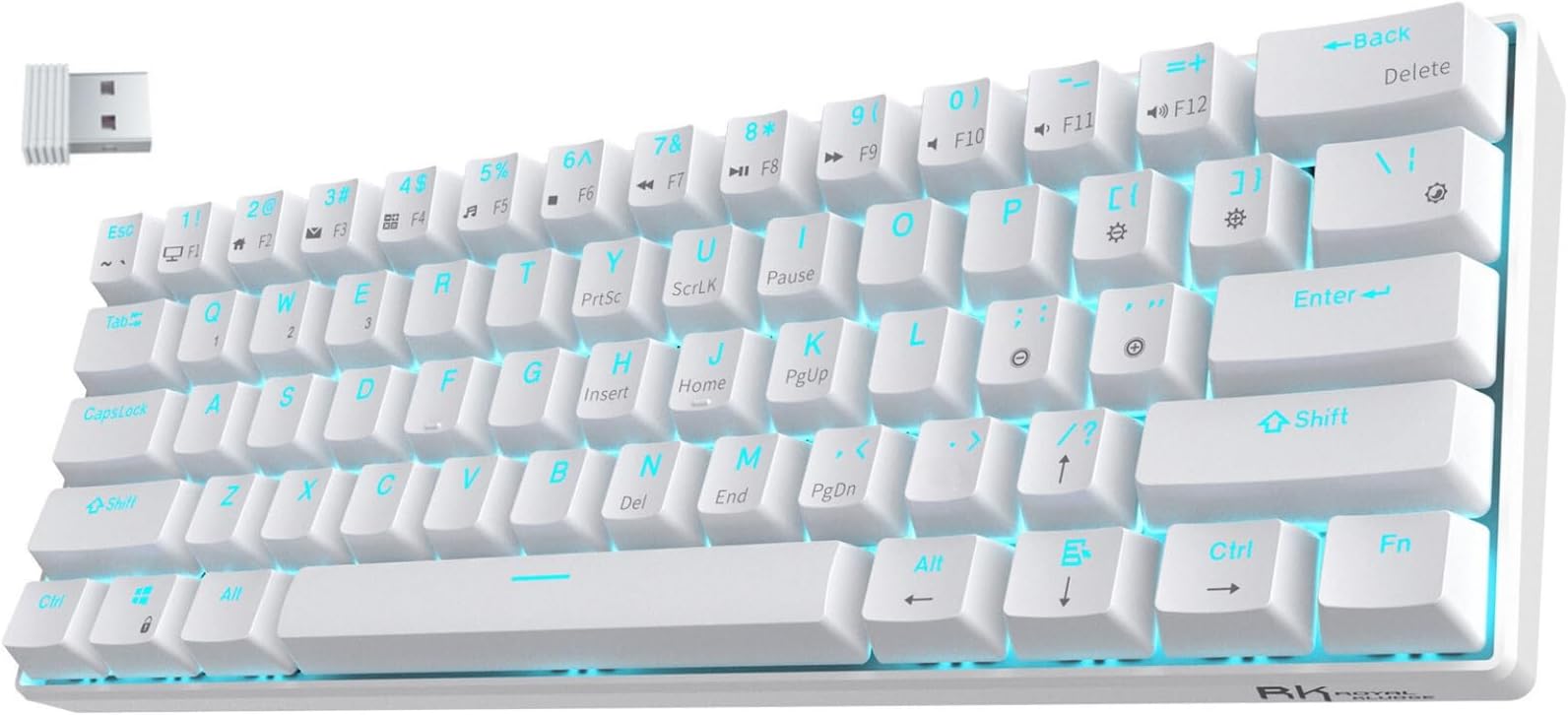
⌨️ Elevate your desk game with the RK61 — small size, big impact!
The RK ROYAL KLUDGE RK61 is a sleek, wireless 60% mechanical keyboard featuring triple mode connectivity (Bluetooth 5.0, 2.4Ghz wireless, and USB-C wired), hot-swappable Red switches, and a high-capacity battery offering up to 13 hours of continuous use. Its compact 61-key layout maximizes desk space, ideal for gamers and professionals alike, while 17 dynamic single-color backlit modes add style without distraction. Compatible across multiple platforms and supported by customizable software, the RK61 blends portability, performance, and personalization in one contemporary package.


| ASIN | B08D8ZR2G2 |
| Additional Features | Backlit, Hot-Swappable |
| Antenna Location | Business, Everyday Use, Gaming, Student |
| Best Sellers Rank | #2,394 in Video Games ( See Top 100 in Video Games ) #216 in PC Gaming Keyboards |
| Brand | RK ROYAL KLUDGE |
| Built-In Media | USB Cable |
| Button Quantity | 61 |
| Color | White |
| Compatible Devices | Gaming Console, Laptop, PC, Smartphone, Tablet |
| Compatible Operating System Family | MacOS, Windows |
| Compatible Tablet Computer Models | AAUB P30 |
| Connectivity Technology | BT5.0, Wireless 2.4G, USB-C |
| Customer Reviews | 4.5 out of 5 stars 1,828 Reviews |
| Enclosure Material | Acrylonitrile Butadiene Styrene |
| Hand Orientation | Ambidextrous |
| Item Dimensions L x W x H | 11.5"L x 4.02"W x 1.54"H |
| Keyboard Backlighting Color Support | Single Color |
| Keyboard Description | Gaming |
| Keyboard Layout | QWERTY |
| Manufacturer | RK ROYAL KLUDGE |
| Mfr Part Number | 093348322 |
| Model Name | RK61 |
| Model Number | RK61 |
| Number of Keys | 61 |
| Number of Sections | 1 |
| Power Source | Battery Powered |
| Recommended Uses For Product | Business, Everyday Use, Gaming, Student |
| Special Feature | Backlit, Hot-Swappable |
| Style Name | Contemporary |
| Switch Type | Linear |
| Theme | Gaming |
| Unit Count | 1 Count |
| Warranty Description | 1 Year Warranty |
A**I
Decent keyboard for gamers
If you’re a gamer on a budget, the RK61 is for you. Not only does it offer its wireless capabilities but it has a keycap puller allowing you to easily access and clean your keyboard. It is not heavy at all and this keyboard can last you over 5 years even for everyday use and gaming. However, if you are into a more professional scene of gaming I recommend something more entitled to you and something with more dependability
T**K
Great keyboards
I have two of these now. One with brown switches the other with red. The red is definitely a bit more clicky, but not by much. It also seems to require less effort than the brown. I have used both for typing as well as gaming with no issues. For now I have the red on my main Windows gaming rig and the brown on the Linux box. Have not had them long enough to attest to longevity, but they are great out of the box. I have also only used them wired, so I cannot speak to the Bluetooth aspect. The whole 60% size thing took a bit getting used to, but not a big deal. I just hit FN Ctrl to enable function keys in games that use them and then switch back for normal functions. I know the "kids" will bot like this, but all light blue is much better than RGB. Now if these guys would only make a matching mouse, I would be good to go. I prefer a smaller lighter mouse with scroll wheel with click than the larger, heavier gaming variety as I use a slightly tall wrist rest and a finger "claw" grip.
L**.
One of the best budget keyboards on the market but...
This keyboard is truly special. It has many things a regular 60% keyboard doesn't have like arrow keys. They switches are in kind of in between thocky and clicky. Pros: Good price, good quality, led lighting is spot on, many features. Cons: Question mark key sometimes doesn't work; arrow keys sometimes don't work. Summary: In all this keyboard impressed me. Even though it had its cons, I would 100% recommend this keyboard to a friend.
H**N
Worth it
Great keyboard for the price— simple, small, feels good to type on… and awesome customer service. Makes switching from my work laptop to personal desktop easy.
B**H
Love it
My son is very happy with it
S**K
Cool!
I probably would've preferred there 60 pro with RGB lights and aluminum chassis, this was my first time trying a 60% keyboard and it is tiny! Some keys are annoying to access because they can be 4 different things depending on what key combo you hold but this can be fixed by remapping your keys in the royal kludge software. You WILL need to do this. Otherwise you are going to have to try 4 button combos to get a ? or a 2. After you get this little piece of customization out of the way though it's a great little board and would be perfect for travelling or for a bed desk
M**G
very comfortable
I bought the red version. very comfortable. no complaints the setting does take a bit of time, and unfortunately they didn't do a good job of documenting it. but Hey, Google is your friend. a quick Google Search solves most. of your problems. note that with different version, swapping between the arrow mode takes different methods. on mine (2020 July shipped) , it's Fn+Enter (written in the little manual), where someone on amazon review reported other methods for possibly an earlier version. what really drove me nuts is the design for the question mark "/?". I used "Fn+ENTER" to switch it off arrow mode. apparently the left arrow becomes OPT , not ALT as is printed on the caps. right arrow is correctly control. I don't use two. so it's more convenient for me to keep the arrows in arrow mode. but that leaves the /? a thorny issue. in fact even in arrow mode, if you press "shift+/" , the keyboard does send out "?" hard keycode to computer. the only issue is "/". at last I just let the keyboard send out up arrow, and in Mac, I used Karabiner to attach a custom rule for this RK61 so I convert up arrow to "/". Then where do I get my up arrow? I created a complex rule to map Fn+O to up arrow. luckily there are many letter keys not yet mapped to functions. ----- on my Magic Keyboard I map the left Fn+hjkl to arrows, but unfortunately Fn+hjkl on RK61 have been implemented to send out hard electric signals for END/HOME etc to Mac, but Mac simply does not recognize these, so it's a waste
M**H
Some issues
Keyboard is great. Love the feel and love the sound. Love the solid "thonk" when i type. Its a great portable keyboard and i am dissapointed they dont make a full size version of this. I know they make full size keyboards but its not the same as this one. Was skeptical about their own brand of red switches but they actually compare pretty well to cherrys. I dont really notice a difference. I just hope they last as long. The main issue is that the wireless is buggy. I cant type to fast because the computer won't pick up every letter or it will get stuck on one letter and repeatedly input thay character. The key isnt pressed. It just seems to be an issue with the wireless because it works fine when connected via usb. Both the bluetooth and the 2.4Ghz have the same issue so I'm at a loss. I tried downloading some software from the website and its all in chinese, which really doesnt matter because the program crashes anytime i try to click on anything. Summary: Great keyboard to type on just as long as you dont need the software and dont need to use it wirelessly
V**O
Migliore tastiera sotto i 100 euro
Bellissima
A**K
ممتاز
ممتاز بنسبة لسعره
A**M
Excellent in terms of size, quality and price
J**L
Tastatur funktioniert super Achtung beim Layout.
Ich habe leider ausversehen das falsche Layout bestellt aber an der Funktion kann man nicht meckern, top verarbeitet. Funktioniert super. Noch nie Probleme mit gehabt!
D**N
Keyboard
I like the keyboard all the essential needs is here. Great job seller!
Trustpilot
4 days ago
2 weeks ago