Desertcart purchases this item on your behalf and handles shipping, customs, and support to Seychelles.
🎨 Elevate your art with precision and color that commands attention!
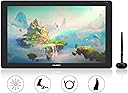
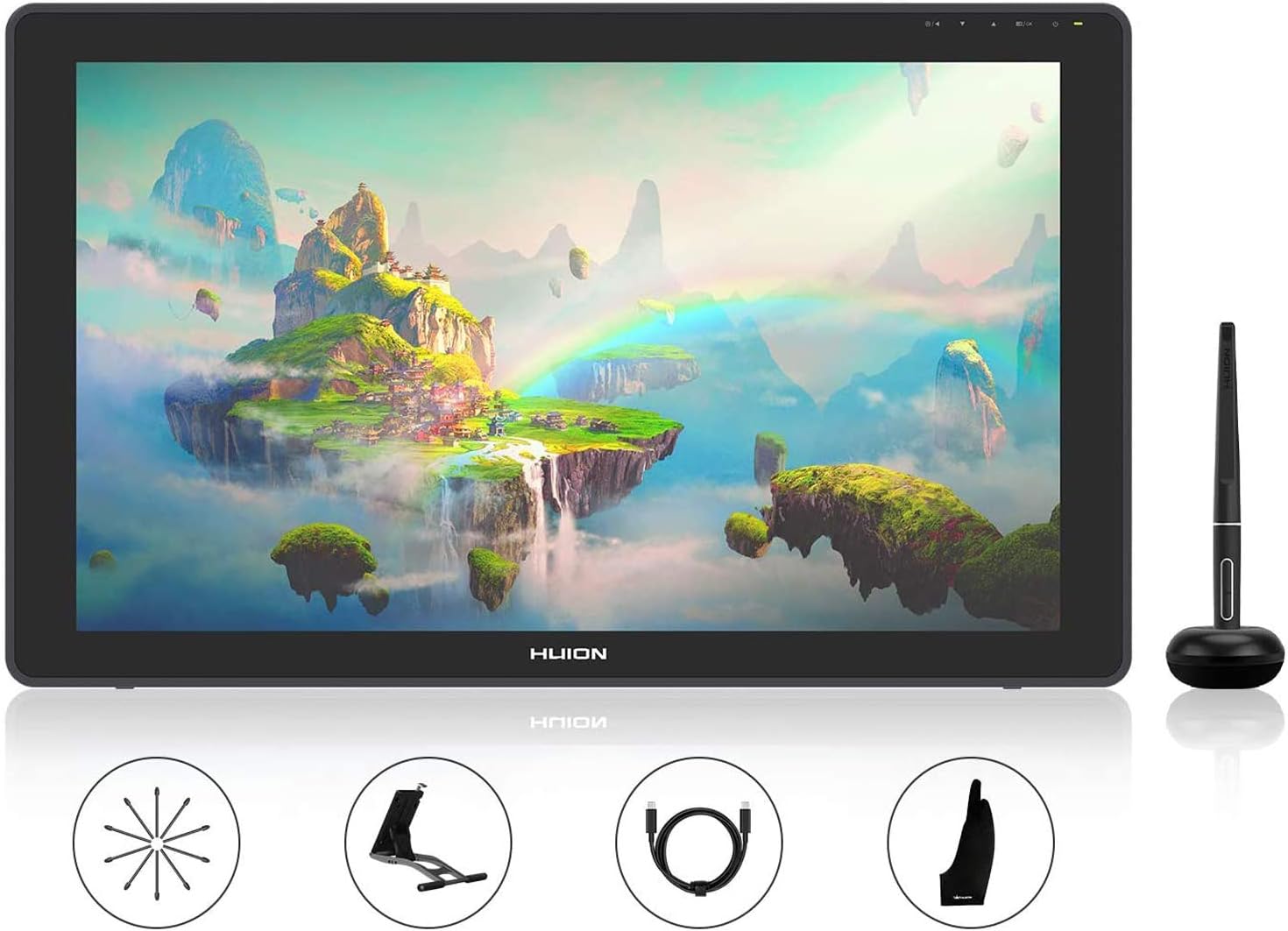
The HUION Kamvas 22 Plus is a 21.5-inch FHD drawing tablet featuring Quantum Dot technology for 140% sRGB color accuracy, an anti-glare fully laminated screen to reduce parallax, and an advanced battery-free stylus with 8192 pressure levels and ±60° tilt support. It offers versatile connectivity options including USB-C and USB-A ports, supports Windows, macOS, and Android, and comes with an adjustable stand, making it a professional-grade tool for digital artists seeking vibrant visuals and precise control.


| Active Surface Area | environ 495,32 centimètres carrés |
| Asin | B0897KN196 |
| Best Sellers Rank | 27,508 in Computers & Accessories (See Top 100 in Computers & Accessories) 59 in Graphic Tablets |
| Box Contents | Stand, USB Cable |
| Brand Name | HUION |
| Colour | Black |
| Compatible Devices | Desktop, Laptop, Android Smartphone |
| Country Of Origin | China |
| Customer Reviews | 4.4 4.4 out of 5 stars (1,109) 4.4 out of 5 stars |
| Display Type | LCD |
| Item Dimensions L X W | 54.6L x 54.6W centimetres |
| Item Highlight | Full Lamination, Anti-Glare Glass and PW517 Battery-Free Pen, ±60° Tilt – for Mac, Windows, Linux & Android |
| Item Weight | 3440 Grams |
| Manufacturer | HUION |
| Manufacturer Part Number | LPEU-GS2202-EU+UK |
| Model Name | Kamvas 22 Plus |
| Model Number | LPEU-GS2202-EU+UK |
| Native Resolution | 1920x1080 |
| Network Connectivity Technology | USB |
| Operating System | macOS, windows |
| Pressure Sensitivity | 8192 Levels |
| Product Features | 140% sRGB Quantum dots, Anti-glare etched glass, ±60°Tilt support |
| Screen Size | 21.5 Inches |
| Specific Uses For Product | Drawing, design, electronic signature, 3D modeling, animation, games, online education, remote work |
| Target Audience | digital artists, illustrators, and designers |
User
Competitively priced, decently spec'd display tablet
I've delayed the purchase of a display pen tablet, waiting for 120 hz, 4k, 100% Adobe98 gamut, laminated big screen specs. This Huion display tablet doesn't meet that wishlist, but it satisfies it, for me. At 60 hz refresh, 72% Adobe98 gamut, and 1080p across a 13.3" diagonal, I wasn't expecting the device to impress or work for me. And yet it does. The greatly reduced parallax displacement between pen and cursor, the available gamut (Wider than sRGB), the build quality, the adequacy of resolution, and the price point constitute a viable professional tool. Yes, I'd like all the 'other stuff', but at this price I know that's not available. I'm delighted with the ease of setup and well considered functionality and neatness of this product, and the effective contribution it's already making to my workflow. It runs cool and quiet (fabless design) colours and black levels are good 'out of the box' - although I took the backlight down to 51% to suit the ambient lighting of my work area. I am inclined to buy a 16" version for my main machine, when Huion make that offer. Another excellent feature of the tablet is its battery-free pen, a feature I have come to expect from previous high-end non-display tablets. Speaking of the pen, I have watched and read other reviews of the Pro 13 which have pointed-up problems in the rendering of straight lines. I've downloaded the latest MacOS driver from Huion, and am using it with the second update to MacOS Mojave. Happily, the 'wobbly line' problem has been corrected - or at least is not showing itself on my system.
User
Not 2K, but a nice comfortable size and tracks acurately
I went back and forth between buying a small tablet with a finer resolution and a large tablet with more 'room' for app panels etc.Went for this in the end. 'only' 1080p, so you will notice some visible pixels to begin with (especially if you are used to working on 2k/4k computer monitors), but honestly after a while you don't really notice and the trade off is you do have a more comfortable workspace with plenty of room for your brush and color panels etc inside your app of choice.Screen is bonded for more accurate pen tracking than the equivalently priced XPen display tablets (for instance) honestly it's hardly noticeable, it's so spot on to the tip of the pen.The screen also has a semi matt finish for a (slightly) less slippery, more papery feel.I still find the sensation of hard plastic pen nip againsts glass unnatural however, so i bought a set of Huion replacement felt nips for the pen which makes it so much better (in my opinion).The bundled power/display cables give plently of connection options, but I do wish it could either be powered and povide display through a single Thunderbolt connection with a single USBc lead or at least be able to use a standard USBc cable each for power and display, rather than the messy and awkward 'hydra' cable that comes with USBc at one end and all 3 of USBc/5mm Power/HDMI on the other.But... All said still a round great budget display tablet.
User
Great size, really good value!
This tablet is the perfect size if you are just starting or if you aren't a professional artist. It's bigger than I though, but not too heavy, and comes with a simple stand for the table.Pen pressure/sensitivity is really good, and the shape of the pen is super comfortable! I love this tablet, and it is definitely really good value! I have been using it for a couple of months now and I haven't found any problems. I love the finish of it as well, it looks beautiful and sleek! Definitely worth a try if you are thinking of swapping to a display tablet... Or even as a first tablet. It's super easy to set up and the buttons on the side help to make your drawing experience much smoother. I also really appreciate the pen stand and all the extra tips, as well as the nice glove that are all included for free!
User
Great price, comfy
Only giving 4 stars as it doesnt come with the cable to support mobile phone usage which is why i bought it. The graphic states that this only works if connected to a laptop or phone which i have recently learned is on most of their graphics.Decided to keep this anyway, I have a kamvas 16 already and was looking for 1 I could use on the go basically - so I gifted this 1 to my brother and hes very happy with it.Other than that, affordable price. Reactivity is great.Comfortable to use although the glove is too small for those who are big boned ;)Easy to use, easy to set up. Light weight, the aluminium casing makes it feel premium.Screen is bright enough so that it wont blind you but easy to see what you're doing.100% would recommend
User
A* Digital Drawing Aid
As a ghost illustrator I have made the move to digital, this has made the switch so much easier. Easy to understand of how to use and create digital art, great pens and nibs, easy to set up. Colour contrast is perfect for what I need it for. I can say this, I would never buy any other brand other than HUION. Thank you HUION.
User
Highly Recommend
I mostly work in Procreate on my iPad but since doing more commercial work I needed to be able to draw in Photoshop. This screen tablet has been a great purchase, and look forward to working on it. The screen space is really nice to work on and it was very easy to set up. There is no gap between the pen and the screen like other tablets I have tested. I took some time to calibrate the colour profile to match my mac, it is still not 100% but it's still really great. Be aware that it is only 1080p so the pixels can be noticeable but it's not really a big deal. I love my Huion Kamvas 22 Plus and would recommend it to anyone wanting to draw, from beginner to advanced.
User
Great tablet with a few oversights
The tablet, stand and pen don't feel cheap contrary to my expectations. The screen quality is allright, you can definately see the individual LCD lights if you look hard enough and they are quite obvious when you turn on the screen, but after about 2 minutes of usage you forget about it. It also comes with 20 replacement nibs... That's like, 20 years worth of nibs, so that's cool. I've upgraded from a Wacom Intuos S and couldn't be happier... for now.That being said there are a few gripes I have with this tablet,First - the stand. It holds the tablet while your drawing. But as soon as you try to do anything, move it, take out the cable, adjust the stand, it instantly falls off and gives me mini-heart attacks (even though I know it's sturdy and won't break, but still). My solution? Jamming the "Thank you" Huion card into the holding tray. Not only does it work surprisingly well but makes me chuckle every once in a while. (Picture shown)Second - I don't like the huion cable. Yes it's convinient that it's all in one cord, but I have heard of Huion cables breaking easily and you can't just plug in an old HDMI cable you had laying around, no, you need to get a replacement which is only sold in the US as far as I know which will cost around 60-80 POUNDS to buy and ship to the UK. I'd much more prefer all the cables going into a hub, then a usb-c to usb-c from the hub to the tablet. It would arguably cost the same to manufacture and make it much more convinient to get a replacement. I'm not deducting points while it's working, but if it breaks in less than 6 months, I will remove 3 stars instantly.Third, the glove is a bit too small, but I have massive hands so that's just me.All in all, these are pretty minor gripes and I'm really enjoying it so far, and so I give it 5 stars.
User
Works well good pen
My doughter seems to be enjoying it a lot she have created a lovely things till now says it's easy to use and light, good size screen
User
Sehr empfehlenswertes Grafiktablett.
Das Grafiktablett funktioniert sehr gut, wir würden es sofort wieder kaufen.
User
HUION KAMVAS PRO 13 Display a Penna qualità prezzo
Qualità costruttiva e facilità d'uso con programmi di disegno. Sembra di disegnare sulla carta " ed io ero poco convinto se potevo trovarmi bene col disegnare su un display con penna essendo abituato solo con la carta" ma ho dovuto ricredermi e fantastico cosa si può fare. Consigliatissimo per chi cerca un prodotto del genere
User
Superó todas mis expectativas
Soy ilustrador profesional. Uso Mac M1. Trabajo más de 8 horas al día con tablets. Llevo 5 meses usando la Kamvas 22 Plus. Antes usaba una Cintiq 13 HD. Necesitaba una tablet más grande. La diferencia de precio tan grande entre Wacom y Huion me hacía pensarme las cosas. Al final tomé la decisión y no me arrepiento. De hecho, la Huion ha superado mis expectativas.Mis dudas antes de usar Huion era si la imagen en pantalla se vería nítida, porque al haber un cristal mate podría haber quizá una distorsión (como el efecto arcoíris). Antes usaba un protector de pantalla mate sobre mi Cintiq, y la distorsión de colores era bastante notable. Pero para mi sorpresa ese efecto no se da para nada en el cristal mate de la Kamvas Plus 22. Jamás tendrás un nitidez como si fuera un cristal brillante (glossy), pero estamos hablando de mate.Otra duda antes de comprarla era si la resolución de 1080 sería suficiente para un monitor de 22 pulgadas. Tenía miedo a que se viera todo pixeleado. Tras trabajar muchos años en una Cintiq a muy alta resolución, al principio sí noté esa "bajada" de resolución. Pero la verdad es que me acostumbré en asunto de una semana. Ahora mismo no noto ningún pixeleado. Creo que es un asunto de que el cerebro se adapte. La única manera de notar píxeles es acercando los ojos muchísimo (menos de 30 cm) a la tablet, pero yo nunca trabajo así de cerca. Honestamente creo que 1080 en 22 pulgadas es más que suficiente. Mayor resolución, al menos para mi trabajo, sería un exceso y quizá hasta un gasto innecesario en electricidad. El ojo humano no está acostumbrado a ver las cosas ultra enfocadas como nos lo dan estos monitores nuevos a ultra alta resolución, que en mi opinión dan una imagen artificial. Si estás pensando en monitores 2k o 4k, piénsatelo porque creo que es "overkill", y al final si usas esas altas resoluciones los iconos y menús de tus programas se verán en miniatura, y terminarás bajándole la resolución a 1080 para verlo todo normal. Así que, ¿para qué pagar por una resolución alta que no vas a usar y cuya diferencia es casi imperceptible?También me preocupaba que llegaran "píxeles muertos". La tablet llegó con un solo pixel muerto. Pensé en cambiarla, pero a la semana ya me había acostumbrado al grado que el pixel muerto "desapareció". Mi cerebro ya no lo veía a menos que lo buscara. Así que no la devolví porque no me molestaba para nada.Otra preocupación que tenía era si el cristal se rallaría. Como prevención compré un protector de pantalla para ponérselo en caso de notar el primer rallazo. Pero afortunadamente, hasta la fecha, no hay ningún rallazo en la pantalla. La he inspeccionado con cuidado, con mucha luz, y ni siquiera se ven micro ralladuras. Está como nueva. Solo por esta razón creo que vale la pena comprarse la 22 Plus en vez de la 22. El protector de pantalla que compré está ahí sin abrir.En cuanto a colores, son muy brillantes. Tiene mucha luz. Solo diría que los rojos están demasiado potentes, muy saturados, y aun no he encontrado la manera de equilibrarlos al 100%. No sé si se pueda. Pero cuando se trata de ilustración, siempre es bueno trabajar con más de un monitor para comparar. Es muy difícil que haya dos monitores que muestren una imagen igual.La tablet trae un guante que creo es muy necesario, porque cualquier sudor que tengas se pega a la superficie y hace que el lápiz no fluya igual sobre el cristal. Para evitar esto tengo que usar siempre el guante. El tamaño del guante, sobre todo en los dedos, era muy pequeño para mí. Para solucionar eso corté las puntas de las partes de los dedos, y ahora me queda muy bien. Recomiendo limpiar el cristal con un líquido sin alcohol al menos una vez al día para asegurar que no haya grasa pegada.No hay efecto parallax.La tablet no se sobrecalienta. No noto calor ni nada raro al trabajar. No emite ningún tipo de sonido.No he tenido problemas con temas de drivers. Instalación fácil. Por recomendación tuve que desinstalar los drivers de Wacom antes de instalar los de Huion.No he tenido que usar el servicio técnico de Huion, así que no puedo opinar al respecto.Después de estos 5 meses, sinceramente creo que me quedo con Huion frente a Wacom. Es cierto que Wacom es el Mercedes Benz de las tablets, pero siendo yo profesional, creo que no vale la pena gastar tanto dinero cuando tienes una alternativa de la calidad de Huion. La tablet se siente profesional, y también se ve profesional. Es la mejor inversión que he hecho en años. Y aun me resulta increíble que tenga esta herramienta por unos 500 € viendo los precios monstruosos que cuestan las Wacom de tamaño similar. Si en algún momento me da un problema editaré esta reseña para indicarlo.
User
Je recommande!
Super tablette! La taille est top pour travailler et faire du dessin pierre à pierre.
User
Grandisima pantalla, perfecta respuesta
De momento va perfecta, super nitida y el trazo estupendo, la sensibilidad tactil la noto mejor que la anterior, se nota la actualizacion del anterior modelo que tuve que devolver porque una actualizacion de drivers la dejo inservible espero que con esta no pase lo mismo
Trustpilot
1 month ago
1 week ago