Buy anything from 5,000+ international stores. One checkout price. No surprise fees. Join 2M+ shoppers on Desertcart.
Desertcart purchases this item on your behalf and handles shipping, customs, and support to Seychelles.
🚀 Carry Speed, Security & Durability Wherever You Go
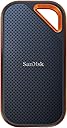
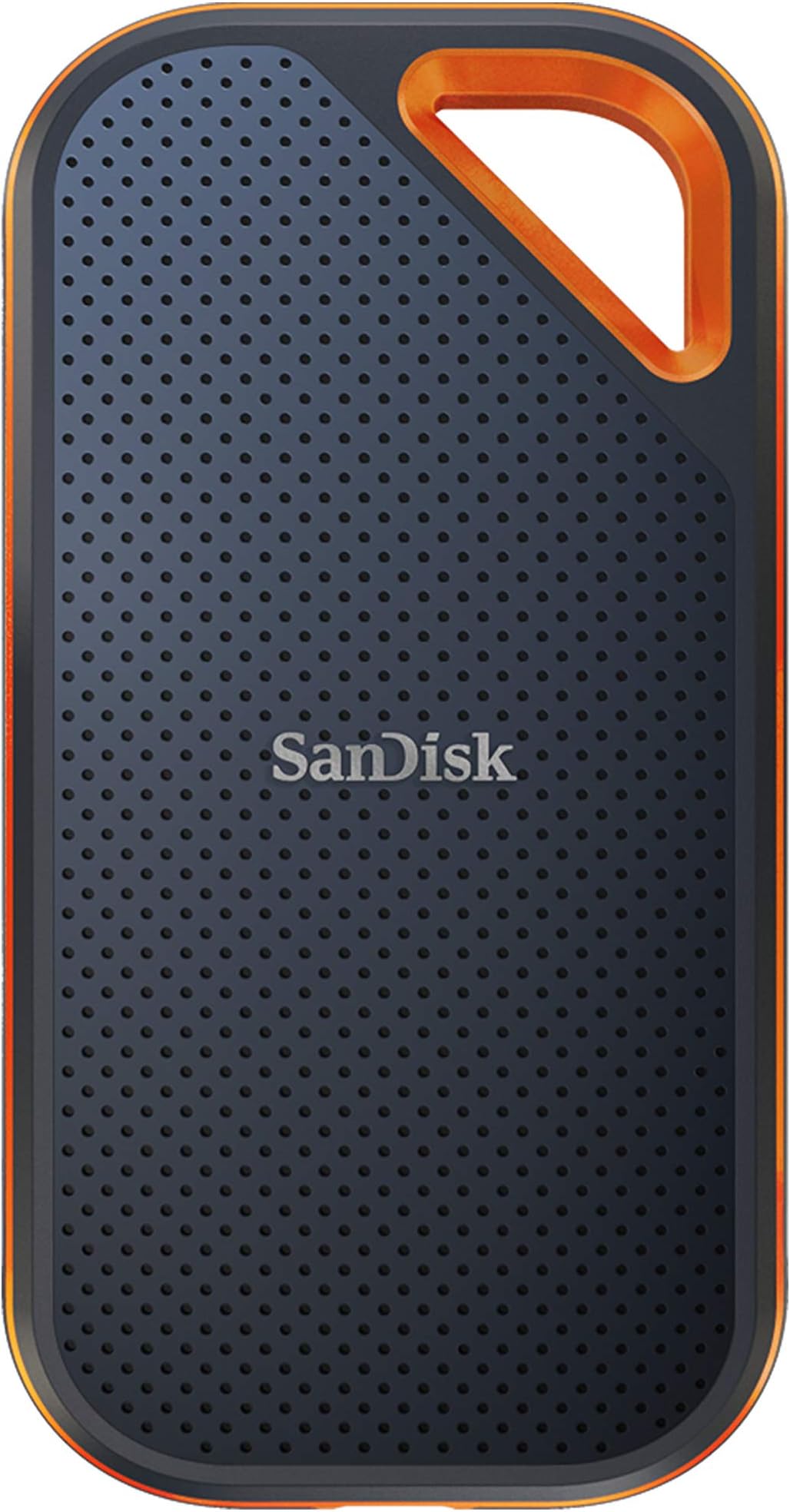
The SanDisk Extreme PRO Portable SSD delivers professional-grade NVMe performance with up to 2000MB/s read/write speeds in a compact, rugged aluminum chassis. Featuring IP65 water and dust resistance, 3-meter drop protection, and 256-bit AES hardware encryption, it’s engineered for creatives and professionals who demand fast, secure, and reliable portable storage on the go.


| ASIN | B08GV4YYV7 |
| Additional Features | Dust Resistant, Water Resistant, Portable, Hardware Encryption |
| Best Sellers Rank | #5 in External Solid State Drives |
| Brand | Sandisk |
| Built-In Media | 1 x SanDisk Extreme PRO Portable SSD |
| Cache Memory Installed Size | 2 |
| Color | Black |
| Compatible Devices | Laptop,Desktop, Smart Phones, Tablets |
| Compatible Video Game Console Models | Microsoft Xbox One, Microsoft Xbox SERIES S, Microsoft Xbox SERIES X, Nintendo Switch, Sony PlayStation 4, Sony PlayStation 5 |
| Connectivity Technology | USB |
| Customer Reviews | 4.5 out of 5 stars 16,816 Reviews |
| Data Transfer Rate | 2000 Megabits Per Second |
| Digital Storage Capacity | 2 TB |
| Enclosure Material | Information Not Available |
| Form Factor | Portable |
| Global Trade Identification Number | 00619659181314 |
| Hard Disk Description | Solid State Drive |
| Hard Disk Form Factor | 2.5 Inches |
| Hard Disk Interface | USB-C |
| Hard-Drive Size | 2 TB |
| Hardware Connectivity | USB Type C |
| Installation Type | External Hard Drive |
| Item Dimensions L x W x Thickness | 4.36"L x 2.28"W x 0.41"Th |
| Item Type Name | External SSD |
| Item Weight | 2.72 ounces |
| Manufacturer | Sandisk Technologies, Inc. |
| Media Speed | 2000 megabits_per_second |
| Mfr Part Number | SDSSDE81-2T00-G25 |
| Model Name | SanDisk Extreme PRO Portable SSD |
| Model Number | SDSSDE81-2T00-G25 |
| Number of Items | 1 |
| Read Speed | 2000 Megabytes Per Second |
| Special Feature | Dust Resistant, Water Resistant, Portable, Hardware Encryption |
| Specific Uses For Product | business, personal |
| UPC | 619659181314 |
| Warranty Description | 5-year limited manufacturer warranty |
S**E
Fast, Reliable, and Worth Every Penny
I've been very happy with this purchase. It's incredibly fast, easy to use, and compact enough to take anywhere. File transfers are quick, and the drive has performed flawlessly since I started using it. The build quality feels solid, and I appreciate the added peace of mind having a back-up of my files.
M**D
Specs are probably true (read below)
OK, so I read many of the reviews of this drive, and I believe that people who are saying this doesn't give them the speeds that it's rated at, may not be testing it correctly. There are MANY factors that go into properly testing the speed of an HD ... OS file buffering/caching being a HUGE one. The drive that I bought, SDSSDE81-1T00-G25 - SanDisk 1TB Extreme PRO Portable SSD - Up to 2000MB/s, boasts speeds up to 2000MB/s (read/write). If you plug this drive into your computer and you use the blue USB 3.0 cable, you will not get the maximum speed out of this device because the max speed for USB 3.0 is 625MB/s. If your computer happens to truly have a USB 3.2 Gen 2x2 port, and you have a cable that supports that, then you could theoretically get the max speed out of this drive. Next, if your computer has a USB-C port, is it truly a USB 3.1 or better (or a Thunderbolt) port, or just a USB-C 3.0 port. Finally you have all of the OS file buffering stuff to deal with. Once you plug this drive in, you'll need to make sure you've set your OS's file buffering/caching to it's highest performance settings. Even with that, testing may not reveal the correct speeds because your OS may not buffer enough of the files being transferred to accurately test the read/write speeds of the drive. Another area for potential speed (and max file size) issues is the file system. You'll most likely want to format (keep) this SanDisk external SSD with exFAT (what it comes formatted in) unless you're going to use it 100% exclusively with your own computer (exFAT is readable/writeable in most OSes). If that's the case, it might be faster performing in your OS's native file system format, but that's not a for sure thing. It'll depend on the size and number of files that you're planning on using it to read/write. Several large files compared to thousands of small files makes a difference in performance too (you may want to look into this further yourself if it is a concern to you). I have a WIndows PC. After doing the stuff I mentioned above, when I do a large file transfer to the drive, it starts out at 1.7GB/s and then begins to drop to a steady 915MB/s or so. This reflects close to the drive's specs at the start, but Windows file buffering doesn't cache enough of the file to get a continual accurate reading, hence the speed drop in write speed. In testing out the read speed, I was only able to get around 700MB/s, but that is because I am copying a file from a super fast HD (this Sandisk drive) to a much slower HD (my internal PC HD), so it can't transfer any faster than this. I also tested reading and writing just from this Sandisk drive and got around the same 700MB/s, however, this is not a fair nor accurate test, because the same drive is doing the reading AND the writing. Finally, I ran the Blackmagic Disk Speed Test that everyone else seems to be using to test drive speeds, and got only 915MB/s read and write speeds. We know this is not accurate since I got 1.73GB/s in my own testing. So all of this to say that I believe this drive is probably fully capable of its advertised speeds, but you will likely not see speeds that fast due to OS limitations, other drive limitations, hardware limitations (your cable and/or port), etc. I'm happy with it because it averages about 1sec/GB throughput, and for files that Windows can buffer completely, I'm getting much closer to the spec's speeds. Hopefully all of this info. is helpful. Just remember, you get the best possible speed out of this drive by connecting it to a true Thunderbolt 3 port on your computer and by setting your OS's caching/buffering settings to maximize the performance (even a USB-C 3.1 or better port will get you the best speed out of this drive).
R**E
Impressive Speed and size!
I recently bought the SanDisk 4TB Extreme PRO Portable SSD, and I must say, I am thoroughly impressed with its performance. This compact and powerful storage device has proven to be a game-changer in terms of speed, form factor, and reliability, especially for film productions. Let's start with speed. The SanDisk Extreme PRO SSD lives up to its name and delivers mind-bogglingly fast transfer rates. I was amazed at how quickly I could move large files, such as high-resolution videos and RAW images. With read speeds of up to 2000MB/s and write speeds of up to 2000MB/s, this SSD ensures that my workflow remains smooth and efficient. It significantly reduces the time spent waiting for file transfers to complete, allowing me to focus on my creative work. Another standout feature of the SanDisk Extreme PRO SSD is its super small form factor. Despite its immense storage capacity of 4TB, it remains incredibly compact and lightweight. This makes it extremely portable and convenient for on-the-go professionals like myself. Whether I'm shooting on location or traveling between sets, this SSD easily fits into my bag or pocket without adding any significant bulk. The reliability of the SanDisk Extreme PRO SSD is also worth mentioning. I have never experienced any data loss or corruption while using this drive. SanDisk is renowned for its high-quality storage solutions, and this SSD is no exception. Its rugged design, shock resistance, and durable construction make it ideal for the demanding environment of film productions. I have full confidence in the safety and security of my data when using this device. In conclusion, the SanDisk 4TB Extreme PRO Portable SSD is a must-have tool for filmmakers and professionals who require fast and reliable storage. Its exceptional speed, compact form factor, and robust design make it a top choice for anyone working with large media files. The performance of this SSD, with its incredible read and write speeds of up to 2000MB/s, has exceeded my expectations, and I can confidently say that I have never had such fast transfers in my filmmaking career. I highly recommend the SanDisk Extreme PRO SSD to anyone seeking a high-performance storage solution for their creative endeavors.
E**T
An absolute must if you require true sustained large capacity speeds
TL;DR: This drive personally verified capable of large, sustained reads for hours if needed and had no problem transferring 500GB+ of data (both read and write) without slowing down at all. If you're tired of external SSDs that slow down due to cache outs and/or overheating, this drive will take care of those issues. ------- I've gone through several Samsung and Crucial external SSDs and one common thing is they all "cache out" sooner than later or even overheat and transfer speeds quickly plummet (sub 50-75MB/sec in some instances) when you're doing large (>100GB) transfers or if you're using the drive as an attached active media for real time use like using a replicated database or photo editing. If the job ends up R/W > 75-100GB+ I will always see drive slow downs consistently on those Samsung and Crucial models. They are good for small, quick transfers especially sub 25GB but anything remotely large and sustained and the slowdown happens. After doing a lot of research and reading along with personal recommendation from some fellow developers and editors, I gave the SanDisk 2TB Extreme PRO (you know it's serious when "PRO" is all in caps) a try. It is very compact and nicely built. Excellent external texture with even a corner clip hole. It comes with both USB-A and USB-C USB 3.2 2x2 cables and is ready for data transfers up to 2000MB/s. So how did it fair? I plugged it into my 1000MB/s rated USB-C port to backup over 500GB of data in one sitting and sat there and watched it transfer the entire set of data with zero slowdowns sometimes peaking OVER 1000MB/sec on large contiguous data asset transfers. This is a first among the pile of external drives I've used over the last 10 years. When it came time to copy the information back, the sustained speeds were still there during the entire transfer. I used it even to run some games for testing and it had no problems for Steam or Blizzard games albeit for normal use I use internal storage. I also did a couple of dev projects externally and it worked absolutely fantastic. As with most external drives, it does get warm during heavy use but nothing that is worrisome. I was able to pick up and hold the drive no problem. I tested it on both Windows 10 and 11 and Windows 11 is slightly slower than Windows 10 in data transfers under the same conditions but still peaked over 900MB/sec. It isn't the Sandisk's fault but the OS. Overall, I can't recommend this drive highly enough. It fixed all the issues I had grown used to accepting with my previous Samsung and Crucial models with expected slowdowns (it wasn't an issue of "if" but "when") and 2TB is spacious enough for now. If I end up needing more capacity I will pick up the 4TB version if needed but as for the 2TB model specifically? Highly recommended. 5/5
K**J
DO NOT BUY THIS DRIVE - SanDisk Unlocker Software lost the pictures of my kids!
DO NOT BUY THIS DRIVE - SanDisk Unlocker Software locked me out of my drive and I lost all of my data. I had been using this drive for months to backup photos of my kids from older HDD Disk Drives, then one day all of my folders were grayed out and it prompted me to install SanDisk Unlocker Software. I installed the software hoping to regain access to all of my files, especially those of my kids! It asked me to add a password for the first time. I followed that process, then it got stuck. I closed the app and reopened it, then it keeps denying my password. Now I’m completely locked out of the drive the I had spent hours transferring our family’s precious memories on to this drive. I’m now going to have to start the whole process all over again. The only way to use the drive again is to WIPE ALL OF MY DATA and remove their janky software. NOTE: In the screenshot I have added to this review, every folder is grayed out even though their awfully designed and janky looking software says my drives are unlocked. I wish they would have told us that eventually we would have be forced to start using this software before I started using this drive. I would have never bought this drive if I knew I’d have to use their Janky Mother F - JMF security software! My hope for you is that you’ll read this review and NOT PURCHASE THIS OR ANY SANDISK SSD Drive!
J**E
Compact and speedy with great storage capacity. It looks nice too.
Compact rocket. This thing is small and fast. Great little unit with great storage capacity. I’ve been using it for several months with no issues whatsoever. Runs cool and it’s easy to store due to its compact size. Because it’s an SSD and enclosed in a durable case, I’m sure it can take its bumps and abuse without issue. Well not cheap, it certainly doesn’t break the bank and its performance as well worth the cost.
A**A
Great for backups
I use this for backups on my MAC / great little item, fast, no problems, easy to setup and use. While this is a 2TB, I do have a 1TB I use for other items. Durable, lightweight, great quality. Would buy again when needed.
L**I
Mixed User Review: SanDisk 2TB Extreme PRO Portable SSD
The SanDisk 2TB Extreme PRO Portable SSD is a premium external storage solution for creative professionals and power users who require blazing transfer speeds, substantial capacity, and rugged durability in a portable form factor. With advertised speeds of up to 2000 MB/s via USB-C and USB 3.2 Gen 2x2 connectivity, this SSD accelerates workflows such as high-resolution video editing, large file backups, and rapid data transfers. However, while its performance and build quality are strong selling points, some users have reported hardware and software issues worth considering. Key Features • Ultra-Fast Data Transfer: With transfer speeds of up to 2000 MB/s, the drive drastically reduces file transfer times, which is critical for high-bandwidth tasks. • Ample 2TB Capacity: The generous 2TB storage provides enough space for high-resolution media, large project files, and comprehensive backups. • Robust Design & Durability: Rated IP65 for water and dust resistance, the SSD is built to withstand challenging environmental conditions during travel and fieldwork. • Updated Firmware: The drive comes with updated firmware that enhances performance stability, security, and overall drive management. • Modern Connectivity: Compatibility with USB-C and USB 3.2 Gen 2x2 ensures the SSD can interface seamlessly with contemporary laptops and desktops. Pros • Exceptional Speed: The advertised 2000 MB/s performance is a significant advantage for professionals dealing with large files and time-sensitive projects. • Solid Build Quality: The rugged, IP65-rated enclosure provides confidence for those using the drive in outdoor or challenging environments. • High Storage Capacity: With 2TB of space, the drive is well-suited for demanding storage needs in creative and professional applications. • Future-Proof Connectivity: USB-C and USB 3.2 Gen 2x2 compatibility means that the drive is ready for next-generation devices and connectivity standards. • Enhanced Firmware: The updated firmware is intended to improve performance consistency and add more data security. Cons & Reported Issues • Hardware Connectivity Issues: • Intermittent Disconnections: Some users have reported occasional drive recognition issues—particularly on systems with older USB-C ports or cables. These intermittent disconnections can interrupt workflow and require re-plugging the device. • Thermal Concerns: A few users observed elevated operating temperatures under heavy and prolonged workloads, which may lead to thermal throttling. Although not widespread, this has been noted in environments with insufficient airflow. • Software & Firmware Challenges: • Firmware Update Process: Although the updated firmware promises enhanced performance, several reports indicate that the update process can be unintuitive. Users sometimes experience temporary instability or reduced performance after attempting a firmware update. • Compatibility Glitches: A few reviews have noted issues with drive recognition on specific operating systems following firmware updates. Users on legacy systems may need to exercise caution or seek technical support to ensure smooth integration. • Premium Price Point: • While the drive offers high performance and robust features, its cost is on the higher side, which may not appeal to budget-conscious buyers, especially when considering potential additional expenses (e.g., certified cables or adapters). Recommendations • For Creative Professionals & Power Users: If you routinely work with large files and require fast, reliable storage on the go, this SSD is an excellent option. However, ensure your system fully supports USB 3.2 Gen 2x2 to fully exploit the drive’s speed potential. Monitor operating temperatures during intensive tasks and consider using cooling accessories if necessary. • Firmware and Software Best Practices: Before performing firmware updates, back up your data and review the manufacturer’s update instructions carefully. For users experiencing post-update compatibility issues, contacting SanDisk support can provide guidance and, if needed, firmware patches. • Hardware Setup Considerations: To avoid connectivity issues, use recommended cables and verify that your system’s ports meet the necessary specifications. Using a certified adapter may help maintain stable connections and maximize performance for users with older devices. • For Field Use: The drive’s IP65 rating is a significant benefit for on-location work. However, remain mindful of potential environmental extremes that could affect thermal performance. In such cases, ensure proper ventilation or avoid prolonged high-intensity operations in confined spaces. Conclusion — The SanDisk 2TB Extreme PRO Portable SSD delivers impressive performance and durability, making it an attractive choice for professionals who need fast and reliable portable storage. Its high-speed data transfer, ample storage capacity, and rugged design are significant advantages. However, the reports of intermittent connectivity issues, thermal concerns under heavy workloads, and challenges associated with the firmware update process suggest that potential buyers should proceed cautiously. You can mitigate many of these concerns and fully leverage the drive's capabilities by ensuring compatibility with your hardware environment, following best practices for firmware updates, and monitoring device performance during heavy use. Overall, suppose you seek a high-end, future-proof storage solution and are prepared to navigate some of these reported issues. The SanDisk 2TB Extreme PRO Portable SSD is a substantial investment in that case.
A**A
Prędkość mniejsza niż opisywana
Przetestowana prędkość to 1012 MB/s odczyt, 1019 MB/s zapis, a więc prawie 2 razy mniej niż w specyfikacji. Sprawdzone na oryginalnym kablu i innym 40GB/s. Wersje Extreme, sporo tańsza, ma niewiele mniejszą prędkość (777 i 958), bliższą podawanej w opisie.
M**A
Extremely Fast, Reliable, and Perfect for Large File Transfers
The SanDisk Extreme PRO Portable SSD delivers excellent performance and is one of the fastest portable drives I’ve used. The compact size makes it easy to carry around, and the rugged design gives extra confidence for travel or everyday use. The USB-C connection is convenient, and setup was basically plug-and-play on both laptop and desktop devices. The only downside is that you need compatible hardware to fully take advantage of the advertised 2000MB/s speeds. It’s also priced higher than basic portable SSDs, but the speed and durability justify the cost for professional or heavy users.
I**R
Very fast
Haven't had many chances to test the capabilities of the SSD, but, so far its performance is quite impressive. Turning on its encryption was also straightforward. I heard many news in the past if its data integrity issues but I hope SanDisk has fixed it and it wouldn't happen down the road.
N**S
Highly recommend
So small and convenient. I bought the Monterey color as well and it is similar transfer speed. Just Wow! For both of them. It's super fast and the perfect size. I'm using it as an external drive, I truly like the size..wanted alot of space..just excellent for what I need to store. I would recommend. Thanks Seller Amazon!
L**.
Velocidad y eficiencia en un disco portátil
Trabajar super bien, excelente compra
Trustpilot
1 month ago
2 months ago