Desertcart purchases this item on your behalf and handles shipping, customs, and support to Seychelles.
โก Power your outdoors smartly โ rain or shine, anytime, anywhere!
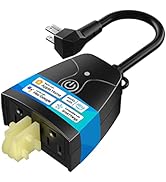
The meross Outdoor Smart Plug (MSS620) is a robust, IP44 weatherproof dual-outlet device designed for seamless integration with Apple HomeKit, Siri, Alexa, Google Assistant, and SmartThings. Featuring independent socket control, customizable scheduling including sunrise/sunset settings, and secure remote access via the meross app, it ensures reliable, energy-efficient management of outdoor and indoor appliances. Certified by FCC and ETL with fire-retardant housing and overload protection, it combines smart convenience with safety for your garden, patio, or backyard.


| Asin | B08HQ2N235 |
| Best Sellers Rank | #20,156 in Tools & Home Improvement (See Top 100 in Tools & Home Improvement) #65 in Electrical Outlet Switches |
| Brand Name | meross |
| Color | Black |
| Connector Type | Plug In |
| Customer Reviews | 4.4 4.4 out of 5 stars (3,961) 4.4 out of 5 stars |
| Included Components | 1 x Smart Outdoor Plug;1 x User Manual |
| Item Weight | 3.2 ounces |
| Manufacturer | meross |
| Material Type | Acrylonitrile Butadiene Styrene (ABS) |
| Model | MSS620 |
| Number Of Items | 1 |
| Number Of Packs | 1 |
| Number Of Poles | 2 |
| Number Of Wires | 4 |
| Part Number | MSS620BHK |
| Plug Type | Type B |
| Specification Met | Etl, Fcc |
| Unit Count | 1 Count |
| Upc | 680306681983 |
| Voltage | 110 volts |
| Warranty Description | 2 Year Manufacturer |
User
Works great with Apple HomeKit! Simple setup, does NOT require another app (if you don't want to)
Lately I've been adding more smart home devices to my home (primarily revolving around Apple HomeKit), and I needed a HomeKit-compatible outdoor smart plug to control my workshop lights. The area I was going to use the smart plug was prone to being exposed to the elements, so I required an outdoor-spec smart plug. Based on the fact that my last two Meross smart home products (the garage opened and the indoor plugs) worked out great, I decided to try their outdoor plug.Out of the box, it was a lot smaller than I was expecting - the Meross Outdoor Smart Plug was replacing a similar remote-controlled plug (using a radio-frequency push-button fob) but it took a lot less space on the back of my workbench where I have all my cables organized. I also like how the rubber plugs (that are used to seal the plug holes when not in use) are attached to the housing, so I won't lose them if ever I have to unplug something in the future. With the smart plug attached to my workbench, I plugged in the smart plug, pulled out my iPhone, and went straight to the Home app.What I like about Meross products is that you do not need to install the Meross app to use them with Apple HomeKit; you can add Meross products to your smart home via the Home app directly; this was also true with their outdoor smart plug. All of the Meross products that I've purchased so far have the required HomeKit QR code decal, making setup and installation a quick job. You can install the Meross app optionally if you want a single interface for just your Meross devices, but it's not necessary.Now that I have integrated my workshop lights into my smart home, another smart convenience has been achieved! The response of the Meross Outdoor Smart Plug is quick and lag-free, it works with Siri commands (mine is "Hey Siri, turn my garage lamps on") and it is exactly the smart plug that I was looking for.
User
Gets the job done
I bought this a year ago for use with HomeKit (Siri) for backyard lights. It isn't perfect, but it earns the fifth star:The bad: Setting up took a few tries, and maybe twice in a year, HomeKit required me to re-pair the device for reasons unknown. Requires you to turn off 5GHz, if you have it, to set up (2.4GHz only). Also, you may have to try a couple different names for the device and the separate outlets if you want to be able to control each plug separately while retaining the ability to turn them both on and off as a single device (e.g. front yard, back yard, whole yard).The good: Does the job. Switches on and off very quickly. Wifi works fine once it's set up. If it requires re-pairing, the process isn't difficult. The button on the device works reliably even before it's set up. Waterproofing has been reliable for a year, even through pretty heavy storms.The best: a week ago, I had to re-pair it and discovered that I hadn't written down the HomeKit code, and the sticker that had it printed on had come off. So I wrote in to Meross through their support page with a couple pieces of info (the device's default WiFi network name and its MAC address, both available from my Eero router control app), and they got back to me in a day with the HomeKit code for re-pairing (along with an apology for taking so long). I was very pleasantly surprised with that kind of high-quality customer support.
User
Good to Go!
Was not bad to setup and works great!
User
Setup is confusing - for IoT on a separate VLAN (w/firewall rules) AND/OR combined 2G/5G network
Getting the setup sequence right is important - otherwise, it may appear that the device won't show up in the Meross iOS app. Even when it shows up in Homekit.Here's what I found (after some trial & error):FirstYou must have a separately broadcast 2G network, the Meross only has 2G (and the instructions make note of the requirement for a 2G network) - a combined 2G/5G broadcast network won't work. Your iPhone has to be on the 2G network when you added the outdoor switch to your network/homekit/meross app.SecondI have my IoT devices on a separate VLAN with firewall rules that prevent crossover from the IoT VLAN to my regular network (I do have firewall rules which allow my iPhone to connect to the IoT VLAN - one way only).Don't try to install and add the Meross app from the App Store - do this AFTER you have connected the Meross outdoor switch to Homekit.To connect to HomekitConnect your iPhone to your 2G network and turn on the Meross outdoor switch - you should see a green/orange light blinking (to reset the Meross, just hold down the power button until it resets).Under Settings, Wi-Fi, you should see the Meross_SW_XXXX "setup new device" -- click on that, you should see a dialog box with a request to add it to Homekit and WiFi. Once you click on allow/continue, next up will be Homekit.in Homekit, scan the QR code on the side of the outdoor switch or box. It takes a while to add it to Homekit. Once it it is added to Homekit, then download the Meross app from the iOS App Store and follow the app registration and installation instructions. The Meross MS620 outdoor switch should automatically be included in the available devices to setup in the Meross app.If you try to add the Meross app first and then add it to your network or Homekit, well, that didn't work for me. Only adding to Homekit first, then installing and adding to the Meross App worked.Why should I care if it is in the Meross App vs. Homekit? Unless I open some more ports (more firewall rules) to allow the Meross outdoor switch to send data back/forth across my IoT VLAN and regular network, Homekit automation won't work (e.g., turn Holiday lights on at dusk and turn off at dawn). You will be able to turn the switch on/off within Homekit (manually, just not via automation).The Meross app, with its own "Routines" (e.g., on at dusk, off at dawn) is able to send automation to the switch when it is on the regular network (i.e., non IoT VLAN) - provided you have the firewall rules setup to allow one way access from your regular network to your IoT VLAN.
User
Easy to set up
These smart plugs work great. Each outlet can be controlled separately. This can be used with Apple HomePod or the Meross app.
User
Do Not Buy!
Would not connect to my network network no matter what I did and I followed the instructions to the letter. This thing is trash.When I tried to separate the 2.4 and 5ghz networks it t still wouldnโt connect AND doing that also disconnected my other two SmartLife devices and my wireless printer. My SmartLife devices never required me to make any changes to my network. They just connected when I did as needed by the instructions.To the manufacturer and designer of the Meross Outdoor Smart Plug, the year is 2026 not 1995. Your customer shouldnโt have to do this.
User
Nice Apple Home Based Switch
Installed under the crawl space for two ciruits - one lighting and dehydration and the other for fans. Works on the silly iPhone just fine in the Apple Home Base section. Programmable there. Easy setup. Decent value for the money. NOT waterproof at a high level, so be sure these are covered and/or protected from weather/rain, etc.
User
No problems after first winter
Setup went fine. It has been out in the open albeit under a porch over the winter in MA without any issues
User
HomeKit compatible
Lo mejor es compatible con HomeKit de apple. Trabaja excelente
User
Wifi plugs that actually work
Bought this to run my two submersible pumps in my back yard remotely when it was raining/ storming while we were away from the house (we were having heavy flooding due to rain)Being able to operate the plugs using wifi and the Amazon Alexa app has saved us lots of money preventing water from entering the house while we are out; it also keeps us dry when we used the app to turn them on inside the house. I have never had an issue with the plugs not connecting to the wifi.We bought another plug to run our lights outside and love that we can used the Alexa app to set up a timer for them.
User
Easy Setup, Rugged Design, Fast Response
Quick to set up on my existing 2.4GHz WiFi network. Works perfectly! Robust design. Will definitely buy more!
User
Funciona muy bien
Funciona sin problemas con Apple HomeKit. Muy recomendable.
User
Excelente
Excelente producto
Trustpilot
1 month ago
4 days ago