🚗 Cut the cable, not the vibe—wireless CarPlay, redefined.
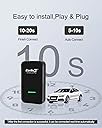
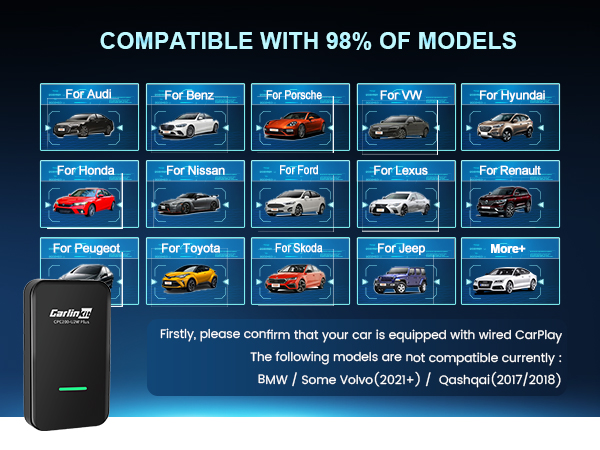
The CarlinKit 3.0 Wireless CarPlay Adapter converts your factory wired CarPlay system (2015-2026 models) into a wireless experience. Compatible with iPhone 5 through 16 Pro Max and popular aftermarket decks, it uses Bluetooth to initiate connection and WiFi for seamless streaming. Easy USB-C plug-and-play installation with lifetime technical support ensures you stay connected without the clutter of cables.


| ASIN | B08P1GWQDB |
| Best Sellers Rank | #875 in Car Audio & Video Input Adapters |
| Brand | Carlinkit |
| Built-In Media | Carlinkit 3.0*1 Instruction manual*1 Data cable*2 Box*1 |
| Color | Black |
| Compatible Devices | iPhone, aftermarket K-enwood, Alpine, and Pioneer decks |
| Connector Type | USB Type C |
| Customer Reviews | 3.6 out of 5 stars 4,767 Reviews |
| Item Weight | 4.8 ounces |
| Manufacturer | CarlinKit |
| Mfr Part Number | CPC200-U2WPLUS |
| Model Number | CPC200-U2W Plus |
| Number of Items | 33 |
| Number of Ports | 1 |
| Package Quantity | 1 |
| Power Plug Type | No Plug |
| Specific Uses For Product | Streaming, Work |
| Unit Count | 1 Count |
| Warranty Description | 1 year |
M**L
Mine has been great
I’ve had mine for almost a year now in my mustang and it has been great! I’ve gone through the set up process twice because I got a new phone and it was quick and easy both times and took about a minute to do. The device itself works almost perfectly. It connects in about 15-20 seconds when I get into my car. Occasionally it will not connect or show up in car play but simply unplugging it and plugging it back in fixes the problem. While using it you probably won’t notice much difference compared to having your phone plugged into your car. However, there is a slight delay in the sound so when you play or pause the music from your phone you will notice a 1-2 second delay. This delay doesn’t seem to affect phone calls. I’ve taken many phone calls while using this device and never noticed a delay that affects the call. I’ve loved using this product and even recommended it to my family and friends. My mom bought a device and it works great in her jeep, however she bought a 2nd one for her corvette which was not compatible. Other than that issue she has also loved her device and so have I. It makes it a lot easier and I imagine it’s a lot better for my phone as I don’t have it plugged in all the time while I drive.
J**M
Worked, but….
Update 4/27/22: This dongle is now completely useless. Original review was about two to three weeks ago and since then, the problem of freezing up and losing connection has gotten worse. I’ve taken the unit out of my center storage area to ensure it does not overheat (see original details below) but that did absolutely nothing for it. Checking through other reviews here, it would appear that the average lifespan of this dongle is about 2.5 months. Way less in some cases. The fact that the return window is shorter than other products I’ve ever had to return may be a hint as to the reliability of this item. One thing is for sure… The company is making a killing at the price-point. Unacceptable in my opinion. I wouldn’t pay $40 for this. And with no ability to return it due to it failing outside the return window in most cases, our only recourse appears to be this review system. Downgrading to one star based on failure and absolutely no costumer support whatsoever. ——————————————————————— I’ve had this dongle in my 2021 Dodge Challenger Hellcat Redeye for about 3 months. Initial connection on startup is fairly quick (about 10-15 seconds) and touchscreen response has a very slight delay of about 1-2 seconds, which is very tolerable. All CarPlay apps work perfectly fine while the unit is online. Pros: The “tether-free” aspect is great. I personally don’t like a spaghetti knot of cables all over my center console. One huge plus in my case is the advantage of control over certain functions that are not available (for safety reasons) when hardwire-connected to my car. Namely, selecting different playlists other than what is currently active on your phone at the time of connection. While hardwired, for example, if I had “Playlist A” active, all songs within that playlist could be manipulated fully (play, pause, skip, etc.) via the car’s touchscreen. But if I wanted to go from “Playlist A” to “Playlist B” it required me to take my phone out of my pocket and select the newly desired playlist. With this dongle, that goes away and you can fully bounce from playlist to playlist, and even type different location searches on apps like Waze or Maps without the need to pre-select any of that prior to your drive, directly on the touchscreen. Also, I simply leave this plugged into my center console storage compartment connected to an “always on” USB power source. The current draw is so low that I (thankfully) haven’t had any issues with battery draining so far. I have left it plugged in for 4 days straight without starting the car and, so far so good. Not having to constantly plug it in and unplug it every time makes things very convenient. Cons: In reasonably warmer temperatures (nothing too hot) after about 15 minutes or so, the unit freezes. All music stops and any routes I have active in my navigation apps cease. The unit pretty much dies and becomes unresponsive altogether. The only remedy is to unplug it for about 10 seconds and then plug it back in. It will then work fine for about 15 more minutes or so, and then the cycle continues. For short trips this wouldn’t be an issue, but with my commute being 45 minutes to an hour one way each day, this gets pretty annoying. It’s to the point that I am considering doing away with this and going back to hardwire connection. I have noted that this happens more when it is hot. Maybe the unit overheats and just ceases? In cooler temperatures, it does not happen too much, if at all. Overall, I am satisfied with how it works WHEN it works. I just wish the reliability was better. Of note, I have updated firmware and take extremely good care of this unit.
D**A
Verry nice addition to 2022 Mitsubishi Outlander
So far this thing is great with only a few glitches where I had to unplug it to get it to connect. I primarily use this in my 2022 Mitsubishi Outlander that only has wired CarPlay. This connects very fast to my iPhone 13pro Max. By the time I start the car and put it into gear, I already have music playing. For the 2022 outlander when you open the door with the car off, it will turn the USB port on which speeds up the connection by the time you get in and hit the ignition. That is also a minus because when I just need to get something out of it and I’m on my Bluetooth headphones, it will connect to Carlin kit automatically. This isn’t a big deal but gets annoying sometimes. I have also tested this on my daughters explorer with an aftermarket radio with wired CarPlay. Hers takes a little longer to link since you have to wait until you start the suv before the USB port has power. Music quality is great and sounds very clear. Maps is very responsive, I have not had any issues with lag with apple or google maps. People have complained about call quality not being as clear as Bluetooth, but that is not the adapters fault. Wired CarPlay sounds different than Bluetooth, it is something do with CarPlay in general. I am glad I gave this a try since some of the negative reviews had me worried. I am very happy with this so far!
B**N
Awesome device IF you can get it set-up.
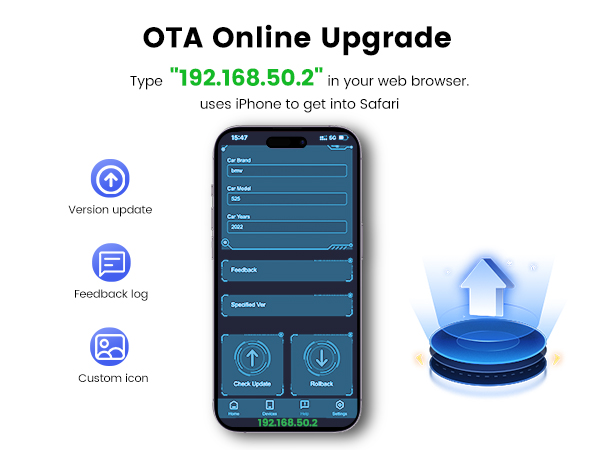
So after reading many reviews from 1 Star to 5 stars I thought I would give this a chance. I printed out 1 reviewers instructions on how to set this device up because he said the directions from the manufacturer did not work. I found that it was incredibly easy to set up and worked pretty much exactly like the manufacturers instructions said. All I needed to do was plug it in and establish a Bluetooth connection to my phone and BOOM I was up and running wireless CarPlay with my iPhone 11 Max in under 5 minutes during my lunch break. At the end of the day I hopped in my car, phone in pocket and CarPlay automatically loaded and started playing the IHeartRadio station I was listening to at lunch.....I was super pumped! I love being wireless!! Fast forward a few hours after I got home and my wife and I hop in the car to go for dinner and I am bragging about my new wireless CarPlay and now it will not connect....WTF?? When we get home from dinner I spend 30min in the car trying to get this to work with no luck. I figured that many of the 1 star reviews must be right and decide to return it. The next morning was a Sat and I had some free time so I decided to give it another go before I returned the device. I plugged it into my 2019 Forrester Sport started the car and Boom it connects without issue?????? Now I am confused. Using the printed out instructions from the other reviewer I decided to update the software. He mentioned that you must update the device multiple times to get the full update. I found this to be 100% true. I updated the software and it said update complete. I exited out and chose check for updates again and it found another and installed it. I did this 3 times until it finally said there were not any updates available. After all the updates were installed I again could not connect...WTF??? After turning the Bluetooth on and off multiple times and doing multiple discover devices I still could not connect until I turned off my WiFi then back on again. At that point I was able to connect!!! Since I made these updates and got it to connect the first time the device has connected without fail every time I get in the car, 5 days straight now. If you are not Tech savy this is not the device for you! if you have average technical ability you should be able to get it to work. Be aware this device will connect via Bluetooth at first but once it does it establishes a WiFi network with your phone then disconnects the Bluetooth. The part that is confusing here is if you look at your phones WiFi it is OFF, if you try to turn it on a message box will appear saying CarPlay will be disconnected if you turn on the WiFi. My final thought is: If you can get this thing to work it is awesome! Unfortunately many users may struggle to set this device up. For this reason I give it 4 Stars instead of 5.
E**B
Ok, not great.
I’ve had two of these. It works most of the time just fine but sometimes it will take a very long time to connect (minutes). It also can do some strange things when the car has been sitting in 100+ degree heat. Once it cools down a bit and I do a power reset it works normally again though. The slow connection gets annoying when it happens though. I eventually replaced it with a different one from Conodova(?) and that one works much better so far and was even smaller and cheaper.
E**N
Works as advertised
UPDATE: 11-01-2025 I am STILL loving this product. I've had it almost 2 years now end it still works great. I think I'm going to buy another one just in case this one breaks, I mean it has to wear out at some point. Rarely do I buy a product on Amazon or anywhere else, where it does what it says it's going to do and it does it so well and for so long. If I could give a sixth star I would. ******* ORIGINAL REVIEW I received this earlier today and it installed easily and seamlessly. No hiccups. I have a 2020 Mitsubishi outlander sport, and I simply plugged the unit into my usb port in my car and it fired right up. There were no decisions to make, no codes to enter, I plugged it in and within about 30 seconds it started working. Basically, it sets up a new Bluetooth connection, which supersedes the normal Bluetooth you might have set up with your car direct to your phone. It works identical to a wired set up, the only difference is there is a tiny lag with the wireless set up as opposed to the wired. But the lag is tiny, and I got used to it quickly. I took about a half hour drive on the highway just to test everything out, and everything works just as well as with the wired, voice dictate, Siri, etc. Again, the only difference I could tell was that tiny lag. I also did some shopping meaning I got in and out of my car several times, of course turning it on and off, and it seems to be about 20 seconds from the time you start your car to the time that it's ready to go. The only negative, and it wasn't even a negative for me because my set up was flawless, was the little direction book was very terse; indeed, there's better instructions on the Amazon product description page. It did ship with a tech-support card giving clear instructions of how to contact technical support if you do have problems. But again, I didn't have ANY problems. I plugged it in and it started up and started working the way I expected it to. Tomorrow, I have a wireless charger/phone holder coming in so this should get me off of chords completely. I've only used it one day now, but I'm completely satisfied with it. It does everything I expected it to do.
G**E
Can’t answer phone calls
I’ve been using this everyday for about a week now. 2019 RAM 1500. Very easy to install and set up. It remembers your phone and automatically connects whenever you get in the car, but it takes 30-60 seconds to connect each time, not too bad but a little slow. There are a couple problems I’m noticing though. First, I can’t accept phone calls. It makes a really weird ring then it won’t let me answer through CarPlay, I have to answer on the phone and switch to UConnect or speaker phone. Sometimes it freezes the whole entertainment system in my truck and I can’t click anything. I had to turn off the vehicle the other day and turn it back on to get it going again. I’ve also just started noticing that my backup camera (shows on the main entertainment screen) is kind of fuzzy. I started inspecting it earlier and realized for some reason it’s showing the CarPlay screen still visible behind the video feed from the camera. My truck doesn’t do that when I have my phone plugged in to CarPlay so it has to do with this accessory. If all I’m doing is cruising and litening to music or using the map it’s great, but not being able to answer calls and having my backup camera wonky is kind of a deal breaker. Will likely return in a few days and find another product.
D**.
Works Great in 2020 Hyundai Santa Fe SE
UPDATE: So far the only real annoyance is the initial sync time when I first start up the car. Other than that, it's been working great and definitely worth the convenience of not having to plug and unplug my phone every time I drive around! I've uploaded more images to show the firmware version of the device as well as settings (which were set by default) in case that helps anyone. Firmware: 2021.03.06.1355 --- ORIGINAL REVIEW: It seems this product is a hit or miss for people... fortunately for me, it seems to be working just fine. Initial setup was pretty easy... although I did run into a minor issue. When I first turned on the car, my head unit showed instructions to connect to "HYUNDA-1234"... but my iPhone wasn't able to see a device by that name. I did see a VOLKSW-5678 which I thought was a bit odd. I tried to initiate the connection from the head unit to my phone and sure enough it asked if I wanted to connect to a device called VOLKSW... I ended up unplugging then plugging it back in, and that fixed the issue. Aside from that, Apple Carplay has been running great wirelessly for a couple of weeks now. I've been able to use Amazon Music/Pandora for music... ask Siri for directions as well as answer phone calls. There does seem to be a slight lag compared to when it was connected via wire, but it's not really that noticeable to me. The biggest lag/delay you might notice is when you first turn on your car, but I mean unless you're in a hurry and ready to race out of the gates as soon as you start the car it shouldn't be too bad.
T**I
كان يعمل بشكل ممتاز الان اغلب التطبيقات لا تدعمه
اغلب التطبيقات مثل شاهد نت لا تدعم المنتج
K**A
Connetivity
I bought it with reluctance, however quite impressed with the performance. Initially narrowed down to this product and otto cast, I chose this product base on the later's website caution it may not work with latest iOS. Used it for a couple of months, it was connecting wirelessly with in few (with in 20) seconds (Before I can take out the car from my garage on to the road). I am using it on my Mazda3 2022 and I cannot ask for more. I have used it on iPhone 6s, X & 12, has issues with 6s, but not with Others. Phone calls were crisp with no lag and music is good enough (In comparison to my Denon at home) on my car's Bose system. There is room for improvement I hope. Although I gave 5stars, that does not mean this units has no issues. There is noticeable (1sec) lag when you skipping songs, and also noted that it dominates the in car entertain system - it will try to show CarPlay all the time. This should be improved - and I hope this can be done in future software UPDATES. Well done to all the team at - Carlinkit.
J**Y
Toyota Camry 2019 Works Great
Worked great out of the box. I did what other reviews suggested and forgot the car Bluetooth before setting this up. Works flawlessly.
D**S
Buen producto para Carplay
Es un muy buen producto, el problema que par Android auto tienes que conectarlo, y muchos tienen éste tipo de teléfono. Seguiré buscando uno para Android.
M**2
Con fallas!
No siempre se conecta en automático. Hay que desconectar y enseguida conectar el cable usb para que detecte el iPhone. Es algo molesto que en algunas ocasiones no se conecte en automático. Demasiado alto el costo, considerando las fallas en la conexión.
Trustpilot
1 month ago
2 months ago