Buy anything from 5,000+ international stores. One checkout price. No surprise fees. Join 2M+ shoppers on Desertcart.
Desertcart purchases this item on your behalf and handles shipping, customs, and support to Seychelles.
🚀 Elevate your network game with mesh-powered, high-speed Wi-Fi that keeps you connected everywhere.
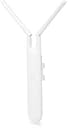
The Ubiquiti UAP-AC-M-US is a dual-band 802.11ac mesh access point designed for extensive indoor/outdoor coverage. It delivers up to 3460 Mbps data transfer rates, supports mesh multi-hop for scalable wide-area networks, and offers versatile power options including 802.3af PoE and 24V passive PoE. With adjustable omnidirectional antennas and easy app-based setup, it’s engineered for professional-grade deployments in high-density and temporary event environments.
| ASIN | B076B4ZVF2 |
| Antenna Location | Home, Business, Outdoor/Travel |
| Antenna Type | Internal |
| Best Sellers Rank | #55,956 in Computers ( See Top 100 in Computers ) #220 in Wireless Access Points |
| Brand | Ubiquiti Networks |
| Built-In Media | antenna |
| Color | white |
| Compatible Devices | Laptop, Personal Computer |
| Connectivity Protocol | ethernet |
| Connectivity Technology | Ethernet, Wi-Fi |
| Control Method | App |
| Controller Type | vera |
| Coverage | Extensive |
| Customer Reviews | 4.6 4.6 out of 5 stars (712) |
| Data Transfer Rate | 3460 Megabits Per Second |
| Frequency | 5 GHz |
| Frequency Band Class | Dual-Band |
| Has Internet Connectivity | Yes |
| Has Security Updates | Yes |
| Is Modem Compatible | No |
| Item Dimensions L x W x H | 10.2L x 10.2W x 38.1H centimeters |
| Item Weight | 5 g |
| LAN Port Bandwidth | 10/100/1000 megabits_per_second |
| Manufacturer | UBNT |
| Maximum Upstream Data Transfer Rate | 583.5 Megabits Per Second |
| Mfr Part Number | UAP-AC-M-US |
| Model Name | Ubiquiti Unifi UAP-AC-M |
| Model Number | UAP-AC-M |
| Number of Antennas | 2 |
| Number of Ports | 1 |
| Operating System | RouterOS |
| Other Special Features of the Product | WPS |
| Router Network Type | Wireless |
| Security Protocol | WPA2-Enterprise |
| UPC | 703624198343 703624203313 |
| Unit Count | 1.0 Count |
| Voltage | 24 Volts |
| Wireless Compability | 802.11ac |
S**A
Device nor working after some time
My device has stopped working How to contact the seller under warranty ?
M**B
one of the best brands
I liked.
J**N
I have a tech background and found this easy to setup. It might be a little harder for someone with no tech skills to get up and going and tweaked, but not too hard. I'm not sure my parents that are senior mac users would manage to set it up. I have their regular long range unit inside and this one mounted on the outside back of the house. 3,000 sqft on about 4/10th of an acre, I have very fast wifi on most of the property now. I may add one more up front and I will have 100% solid coverage on the entire lot at high speeds. Other than going out to the front curb -- furthest place from these access points, I get a good 20+ mbps everywhere (at the slowest), which for a phone is great for everything and often it's MUCH faster. I'm 20 feet from the access point now and my phone tested 144Mbps down. If I wanted speeds that fast at the far end of the house, I'd need one more unit inside, but not really any need for that now. If your in a congested suburban area with a larger house, I've found a multi access point setup is a necessity now if you need good wifi coverage. I'm on zoom daily and needed a rock solid connection and this has done it. Allows me to be everywhere except way up in the front of the yard and have a rock solid fast connection. Bottom line: get it if you have some tech skills and can manage to set it up and want great wifi coverage. Plan to have 2 units minimum if you have a larger home and potentially 3-4 if you have a very large home / congested area or need very very fast speeds on the whole property.
E**C
I wasn't too sure about this, 600 feet sounds excessive, but I went ahead and tried it out. Bought the antenna mount with it and put this on my (Abandoned by my old provider, not functional!) internet LOS dish on the top of my house. This was to get around the walls on my house which are up to 12 inches thick limestone block. This basically puts the AP at what I would consider the best possible placement for my property, and it works. However some things I noticed: 1. being up so high and only needing to penetrate my roof (which is NOT rock.. of course) allows this thing to embarrass my existing Orbi setup. Almost anywhere in my house if this doesn't match the power of the Orbis.. it exceeds them. Ouch. That's money flushed I suppose. Will upgrade them eventually with more Ubiquiti. 2. Yes it can.. reach at least 300 foot. With huge power. I've only found one area outside my house where the Orbis are generally (not all the time) beating this thing. Not a fair fight.. the Orbi has satellites! 3. The software control is wonky. If I connect to the network that this thing is on, I can't see it and the software immediately stops receiving heartbeats from it, and despite it working fine it claims it is dead, and stops interfacing with it. I am guessing there is a system or setting I am missing that allows it to do this though. Overall I'd consider NOT buying this a mistake. It's not very expensive but it functions way out of the league by price. The control offered by it is great, and the power and coverage are second to none. I will be pairing this with a real AP controller sooner or later, and I have high expectations for it based on what I have. Edit: This thing just survived a 30 year snow storm, totally exposed on my rooftop in a 11 degree blizzard followed by a ice rain storm. (2021 is already trying to to 2020!) Still works, though it seems the sheltered Orbis are now outperforming it near to the house, which is a bummer. Also getting some drops on cameras out at the edges of my property. Still given all the other carnage of the storm the fact that it works at all is pretty amazing!
S**E
Absolutely fantastic product! WiFi was at least 400’ @ 15mbs! I live on a mountain and have a lot of trees, I firmly believe if my property was flat and cleared, it would reach much farther. I’m using this to get WiFi to solar powered wireless security cameras across my property. That would have been a lot of ditches to run wires. The device itself isn’t that easy to figure out how to set up, but once figured out, it is easy to do. Word of advice, use the app, instead of the controller unless you’re very tech savvy. I never could get the controller to work on my Mac. You have to download Java, and a bunch of other stuff and it still didn’t work. After reading through the help pages on the website, it said you can install as a stand alone unit using the app! Well this information wasn’t in the directions that came with the product, and it should be. Once I found that out, I had it running in less than 20 minutes, and it preformed up to, or a little beyond my expectations. Fabulous. I can add others, albeit with power (solar) at a later date to extend it even further. Two more units and my whole 10 acres will be covered in high speed WiFi. That’s pretty good for units under $100 bucks each!
R**N
We added this product to an existing Ubiquiti AP environment at our church to serve an outdoor location recently constructed. Wanted to use the same configuration/management capabilities of the Unifi network controller (self-hosted on a computer at the church). As others say, this is a good product and is working well. My comments relate to a few mechanical issues with the device that may be useful to understand: 1) it can be tricky to get the Ethernet cable connected - just enough room to accomodate the cable connector "shell" 2) there is a grommet to go around the cable to keep the unit waterproof but the grommet assumes the cable will be threaded through and then the RJ45 connector added. Instead, we cut the grommet to get it around the cable that already had the RJ45 3) the status light on the unit is not obvious at first glance (the light is inside with a "window"). And, if one is outside when the (white) light first comes on, it is very hard to see. Found the light by connecting temporarily inside where the light was less bright. 4) once the device is inserted in its mounting bracket, it cannot be removed without removing the whole bracket from the wall (and then still a bit tricky to disconnect the "fingers" that connect it to the mount). On the plus side, there is a built-in level in the mount which is very helpful. I am glad I had a fair amount of technical background when using the Unifi network controller software.
M**G
I purchased this to improve WiFi access outside the house. I don't have a need for a mesh network as most of the important devices in the house are wired, but I do have a WiFi camera by our front gate that is about 75 feet from the house and a smart switch and outlet in our detached garage. I could not access the camera by the front gate that far away without the AP, making it pretty useless. My network is very basic. A Cable modem with a switch and POE switch (for POE IP Cameras). I connected the Ubiquiti AP to my switch that connects to the Cable modem using the provide POE Injector. It would be nice if the power cord was longer. With the POE injector sitting on my desk, the cord could not reach the power strip on the floor. I used a spare cord for a laptop power brick. I ran an ethernet cable about 50 feet to the AP attached to a column on our front porch. Setup was a breeze. It's been a long time since I've setup an AP and I remember the last time it was a pain setting up the AP on a same branded Router. Setup a Ubiquiti Account, log in to the router, a few clicks, confirm the WiFi credentials and that's it. It just works and it has worked without a hiccup since even during several heavy down pours and a couple strong thunderstorms. Before the AP, it was hit or miss if I could access the smart switch and outlet in the garage. Usually, I couldn't access them. If I could, it would take a good 10 seconds or more to turn on or off the item attached to the switch or outlet. Now, it connects instantly and turns the item on or off immediately after tapping the power button in the app. Since installing, I've added 2 smart garage door openers. They connected without a hitch and respond quickly through the app. The Web based interface is great. Very quick and intuitive. It is packed with lots of feature even without having a UniFi Security Gateway.
Trustpilot
1 day ago
1 week ago