Desertcart purchases this item on your behalf and handles shipping, customs, and support to Seychelles.
🚀 Elevate your home network with lightning-fast, secure, and limitless storage!
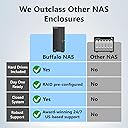
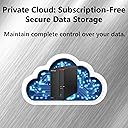
The BUFFALO LinkStation 710 is a 4TB 1-bay NAS designed for professionals seeking secure, high-speed network storage. Compatible with Windows and MacOS 26, it offers subscription-free personal cloud access, automated multi-device backups, and advanced SSL encryption. Made in Japan and backed by 24/7 US support and a 2-year warranty, it’s the ultimate centralized storage solution for home or small office.


| Asin | B08V5LFRDW |
| Best Sellers Rank | #4 in Network Attached Storage (NAS) Devices |
| Brand | BUFFALO |
| Built In Media | AC Adapter, Ethernet Cable (Cat 6A), LinkStation 710D, Quick Setup Guide, Warranty Statement |
| Color | Black |
| Compatible Devices | Desktop, Laptop |
| Customer Reviews | 3.2 3.2 out of 5 stars (199) 3.2 out of 5 stars |
| Item Dimensions D X W X H | 8.07"D x 1.77"W x 5.01"H |
| Item Weight | 3 pounds |
| Manufacturer | BUFFALO |
| Mfr Part Number | LS710D0401 |
| Model Number | LS710D0401 |
| Mounting Type | Desktop |
| Number Of Items | 1 |
| Number Of Packs | 1 |
| Size | 4TB (1x4TB) |
| Unit Count | 1 Count |
| Upc | 747464134581 |
| Warranty Description | 2 year manufacturer limited |
User
Works good for Time Machine on Mac Tahoe 26.2
Works great for the Time Machine backups on Mac Tahoe 26.2. Easy to setup by following their quick start guide and downloading the software. I had to do two firmware updates before using it; took about 30 minutes. Downloaded the owners manual and it easily walked me through setting up the Time Machine backup. First backup takes a few hours. Accessing the drive via Finder is easy and drive is very fast. I've got it plugged into my Xfinity cable modem with the supplied cable. The drive offers more than I need. I'm not doing the web access or iPhone connection. Noisy when doing the backup. Fits nicely on the desk. Hope it will have a long life like my Mac AirPorts. Going to run both the Buffalo and AirPorts for a bit to make sure all is well and until Mac stops supporting the AirPorts.
User
DIED after 5 Months with LESS than 1% of the drive being used
I am another victim of Buffalo's outdated technology and I WANT MY MONEY BACK!!!! It would be the least thing they could do since I have to pay for my own data recovery thanks to deceptive marketing.I am extremely disappointed with my LinkStation 710 8TB. I purchased it on June 12th, 2021. I called customer service the day I received the drive. I knew something was not right with it since the device made clicking sounds every so often, but I was reassured that there was NOTHING wrong with the drive. The customer service guys kept saying "It was the new hard drive spinning up and it will settle in the case after a while" or "it is just the fan keeping the drive cool. You have nothing to worry about. The S.M.A.R.T. technology will notify you if there is a problem with the drive."I purchased this LinkStation because I was worried about the life of my current backup system and I was running out of space. I have a GoFlex drive that is more than 10 years old and I thought I would upgrade the system for a better piece of mind. Boy was I wrong. My LinkStation just completely stopped working one night in the middle of a transfer. THE DRIVE WAS LESS THAN 6 MONTHS OLD. On Dec 6th, 2021, I had to ship the broken product to a data recovery company. I thought I had nothing to worry about since my product had a 3 year warranty. I should have checked the fine print. The warranty only covers the drive itself. I was fooled by the FREE DATA RECOVERY evaluation sticker on the product. Deceptive advertising on the product. What really ticks me off the most is the fact that Buffalo did not cover the recovery cost since it was directly due to the failure of their product. They handed me off to an independent data recovery center and I have not heard from them since. How is that for customer service? I feel they have misled me from day one and I want my money back. It is the least they can do to offset the cost of me trusting them with my precious memories and important personal data.The LinkStation was equipped with S.M.A.R.T. (Self-Monitoring, Analysis, and Reporting Technology) to monitor the internal drives and detect and report various indicators of reliability and to anticipate drive failure. I guess that never worked. How can I continue to place my trust in a device that cannot perform as expected? It has been one thing or another leading up to the device shutting down completely. The technology was old and outdated. Buffalo did not even respect their customers enough to update the user manuals for their devices.It is a shame that my GoFlex home (purchased in 2010) has OUTPERFORMED and OUTLASTED the LinkStation purchased on June 12th. I have uploaded a picture of them side by side. The item with the green light is the drive that is still running (hint: IT is NOT the BUFFALO LinkStation).DO NOT RECOMMEND THIS PRODUCT. DO NOT THROW GOOD MONEY AT AN INFERIOR PRODUCT.
User
Very nice drive
Had an issue with the first drive I received, it was not showing formatted, and would not allow access to format. It was replaced (Amazon) and the new drive works as advertised.A little learning curve to set up but help menu and support is very clear and helpful.
User
Not bad, but ...
Considering the reviews, most NAS drives for home usage are slow and not very reliable. I went between an WD MyCloud and the Buffalo. The latter is now deployed in my home, but only for a day. It's connected to a satellite of the Netgear Orbi 750 (5400 Mbps Wifi 6) and base speed should be sufficient.Anyway, setup comes first and the drive basically connects to an ethernet port somewhere in your network. Although the Buffalo LinkStation 710 sports a 2.5 Gbps ethernet port, the mentioned satellite is limited to a 1 Gbps port. However, that's unlikely to be a problem.Setup has a printed quick start guide, and most of the time it's fairly clear what to do next. The software link references a Japanese server (in English). This is where to download the two relevant apps (NAS Navigator for setup and firmware updater). The firmware updater is over the network and, for some inexplicable reason, took 30 minutes for the update that ended up failing. A second attempt finished successfully in about a minute.The NAS Navigator software is used to set up a new drive (i.e., to find it), and after that is reduced to mainly being a hyperlink to the web interface of the drive itself. Most information relies on this rather than the software installed on the desktop. Once installed, some options are cryptic at first and user guidance is minimal. You can get it done, however, with a little "guessing".You can create protected folders that only selected users can access. First i was curious how fast the drive would perform as that's both a network issue and the included server/drive. The S.M.A.R.T. info for the drive reveals that it's a Seagate ST4000VX005, which is a 7200 rpm SATA drive. Seagate rates the maximum transfer speed at 180 MB/s. That's not SSD territory, but pretty good for an HDD.Now, there are multiple factors influencing the effective speed and my tests were neither comprehensive nor may they be representative. That said, from my Windows 11 desktop I could achieve a decent 80 MB/s maximum with a fairly consistent data rate. I used a 1 GB file, and that's more efficient than small files. Not directly comparable are my Mac Mini M1 results where I used BlackMagic's SpeedDisk benchmark. As it employs multiple file sizes, it's more realistic, but that's likely not the only excuse for the rather disappointing 30 MB/s maximum for read and write.Overall, the performance is in line with other reports and time has been too short to judge reliability. Once set up, it's easy to use. The supplied software tools, however, are rather minimalistic. The web interface from the drive directly, however, is good.Last, but. It least, the fan is fairly noticeable. In a quiet room, it can be easily heard from more than 2 m.
User
Conspiracy Theories
I bought the 710 8TB in 2023 as my main backup device for home and business files. Performance was mediocre from the start, with painfully slow file transfers. I even had to hire a network engineer to improve the setup.Then, about three months before the warranty expired, a firmware update was released. Roughly a week later, the unit disconnected while copying files and would not reconnect.Tech support was responsive, but their only solution was to send me to a recovery partner that quoted $800 to $2,500 to maybe recover my data. That felt ridiculous, and even worse it seemed routine for this company.Instead, I removed the hard drive from the enclosure, connected it directly to my computer, booted into Ubuntu, and recovered all of my files myself in about three hours. The drive itself was fine. I reformatted it and now use it as extra storage on my desktop.So the actual problem appears to have been the enclosure or firmware, not the hard drive. After this experience, I do not trust this product or the company Buffalo and would not buy it again.
User
Poor, Confusing Software
Hardware made well enough, but management and DLNA software a total bust. Firmware upgrades cannot be completed within drive settings page; generates server connection error messages and fails to permit user to point manual update commands to firmware profile storage folder. DLNA interface fails to confirm and store folder choices and settings. Each time the user enters the settings, all active selections are not indicated. No "apply" button to confirm setting choices. DLNA server does not support or permit sorting music by track number. Buffalo knowledge base articles and user manual PDF instructions do not match software interface installed on unit. Utterly useless product for anything other than generating headaches and heartburn. I will return this drive as soon as I've factory reset it.
User
Well, my 2nd Buffalo NAS drive I got seemed to be someone's return?
Well, my 2nd Buffalo NAS drive I got seemed to be someone's return since the box seal was broken, but it had everything in there. I liked the Buffalo NAS drive so much, I bought a 2nd one for all the back-up needs for my 10 year old dying Western Digital NAS junk. Although WD do make a damn good hard drives like no one else does!My 1st Buffalo NAS drive absolutely had no issues connecting to my Main, Mobile, and my media PCs. Transfer rate was very impressive, as well! My 2nd Buffalo drive, I had issues with. I did all the firmware update, and did all the stuff as Buffalo says. I first had to do a "Factory Reset" to bring up the password change screen. After that, Buffalo software recognized the new 2nd drive, but I could not "map" the network drive.I found out the default "Share" folder didn't exist (where it should have in the drive) so, I created a folder in the NAS Drive using the web interface. Then, I was able to map the NAS folder like a normal drive. Buffalo, man... are you kidding me? I want half the money back for the time I spent where I shouldn't have. LoL Just kidding, Buffalo has a good NAS drive. Just, don't screw your customers.If this wasn't me, and someone not familiar with NAS drives, you'd be receiving some nasty support calls and product returns.This product may be simple (if you're lucky), "plug & play" type, but with its mandatory software, it can be confusing. Western Digital NAS is highly recommended for ease of use, and seamless connectivity. However, Buffalo has a very impressive transfer rate, upload/download speed if your router supports it, like mine does. Buffalo also uses Western Digital "Red Drive" ideal for Network Drives if you buy the ones with the drives includedGood Luck!
User
Still solid after 3 years
I bought this in 2022 as my first NAS experiment. To date, this thing is running solid. I've added external USB hard drives to expand the storage to an additional six terabytes. The whole system is now running 10 TB. I have it sync with my Dropbox as well. I can remotely access all my files. Just like running a server. I chose a powered external for my expansion, so that I would not put a load on the power supply of the NAS, via USB port. At some point I might upgrade, to a multi-dock NAS, but for right now, this thing is holding down the fort. Can't beat it for the price.
User
Would purchase again….
Great External Drive….. the only “problem”, if one wishes to call it that, is the software used to access it: not the actual coding in the software, but rather, the instructions, or lack there of. Good thing that I was somewhat computer savvy, otherwise I could imagine the headaches & frustrations that a non techie person would experience. Good Server/Drive for your money.
User
غبي جدا كسحابة تخزين ومعقد لابعد درجات التعقيد
غبي جدا كسحابة تخزين ومعقد لابعد درجات التعقيد ، ويحتاج لشخص متخصص ومتعمق في الشبكات وانواعها ع شان يعرف يتعامل معه ،لي ثلاث شهور شارية ولحد الحين ماعرفت له وما اقدر اوصل للبيانات من خارج نطاق الشبكة 😡😑
Trustpilot
3 weeks ago
5 days ago