Desertcart purchases this item on your behalf and handles shipping, customs, and support to Seychelles.
๐ Elevate your workspace WiFi โ power, speed, and control in one sleek package!
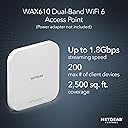
The NETGEAR WAX610 is a cloud-managed WiFi 6 dual-band AX1800 access point designed for small to medium businesses. It supports up to 200 clients across 2,500 sq. ft., offers 2.5G Ethernet connectivity, and flexible PoE+ or AC power options. With advanced security features like WPA3 and remote management via NETGEAR Insight, it delivers reliable, high-performance wireless networking tailored for modern professional environments.


| Antenna Location | Indoor |
| Antenna Type | Internal |
| Asin | B08D3693SV |
| Brand | NETGEAR |
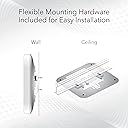
| Built In Media | Installation guide, WAX610 Insight Managed Wireless Access Point, Wall/ceiling mount kit |
| Color | white |
| Compatible Devices | Internet Protocol Camera |
| Connectivity Protocol | ethernet |
| Connectivity Range | 2500 Square Feet |
| Connectivity Technology | Ethernet, Wi-Fi |
| Control Method | App |
| Controller Type | Switch |
| Coverage | 2500 square feet |
| Customer Reviews | 4.5 4.5 out of 5 stars (248) 4.5 out of 5 stars |
| Data Transfer Rate | 1 Gigabits Per Second |
| Frequency | 2.4 |
| Frequency Band Class | Dual-Band |
| Has Internet Connectivity | Yes |
| Is Electric | Yes |
| Is Modem Compatible | No |
| Item Dimensions L X W X H | 20.3L x 20.3W x 7.6H centimeters |
| Item Weight | 635 g |
| Lan Port Bandwidth | 2500 megabits per second |
| Manufacturer | Netgear |
| Maximum Upstream Data Transfer Rate | 1 Gigabits Per Second |
| Mfr Part Number | WAX610 |
| Model Name | WAX610-100NAS |
| Model Number | WAX610-100NAS |
| Number Of Antennas | 4 |
| Number Of Items | 1 |
| Number Of Ports | 5 |
| Operating System | Windows XP |
| Other Special Features Of The Product | Access Point Mode |
| Router Network Type | hybrid |
| Security Protocol | WPA3 |
| Unit Count | 1 Count |
| Upc | 606449148282 |
| Voltage | 100240 Volts |
| Wi Fi Generation | WiFi 6 |
| Wireless Compability | 802.11ax |
User
Works great with Quest 2 and Virtual Desktop but be sure you have the right AC adapter/PoE injector
Bought this AP to get rid of lag and stutter on my Oculus Quest 2 with Virtual Desktop and this device did not disapoint but there were a few caveats. I have a Netgear R8000-100NAR router which is perfect for my home and the 6 people that live here. The extra 5GHz AC stream was a great upgrade from my Netgear R6400 which was dying and required weekly reboots when it hung. Most of my family does not have Wifi 6 devices anyway so 802.11ac was fine for them and the general coverage on the R8000 is really good.But enough about that. I bought an Oculus Quest 2 about a month ago. I learned I could bypass the link cable with Virtual Desktop to play my SteamVR games wirelessly. But the old router (and new one) was lagging and stuttering. I was getting the cap 866MBps with 25-40ms latency. My router is on the opposite end of the house and has to send wireless through 5 walls, a microwave, and refrigerator to get to where I use my Oculus for roomspace VR. I considered the fact that I'd made a terrible mistake with the R8000 and should have gotten a Wifi 6 router. But the R8000 was on sale and was a great buy for the price since its not new tech anymore. And even an AX router was not going to cut it here because of signal drop-off so I decided to buy and place this AP on the far end of the house where I use my Oculus the most. It is a dramatic improvement when playing VR from my PC to the Quest 2 headset and am getting a solid 1.2Gbps with 15-25ms latency. Games run smooth without stutter or artifacting (beyond what is happening with my really old gaming rig). So long story short, it's working and it works great.Here's what hit me though. Not that this is anything against the device but be aware and it might save you a headache. When I first plugged it in and tested, I was actually getting worse or equal performance to my 866Mbps AC connection. I wasn't really happy with that considering it's supposed to be faster. Firmware update didn't fix it. I knew the AP didn't come with an AC Adapter (12V - 2.5A), and I was okay with that. I had some really nice Cisco and Lucent PoE adapters for some SIP phones that I figured would work fine. But I was just casually looking at the AP and realized the power LED was amber. Looking in the AP notifications it said reduced throughput because of low power. I tried both brands of injectors to no avail, but remembered I had my AC adapter from the old R6400 router. Plugged it in instead and boom. Power LED went green, and the performance went through the roof. My point is this is a great AP., but make sure you have a suitable power adapter or the proper PoE injector for this particular AP as the industry standard ones I tried didn't work with it.
User
Excellent WAP, one of the best Netgear has ever made.
I have installed many a WAP (professionally) throughout the years, in a multitude of environments. While I have been underwhelmed by commercial Prosafe Netgear WAPs in the past, I gave this one a try anyway. I have never been happier with a purchase decision. It works splendidly, no hiccups, steady connection, and even the automatic band detection works better than some Cisco products I've used in the past. They did something right! Highly recommended, especially if you are using Netgear PoE++ switches and/or their Insight cloud service.
User
The best WiFi 6 Dual Band Access Point on the market, best value purchase
In the last two months I have been testing so many WiFi access points from many top brands such as Cisco, Netgear, Unifi, and Linksys, the goal was to find the best WiFi 6 AP at a reasonable price.I finally decided to go with this AP (WAX610, I bought the 3 packs at $378.54, which allows me to cover 7000sqft). This system works out of the box, after hookup to the Ethernet switch with POE+ and wait for the AP to completely boot up, it took me 5 minutes to set up via built-in web UI. I have been able to set up 4 SSIDs networks that allow me to isolate the main office VLAN, IoT items, and Guest network and assigned them to separates VLANs.After a week of testing I could not find any obvious issue, the only complaint I would like to bring up is the operating temperature is too hot. I really hope that Netgear will fix this issue in future hardware releases.Please look at some of my test photos attached with this review.
User
VERY GOOD value for wifi 6 AP
Easy to install with Netgear insight app. This device is meant for business use but being used at home.Purchased the Wax610 to mesh with a wac540. In the pic you can see the wax 610 is way smaller than wac 540. There is also a smartthings hub in picture so that gives you idea on size. Works as promised with no issues. Covers both floors of house and receive very good signal in all directions for about 200 feet. Will test some more once snow melts. One small issue is how ethernet cable plugs into unit it doesn't have carve out so that unit could lay flat if not using wall or ceiling brackets.
User
AP Awesome. Netgear Insight not so much!
I like the product. The problem is Netgear Insight. I know you never have to use Insight. Insight should be able control all options of the product connecting to Insight.
Trustpilot
3 weeks ago
2 weeks ago