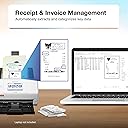
📈 Elevate your workflow with AI-powered speed and wireless freedom!
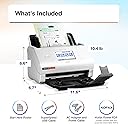
The Epson RapidReceipt RR-600W is a wireless desktop receipt and document scanner featuring ScanSmart AI PRO technology for intelligent data extraction. It offers ultra-fast duplex scanning at 35 pages per minute, a robust 100-page automatic document feeder with staple protection, and a 4.3-inch color touchscreen for PC-free operation. Designed for small businesses and professionals, it integrates seamlessly with financial software like QuickBooks and TurboTax, making receipt and invoice management effortless and efficient.


| Asin | B08P3ZXTP7 |
| Best Sellers Rank | #23,927 in Office Products (See Top 100 in Office Products) #20 in Document Scanners |
| Brand | Epson |
| Built In Media | Item |
| Color Depth | 24 bpp |
| Connection Type | Wi-Fi |
| Customer Reviews | 4.2 4.2 out of 5 stars (704) 4.2 out of 5 stars |
| Item Dimensions D X W X H | 14.25"D x 10.25"W x 12.38"H |
| Item Type Name | Receipt Scanner |
| Item Weight | 8.2 pounds |
| Light Source Type | LED |
| Manufacturer | Epson |
| Media Type | USB |
| Minimum System Requirements | Windows, macOS |
| Model Name | RapidReceipt RR-600W |
| Optical Sensor Technology | CIS |
| Resolution | 600 dpi |
| Scanner Type | Document, Receipt |
| Standard Sheet Capacity | 100 |
| Unit Count | 1 Count |
| Upc | 010343953512 |
| Warranty Description | 1-year limited warranty in the U.S. and Canada |
| Wattage | 13 watts |
User
Glad I Bought This!
Best document scanner I’ve ever tried. Quick, convenient, and easy to use. The software works with my MacBook just fine. I had a ton of receipts and other documents that needed to be filed and categorized and this made the process so much easier. The price is a little steep, but it’s worth it.Highly recommend.
User
Great! Organizer
I really love my Epson RR-600W scanner! It's been a huge time-saver for organizing receipts and documents. The wireless scanning feature lets me send scans directly to my phone or laptop, which is super convenient. The automatic document feeder handles stacks of receipts quickly without jams, and the scan quality is consistently sharp and clear.The bundled software is particularly impressive - it accurately extracts key information from receipts and can even categorize expenses automatically. I've found it saves about 80% of the time I used to spend manually entering expense data.Small footprint on my desk, reliable performance, and great scan quality make this an excellent choice for anyone needing to digitize receipts and documents efficiently. One of my best home office purchases this year. CopyRetry
User
No Computer Necessary! I push scans directly to NAS while stand alone.
I had this setup within 30 minutes, scanning documents to QNAP NAS with SMB share. It took a while( another 30 minutes ) to setup config for optimal performance for what I wanted, including custom icons. It does not scan like shown on TV for multi-page documents, I have to put a multi-page document in face down, upside down. Wifi works as if connected to PC. Scan2 works alongside the older Scan software, the drivers do not interfere. Epson Smart Panel from Android works too, scanned directly to phone first attempt. Scan quality is good, I did notice some tilted scans, I think was due to the exit tray pages blocking current scanning page. There are some Epson prompts that go away in 3 seconds, which works, just not the firmware one. Currently, I would buy this RR600W document scanner again just for the large display, stand alone features, scan directly to SMB Share. There is also Cloud and USB Stick destinations, I have not tested all the other features for receipts and OCR which is an advertised sweet point. This scans so fast I would not want my old, one of a kind, photos to go through it without protection; use a table scanner.
User
Doesn't function
The product arrived with no installation software and unclear instructions on how to assemble or activate the product other than to download software from a designated website. Once successfully assembled, an attempt was made to download the software. Cryptic and minimalist instructions on the website apparently resulted in a partial download, and the following message: "Unable to find necessary files. Make sure the following software is installed: - epsonscan2-epson event manager if the software is not installed, reinstall it again."Repeated installations resulted in the same message.Neither the user guide for the product nor the online help functions provided any meaningful content.An attempt was then made to contact customer support. After-hours support was not available. Verbal support was available only from 7:00 a.m. to 4:00 p.m. notwithstanding the fact the product had been delivered after 4:00 p.m.An attempt was then made to request support by email. Email support required the completion of a lengthy form which, after numerous repeated completions including the required captcha, resulted in the email request being consistently rejected.The next morning at approximately 10:30 a.m. an attempt was made to initiate telephone support. After the customary "all representatives are busy" message, a requested call back number for the customer was provided. At 1:30 p.m. a call back from a Epson representative was made. The caller was, typically, located in the Philippines. The connection was, typically, poor; the purported Epson representative was, typically, poorly versed in English.After answering a lengthy series of questions and being provided an opportunity to explain the problems with the Epson product, the Philippines representative indicated she was unable to provide assistance. She then transferred the call to a second party who was versed in English but, after several requested reinstallations of the software, was also unable to make the product functional. The second representative stated providing functionality would require the intervention of yet a third representative. The third representative was not available and a customer call back number was again required.Thereafter, from approximately 1:37 p.m. to 4:50 p.m., in constant contact with Epson Representatives, repeated attempts to make the product function wholly, or even significantly partially, failed even when an alternative computer was employed.At 4:50 p.m. the conversation was abruptly terminated and an attempt to re-establish connection was summarily rejected by the Epson number previously provided.Further customer attempts to download the requisite Epson software required repeated download attempts and excessively long sequential download times. Once the downloads were presumably completed, a subsequent lengthy update download was required.After all the apparent downloads were completed, an attempt was made to utilize the product by inputting numerous business cards. That input appeared to be successful notwithstanding great difficulty in establishing and identifying a file in which the downloads were/could be saved. Once the business card file was established and presumably saved, attempts to view the contents of the file were totally unsuccessful. The file appeared to contain no records whatsoever. When opened the file folder appeared completely empty with no files whatsoever to be read
User
Included product sales is a scam.
I purchased this product a few months ago. The product is fine. However, included with the quick start info, were the directions for Driver Support install Total scam - stealing money every month. Impossible to cancel - Total scam. I am very disappointed with Epson and it's distribution chain for the inclusion of the Driver Support literature. Not the same world that I grew up in.
User
The perfect companion for getting involved in digital document archiving.
I bought the RR-600W to replace the duplex scanner on a big color laser printer. This meant I needed a compact scanner that could do:- auto document feed- 2-sided scanning- presets- network file transferThis model checks all of the boxes. The device is quite small yet creates very good quality scans. The interface is user-friendly and pretty straightforward. I set up a preset for 1-sided scanning and another for 2-sided scanning to a local SMB share that is attached to my Paperless-ngx document manager.This is so easy to use! I was able to teach my family to use it, now they can digitize their documents too. It has the ability to add more pages when the loaded pages have been scanned which is really useful, and helps to group different documents into one final scanned doc. I'm very impressed with the features and speed of this little guy and would readily recommend it.
User
Escáner de muy buena calidad
Escáner de muy buena calidad. Rápido y fácil de manejar.
User
Meets all my Integration needs with old and new applications
I absolutely love this Scanner. The only down side for me was changing the stacking order of the pages from laying the pages top down to turning the stack around with the first page on the bottom to get the pages in the Top-Down order. This scanner is fast and with its scanning destination option is well suited for my needs. In time it will completely replace my obsolete and discontinued Neat scanner. There has been nothing like the Neat desktop application since around 2018. This scanner allows me to effectively use the discontinued Neat application print-to -Neat to replace the proprietary Neat scanner driver. This scanner is obviously Intune with current applications. However, it is a little costly
User
Rapidreceipt Rr-600w
Flawless and was incredibly easy to get it up and running. Quality, Speed in scanning and does a great Job with scanning different size forms and slips. Highly recommend this scanner for the money.
User
Perfect
Perfect
User
facture de n'importe quelle épaisseur
très facile a utilisé prend plusieurs factures en même temps
User
Almost perfect, 9 out of 10
I like it, the only reason I don't give it 5 stars is because of this, once you saved what you scanned and you notice you forgot a receipt, it's impossible to edit . It would be nice to be able to send a saved scan back in the scanner to edit or add a receipt instead of having to re-scan everything
User
Doesnt pick up details, or when it does, its wrong
I had high hopes for this machine, unfortunately for me it has multiple issues:1) It constantly loses the connection with the computer and needs to be shut off and reset2) When you review the scan and update the info that has been recorded off the receipt (which is 75% of the time wrong) even after you correct it, it still imports into Quick books with the wrong date, wrong info so you end up typing in the details of the receipt all over again. I next to NEVER write reviews but this thing is an absolute waste of money.3) Its just faster to enter into QB manually then using the scanner, the only benefit from it is it will add the scan to the file so you can referenced it later if needed.
Trustpilot
1 week ago
1 week ago