🚀 Elevate your home network to pro-level speed and coverage — don’t get left buffering!
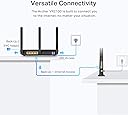
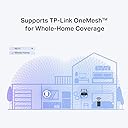
The TP-Link Archer VR2100 is a powerful AC2100 dual-band modem router combining Super VDSL technology with MU-MIMO for ultra-fast internet speeds up to 2.1 Gbps. Featuring four Gigabit Ethernet ports, a USB 3.0 port, and OneMesh™ compatibility, it delivers seamless whole-home coverage and versatile connectivity tailored for demanding home and office environments.
| ASIN | B0851D1MF3 |
| Are Batteries Included | No |
| Best Sellers Rank | #57,109 in Computers ( See Top 100 in Computers ) #924 in Routers |
| Brand | TP-Link |
| Color | Black |
| Connectivity Type | Wi-Fi |
| Customer Reviews | 4.2 4.2 out of 5 stars (455) |
| Date First Available | 21 March 2020 |
| Item Weight | 1.13 Kilograms |
| Item model number | Archer VR2100 |
| Manufacturer | TP-Link |
| Number of Ethernet Ports | 3 |
| Operating System | Windows |
| Product Dimensions | 21.6 x 16.4 x 3.7 cm; 1.13 kg |
| Series | Archer VR2100 |
| Voltage | 12 Volts |
| Wireless Type | 802.11ac |
G**S
I used it as an internet connection between my computer destop and the modem.
C**A
Modem was delivered in Australia with a UK plug hard wired to the transformer that is incompatible with Australian power outlets. You will need to source either a bulky UK/AUS adaptor to connect to power outlet OR a different transformer with an Australian power plug. I 'borrowed' a transformer with compatible specs (12V/2amp) from a PVR already in the home. Thereafter the installation and setup went well enough.
P**O
Ever since upgrading to Sky Q we've had issues with our broadband. Drop outs, buffering when watching prime video, even the WIFI signal on my PC was terrible, resulting in poor latency and slow download speeds. I tried power line adapters, which work fine with my wife's work PC, but mine is on the other side of the house so the signal crosses over the main power junction box, so the connection is pants (although even my laptop was rubbish, even when sat 2 foot from the router) I'd had enough, so did a bit of research. I had read a few things about modems needing certain settings/features to work with Sky, so I was a bit apprehensive about committing to something that might not work. I bit the bullet on this model (VR2100) and I'm so glad I did. The router feels great, build quality is nice, nice big antennas and the setup was easy as pie. I plugged it in, followed the instructions, selecting the Sky option, and... it just worked. I downloaded the app to my phone so now I can easily see what devices are connected to the network, I've labeled each device up in the app so I can see exactly what each one is (kids tablets, Sky box, mine and the wife's phones etc) and set up a seperate guest network for people who come over. The user interface is so easy to use, and now I can control connections, set time limits on devices, even block and kick devices from the network. I did turn the auto switching off, I found my phone was struggling switching between the two frequencies, so I have stuff that's static/in the same room as the router connected to the 5ghz band, the rest is on the 2.4Ghz. I also bought a low profile USB drive and plugged it into the USB port on the side of the router, you can barely even see it in there but now I have network attached storage, so I can easily transfer files between PC/Laptop without using the cloud, and back up photos or other things. I would absolutely recommend this to anyone. My PC download speeds are now running at full speed (we're on a 40 meg connection) and my connection when gaming is solid and ping/latencies are really low. If you have a Sky Q router, just do yourself a favour and throw it in the bin. Get one of these, you won't regret it!
C**E
Worked really well until it didn’t which I’m really surprised about as I have multiple TP-Link products, all of which are going strong. Contacted support and spoke to JerryA via chat who was so helpful and patient with me. Still under warranty so a replacement is on the way. Great customer service.
C**R
After changing to an ISP with a business line, I originally purchased a TP-Link C2300 router with an expensive modem from another brand, expecting really reliable performance, only to experience no end of trouble, needing to restart the modem frequently as the speed would grind to a halt on a regular basis. After more than a year of frustration I was reluctant to buy another separate modem, so I decided to give this a go as a cheap option and it worked pretty much flawlessly straight out of the box. The set up was easy and all the previous hassles experienced with the other modem disappeared immediately. The tether app on the smartphone makes set up practically automatic. There are a couple negatives though and the main one is lack of support for WPA3 security over wi-fi. I hadn't read the small print and just assumed it would be there at time of purchase, so I was rather dismayed to find that missing. Later on my wife started working from home with her work computer and it refused to connect for more than a few seconds before kicking her off. The reason was that her IT department had set WPA3 as a minimum requirement, so if you are bringing home a work laptop, this may not be a good option for you. I actually solved this after having a brainwave and setting it up to operate purely as a modem in bridge mode, then connect it to the C2300 router, which offers better security and a stronger signal, so finally it all works brilliantly. It looks a bit strange having both devices there, but the combination works well and the C2100 is quite flexible in the sense that it can be used as a standalone modem, router or both together, as will be the case for most users. If it had better wi-fi security I'd give it 5 stars at this price.
Trustpilot
1 month ago
1 month ago