📺 Go wireless, go big — your screen’s new best friend!
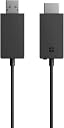
The Microsoft Wireless Display Adapter V2 is a compact, plug-and-play device that wirelessly mirrors your Windows 10/8.1 Miracast-enabled device screens to HDTVs or monitors up to 23 feet away. Perfect for professionals seeking seamless presentations or immersive media streaming, it supports Surface devices and other compatible Windows gadgets, modernizing meetings and entertainment with reliable, high-quality wireless display technology.
| ASIN | B01C9YTI9S |
| Best Sellers Rank | #487 in USB Computer Network Adapters #120,089 in Electronics Accessories & Supplies |
| Brand | Microsoft |
| Built-In Media | 1 product |
| Color | Black |
| Compatible Devices | microsoft |
| Connector Type | HDMI |
| Current Rating | 1 Amps |
| Customer Reviews | 4.5 out of 5 stars 4,061 Reviews |
| External Testing Certification | Não aplicável |
| Finish | Projector |
| Global Trade Identification Number | 00889842003192, 04058154049778 |
| Item Dimensions | 4.07 x 0.87 x 0.43 inches |
| Item Height | 11 millimeters |
| Item Weight | 33.1 Grams |
| Item dimensions L x W x H | 4.07 x 0.87 x 0.43 inches |
| Manufacturer | Microsoft |
| Model Number | P3Q-00003 |
| Number of Items | 1 |
| Number of Ports | 2 |
| Package Quantity | 1 |
| Power Plug Type | Type A - 2 pin (North American) |
| Specific Uses For Product | Monitor,Projector |
| UPC | 889842003192 |
| Unit Count | 1 Count |
| Warranty Type | Limited |
C**N
Excellent product and support from Microsoft! Using it now with the latest Windows 10 1803 update
I would highly recommend this product, for hooking up a flat-screen TV that has HDMI ports, to your Windows computer . I use it with my Surface Pro 4 (i7 Processor, 16gb RAM & 256gb SSD), under Windows 10 Pro. Nice out of box experience. In fact, before I got the Wireless Display Adapter V2, my Surface Pro docking station was not able to use more than 2 speakers, connected to my Receiver (which has 5 speakers) through the HDMI physical cable). While my MacBook Pro running Windows 10 Pro, was able to use all 5 speakers, for TV sound through the HDMI cable. Even Microsoft's easily accessible phone support was not able to help me utilize all 5 speakers, before I got the Wireless Adapter. But once I got the Wireless Adapter, the 3 other speakers (including the woofer), started working like magic! I installed the Windows 10 1803 update two days ago and I was worried, because it seemed like it was taking too long for the flat-screen TV to connect. I immediately called Microsoft Tech Support (almost no wait time) and the TV started working about one minute before I got hold of the Tech Support Rep. With my approval, the Tech Rep took a look -remotely-and it looked fine. The Tech Rep noticed a problem with one of my docking station's USB ports in Device Manager (a problem unrelated to this Wireless Display Adapter) and after about one minute and a reboot, the USB problem was fixed. I would highly recommend this product and thank Microsoft for their excellent and easily accessible Tech Support!
W**)
The best for Android
Screen mirroring tools from Android mobile devices run a pretty big gamut, but if you're looking for an easy to use, reliable device with a quality picture, there's not really anywhere else to go but here. Excellent full screen projection, high quality reciever, and a vivid, colorful display. The Microsoft Wireless Display Adapter is exactly what I needed when I wanted to cast my screen. I will be thinking twice about getting any other product in the future.
N**N
Works perfectly fine, but you have to know what you're buying.
This adapter works great for what I needed it for, which was to broadcast my computer screen on a tv without wires. If you're worried about the bad reviews of people saying they can't connect or update it, here's the thing: This product does NOT work on Windows 11 right out of the box. This version of the Microsoft Display Adapter was first introduced in 2014. Windows 11 was introduced in 2021. Some of you may luckily get an adapter that has been updated before it was packaged, so a few of you might luckily get one that does work well with Windows 11 right out of the box, but that's extremely rare. You MUST first connect and update this in a Windows 10 device. Only once you do that update will you be able to use this with Windows 11 devices. The newer 4k version of this adapter is the one that works with Windows 11 right out of the box.
N**5
Exceptional. Far better than expected.
I purchased this to mirror my PC screen for a golf simulator. I had previously been mirroring with Roku, which produced a choppy and laggy video. Roku is fantastic for streaming YouTube, Amazon Prime, Hulu, etc., but it is neat good for mirroring a PC screen/video game. Installation and operation couldn't possibly be any more simple. I plugged it into my projector, and about 15 seconds later, Windows Key + K, then select the Microsoft Display adapter. No software installation is required at all. There is almost zero lag and no choppiness at all. I'm kicking myself for not purchasing it sooner.
S**R
Surprisingly easy and seemless experience
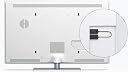
Plug it into the HDMI port of TV, plug in the USB end to a USB port on the TV(for power). For Windows10 search 'connect to wireless display' or if using a laptop it most likely has a function key that looks like a monitor for choosing projectors or secondary displays. Either way there is a 'connect to wireless display' button, hit that and wait a few seconds and you'll see your TV show up on the list. Click on it and another few seconds you'll have a 2nd display that can be used as a clone, an extension, or as the sole display. I've had no issues with lag, drop out, audio glitches, or anything else negative. Just a smooth extended monitor. I have not tested range, however, as I use mine within 10-15feet of the receiver.
A**T
Works good once set up properly.
I bought this to use with a Lenovo laptop with windows 11 on. It didn't connect to this display adapter. But it was working with another laptop with Win 10 installed. I updated the firmware in the Widi adapter and the issue was solved but it took me days to figure out the solution. The firmware update I got wasn't new. It was a few years old already. I don't understand why they sell these adapters with a firmware from 2021.
R**N
ok
Ok, not greate
H**I
It's Okay
I bought the first version a couple years ago and ended up returning it. It was far too laggy, and the audio/picture would not sync properly. I would always have to pause and unpause so it would re-sync. While this one is better, it still suffers from the same issues. Just not as much. Setting the picture quality in certain apps to 720p HD on my Galaxy S9, it pretty much works flawlessly while watching media. Netlfix, Hulu, YouTube TV, DisneyPlus all work really well. Unfortunately, setting the quality to Full HD (1080p), it starts to have problems like the first version. I'm hoping the 4K version is somehow better than these.
Trustpilot
2 months ago
1 month ago