Desertcart purchases this item on your behalf and handles shipping, customs, and support to Seychelles.
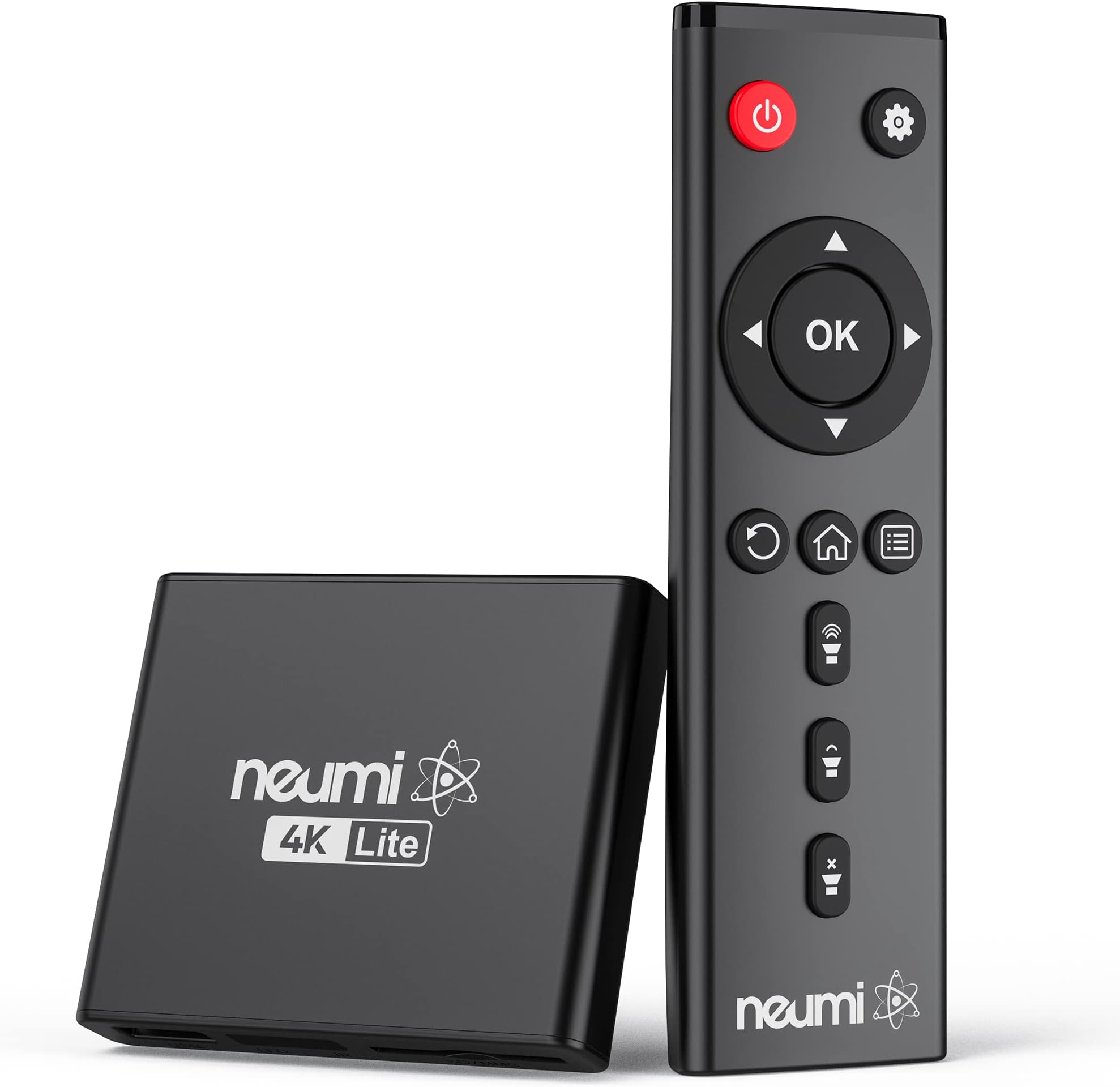
🎬 Unlock your media’s full potential with NEUMI Atom 4K Lite — where simplicity meets stunning 4K brilliance!
The NEUMI Atom 4K Lite is a compact, user-friendly digital media player that supports ultra-high-definition 4K video playback at 60Hz via HDMI. It reads USB drives up to 8TB and SD cards up to 1TB, supporting a wide range of video, photo, and audio formats. Featuring automatic playback, resume functionality, and a unique trigger sensor input for interactive use, it’s perfect for home theaters, digital signage, and creative installations. Its small form factor and broad compatibility make it an affordable, versatile solution for modern media consumption.
| ASIN | B08MFFVD1P |
| Best Sellers Rank | #9,162 in Electronics ( See Top 100 in Electronics ) #43 in Streaming Media Players |
| Brand | NEUMITECH |
| Color | Black |
| Compatible Devices | Television |
| Connectivity Technology | HDMI, USB |
| Connector Type | HDMI |
| Controller Type | Remote Control |
| Customer Reviews | 4.4 out of 5 stars 567 Reviews |
| Form Factor | Media Player Box |
| Item Dimensions L x W x H | 3"L x 2.6"W x 0.6"H |
| Item Weight | 9.9 ounces |
| Manufacturer | NEUMITECH |
| Memory Storage Capacity | 4 TB |
| Mfr Part Number | ATOM 2K |
| Model Name | digital media player |
| Model Number | ATOM 4K Lite |
| Other Special Features of the Product | Seamless video switching, trigger capability |
| Resolution | 4k |
| Special Feature | Seamless video switching, trigger capability |
| Unit Count | 1 Count |
| Video Codec | H.264/AVC, H.265/HEVC |
| Video Output Resolution | 2160p/60Hz (4K/UHD) |
K**R
Good in a pinch for needed use, certainly worth the $.
It's working as advertised and well worth the $. I've had connectivity issues on one part of my room and where my bed is so I've put lots of stuff on chip - also my own music, music, photos - and these devices play it well. The ONLY complaint - not worth a star but it's a warning in case - they seem largely in one "Mode" or another. That is you have to go to the root menu to play Videos, to play audio only files and then again to view photos... I don't see why they can't make them just do all of it. This particular model does load most files rapidly and has more options but can't rotate photos without going to the setup it seems. An earlier one (different brand) did rotate photos and had a cool zoom feature BUT it took forever for any image > old school SD media to load and did it EVERY time so if you backed out of the photo into the same directory you'd have to wait fora slow crawl. Not here. It also plays more files without error or saying non-supported format vs the earlier model (different brand I think) bought 5+ years ago. Also this thing's remote doesn't disrupt a Insignia or Samsung TV which that earlier one did. I'm just posting these in case anyone has those issues. This is an edge tech but pretty fun and worth the $.
J**T
Good little device that does what it's supposed to!
We ripped much of our music CDs to an external hard drive and also stored our music videos on it. We were surprised to learn we could connect the hard drive to our Sony Blu-Ray/dvd player with a USB cable and play these files over our TV. However we have more than one TV and didn't want to move the dvd player back and forth. With a quick search we learned there was such a thing as a media player. We bought the NEUMI device because it was the cheapest on Amazon at the time and it had good reviews. We plugged it in (hard drive to NEUMI by USB, NEUMI to TV by HDMI) and ta-da! it worked. It actually recognized the hard drive with less fuss than the dvd player does. The picture and sound quality are, as far as I can tell, the same (although the small TV is a limiting factor for the sound). The remote is pretty easy to use and has positive "feel" to it - no delay or need to press more than once. We play .flac, .mp3 and even .wav audio files and .mp4 video files and have had no problems (some of the video files are over 2 Gb in size.) We use a 4 TB Western Digital external hard drive also with no problems. One criticism is the NEUMI usually doesn't show the metadata (artist, song title, album) for the music files although there is a place for it on the screen--it does show the file name which is usually the song title. The Sony dvd player does show the metadata for the same files. Also, sometimes it is hard to navigate backwards without going past the screen you want. All in all, it's a good little device than does what we want it to. I'd say 4 and a half stars but I'm rounding up to 5. (If it starts having problems or stops working, I'll update my review.) We're in the process of downsizing and we think that with a decent sound bar we won't bother with a separate stereo system.
B**C
A tiny, no‑nonsense 4K player that just works
This little NEUMI box surprised me with how quickly it boots and how reliably it plays files from a USB drive. The interface is barebones, but that’s exactly what makes it easy — plug in storage, power it on, and it starts playing without any fuss. It handled 4K files smoothly, and the HDMI output looks clean on a projector or TV. Build quality is lightweight but solid enough for a set‑and‑forget setup. If you just need a simple media player for looping videos, signage, or basic playback without streaming apps or complicated menus, this one gets the job done with zero drama.
K**L
Simple yet quality video player for lots of uses.
Seems to be working just fine with the exception of the remote which, despite having fresh batteries, doesn't work. At all. Fortunately, the remote for my Micca works as a replacement. I like the picture quality & supports a good number of file formats. If you have a bunch of videos on flash drives, etc. & want to play them, this is a good way to go. Four stars for the item quality but minus 1 star as the remote supplied doesn't work.
P**N
works for TV-based slide show; no USB power
Modern TVs should be able to do slide shows all by themselves, but I've never found one that could be programmed to turn itself on at, e.g., 10 am every day and start going through images on a USB stick. An LG TV, at least, can be programmed to turn itself on and show whatever is on HDMI2, for example. If you plug this Neumi device into HDMI2, therefore, you can have a digital photo frame on your wall during the daytime instead of a big black void. There are two menus that you need to use, one for the overall device (set to autoplay photos) and one for the slide show itself. The settings seem to be sticky so they should survive power failures. For autoplay you need to format a USB drive as NTFS and put all of the photos at the top level of the drive (can't organize into folders). This device comes with a wall wart, which makes no sense in our age of USB/USB-C. This makes it tough to have the device turn on/off with the TV. Also, the remote is infrared-based instead of radio/Bluetooth. It would be better if one could control this from a phone via Bluetooth or at least with an RF-based remote so that the box could be hidden behind the TV. It doesn't seem to have an option to display either the filename or a caption associated with each photo. The device is compact enough to travel with so if you need to do a slide show on a TV at an event and don't want to rely on a laptop computer this could be useful.
N**Y
So far, great - knock it down one star though - give it back (see end)
The setup is simple, and the interface bare bones child's play, easy. It takes a few seconds to warm up, but flashes through the attached drive quickly. It handles subtitles, both embedded and srt, something my $1,400 smart TV refuses to do with the USB input. It's supposed to handle 2T drives, but the first one I hooked up did not work. The unit displayed the directory structure, but wouldn't display any files in them, I got an error message that no supported files were found. I tried a 32 gig stick, and that worked, so it occurred to me the 2T drive I tried was several years old, a WD My Passport. I tried a newer 2T Seagate, and no problem. The upscaling engines in Vizio TVs excel at handling 1080p files directly from the USB input, though of course the handling is primitive, limited size, format, no fast forward, no subtitles, ridiculous (clearly they don't want you using your own files, it cuts into their streaming money). All those problems vanish with this box, and the upscaling engine seems to handle the HDMI stream just as well, I couldn't detect any difference compared to the direct digital access to the video files. Some of the first files I tried were 1080p x265, and they were awful, swirling lines in dark backgrounds, extreme color saturation. But when I played the same files through USB, it was the same thing. I had to go to a 5.1G x264 file, and that's something the USB input would never play, too big. Only a set top box can deliver a file that size, at least to a Vizio. Odd, usually x265's are fine, just a couple of examples that weren't, poor processing at the upload end I guess. But the Neumi saved the day. What else? The power cord is a bit short, and as others have pointed out, the remote range is an issue. You have to be careful to leave the face of the box clear for the remote to see it. It comes with an RCA cable . . . for what? What kind of modern device has RCA inputs these days? They should have dropped that and moved the USB input to the back panel. If someone needed RCA they could always use a cheap HDMI converter cable. One small glitch, even after you turn it off, the USB port remains powered for some reason, meaning that the attached drive continues to run, not good. The solution is to unplug the drive of course, but to keep the wear and tear down on the ports, I have a short USB extension cable attached to the Neumi, and also one for the main drive I use, so that the cord connections can take the beating. It also means the Neumi stays in place better. Note that it's so light, even the curl in an HDMI cable shoves it around, so I had to tape it in place. And, there's no explanation for what the remote buttons do in the packaging, but there's just a few of them, easy to figure out. Apparently any drive connected to it acquires a new directory called "LOST.DIR", but it's harmless. Often inexpensive video equipment from you know where doesn't last very long, even though they're solid state. The other reviews don't seem to show a systemic problem, so we'll see. If it does live, device of the decade. Ed: I decided to buy a Vernatim SSD as my working drive for this thing, but the box won't recognize it when it starts up with the drive already connected. You have to let the Neumi boot up and then plug it in. Which is fine, because I don't leave the drive in when the box is off, as the USB port is still hot. Whether this is a Verbatim thing or not, I don't know. Also wik: It was the Verbatim drive, that's just a mess. It's formatted to FAT32 and apparently can't be changed, though I'm not sure that was the issue. In any case, I substituted a Samsung SSD and the Neumi box sees that drive just fine, whether it's connected before or after starting up. Everything is going well, this little $45 box is humming along nicely. I do wish you could change the appearance of the main screens, the multi-colored pastel thing is not my cup of meat. Details, details. Also also wik: I'm having intermittent problems with brand new Seagate 2T drives. Sometimes it works, sometimes it freezes in the middle of a file, and the only solution is to shut down and unplug. You could use the Samsung SSD as a working drive, and copy over what you wanted to watch, but that messes up the spontaneity of browsing through a collection. Or, you could just pony up for the SSD's and abandon "normal" external drives. Oh well, the box works so seamlessly otherwise, I'm willing to put up with this problem. Also also also wik: I just had a problem with separate srt subtitles (for "Shadow Detective"). The file played normally for the first ten minutes, and then the subs vanished. They didn't appear at all for the next five episodes. In the end, I had to hard code them with iDealshare. Maybe it was just a glitch with this series, but all the files played correctly on VLC. Ed: The remote quit working, I thought it just batteries (aziz), but new ones didn't help. I finally got it working again after cleaning the contacts, but in the meantime I broke out the remote from my backup, recently purchased, and zang! That remote works massively better than the original, crisp. I assume they heard the complaints and made some changes. Add back the star then, for this brilliant device. After some trial and error, I only use an SSD drive these days, 2T. I've had no issues since. I keep the backups on old-style external hard disks, which apparently last longer in storage, and just use the SSD as the current working drive, deleting shows after I watch them. Which leaves plenty of room for my entire movie collection, all my music, and tons of archived classic TV. I use 1080p 264 files, about 3-5 megs each, and the Neumi eats them up with relish.
S**Y
Works fine except...
Works fine except it does not have video control buttons on the remote and I could kick myself for not realizing this sooner. The video and sound quality are not as good as my firetv stick however the one star is for selling this item at the price point it is where I now have a useless remote and need to buy another remote from the manufacturer therefore increasing the price of the actual project and experiencing further delays.
Y**R
No way it's 4K
I've ripped dozens of DVDs to MVK files, and wanted something I could leave plugged into my main TV that would allow me to access my media quickly and easily. Well, I guess the Neumi player was quick and easy, but the quality was atrocious! The audio/video/subtitles of my MKVs didn't line up. I don't think the player is capable of deinterlacing because many videos have horizontal lines running through them and choppy picture during action scenes. It played the MP4 files a little better, but I have no interest in devoting the time it would take to convert all my video to MP4. I actually panicked when I first played video on this media player because I thought I messed up the rips somehow, or the files were corrupted... But I checked their value using AirPlay from my MacBook and the same grainy, distorted files played really beautifully that way. I really just didn't want to have to involve my laptop to play my digital videos. This player may be useful for traveling, but it has no internal memory. Fortunately, it does handle pretty large flash drives formatted to exFAT. I tried a few other media players with similar quality results. At least the Neumi player has the best remote of them all. Minimal buttons make it easy for fingers to navigate in a dark room, and its range is leaps and bounds better than the Micca media player's remote.
M**A
Arnaque
Notice en chinois, il faut le renvoyer aux USA 35 euros de port pas un bon achat
P**A
Finger weg
Hatte mich für dieses Gerät entschieden da es nach Beschreibung alle gängigen Formate wiedergibt. An sich Kein schlechtes Gerät, leicht einzurichten und die Menüführung selbsterklärend. Das Problem ist nur das es kein einziges USB Gerät größer als 64 gb erkennt. Egal ob Stick oder Festplatte, egal wie es formatiert ist. Ein Stick mit 32 gb läuft super. Meine sämtlichen Festplatten, auch neuester Generation werden nicht erkannt, nicht mal eine SSD !!! Keine Ahnung wie die positiven Rezessionen zustande kommen. Das Ding ist Schrott, Finger weg davon.
R**B
Returned
Returned as it didn't work for me. Bought a more expensive one instead that works perfectly.
B**2
Buen producto
Buen producto, no me fijé que era el "lite", sin embargo trabaja muy bien como el 4k normal
T**R
Funktioniert tadellos - mit Steckeradapter US zu EU (nicht enthalten)
So läuft‘s auf dem Messestand mit jedem TV. Davor hatte ich immense Probleme, vom USB-Stick die Videos abzuspielen. Benötigt Netzanschluss 220 V
Trustpilot
2 months ago
1 week ago