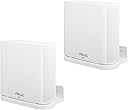

📡 Elevate your WiFi game—because your mesh deserves the spotlight!
This wall mount holder is precision-crafted for ASUS ZenWiFi AX and AC Whole-Home Tri-Band Mesh WiFi 6 systems, providing secure, elevated placement that enhances signal strength and keeps your devices safe from pets and kids. The package includes all necessary mounting hardware, ensuring a quick, stable installation that doubles as a sleek home décor upgrade.
| ASIN | B08MW631K2 |
| Best Sellers Rank | #49,744 in Computers ( See Top 100 in Computers ) #155 in Whole Home & Mesh Wi-Fi Systems |
| Color | White 2Pack |
| Connectivity technologies | Wi-Fi |
| Customer Reviews | 4.4 4.4 out of 5 stars (36) |
| Date First Available | 11 February 2021 |
| Frequency | 5 GHz |
| Item Weight | 215 g |
| Item model number | ASUS ZenWiFi AX |
| OS | RouterOS |
| Other display features | CE |
| Package Dimensions | 17.1 x 13.3 x 5.2 cm; 215 g |
| Special features | WPS |
| Whats in the box | Screws and dry wall anchors |
| Wireless communication technologies | Wi-Fi |
M**W
I have a mesh system with 3 nodes and noticed that things like placing a node behind the TV, near the floor, behind most solid obstructions, or in an area of congestion (like lots of electrical wires, lots of Wi-Fi devices, or strong magnetic fields) seemed to cause issues. Just getting the router up a little made a big difference. For example, I mounted one node behind the TV near the top of the TV and it made a difference. It’s still hidden from view by the TV screen, but connections are more robust than when it was sitting on the TV cabinet (down at the bottom, rear of the TV). The best defense against issues from a cluster of Wi-Fi devices is to use a switch … changing as many Wi-Fi devices to wired ethernet connections as possible.
K**R
Well fitting support. Changed mounting screws and wall anchors. Delivery timely. Packaging undamaged.
E**S
This is a custom fit mount for the ASUS ZenWiFi AX. It’s well made and holds the weight of the router. The one thing they need to fix are the installation and use instructions. They provide no guidance whatsoever about how to remove the router from the mount. It’s tricky! You need to push a flat head screwdriver behind the outermost tabs and pull the router back towards the wall to remove at an angle.
A**E
Perfect fit for my ASUS ZenWiFi ET8. Easy wall mount installation. Some say the bottom isn't finished but this doesn't really bother me.
J**R
I ordered a different sellers supposedly same item which were too small to fit my ASUS AX6600 XT8 routers and were returned. As for durability they seem sturdy.
Trustpilot
1 month ago
5 days ago