⚡ Power up your laptop’s potential — desktop GPU performance, anywhere.
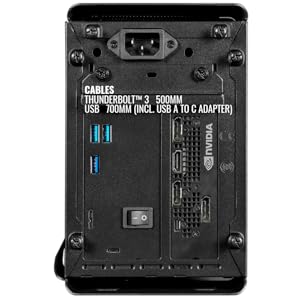
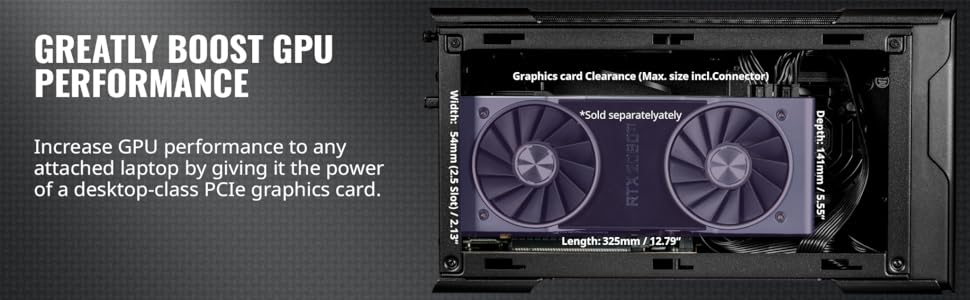
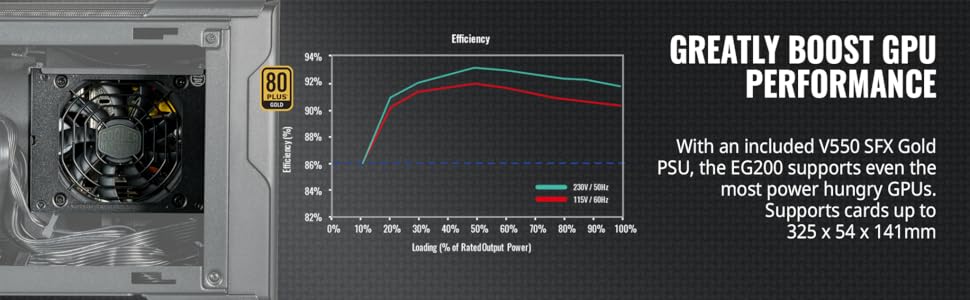
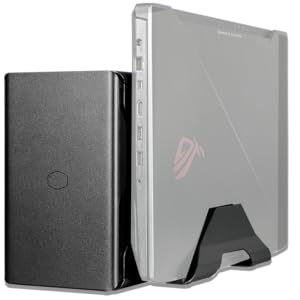
The Cooler Master MasterCase EG200 is a compact, metal external GPU enclosure featuring Thunderbolt 3 connectivity with 40 Gbit/s transfer speeds and 60W laptop charging. It supports full-sized desktop GPUs with a 550W PSU, includes a hard drive dock for 3.5" or 2.5" HDD/SSD expansion, and integrates a laptop stand to streamline your workspace. Ideal for gamers and professionals seeking desktop-class graphics performance on the go.



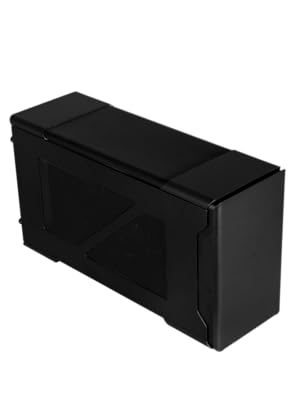

| ASIN | B08T63FV2C |
| Customer Reviews | 3.7 3.7 out of 5 stars (22) |
| Date First Available | January 15, 2021 |
| Item Weight | 11.92 pounds |
| Item model number | MCM-EG200-KNNA55-S00 |
| Manufacturer | Cooler Master |
| Product Dimensions | 15.08 x 5.51 x 8.19 inches |
A**R
EGPU Enclosure Comparsion
I am posting this review to all of the EGPU enclosures that I tried in the hopes that it might help someone else that's trying to make a purchase decision. I'm ranking these from most favorite to least favorite. My primary goals are to be able to run 4x 1440p external monitors and I want the unit to be super quiet and reliable. I tested each with the following equipment: 1. 2019 16" MacBook Pro 2. Dell XPS 13 9305 and 7390 3. Lenovo ThinkPad P1 Gen 3 4. AMD 5500XT GPU 5. Nvidia 1060 GPU 6. Four Acer 27" 1440p displays 1. Cooler Master MasterCase EG200 - while the most expensive out of the bunch, it is my favorite due to best compatibility, reliability, and lowest noise level in my experience. This one also seems to have the best build quality and easiest to replace the PSU later if I ever want to. Also includes a built in stand for my laptop. 2. Razer Core X Chroma. Great build quality but the case fan and PSU fans are both far too loud for my liking. I also could not get the ethernet port to work with my MacBook Pro 16" but that worked fine with my Windows laptops. The PSU and fan also seems harder to change if I ever want to do that in the future. 3. Sonnet Breakaway Box 750ex. Great feature set but clearly not built as well as the Cooler Master or Razer and more importantly I could not get it to work at all with any of my equipment so worthless to me. 4. Sonnet Breakaway Box 750. Same story as #3 but thought perhaps I just had bad luck with the 750ex. Nope! Could not get it to work with any of the equipment listed above.
K**R
Great Product, Does Not Work on Windows 11
Title says it all, product is fantastic so long as you dont need it to work on windows 11. The product will not function if you are using win11.
C**S
Couldn’t get it to work
I was unable to get this to work on two different laptops; not sure if I got a bad unit but it was never detected on the thunderbolt port. I wasn’t able to find anything in the way of official documentation or instructions, and the troubleshooting recommendations of the eGPU community seemed hacky for making it work… I ended up locking up a Linux laptop following advice for getting it to use the eGPU (had to ssh into it to revert my changes). Again I may have gotten a bad unit but it was not plug and play at all.
O**C
Windows 11 issues have not been fixed
Edit: CM Support officially confimed to me that they aren't even going to make the effort to make it compatible with Windows 11. Worked great on my Windows 10 laptop running a dual fan 3060 Ti. Irresolvable Code 12 issues after I upgraded to Windows 11 for work. The usual troubleshooting steps on egpu.io don't work. I know eGPUs are notoriously finicky, but this seems to be an EG200-specific issue. Now it's just a paperweight until Windows 11 issues are sorted out. Forum posts about this have been popping up since January 2022 and there seems to be no progress on finding a solution. CM support has been unhelpful as well.
M**S
Works as expected
Have a small mini PC . Runs Windows 11 pro that works great but lacked a bit in video quality. It has an intel board with thunderbolt 4 support. Bought a EVGA 3080 video card. I know over kill. I can play all games at ultra level with great frame rates. The 3080 just barely fit . Saw some comments where no video using USB-C . It’s my understanding you need either Thunderbolt 3or4 to make the connection. There is also a USB port if you are going to use the built in HDD dock. However you only need the thunderbolt cable if not using the internal HDD bay. Only issue I ran into at install was my video card was a few mils bigger than specs. Was able to make it fit. Also I had to load drivers before I was able to get my mini pc to see the external GPU as a display device. Case is heavy . Feels like it could take a good drop and hold up. Power supply is more than enough for any video card out there. Comes with extra cables if your video card takes more than 2 power cables . Probably a little pricey for a case and power supply but it does what its intended to do.
G**S
The best headache ever!
Love this thing! Took my laptop from barely being able to handle the more intensive games on low and 1080p to crushing the same games on ultra and 4k with my rtx 3050. However, be WARNED, getting these enclosures to work with laptops can require quite a bit of work (think i spent a good 4 days trying to get my gpu recognized) and pc know-how. If you find your cards not coming up plug and play wise hit up egpu.io's website (Google it) Also I got mine used and it was practically brand new but I am starting to see issues with the usb hub. I can't say for sure if its the enclosure ot my laptop causing the issue but thats the only actual issue I've had with the enclosure itself.
M**S
Top quality, excellent value
The unit feels and looks well built. It's quick and easy to set up and worked right, first time. What more could you ask.
C**.
Not sure what the issue was…
The unit seems to be a quality build and good features, but I didn’t have any luck getting it to actually work. I have had two units now, and neither unit would display video. I could see the USB C connection in the device manager, but it would never display video. I tried multiple video cards, two different PCs, and different bios settings on both PCs with no luck. To top this off there is very little info online about troubleshooting this issue. I gave up at this point and returned everything.
Trustpilot
1 month ago
2 weeks ago