Desertcart purchases this item on your behalf and handles shipping, customs, and support to Seychelles.
๐ฌ Elevate your mobile video sound gameโbecause your story deserves to be heard loud and clear!
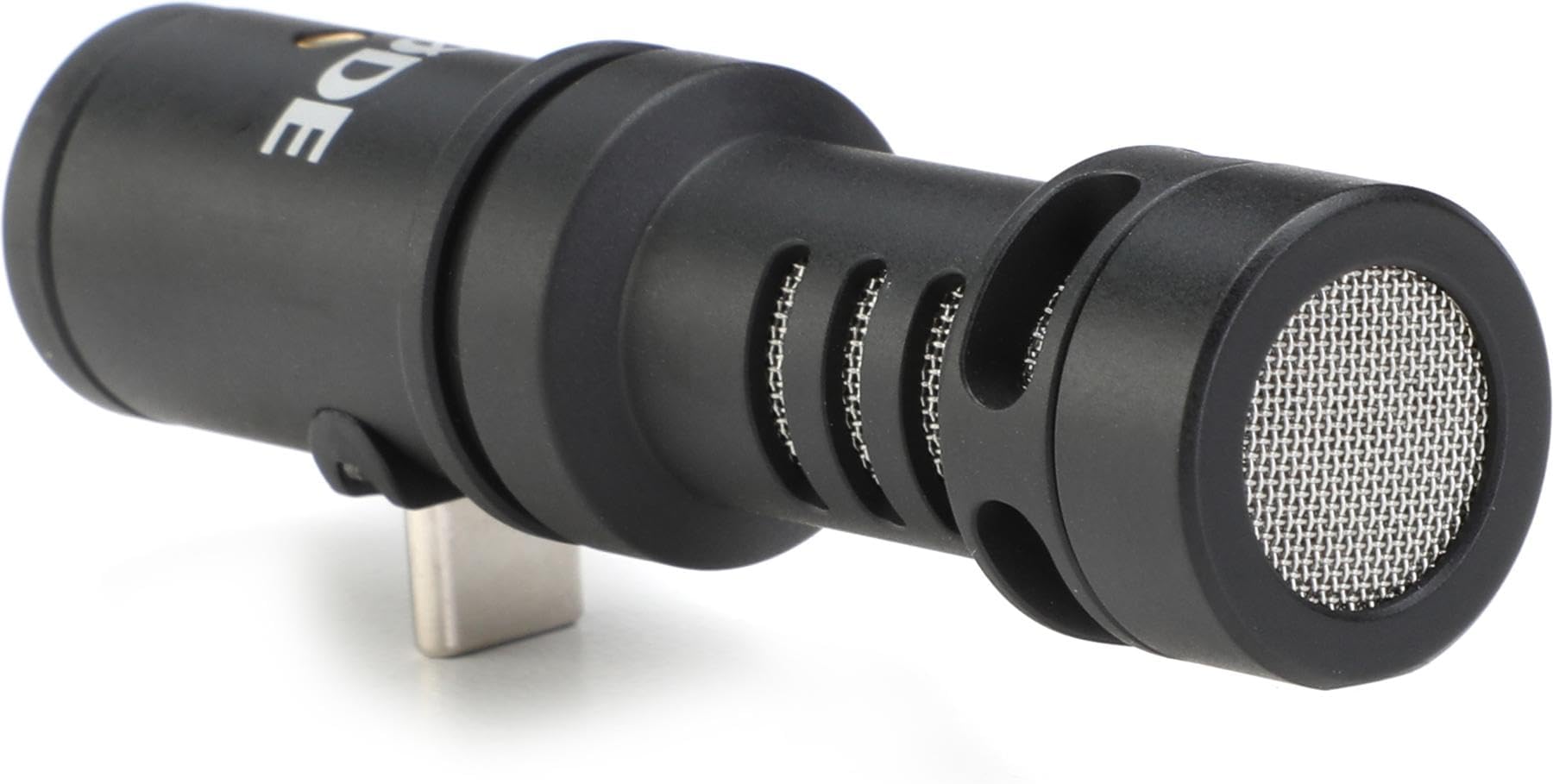
The Rode VideoMic Me-C is a compact, unidirectional microphone designed for USB-C smartphones running Android 10 or higher. It delivers superior audio clarity by reducing background noise, includes a furry windshield for outdoor use, and features a 3.5mm headphone output for direct monitoring. Compatible with RรDEโs Reporter app and other recording apps, itโs the perfect tool for professionals seeking studio-quality sound on the go.
| ASIN | B092VB4K3P |
| Antenna Location | Singen |
| Audible Noise | 20 db |
| Audio Sensitivity | 35 db |
| Best Sellers Rank | #62 in Professional Video Microphones |
| Brand | Rode |
| Built-In Media | Microphone |
| Color | Black |
| Compatible Devices | Headphone, Smartphone |
| Connectivity Technology | USB Type-C |
| Connector Type | 3.5 mm Jack, USB |
| Customer Reviews | 3.5 out of 5 stars 391 Reviews |
| Enclosure Material | Stainless Steel |
| Frequency Range | 20Hz - 20kHz |
| Frequency Response | 20 KHz |
| Global Trade Identification Number | 00698813007295 |
| Hardware Platform | Camera, Smartphone |
| Item Dimensions | 9.1 x 9.1 x 9.1 inches |
| Item Type Name | VideoMic Me-C Directional Microphone For USB C Devices |
| Item Weight | 27 g |
| Manufacturer | Rode |
| Mfr Part Number | VMMC |
| Microphone Form Factor | Mini |
| Model Name | VMMC |
| Model Number | VMMC |
| Number of Batteries | 1 Lithium Ion batteries required. |
| Number of Channels | 1 |
| Polar Pattern | Unidirectional |
| Power Source | Corded Electric |
| Recommended Uses For Product | Singen |
| Signal-to-Noise Ratio | 74.5 db |
| Special Feature | Clip |
| UPC | 698813007295 |
| Unit Count | 1 Count |
| Warranty Description | 1 Year |
J**A
Works on the Pixel 6 Pro and Pixel 7a
I bought this Rode microphone due to a recommendation given to me by Rockville Audio. I use their equipment in my studio and needed a USB-C microphone to plug directly into my phone. Rockville didn't make anything like that so they recommend Rode. I was a bit hesitant because of the negative reviews, but some of those reviews are a bit vague. What phone were they using? Did they download the driver? Were they using the Rode app? Did their phone have Android 10 or higher? What steps did they take to fix the problem? Did they switch their camera settings from "built-in mic" to "wired mic"? Etc... Another review I read said they were sent the wrong item. I don't know if that is true or not. But always always always read the product description. Just because you typed USB-C in the Amazon search doesn't mean you won't get Lightning and Thunderbolt in the search results. Here is how it works. You need to have a cell phone running Android 10 or higher. You can find out what version of Android your phone has by looking for it in your phone settings (go to Settings > About Phone). You will need to download the Rode Reporter app. Plug the Rode microphone into the phone, and there will be a message pop up on your screen asking if you want to open the app. (Or at least it does on both Google Pixels). Tap yes. In the app, go to options and there it will let you know if the driver is current or needs to be updated. The option will only appear if the microphone is plugged in to your phone. One person asked in a review why this can't be done in the factory. The reason is because it's an "update". Updates are for things that have already been manufactured, meaning they have already been packaged, shipped, and either purchased or sitting in a warehouse somewhere. The factory cannot update something that has already left the factory. When software (like the Android operating system) gets updated frequently, sometimes firmware also has to be updated in order for the hardware to remain compatible. I first used it on my Pixel 6 Pro. I did not update the driver the first time I used it and it had intermittent screeching noises. (But I used a backup phone to record audio just in case. I always have a backup when testing new equipment.) Then I installed the driver and this time the audio was clear. It didn't seem to be any louder than the phone's built in microphone, but the audio had a much lower noise floor, making it a lot clearer. (Without getting too technical, a lower noise floor means you can turn up the volume of the finished recording without having audible "room" noise.) Then I tested it on my Pixel 7a. This time I just installed the driver figuring I would have to anyway. It worked. Clear sound, low noise floor, no intermittent screeching. If you are using this to record video, you might need to switch your camera settings to "wired mic" instead of the default built in mic. I had to do that for both of my Pixels. Your phone may be different. On the Google Pixels, that option only appears when there is a mic plugged into the phone. Both of my phones are running Android 14. Both of my phones also have bulky cases. This microphone is not designed to be used with a phone case, so if you have a phone case you will need a specific type of adapter. I was able to get a 2 pack here on Amazon for around $10. The adapter you will need is a USB-C male to USB-C female (or vise versa, same thing), but make sure it says "full function" and/or "audio/video" most of the USB-C adapters only support charging and data transfer, but won't support audio and video, so you will need to be careful about that. Also, I've noticed this microphone isn't purely directional. It picked up someone whispering sitting in a pew behind where the phone was recording. I just want you to be aware of that if you consider purchasing this. For me that isn't a problem. I know this is a long review, but I wanted to be as thorough as possible. If you're going to spend $80 on a cell phone mic you want to make sure it's the right one. (And if you're wondering why I have 2 phones... No, I'm not rich. Only one has service, and the other was given to me by a kind person to be used to record our church services.)
P**E
2nd time buying and it is having worse problems than the first time
I love RODE Mics. Always use them for filmmaking. More recently tried the VideoMic Me-C for my samsung phone as I work remotely in Africa capturing footage and interviews in remote areas. The sound quality is lovely with this product, and the product itself is lightweight and sturdy. Unfortunately after a six months of using it (I bought it in January and started having issue in July) it started randomly warping and blurring the sound in videos. Usually it would record fine for the first 2 minutes or so, so when I would do a quick check of my footage, the sound would be great at the start. Then I would only realize upon watching the video the whole way through that part way the sound became muffled and almost robotic and I could not use the footage from that point. I was devastated because I used it for an important recording that I can't redo and only half the clip had good sound. I've reached out to RODE since its within warranty period but they made it very difficult to exchange or refund. I bought a second one, and it started having the same problem upon first time using it. I don't recommend this product.
S**E
Fantastic Mic
The small size of this mic can be very deceiving. It is incredibly directional, and the large dead cat that it comes with knocks out so much unwanted ambient noise. I have read numerous reviews of issues with buzzing. While that was not the case for me I would recommend that if you purchase this mic to also download the Rode Reporter app which will offer a driver update for the mic. That seems to clear up the majority of operational issues. My only criticism is that I wish the USB-C connection was a bit longer so that it could accommodate for a phone case. Besides that, the quality of this mic is top notch.
M**K
Great for Birding
As an avid birder I often find myself trying to record bird audio. Not just for in-the-field identification, but for documenting calls/songs and uploading them to eBird. I've had mixed experiences with using just my phone. It works, but lots of noise and very difficult to hear birds which makes live identification almost useless. Recently my phone (Pixel 7) began generating a clicking sound when recording, which rendered audio completely useless. There were no problems with delivery. The product box did have some slight damage to it but the contents looked otherwise unharmed. I proceeded to unbox the mic and plugged it in but it didn't work. No sound. So I read the instructions and downloaded the rodereporter app and tried again and it worked, albeit with some very noticeable noise. After some time experimenting with the mic the rodereporter app informed me a firmware update was available, which I had it apply. Immediately the noise was eliminated I've taken it out in the field briefly to get a feel for its sensitivity. It's definitely not a parabolic mic, but it is a pretty significant improvement over my phone's built-in mic. Using the monitoring port, I can hear birds that I can't with my naked ear. The limited outdoor recording I've done so far has been great. Very good SNR and bird songs and calls are just crisp and clear. Pros: 1) It's amplified and a big improvement over my phone's mic. 2) It's tiny and thus very portable. 3) It produces clean sound with low noise. 4) It's upgradeable (firmware) and thus some performance issues can be fixed without having to return it. Cons: 1) It's a bit 'tinny' sounding, though it's fine for my purposes. 2) The USB-C connector isn't very long so the mic doesn't work without modifying my case. I bought an extender, which works, but it's less stable. 3) without the windscreen it's very sensitive to wind. The windscreen is a must if you're outside. 4) The biggest drawback is the material. While substantial feeling, the metal of this microphone leads to 'ringing' when you bump it or accidentally touch it. Not a deal breaker but plastic might have been a better material given my unique use case. It's definitely a keeper and will go in my hiking/birding pack for those moments when I want to sample a unique bird or just plain want to hear better. Overall I'm very happy with it and would likely buy it again.
M**H
Update to "My iPhone 15 Pro Max would not recognize this mic"
When I removed my phone case I was able to seat the mic's USB connector all the way into my iPhone 15 and it worked with my apps. I want to protect my expensive phone so I carved out a wide notch at the base of my case to accommodate the mic and clamp. If you don't want to cut your case you can try a short extender like this one https://www.amazon.com/dp/B07MBWH7QG but then you'll need some other way to secure the mic. I'm not sure that I want to cut up my expensive Mag case when it arrives. Please share if you have found a good method to secure the mic while using and extender.
E**A
Not for iPhones, even if they have a USB-C connection
I am sure this is a good microphone, but it does not work very well on iPhones. I bought it for my iPhone 15 thinking it would work since it had a USB-C connector. Nope. Not so much. Turns out you have to purchase a different model of this mic designed specifically for iPhones. So it goes.
R**E
Horrible squelching, garbled audio...some of the time
First couple recordings it sounded fair, although it seems to catch more high register and misses much of the deeper sounds. But then it started giving me a horrible squelchy distortion to the point that you could barely hear my acoustic guitar or vocals, it was 90% squelch. I'd unplug, replug, then it sometimes worked again. Two days ago I had the most frustration. Plugged it in, connected earbuds to be able to replay a short clip to make sure it wasn't squelching again, all sounded fine, disabled bluetooth to switch the input back to the mic, spent 20 or so minutes trying to get a perfect take. Mission accomplished! Perfect take! Then I played it back. Pure squelch again! Sooo frustrating and time consuming. Edit. I followed Kahuna Dog's instructions in his review, and the random squelching persists. Yesterday it started squelching half-way through my recording. So it was fine for the first minute, and then pure squelch for the rest of the song. -Download the RodeReporter app from the Google Play store -While the app is running plug in your mic -Go to Settings -Configure -Update firmware
J**.
So Much Better!
If you are using your camera to film band videos or promos, this make all the difference when combined with the Open Camera App on Android.
C**N
Manque d'informations sur le produit
Satisfaite mais pas suffisamment d'explications pour la mise en marche
M**K
Very good sound
Very good sound
A**R
Avoid
I rarely take the time to write a review, but this is such a crappy product. Every random film has static and squelches. I updated Firmware, and looked everywhere for a solution, tried airplane mode ect. It is so disappointing to record and then look back and see the recording is completely useless. It is a pity as when it works it is great, but if you don't want to have to re-record or the time, then avoid this.
A**A
Amazingly bad
I use it with my Android smartphone, and the sound quality is terrible. I've tried recording guitar, piano, and vocals, but it just doesn't work well. I didn't expect it to produce artifacts, but rather to track rehearsals or review our performances. However, the quality is weak and low. I can never get it right.
A**E
Tutto ok
Sono molto soddisfatto. Buona registrazione per la fascia di prezzo.
Trustpilot
1 month ago
2 weeks ago