Desertcart purchases this item on your behalf and handles shipping, customs, and support to Seychelles.
๐ฅ๏ธ Cool your rig, own the roomโbecause overheating is so last decade.
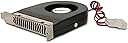
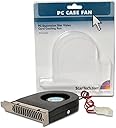
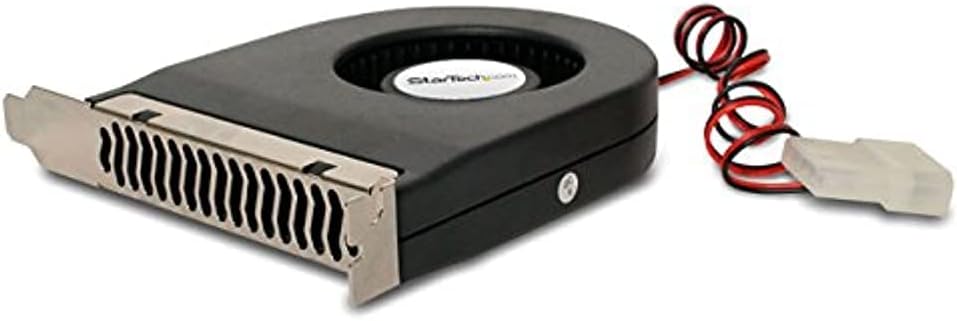
The StarTech.com Expansion Slot Rear Exhaust Cooling Fan is a compact, high-performance PCI fan designed to fit standard full-height computer cases. Operating at 2200 RPM with a 6.9 CFM airflow and ultra-quiet 32 dBA noise level, it efficiently cools expansion cards like GPUs to prevent overheating. Powered via a simple LP4 connector, it features a reversible bracket for customizable airflow direction and durable ball bearing construction with a mean time between failures of 37,739 hours, ensuring long-lasting reliability.


| Air Flow Capacity | 6.9 cfm |
| Asin | B0000510SS |
| Best Sellers Rank | #1,264 in Computer Case Fans |
| Brand Name | StarTech.com |
| Compatible Devices | Desktop |
| Cooling Method | Air |
| Customer Reviews | 4.4 4.4 out of 5 stars (775) 4.4 out of 5 stars |
| Global Trade Identification Number | 00065030782739, 05051749372618 |
| Included Components | 1 Expansion Slot Exhaust Fan |
| Item Dimensions L X W X H | 6.61"L x 1.08"W x 7.87"H |
| Item Weight | 0.1 kg |
| Manufacturer | StarTech.com |
| Material Type | Plastic |
| Maximum Rotational Speed | 2200 rpm |
| Model | FANCASE |
| Noise Level | 1 db |
| Number Of Items | 1 |
| Number Of Packs | 1 |
| Part Number | FAN-CASE |
| Power Connector Type | 4-Pin |
| Unit Count | 1 Count |
| Upc | 065030782739 |
| Voltage | 12 volts |
| Warranty Description | 1 year warranty |
| Wattage | 1.8 watts |
User
Better than expected. Makes some noise though
Moves more air than I expected. It does make some noise, but it is mostly the sound of the air being pushed through. The fan motor itself is quiet.I added this to help cool down case temperatures while gaming. Goal is to add another path for the air to flow from the front case inlet fans and exit out the back. So far it seems to be helping!
User
They move air like a G !
I bought two of these fans to cool my Samsung 980 PRO SSD temps (55C) in my Asus ROG Strix Helios case. It looks very pretty but airflow is very poor, causing higher temps on my SSDs. I already had a (3)120mm fans as intake and a 360mm Corsair H150i AIO and 1 other rear fan as exhaust. First attempt to resolve the temperature problem involved moving my EVGA RTX3090 GPU from Horizontal to Vertical mount. This helped reduce temps by ~ 3-5C as it allowed for better internal airflow.Then I added these fans and for faster air movement and now my SSD temps are 35C- 40C which made me happy. Slight caveat ...1 fan is ok as it drops temps just as much, depending on placement of device you want to cool. Noise is almost inaudible from my location.I added a second one to cool the boot SSD next to my CPU (i9-13900K) and now both my SSDs are very cool (literary!)...but the added noise of the second fan is the price you pay.Give the fan about 10 minutes to do its work. You wrong be disappointed.
User
Amazing! But to make it great requires more parts.
If you have a hot videocard that is not a blower this thing can really work wonders, very powerful!But running at full speed it is noisy and likely will not last as long as it could.Get a Molex to 3-pin adapter wire. You will want to plug it into either a fan controller or a PWM case fan that has a 3-pin piggyback.If the device is speed-controlled by either of those means you may find that it is significantly more powerful than most conventional case fans and not particularly loud for the amount of work it gets done.I highly recommend this for any conventional ATX/MATX case but with a dremel you can even fit it in that grill to the left of your PCI slots and the mounting bracket does come free from the fan meaning you can change its direction. This configuration instantly took 10C off of my peak GPU temps.A more complete kit would get five stars from me but I absolutely do not regret buying!Be aware that you might want to rethink your fan layout after adding this because it will likely create a negative pressure environment and this means more dust in the case. Upgrade to the best intake fans you can find and you'll be glad you did.If the day ever comes that they make a PWM version of this unit I will buy several of them. Please make a PWM version!!
User
*Updated* Moves air like itโs going out of style, easy to change intake direction
Bought this fan originally to install in a MicroATX build for my wife, since her motherboard has few fan headers. The fan plugs in using molex, so no problems there. But I was not expecting what I got. This thing moves a massive amount of air and does so relatively quietly. You can hear it, but the amount of noise it adds when compared to the rest of my rig is negligible. I donโt hear it anyway since I always game with a headset.I have an XFX RX 580 in my own build which can get extremely hot while gaming, so I did an experiment: I flipped the fanโs intake to draw air from the bottom, by unclipping the case bracket on the fan from the plastic tabs and flipping it around, like other reviews have suggested. I then installed it just above my graphics card, so that it draws hot air from the top of the card through the PCB cover. It seemed a better idea than installing it underneath.I was expecting a difference but running this fan above my card cooled it by a whole 5C. Pretty significant! Iโm so happy with itโs performance that I have ordered another one. Hopefully itโs durability will match. So far I am absolutely stunned.*Update 12/12/19*: Still running strong! No change in noise level. Worth every penny. Iโd give it more stars if I could.
User
Simple, yet effective
I had an old legacy graphics card running on my dual-boot Win 10 Pro 64 bit & Win XP Pro 32 bit. The card, and motherboard, started creeping into the high 70s, even with mild internet browsing or video watching - NO games or intensive power-hungry programs. While watching videos, or with more than two browser tabs open, the PC would crash.Installed two of these fans and the graphics card and motherboard are now operating around 40 - 50 degrees under load.The packaging was minimal, which is great for the environment, and the install was easy. I flipped the fans the opposite direction by inserting a narrow, flat-head screwdriver under the frame and using the screwdriver as I pry bar while simultaneously depressing the tabs which attach the frame to the fan body with a secondary screwdriver - you'll understand when you look at the units. Even with flipping the fans, install, including powering down and rebooting the PC, was less than ten minutes.Although there was a mild whirring sound, that soon faded. In fact, I no longer heard the fans after a couple hours; probably I had become inured, but it was a fairly quiet drone, nothing annoying.Purchased two SATA to LP4 adapters to power the units, an additional $14 total, with my entire outlay being less than $35. My system no longer crashes due to overheating components and my graphics card will easily last a few more years.Highly recommend the seller and these specific fans. Even if you've never cracked a PC case before, these fans are easy to install.
User
Worked very well, but it was a bit too noisy for my liking.
First off, let me say that this fan worked quite well. I have a server GPU in my computer (AMD FirePro S10000) that gets rather warm at idle, and putting this fan directly above the card (with the intake facing down) dropped temperatures by over 5 degrees celsius! However, this came at a cost. The fan makes a loud whirring noise, and although I do not mind lots of noise at load (I have two powerful server fans in my desktop for when I am doing GPU-intensive tasks), it was quite annoying while trying to listen to music or simply browse the web. The server fans I have can be dropped to near-silent noise levels during normal usage with a PWM fan controller. However, since this fan uses a 4-pin PATA interface, it stays at max speed all the time.
User
great for LSI Megaraid sata controllers
Previously I've used 40mm fans mounted by forcing screws in to the heatsink fins, but I recently upgraded to a 16 drive controller that has a giant heatsink with smaller fins. These controllers are designed for high volume server fans. I tried using a dual 90mm pcie fan mount bracket, but it was just pushing hot air around the case and not really doing much good. It was better than nothing but I went on the hunt for something better.Then I came across this fan. Like everyone else, I wish they would update the design and get rid of the molex connector but I dug out the cable for the PSU and hooked it up. For the people claiming its loud, sure it's louder than a noctua fan running at 1000rpm, but it's not THAT loud. I have a spare bedroom where I keep all my pc's and I don't notice this fan over the other fan noise in the room. With the door open I can barely hear the pc's running, and this fan doesn't stick out above the rest.It does move way more air than I expected it to. When I put my hand behind the case I can feel the warm air it's sucking out from the sata controller I have it mounted next to. It has lowered the temps of the controller. It's not substitute for having a 3000+rpm fan blowing air over it, but it's enough for me to be comfortable with it. If you need something to keep the temps in check for a card like this I would recommend it, if you don't have access to a 3d printer so you can make a proper fan shroud. The fan takes up exactly one pcie slot, so you aren't giving up more space than that.
User
Great for keeping Hotspot down on RTX 4060 OCed!
Dropped the hot spot on RTX 4060 OC about 6C (From 100C to 94C) not too bad considering how cheap it was. The noise is bearable but not good. Overall, good but not great and could be quieter.
User
Fantastic performance at low price
Have mounted this beside my PCIe NVME 1 TB SSD PCIe adapter add on unit. These drives tend to run hot. Immediately noticed the lower temperatures of my SSD after installing the PCI slot fan. Currently running about 20 degrees F cooler than before the fan was installed. Exceeded my expectations.
User
Muy efectivo
Bajo 4-5 grados Celsius la temperatura de la tarjeta grafica, en m caso esta se ajusto perfectamente debajo de esta, basicamente ayuda a recircular el aire de adentro del gabinete hacia afyera de este mismo. Es importante que se use asi como se indica, de esta manera evitas que entre polvo dentro del gabinte.
User
Excellent Case fan for cooling your video card.
Bought this after searching for a while to get aCase Fan that can sit below your video card. Its the only one I could find to suck hot air straight out the back of the case. My only criticism is the power connector is old school - like me. Suggest it get switched to a more modern 12 v plug...otherwise it does a great job and my case runs much cooler now - even when playing hi res games.
User
Good budget expansion slot fan
A little bit noisy but it gets de job done. The price is good so no complain here.
User
Does what it says; manufacturer's customer support was good
Device does what it is supposed to. I wanted to mount it drawing air from below rather than above, but the manufacturer's website did not say whether the bracket was reversible. Not wanting to damage it, I asked the question of the online support chat person, who was able to answer before long that it was indeed reversible.
Trustpilot
4 days ago
2 weeks ago