Desertcart purchases this item on your behalf and handles shipping, customs, and support to Seychelles.
🚀 Capture Every Frame, Own Every Stream!
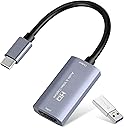
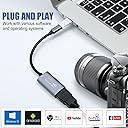
The Guermok Video Capture Card delivers professional-grade 1080P 60FPS and 4K 30FPS HDMI input capture via USB 3.0 and USB-C interfaces. Designed for ultra-low latency and plug-and-play convenience, it supports a wide range of devices and streaming platforms, making it the ultimate portable solution for gamers, content creators, and remote professionals seeking flawless live streaming and recording performance.


| ASIN | B08Z3XDYQ7 |
| AV Output | MPEG-4, MOV |
| Antenna Location | Game Streaming, Image Capture, Live Streaming, Video Recording |
| Best Sellers Rank | #1 in Internal TV Tuner & Video Capture Cards |
| Brand | Guermok |
| Built-In Media | Installation Guide, USBC to USBA Adapter, Video Capture Card |
| Compatible Devices | Gaming Console, Laptop, Quest 3/3s, Switch 2/1, iphone |
| Customer Reviews | 4.4 out of 5 stars 3,577 Reviews |
| Hardware Interface | HDMI, USB 2.0, USB 3.0, USB 3.0 Type A, USB 3.0 Type C |
| Item Dimensions | 7.48 x 0.98 x 0.39 inches |
| Item Weight | 30 g |
| Manufacturer | Guermok |
| Mfr Part Number | GM-29A |
| Minimum System Requirements | Minimum System Requirements: Windows 10/11 (64-bit), macOS 10.15 or later, Intel Core i3 / AMD Ryzen 3 processor (or equivalent), 4GB RAM, and an available USB 3.0 port. For stable 1080P60 video capture and streaming performance, a USB 3.0 connection is strongly recommended. Actual performance may vary depending on the computer hardware, capture software, video source resolution, and encoding sett… |
| Model Name | GM-29A |
| Model Number | GM-29A |
| Number of Items | 1 |
| Number of Packs | 1 |
| Operating System | Mac OS, Windows 10, Windows 11 |
| Other Special Features of the Product | 4K30 HDMI Input, 1080p60 Video Capture, Compact Plug-and-Play Design |
| Platform | Android, Mac, Meta Quest, Nintendo Switch, Nintendo Switch 2, PlayStation 4, PlayStation 5, Steam Deck, Windows, Xbox, iOS |
| Recommended Uses For Product | Game Streaming, Image Capture, Live Streaming, Video Recording |
| Special Feature | 4K30 HDMI Input, 1080p60 Video Capture, Compact Plug-and-Play Design |
| Tuner Type | ATSC |
| UPC | 711731466194 |
| Unit Count | 1 Count |
| Video Capture Resolution | 1080p, 4K |
D**N
Works great for capture and streaming
Plug-and-play with no drivers needed. It worked right away with OBS. Handles 1080p at 60fps smoothly and supports higher input resolutions without issues. Build quality feels solid, the dual USB-C/USB-A flexibility is convenient, and latency is low enough for live streaming or recording gameplay. Great value for a reliable capture card.
T**H
**Seamless Streaming: Guermok Audio/Video Capture Card Delivers Excellence**
I recently purchased the Guermok Audio/Video Capture Card, USB3.0 HDMI to USB C, and it has truly transformed my streaming and recording experience. Here's why I believe this product is a fantastic addition to any setup: ### High-Quality Capture The capture card supports 4K 1080P at 60FPS, ensuring that every detail is crisp and clear. Whether I'm recording gameplay or streaming live, the quality remains consistently high, which is crucial for maintaining a professional look and feel. ### Easy Setup The plug-and-play functionality makes this device incredibly user-friendly. There's no need to install any drivers, which means you can get started right out of the box. I had it connected and running within minutes, and it worked flawlessly with my existing equipment. ### Versatile Connectivity The USB3.0 to USB C interface offers a versatile connection, making it compatible with a wide range of devices. This flexibility has been particularly useful for me as I switch between my desktop and laptop without any hassle. ### Reliable Performance The capture card has proven to be highly reliable. There have been no issues with latency or dropped frames, even during long recording sessions. This reliability gives me confidence in the product, knowing it can handle extensive use without failing. ### Compact and Portable Its compact design makes it easy to carry around. Whether I'm moving between rooms or traveling, the capture card fits neatly into my bag without taking up much space. This portability is a significant advantage for content creators on the go. ### Excellent Value For the price, the Guermok Audio/Video Capture Card offers exceptional value. It provides features and performance that rival more expensive models, making it a smart investment for anyone looking to enhance their video capture capabilities. In summary, the Guermok Audio/Video Capture Card has exceeded my expectations in every way. Its high-quality capture, ease of use, versatile connectivity, and reliable performance make it an essential tool for any content creator. I highly recommend it to anyone in need of a dependable and high-performing capture card.
X**G
Works perfectly with OBS right out of the box.
Pros: - Works right out of the box with OBS. No drivers, no configuration needed. - Video quality is very good when connected to a Kaico OSSC upscaler to capture RGB video from arcade games. Cons: - It doesn't work consistently at 60 Hz and drops frames now and then. I don't think it ever goes below 30 so I'm tempted to say 30 Hz capture is probably reliable. That said it does hit 60 Hz most of the time. Given the extremely low cost and ease of use I can overlook the cons. If you need something that just works and can live without 60 Hz it's perfect.
J**.
Reliable, plug-and-play performance for streaming
I’ve been testing out this Guermok Video Capture Card to integrate into my home setup, and it has been solid. It offers a true plug-and-play experience with OBS, and the 1080P/60FPS output is stable without noticeable latency. The build quality is decent for the price point, and it’s been a great, cost-effective solution for capturing footage from my console and camera setup. If you need a straightforward, no-nonsense capture device for streaming or local recording, this does exactly what it promises.
T**R
4K is for input only, max output is 1080p
I have an Elgato Cam Link 4K, but it's flaky (and the previous one failed after a year), so I was looking for something that might be more reliable. I've only had this for one day, so it's too early to tell about that, but it seems to be pretty well made for the price. My MacBook Pro recognized it right away and within 2 minutes, I had it working with OBS. No drivers or extra software required. The downside I can immediately see (when compared to the Elgato Cam Link 4K) is that this device does not output 4K. The "4K" in the description refers only to the input (i.e., from your camera). The USB side of the connection only puts out 1080p, which is HD resolution, not 4K. I admit that I didn't read the description as clearly as I should have, and now that I know that, I don't think the product description is deceptive. Just wanted to point that out in case someone else is comparing this to the Cam Link 4K or similar device. In summary, this has half the output resolution of the Cam Link 4K but is a lot less expensive and hopefully more reliable.
L**N
works perfect for projection, discord streams, and/or light games.
i bought this to project switch games onto my laptop and it's perfect for that. pros: - works right out of the box, no drivers or additional setup needed. it comes with an adapter if your laptop/monitor doesn't have a type-C port. - the video quality is very crisp, and there's no delay/mismatch in audio. - the recordings look amazing. cons: - the card struggles with high motion, but it's not THAT bad. still, i wouldn't recommend it for competitive games, heavy games or actual streaming. - for me, OBS didn't recognize the card properly and wouldn't record audio. if you're streaming/recording, double-check beforehand.
N**N
Worked with my Nintendo Switch and OBS
I got this because I wanted to connect my Nintendo Switch to my OBS on my iMac without needing a second monitor. It works great and I am able to stream my game on Twitch no problem. It was compatible with my switch and Mac, and the only thing I noticed was a very slight delay when I used the left trigger on my controller. The resolution looks fine and it was very easy to use. It came in a small box and was not damaged. It’s exactly what I expected for the price! If you’re not looking to buy a really expensive capture card for your gaming, then I think this is a great option for starting out.
C**Y
Works as intended, good visuals, good frames.
I bought this to use to capture gameplay on my Nintendo Switch 2. It works as described. The software you use makes an impact on its performance- I use OBS for its digital camera. The video's lag was barely noticeable. If you're playing something that needs to capture every frame with precise timing, then maybe not this. But for something like Animal Crossing, or Ocarina of Time n64, this works perfectly. No HDR, though. Item did come with the usb-c to usb-a adapter though!
K**A
Great little device, does the job
Been on the market looking for a capture device that is decent enough with low latency that doesn’t break the bank. This little device does the job! I have my Nintendo Switch plugged in to my android tablet and while there is latency it is not as bad as other similarly priced capture devices. Well worth it, going to have a blast on my extended flight playing coop on a larger screen. Cheers
C**N
Ottimo
Funziona benissimo, è utile per convertire il segnale audio/video da HDMI a USB-C
L**P
Super carte d'acquisition usb
Fonctionne super pour capturer un flux HDMI vers un pc. J'arrive a récupérer le flux vidéo sur HDMI en sortie de télécommande d'un drone et de l'envoyer sur OBS pour streamer via mon ordinateur. Attention que si le périphérique est reconnu comme usb2 il faut retourner le connecteur usb-c et il sera vu comme usb3
A**N
Lag is about 1 sec. Good for recording, but not for gaming.
No matter what kind of software you are gonna use, the card adds about 1sec delay. 1080x60fps is supported.
P**I
Alternative to HDMI Monitor
Needed an HDMI monitor to setup my Mac mini. Decided to get this instead. Worked well with both my iMac and iPad. Need to use the right software on the iMac and iPad.
Trustpilot
1 month ago
1 day ago