Desertcart purchases this item on your behalf and handles shipping, customs, and support to Seychelles.
🖥️ Elevate your workspace, elevate your game.
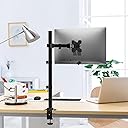
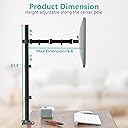
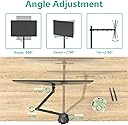
The WALI Tall Monitor Arm Mount supports 13-34 inch monitors up to 22 lbs, featuring full-motion adjustability with 360° rotation, ±90° tilt and swivel. It offers dual mounting options (C-Clamp and grommet base) for desks up to 3” thick, with detachable, height-adjustable VESA plates (75x75mm & 100x100mm). Made from alloy steel, it comes with a 10-year warranty and US-based customer support, designed to enhance ergonomic comfort and maximize desk space.


| ASIN | B01IWOCCOW |
| Best Sellers Rank | #28 in Computer Monitor Arms |
| Brand | WALI |
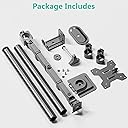
| Built-In Media | mount, hardware kit and installation instructions |
| Color | Black (Single) |
| Compatible Devices | Monitor |
| Customer Reviews | 4.6 out of 5 stars 9,370 Reviews |
| Enclosure Material | Alloy Steel |
| Global Trade Identification Number | 00811278020603 |
| Item Type Name | Single Mount |
| Manufacturer | WALI |
| Material | Alloy Steel |
| Maximum Tilt Angle | 90 degrees |
| Maximum-Supported Screen Size | 32 inches |
| Mfr Part Number | M001XL |
| Minimum-Supported Screen Size | 13 inches |
| Model Number | WL-M001XL |
| Mounting Type | Tabletop Mount |
| Movement Type | Articulating |
| Number of Items | 1 |
| Number of Packs | 1 |
| UPC | 811278020603 |
| Unit Count | 1 Count |
| Warranty Description | 10 Year |
S**O
Good enough to replace my others!
Trying to arrange multiple monitors on a single desk is usually never an easy task, even less so when your desk is against a wall, in a cove, and/or just has limited space in general. When I made the transition from YT content creation to live streaming, I felt a need for a third monitor... as I already had two monitors (side by side) on a dual-monitor desk mount, but I had no more room to expand (horizontally)... I could only go UP! After searching through all the monitor stands over and over again, I ultimately decided on this WALI "Extra Tall" mount, and I'm glad I did! Not only is it more sturdy than the dual monitor mount I had already owned (even with just one monitor on it), but this one is much TALLER, has a considerably longer arm, and I don't have to tighten down all the bolts once I get the monitor in the position/orientation I want it to be in... like I do with the dual monitor mount. That one, I have to loosen the bolts, move the monitor, then tighten the bolts... otherwise it sags, tilts, rotates... etc etc. The WALI mount though, yeah... it holds the monitor exactly where & how I want it! Currently it is only holding an older 27" Acer monitor, which also happens to be an 'nVidia 3D Vision" monitor... which were exceptionally heavy monitors for their size! The arm is secured near the very top of the pole in order to have that monitor above my primary larger 32" monitor, and is slightly tilted down/at me. It doesn't wobble, it doesn't drift, the arm articulates easily enough, and it doesn't even sag when I extend the arm outward all the way! It simply does what it's meant to, and it does it well enough that I'm replacing my dual-monitor stand with another two of these. (They don't sell the arms separately, so I have to buy 2 additional mount kits in their entirety. I plan on using just the arm from one of them to add to the pole I already have mounted, and then I'll use the 3rd kit in it's entirety for the 3rd monitor.) Why do this if I already have my 3 monitors mounted to my desk? One, the WALI mount is much more sturdy! Two, the WALI arms are almost twice the length of the arms on the dual mount I currently own. Three... again, I don't have to mess with the bolts every single time I want to make even a tiny adjustment! The WALI mount is just... better in every way! Sturdier, longer, easier to adjust, and less pricey!
M**D
Sturdy & Flexible Quad Monitor Mount — Perfect for a Multi-Screen Setup
I recently installed the WALI Quad Monitor Mount (model M004S-P) on my desk, and it’s been a game changer for my multi-monitor setup. Here’s how it’s performed and what to know: What I Love: • Capacity & Compatibility: The top bracket supports a massive 49″ ultrawide monitor (up to 44 lbs), and the three lower arms each handle up to 27″ monitors.  That gives me a ton of screen real estate. • Strong Build Quality: The arms and center pole are made of steel, which feels very solid. Even after a week of adjusting positions, everything stays stable and doesn’t sag. • Excellent Adjustability: You get great tilt (top: +20° to –20°, lower arms: +45° to –45°), swivel (180°), and full 360° rotation.  This makes it very flexible to position screens exactly how I want. • Cable Management: Built-in channels help hide and route my cables cleanly. That made my desk much neater. • Easy Installation: Comes with all the tools and hardware. I mounted it via a C-clamp on my 2.5″-thick desk, and the instructions were pretty straightforward. Things to Consider: • Desk Thickness Limitation: The C-clamp works well up to certain desk thickness (0.39″ to 3.15″), so check your desk before ordering.  • Heavy: Because it’s steel and supports heavy monitors, the mount itself is not lightweight. Make sure your desk can handle the weight. • Complex Setup: With four monitors, aligning everything takes some time. Be patient during installation — it’s not a “plug and play” mount. • Space Needed: The center pole is “extra tall,” so make sure you have enough vertical clearance (consider under-shelf or overhead obstructions). Use Case / My Setup: • I have a 49″ ultrawide as my primary screen for trading / work, and three 24″ monitors below for dashboards, communication, and reference material. • This mount helps me keep everything at eye level, reduces neck strain, and frees up a ton of space on my desk. • I also like that I can tilt or swivel individual monitors depending on whether I’m watching, coding, or reviewing charts. Overall: If you’re running a multi-monitor setup or planning to, especially with a large ultrawide + additional screens, this WALI mount is a very strong, durable, and flexible option. It’s well worth the investment for serious productivity.
S**R
Pole Type Monitor Mount Worth Buying
This monitor mount is heavy duty! Sturdy, well built, and can mount two different ways. I have a keyboard stand with an upper shelf. I installed the monitor mount using a center slot I had cut into the shelf and it was a breeze installing it. My video monitor is small and I wanted it just above my music rack which sits toward the front of the shelf. I have a video system combined with my keyboard so I can watch movies while practicing. I highly recommend this monitor pole mount. Great value for the money. Monitor can be moved in a plethora of positions.
T**Y
Overall, very good for the price.
For the price, I’m pleased with it. Overall, it’s a sturdy stand with quality machining. All the screws went in easily, poorly machined products have crooked holes or bad threads. The mount base comes with 2 types, standard mount for a desktops surface. The other one is for desktops with monitor holes/cabling drilled through them. All the parts are heavy gauge and I encountered no difficulty during assembling. There seems to be a tension screw for the tilt feature. I had to tighten the screw that holds the tilt joint together because out of the box, the monitor flopped forward hard. I had to be mindful while mounting it to the main arm so it wouldn’t slam into my glass desktop. The 2 arms that allow you to move the monitor forwards and back, left and right were a little stiff, I loosened the screw a bit on the main arm, at the pole. That seemed to be all that was required. I tried to loosen the bolt where the 2 arms meet, and it wouldn’t budge. I didn’t force the issue. The instructions were adequate for assembly without covering anything else, like adjusting the tilt bolt for the weight of the monitor. So, while I think this was a good mount for the investment, there are tradeoffs to mention. I’m accustomed to swinging my monitors upward and dusting underneath them. Height is fixed by a screw on this one. I was struggling to install the monitor cables when I realized you can tilt the bottom toward you until the top or the monitor hits the pole, or, until it’s sitting nearly flat like a table. Elevated several inches above the desktop. I consider this a Pro / Con feature. Where the arm ties into the VESA mount, the fit is a little sloppy. It’s not a safety concern but I can wiggle the monitor backwards and forwards at the outer edges “About ¾ inch “before feeling any resistance from the mount. Same goes for tilting. I don’t see this as much of an issue. Normally, I don’t foresee any outside forces acting in the monitor to create a problem. However, there’s room for improvement. The rest of the machining seemed steller. I have multiple computers in different rooms. 32” monitors are used as primary monitors with 32” to 23” as secondaries. I like mine roughly 1” above the desk. That places the top of the monitor at my eye level and the ideal viewing angle. I have fully articulated, hydraulic mounts on most of my monitors. Nice ones for large heavy monitors run $75 to $100 and up. I paid $36 for this one. The……… WALI Monitor Arm Mount for Desk, Single Extra Tall Computer Desk Mount, Monitor Bracket Mount Stand Single, up to 32 inch, 22 lbs (M001XL), Black. Amazon lumps the reviews of similar products together, so I specified which mount I purchased. I’m using this one on a glass desktop, I’m attaching it to the same point I constructed from wood for a different mount. It didn’t lower the monitor low enough either. So, the top of that mounting point is 4” lower than the surface of the glass top. Despite being that low, I didn’t actually need the 32” pole / monitor mount, the 16” model would have worked. There’s still 2” of pipe available above the arm. The 32” was on sale & I didn’t know if the 16” would suffice. The pole is a screw together 2 piece. I unscrewed / removed the other pole as it looked out of place in my dual computer setup. That leaves a hole in the top of the pipe / mount. I wish they included a cap for that. The top pipe has a cap but of a different diameter. I’d like to give it 4 ½ Stars but Amazon won’t let me. I’ve got to go with 4. Height adjustments with heavy monitors and an Allen wrench can present a challenge, it’s the nature of the beast and I won’t give it 5 stars for a few reasons. The sloppy VESA mount and loose tilt motion. No instructions that cover that, or if I was supposed to loosen the arm at the pole to improve motion. I would recommend this mount to others.
A**D
Elevate Your Workspace: WALI Quad LCD Monitor Desk Mount Review
Hey there, fellow multitaskers! If you're juggling multiple screens like a pro, the WALI Quad LCD Monitor Desk Mount is about to become your new best friend. It's not just a mount—it's a game-changer for your workspace organization and productivity. Four Times the Efficiency: Say goodbye to clutter and hello to a streamlined setup with this quad monitor mount. It's designed to hold up to four 27-inch screens, each weighing up to 22 lbs. That's serious support for your screens, whether you're a gamer, designer, or multitasking enthusiast. Fully Adjustable: Need to find that perfect viewing angle? No problem! This mount offers full motion adjustability. Tilt, swivel, rotate—customize each monitor to suit your ergonomic needs and reduce neck strain. It's like having a personal assistant for your screens. Sturdy and Reliable: Built with high-quality materials, this mount is sturdy and durable. It keeps your monitors securely in place while freeing up valuable desk space. Plus, the sleek black finish adds a touch of modern elegance to your setup. Easy Installation: Setting up is a breeze with the included hardware and step-by-step instructions. You'll have your monitors mounted and ready to go in no time, without needing a degree in engineering. Cable Management: Tired of tangled cables? This mount comes with integrated cable management clips to keep your workspace tidy and cables organized. It's the little details that make a big difference. Versatile Use: Ideal for home offices, gaming setups, design studios, and anywhere you need to maximize screen space and efficiency. It's the upgrade that transforms your desk into a command center. Overall: The WALI Quad LCD Monitor Desk Mount isn't just a mount—it's a productivity booster. With robust support, full adjustability, and sleek design, it's the solution to elevate your workspace and take your multitasking game to the next level.
G**X
Heavy, sturdy, and super stable
This mount is built like a tank — heavy, sturdy, and super stable once it’s up. The instructions had me scratching my head for a minute, but there are two different ways to install it, so once you figure out which method works for your setup, it comes together nicely. My favorite part is the little tool‑storage area. It keeps everything in one place so you’re not hunting for Allen keys later when you need to adjust or take it apart. Honestly, every mount should have this. Great product overall, even with the slightly confusing instructions.
S**I
Great product
This is an extremely great and quality product. Very easy to put together. Everything is totally adjustable, gives you that flexibility on heights and all. Mounting was easy, very sturdy for it weight. I ended up freeing up great amount of space on my desk.
N**.
Super Affordable and Well Built Quad Monitor Stand
Like many people during the pandemic, I was forced to work from home. Living in a studio apartment, working space is at a premium, so I can't afford to have all of my work space dominated by monitor stands. I went looking for a monitor stand that could support 3 or 4 monitors, in a stacked orientation, that clamped to the work surface. A lot of the competitors were up in the $100-$200+ range, and some of those didn't even have the table clamp. I don't know what person in their right mind would mount this much weight (let alone $$$) to a stand, and just rely on a stand with legs to hold it. But I digress. - Assembly. As others have mentioned, this stand assembles incredibly simply. Everything comes in 2 boxes (way smaller than you would expect for how big it actually gets), and is labelled in bags. The instructions are very straightforward, and without rushing, I had everything assembled in about 20 minutes. I then spent another 10 minutes cable managing. You could spend more time with this if you were more OCD than I am. - Positive Impressions. Other than being easy to assemble, I feel like a monitor stand should just sit there unobtrusively, which this one does.. I am running 19" monitors on top, a 15" monitor on the bottom right, and have the bottom left open, and am using my laptop in that space. I like that the cable management running vertically has a space for the hex keys that are used in installation. I don't feel like the stand is insufficient in terms of support in any way. I also like the way in which everything can be adjusted easily without too much effort. I also like that I have the option to through-mount this through a grommet. I can't speak to that, but I'm glad it was an included option. Also, the price was something you can't overlook. Build quality is excellent for the price. The monitors stay where you put them, and you can easily tilt the monitors as you see fit. The attachment mechanism to join the monitors to the stand is also pretty excellent. Things that could use improvement: - Cable management. As others have mentioned, by the time you get down to the bottom, you can't fit 8 cables through it. Also, the plastic clips that run along the arms are good when there's nothing in them, but they tend to flex a fair bit once you have cables running through them. Not bad, but could use some help. - Articulation. If you're using smaller screens like I am, you may have some difficulty getting all the screens to meet in the middle. This is due to the fact that the arms don't clear the hinges very far, and can only fold up to about 65 or 70 degrees. See one of the pictures. - Included spacers. I'm glad that they included spacers and screws, but the ones that they included were too big for my smaller portable 15" monitor. I actually had to cut the plastic spacers in half in order to get them to work. Another set of shorter screws would be nice. This is shown in the second included picture. Things to be aware of: - Won't flush mount to the wall if your desk is up against the wall. Because of the way arm-based mounts articulate, unless you're running the max size monitors that the stand supports (27" for this), you will lose some space behind, and subsequently, lose some space on your desk. Not a design flaw. Overall, I 100% love this stand. There are some minor picky points that I have, but I would buy it again. I also will probably buy another arm portion if I need to expand in the future, which you can totally do, as I am pretty sure that WALI sells the parts seperately. Highly recommend. If this review was helpful to you, please mark it as such, so that I can know that you appreciated the review, and that others who may have questions about this product can find helpful information.
A**W
違う商品
43インチモニターを購入し、 高さが欲しかったのでポールの長い本商品を購入しました。 翌日配送できましたが、到着して開封してみると本商品はポールを2本連結させるようなのですが1本しかはいっておらず返品しました。 型番を確認すると M001XLと製品ページではなっていますが、届いたのはM001SXLでした。
K**N
Good quality
Bought this to hold 32in monitor above imac 27in, does the job and very good quality.
I**E
Excellent piece of kit.
I have used some of the monitor arms' pieces to put together this triple arm to hold my heavy giant print study Bible on a tray at bedside. It fits on my old Ergatron short desktop pole. It's far easier to just need to tilt the tray than to pick up and hold the heavy book.🙏 The 31" WALI pole is used in the loungeroom for my computer set-up along with a few of the monitor arm bits, plus a WALI 3 Tier Arm. (another review😊) Good stuff these WALI products, and well worth the money.
A**I
Sturdy, functional monitor bracket with professional, stylish design
Sturdy, functional monitor bracket with professional look I bought this monitor bracket in white, and it’s excellent. It feels sturdy, functional, and professional looking, making my workspace more organised and stylish. Installation was straightforward, and it holds the monitor securely while allowing smooth adjustments for tilt and rotation. The bracket complements my desk setup perfectly, and the white finish looks clean and modern. Overall, it’s a high-quality accessory that improves ergonomics and enhances the look of any workspace. Pros: • Sturdy and reliable, • Functional with smooth tilt and rotation, • Professional, stylish appearance, • Easy installation, Cons: • Only supports one monitor per bracket, • Extension may be limited for very deep desks, Overall, a solid, functional monitor bracket that looks great and improves workspace ergonomics.
A**D
Good product
Good product
Trustpilot
1 day ago
5 days ago