Buy anything from 5,000+ international stores. One checkout price. No surprise fees. Join 2M+ shoppers on Desertcart.
Desertcart purchases this item on your behalf and handles shipping, customs, and support to Seychelles.
⌨️ Elevate your workspace with the compact keyboard that works as hard as you do.
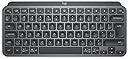
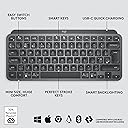
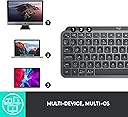
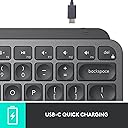
The Logitech MX Keys Mini is a premium minimalist wireless keyboard featuring an 80-key compact layout, smart adaptive backlighting, and multi-device Bluetooth connectivity. Designed for professionals on the move, it offers ergonomic perfect stroke keys, USB-C rechargeable battery, and seamless switching across up to three devices. Built with sustainable materials and certified carbon neutral, it combines style, functionality, and eco-conscious innovation for the modern manager.


| ASIN | B07W6GGC8W |
| Antenna Location | Office |
| Best Sellers Rank | 2,039 in Computers & Accessories ( See Top 100 in Computers & Accessories ) 21 in Keyboards (Computers & Accessories) |
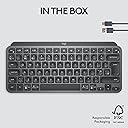
| Box Contents | Keyboard Charging cable Important Information Document |
| Brand | Logitech |
| Brand Name | Logitech |
| Button Quantity | 19 |
| Colour | Graphite |
| Compatible Amazon Tablet Models | Amazon Fire 5th Generation, Amazon Fire 7 5th Generation, Amazon Fire 7 7th Generation, Amazon Fire 7 9th Generation, Amazon Fire HD 10 5th Generation, Amazon Fire HD 7 4th Generation, Amazon Fire HD 8 5th Generation, Amazon Fire HD 8 6th Generation, Amazon Fire HD 8 7th Generation, Amazon Fire HD 8 8th Generation, Amazon Fire HD 8 Kids 7th Generation, Amazon Fire HD 8 Kids 8th Generation, Amazon … |
| Compatible Devices | Laptop, PC, Smartphone, Tablet |
| Compatible Operating System Family | ChromeOS, Linux, MacOS, Windows |
| Compatible Tablet Computer Models | Amazon Fire 5th Generation, Amazon Fire 7 5th Generation, Amazon Fire 7 7th Generation, Amazon Fire 7 9th Generation, Amazon Fire HD 10 5th Generation, Amazon Fire HD 7 4th Generation, Amazon Fire HD 8 5th Generation, Amazon Fire HD 8 6th Generation, Amazon Fire HD 8 7th Generation, Amazon Fire HD 8 8th Generation, Amazon Fire HD 8 Kids 7th Generation, Amazon Fire HD 8 Kids 8th Generation, Amazon … |
| Compatible devices | Laptop, PC, Smartphone, Tablet |
| Connectivity Technology | Bluetooth |
| Connectivity technology | Bluetooth |
| Country of Origin | China |
| Customer Reviews | 4.5 out of 5 stars 1,157 Reviews |
| Enclosure Material | Plastic |
| Hand Orientation | Ambidextrous |
| Is Electric | Yes |
| Item Dimensions L x W x H | 29.6L x 13.2W x 2.1H centimetres |
| Item Weight | 550 Grams |
| Keyboard Backlighting Color Support | Single Color |
| Keyboard Description | Wireless, Minimalist |
| Keyboard Layout | AZERTY |
| Keyboard description | Wireless, Minimalist |
| Language | English |
| Manufacturer | Logitech |
| Manufacturer Part Number | 920-010495 |
| Mechanical Keyboard Switch Model | MX Mini |
| Minimum Required Operating System Version | Windows 10 |
| Model Name | MX Keys Mini Keyboard |
| Model Number | 920-010495 |
| Number of Batteries | 1 |
| Number of Keys | 80 |
| Power Source | Battery Powered |
| Product Features | Compact, Customizable Display Keys, Easy-switch, Perfect stroke keys, Smart backlit keys |
| Product Warranty | 2 year manufacturer |
| Recommended uses for product | Office |
| Series Number | 920010495 |
| Special feature | Compact, Customizable Display Keys, Easy-switch, Perfect stroke keys , Smart backlit keys |
| Style Name | MX Keys Mini |
| Switch Type | Mechanical |
| Theme | Modern |
| Unit Count | 1.0 count |
P**L
Don’t give up trying to get this keyboard to work….
I nearly did after the keyboard refused to connect over Bluetooth. I tried everything until that point to get it to pair with my PC. I made sure Bluetooth was turned on but keyboard and PC only paired intermittently, or not at all. I moved the keyboard closer to my PC in case the range (1.5m) was too great. I followed the simple Logitech instructions on the lid of the box all without success. Not to be beaten, I purchased separately a Logitech Bolt USB receiver and plugged this into my PC. I then downloaded and installed the Logitech software referred to on the box lid. I thought this was unnecessary before - it’s a Bluetooth keyboard for typing, what else does it need to do? However, I was wrong. Within 2 minutes of following the software setup procedure the keyboard paired successfully. It has been working perfectly ever since. The keyboard has been connected to my pc now via the USB receiver for 5 days. Bluetooth is switched off on my PC as I could not get this to work. In spite of the poor initial set up experience I am still please with this keyboard. I like the quality and functionality, including the auto back lighting when my hands hover over the keys. The keys also feel nice and responsive. Some of the extra features in the software to customise the keyboard are genuinely useful. To sum up, it’s a good keyboard. If it doesn’t connect over Bluetooth for you, don’t give up. If you like the keyboard i suggest you buy the Logitech Bolt USB receiver and then try to connect. This worked for me.
J**E
Compact, Tactile, Good Feedback but a Tad Expensive
This is my 2nd wireless keyboard from Logitech initially using the Logitech K380 I have since upgraded to this MX Keys Mini. The look and styling of the product is great, clean and crisp and its also compact enough to fit comfortably into any laptop bag, backpack, even a handbag. The build quality it great, with a decent weight to it and the solid plastic construction, you'd be forgiven thinking it was an aluminium body. Touch wise and button feedback is also good, the way each key has an intentional concave is nice on the fingers and the noise level of the keys is also quiet. The spacebar is louder than the other keys for sure but not drastically. Connectivity is good, with the ability to link 3 separate devices to the one device makes switching between laptops (personal and work) really easy. I also enjoy the dedicated emoji button (on F7) when I am replying to emails or WhatsApp messages. Overall, I found the price to be quiet steep compared to the K380. Personally while I love the keyboard and won't be changing it, I wouldn't say its worth 3x the price but its definitely worthy of a £70-£80 price tag. Functionality is good, feedback from the keys is good, letter size and key size is well thought out so if your looking for a decent, compact keyboard that's rechargeable and looks the part then this is the one for you, just be mindful you may be paying a little more than you probably should be.
B**R
A Game-Changer If You Switch Between Mac & Windows
This keyboard blew me away—especially compared to the sleek Apple Magic Keyboard. It feels much more tactile and satisfying to type on, and works brilliantly with both Mac and Windows systems. ✅ Pros: • 🪄 Seamless multi-OS use Instantly combines Mac and Windows layouts—perfect for dual-environment users. Works great with both, without funky remaps . • ✅ Better typing feel than Apple Keys offer more travel and are gently curved—not flat—making typing more accurate and comfortable . • 🔄 Easy device switching Switch between three paired devices at the tap of a button—no re-pairing needed  . • 🌙 Smart backlighting Lights adapt to ambient light and your hands, turning on only when needed. • 🏗️ Sturdy build Solid, slightly weighted frame keeps it stable on your desk. ⚠️ Cons: • ⚖️ Heavier than Apple A bit weightier and bulkier—less ideal for travel or lap use. • 🔋 Needs recharging Unlike Magic’s rechargeable, this one uses micro-USB/USB‑C. Reliable, but not wireless charging. 📝 Final Thoughts If you bounce between Mac and Windows and want a keyboard that feels premium and performs flawlessly, this is one you’ll actually enjoy using. Logitech nailed the blend of comfort, quality, and convenience—making this my go-to recommendation over the Magic Keyboard.
A**R
Nice keyboard, not as good as the old K810
I purchased this keyboard to replace my 13 yr old Logitech K810 keyboard which has served me very well. The size and format is about the same. I like the small keyboard as it feels much more like a laptop keyboard. Very easy to switch between three devices at a press of a button. I choose to turn off the keyboard backlight to save battery but this is a nice improvement on the K810. Reason for the 4 stars. The keyboard is much heavier (meaning that it feels very solid) which means that it's abit more of an effort to move around my desk when I am working on papers. Also I used to carry the K810 in my bag to the office - not sure I will do this anymore. Also the MX is slightly slanted - whereas the K810 was totally flat. I preferred the K810 flat (or is that because I am used to it!) - but laptop keyboards are flat!
S**N
Great keyboard, exactly what I was looking for.
I’ve been using the Logitech MX Keys Mini for a while now, and honestly, it’s one of the best compact keyboards I’ve tried. It feels solid and well-made out of the box — nothing flimsy or cheap about it. The keys have a nice soft feel when you type, and even though it's smaller than a full-sized keyboard, it doesn't feel cramped at all. One of the things I really like is how comfortable it is to type on. The keys are well-spaced and have this gentle tactile feedback that makes long typing sessions way more pleasant. It's also super quiet. The size is perfect if you’re short on desk space or want something a bit more portable. I’ve paired it with both my laptop and tablet, and switching between devices is super easy — just a tap of a button. It connects via Bluetooth, so no dongle needed (though you can use one if you want), and the battery life is impressive. I’ve had it for two months now, and haven't needed to charge it yet. However, this is party due to the fact I don't use the backlight, as I'm in a well it area,, I don't need it. If you do use the backlight, expect the battery life to be shorter. Design-wise, it looks really sleek, kind of minimal, but in a good way. It fits right in with my clean, modern setup. And it’s got a bunch of handy shortcut keys too, like for muting your mic or taking a screenshot, which is actually more useful than I expected. I had a small problem at the start; when it came, the number 5 was broken, the rubber o-ring that actuates the keys had torn, making it impossible to use the number 5. I processed the return, expecting to send it back, but I attempted to return it, but was told I can't return products with a lithium-ion battery despite following all return instructions. I heard nothing of this from Amazon, so I contacted support and highlighted my issue. It was sorted out within minutes, and I was able to keep the original keyboard, as well as the replacement. Great customer support from Amazon as always. Overall, if you're after a compact wireless keyboard that feels premium and works smoothly across different devices, the MX Keys Mini is a solid pick. It's not cheap, but you get what you pay for.
S**M
Expensive but worth it
I've never written an Amazon review before, but wanted to write one for the MX Keys Mini as I'm impressed with it so far, and it was an expensive purchase. This is the first wireless keyboard I've purchased which I plan to use predominantly for work as a data analyst. Initially I purchased the Pebble Keys K380 keyboard however I felt the keys were too close together although I do have medium-sized hands. I also found I often forget the numpad is there when using the full-length keyboards at work. Plus, I wanted a keyboard that has a similar typing feel to my MacBook Air as I prefer quiet scissor-switches over mechanical. Having read various reviews for similar lower-priced variations along with reviews of the MX Keys Mini itself I decided to go with it. On switching on for the first time my work laptop connected to it pretty much instantly which was a good first impression. On first use I noticed a big difference in typing compared to the K380. I made far less typos and I like how each key is moulded. It's definitely very similar to typing on the newer iterations of the MacBook keyboards. I also like the fact it supports multi-device connectivity and is suitable for both MacOS and Windows which although I haven't tested this feature will definitely come in handy in future. The various top-row function keys are also useful for various shortcuts etc. Overall, having had it for just a few hours I can tell it's a keeper so long as there aren't any issues with it. I wanted a wireless keyboard that was well-built but light, quiet, transportable, and with multi-device connectivity/functionality and I've definitely got that so far. Really hopeful it performs well long-term and I get a good life out of it. It's just a shame that Logitech haven't manufactured a carry case for it as it's an expensive keyboard and one that is likely going to travel with me to work. It definitely needs a case if you plan on travelling with it for work etc.
S**M
Very Nice Keyboard, Just Needs a Bit of Getting Used To
I used to have the Apple wireless keyboard, but it stopped working recently. I switched to this one and honestly, it's been a great experience so far. Typing is super comfortable, the keys feel soft and quiet, and the letters are easy to read. The backlight is one of my favorite features – it turns on automatically when my hands get close, and it looks amazing in low light. One thing that really helped me is the ability to customize some of the keys. I set up a few shortcuts that make my workflow smoother. But I did face a small issue in the beginning: the Control and Fn keys are swapped compared to the Mac keyboard I was using. I often use them with the Tab key, so that confused me a bit. It took me a couple of days to adjust, but now it feels more natural. The only thing I wish it had is a smarter way to handle the backlight. Right now, there's no option to keep the lights on only at night or in dark environments. Sometimes it turns off too quickly or doesn't turn on when I want it to. It would be perfect if Logitech added a feature for more control over the lighting behavior. Overall, this keyboard feels premium, works great with macOS, and has a clean, compact design. If you’re switching from a Mac keyboard, this is a strong upgrade—you just need a few days to get used to the layout.
C**S
Excellent Keyboard
Really pleased with this keyboard. The keys are solid and have a nice, crisp feel to them. None of the rattling you get with cheaper keyboards, just a gentle 'thud' as you type. So typing on this is a pleasant experience. Backlighting is great, switching between devices is quick. Function keys make it easy to bring up tools like dictation, emojis and screen capture, and I think these can be customised in the app. Battery life is excellent: I've had it for 10 days and I've only had to charge it once.
M**T
Produit robuste
On ressent la qualité des matériaux au toucher. Ils sont faits pour durer dans le temps. Seul bémol, une autonomie limitée comparée au clavier APPLE.
G**C
Some funny behaviour on windows
This is supposed to be windows and mac compatible but a few of the keyboard functions are not as they should be on windows. For example, the € symbol should be ALT(GR) + 4, as per the graphics. Nope, it is ALT(GR) + 5. We figured that out by luck. The @ and " icons are stuck the wrong way around. I don't know how to change them and I shouldn't have to figure it out. There are others but I'm tired and didn't take notes while I was helping someone earlier. Quality feels really nice though
D**O
El mejor que he tenido
El mejor teclado que he tenido. Tengo uno en versión normal que uso más, pero esta versión mini me permite llevarlo a todas partes. Especialmente útil porque cabe en la funda de neopreno del iPad Pro 10.5 y así llevo mi oficina perfectamente empaquetada. Es robusto y fiable. Echo de menos, no obstante, algunas teclas que utilizo mucho, pero en una versión compacta no se puede pedir todo.
G**S
Great product!
Everything as expected!
M**O
Top delle tastiere
La migliore delle tastiere da utilizzare in viaggio che in ufficio. Materiali resistenti e design eccellente. In grado di lavorare su tre dispositivi contemporaneamente
Trustpilot
2 months ago
2 weeks ago