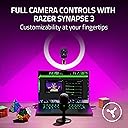
🎥 Elevate your stream game with razor-sharp clarity and pro-level control!
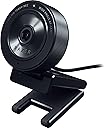
The Razer Kiyo X is a compact, high-performance streaming webcam offering 1080p at 30FPS or 720p at 60FPS video capture, equipped with smart auto focus and fully customizable image settings via Razer Synapse 3. Its flexible mounting options and portable design make it ideal for professional-quality streaming anywhere.


| ASIN | B09DGQHV87 |
| Are Batteries Included? | No |
| Best Sellers Rank | #42,918 in Computers & Accessories ( See Top 100 in Computers & Accessories ) #159 in Webcams |
| Box Contents | Streaming Webcam |
| Brand | Razer |
| Brand Name | Razer |
| Camcorder Type | Webcam |
| Colour | Black |
| Compatible Devices | Personal Computer, Laptop |
| Customer Reviews | 4.1 out of 5 stars 1,122 Reviews |
| Digital Zoom | 3 x |
| Effective Still Resolution | 64 MP |
| Effective Video Resolution | 1080 Pixels |
| Exposure Control Type | Automatic |
| File Format | JPEG |
| Flash Memory Installed Size | 128 GB |
| Flash Memory Type | SDHC |
| Focus Type | Auto Focus |
| Form Factor | Compact |
| Has Image Stabilization | No |
| Image Aspect Ratio | 16:9 |
| Importer Contact Information | Acro Engineering Company |
| Item Type Name | Broadcasting Camera |
| Item Weight Unit of Measure | 11.2 Ounces |
| Lens Type | Zoom |
| Manufacturer | Razer |
| Maximum Aperture | 3.5 Millimeters |
| Maximum Display Resolution | FHD |
| Maximum Focal Length | 1 Millimeters |
| Minimum Aperture | 22 f |
| Minimum Focal Length | 1 Millimeters |
| Model Name | Kiyo Pro |
| Model Number | RZ19-04170100-R3M1 |
| Network Connectivity Technology | USB |
| Optical Zoom | 3 x |
| Packer Contact Information | Razer |
| Photo Sensor Technology | CMOS |
| Screen Size Unit of Measure | 2.7 |
| Sensor Type | CMOS |
| Shooting Modes | Manual, Auto |
| Style Name | Kiyo X |
| Supported Audio Format | PCM |
| Supported Image Format | JPEG |
| Unit Count | 1 Count |
| Video Capture Format | MP4 |
| Video Capture Resolution | 1080p |
| Warranty Description | 1 year manufacturer |
| Water Resistance Level | Not Water Resistant |
| White Balance Settings | Auto |
| Zoom | Digital |
M**I
good product with decent FoV
This product has better clarity and a decent coverage. Thought it is slightly on a higher price range, it is worth for the clarity and coverage.
S**R
Good 👍
Picture quality is too good, got it for 3.5k . I use it for google meet classes , the mic quality is decent though. U can also change settings in the razer app Nice webcam in this price range
P**L
Ok ok product.
So far so good. Wish there were some settings to tweak the video quality. Also the clip could have been better designed.
A**A
Camera is awesome
Build quality is great as well the video is good, I'm using 720p at 60FPS in windows. And it works as well on macos. Great value for money product. Autofocus is also nice .
M**U
Extremely Disappointing - Constant Flickering and Poor Quality
I recently purchased the Razer Kiyo X webcam with high hopes of improving my video conferencing and streaming experience, but unfortunately, I have been sorely disappointed. This webcam has proven to be a real letdown for several reasons. First and foremost, the constant flickering issue is maddening. The video quality is plagued by this distracting flicker, making it nearly impossible to use for any purpose. I've tried adjusting various settings and lighting conditions, but nothing seems to resolve this glaring problem. Moreover, the overall video quality is abysmal. I expected a webcam from a reputable brand like Razer to deliver crisp and clear visuals, but the Kiyo X falls short in every way. The image is grainy, colors are washed out, and it struggles to provide a decent frame rate. It's a far cry from the quality I anticipated and is simply unacceptable for any serious video content creation or professional use. To add to my frustration, the software and drivers provided by Razer have been less than reliable. Frequent crashes and compatibility issues have made the user experience even more infuriating. In summary, I regret my purchase of the Razer Kiyo X webcam. It's a disappointing product that fails to meet even the most basic expectations for video quality and reliability. I strongly advise potential buyers to look elsewhere for a more dependable and higher-quality webcam option. Save your money and your sanity – this webcam is a real letdown
V**N
Dose the job that should have been done 10 years ago
For Apple it’s a second choice
S**E
Razer Kiyo X is better than C922 Pro HD Stream Webcam
In comparison to C922 Pro, Razer Kiyo X has better sensitivity, better colors and overall quality. You can save your settings. I have been user of Logitech camera C922 pro, at about 1/3 price you can get Razer Kiyo X. A must have webcam! So its a C922 killer!
S**Y
High quality
For This price range, the video looks clean and clear like it is a YouTube HD video, love it.
G**E
Ottima
Fa il suo lavoro ,la uso come handcam per la tastiera e il mouse e si vede molto bene.
R**A
A great budget webcam
The camera is good quality, gives off a great picture. I used it to go on video with friends and loved ones often and it replaced my extremely old Logitech cam. The only issue with it is that you need to uninstall the driver in order for your pc to pick it up as the razer kiyo, otherwise it's registered as a usb webcam only. I have mine on a tripod clipped on to my monitor stand as I don't like webcams hanging over my monitors.
S**R
A noticeable improvement in image quality
Until now, I have been using a cheap Chinese camera for all my video conferences. It did an OK job. But since I'm now 100% home office based, I decided to invest in a 'professional' camera so that I can come across clearly. After thorough research, I opted for the Razor Kiro, vs. Logitech C920. It is not disappointing. Setup was plug & play (no need for the Razer SW in my opinion), and the image quality of top-notch, several of my colleagues have already commented on the massive improvement. Highly recommend this camera not just for gaming, but if you are spending many hours of your day on video conferences.
R**O
Rapport qualité prix top
Je suis vraiment satisfait de cette webcam Full HD. L’image est claire et nette, même en faible luminosité, et les couleurs sont naturelles. Parfait pour les visioconférences, les cours en ligne ou le streaming. La mise au point est rapide et le micro intégré restitue bien la voix sans trop de bruit de fond. L’installation est ultra simple : branchée en USB et reconnue immédiatement, sans besoin de pilotes supplémentaires. Elle est stable sur l’écran grâce à son support, et le design est discret. Excellent rapport qualité-prix, je recommande sans hésiter !
X**R
Preis - Leistung lohnt sich
Die Webcam verbindet sich anstandslos auch mit Linux. Das Razer-Tool ist unnötig. Liefert scharfe Bilder, stellt sehr gut scharf und die automatische Belichtung funktioniert sogar mit Anpassung des Farbtons, prima.
Trustpilot
5 days ago
1 day ago