
โจ๏ธ Elevate your typing game with timeless precision and pro-level comfort
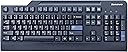
The Lenovo 73p5220 Preferred Pro USB Keyboard delivers a classic, full-size 104-key layout with three Windows keys, optimized for professional productivity. Its wired USB connection guarantees a secure, lag-free experience, while the subtle 2ยฐ incline and multi-route cable options provide ergonomic comfort and a tidy workspace. Designed for serious typists who value reliability and focus, this keyboard blends traditional design with modern functionality, making it a top choice for millennial managers seeking efficiency without distractions.
| ASIN | B000AOYWVE |
| Additional Features | Dedicated Media and Shortcut Keys |
| Antenna Location | Office |
| Best Sellers Rank | #1,258 in Computer Keyboards |
| Brand | Lenovo |
| Built-In Media | Preferred Pro Keyboard |
| Button Quantity | 104 |
| Color | Business Black |
| Compatible Devices | PC |
| Compatible Operating System Family | Windows |
| Connectivity Technology | Wired |
| Customer Reviews | 4.6 out of 5 stars 595 Reviews |
| Enclosure Material | Plastic |
| Global Trade Identification Number | 00000435653062 |
| Hand Orientation | Ambidextrous |
| Item Dimensions L x W x H | 17.8"L x 7.3"W x 1.3"H |
| Keyboard Backlighting Color Support | Single Color |
| Keyboard Description | General Purpose USB Keyboard |
| Keyboard Layout | QWERTY |
| Language | English |
| Manufacturer | Lenovo |
| Mfr Part Number | 73P5220 |
| Model Name | 41A5289, SK-8825, 54Y9400, KB1021 |
| Model Number | 73P5220 |
| Number of Items | 1 |
| Number of Keys | 104 |
| Number of Packs | 1 |
| Power Source | USB Powered |
| Recommended Uses For Product | Office |
| Special Feature | Dedicated Media and Shortcut Keys |
| Style Name | Contemporary |
| Switch Type | Membrane |
| UPC | 809185811612 795327808568 012300306386 809386468769 311804067152 884942236211 790304490699 763615774147 611101305323 000435653062 807030492665 |
| Unit Count | 1 Count |
| Warranty Description | 1 |
E**F
Ah. Relief!
In 2008, it has become hard to find a decent keyboard. For starters, most manufacturers take it upon themselves to tweak the layout of their offerings, leaving you with an L-shaped Enter key, an extra "fn" button or a rearranged Insert/Delete cluster. I have a computer at work as well (who doesn't?) and for four years I've put up with one of these fancy-schmancy media keyboards. I can't believe the RELIEF I'm feeling after getting this Lenovo product with an unaltered, matching layout! I feel like my spine is taking care of actions such as moving text blocks around. The quality of this Lenovo is very good. It's a plastic keyboard, so I doubt it'll survive the beer and coffee tests we gave the 3270 of yesteryear. It's also perhaps a little bit too lightweight for my taste. However, the keys feel solid and responsive, no matter from which angle you hit them - again, a relief from my former "ergonomic" keyboard, where the tactile feeling was more of a mushy kind and sometimes a key wouldn't register if you hit it at an angle. I like the appearance of this one, too. The lack of media buttons gives it a cool business attire, while the non- square layout makes it look more contemporary. I use it on a dark antique desk, and it looks fitting. The two Enter buttons are a dark blue/gray, but they don't stand out as much in real life as they do in the pictures. The wrist rest is also a nice surprise: while you don't need it (the KB stands flat enough), it does fit snugly and has a feeling that I would describe as something between leather and non-slip rubber. It's a little hard though, so it won't replace a gel pack if you need something like that. The downside of this device is that it requires an unsightly cable connection. However, the extra cable comes with benefits: - It works. You just type and there it is (I know, Duh, but try a few wireless keyboards at this price!). - It's secure: whatever you type, it's between you and your keyboard, no password sniffing from your neighbor. - It can wake the PC (depending on motherboard). I love being able to hit the space bar to power up my PC which is now stowed out-of-sight in the armoire. Bottom line: for 35-ish $$, this is probably one of the best keyboards and you couldn't go wrong with it.
R**Y
They have a nice long throw (that's why people who have only ever ...
This is a REAL keyboard intended for touch-typists and those who spend long hours actually typing. They have a nice long throw (that's why people who have only ever typed on laptops don't like them very much) and good tactile feedback. It's constructed of heavy plastic -- both the case and the keycaps -- giving you a very secure, robust platform for extended work. The company that I work for has deployed these keyboards for years so I've seen a ton of them -- never seen a broken one, though. We do have a sprinkling of cheaper keyboards from other companies and finding them broken is not unusual. At work, I provided myself out-of-pocket with a Unicomp Classic 101 White buckling-spring mechanical keyboard ($84) but, as nice as it is, it's far too noisy to subject my loved ones at home to. This Lenovo keyboard is an excellent compromise: It still feels great but it's much quieter (not silent, though, but it's relative). All of the keys are placed where they are supposed to be. The pipe key is above the Return "Enter" key and not on the top row where it doesn't belong, for instance. For the record, these keyboards are in use on Linux workstations at work and on a Mac at my house. Mac users should swap the "Alt" and Windows keys to get them to function properly as "Option" and "Command" keys. Use the Keyboard control panel and click on the "Modifier Keys..." button to make this change. I would have purchased a white model if only it were available. I work in subdued lighting -- dark, sometimes -- and it's simply easier for me to locate specific keys on a white keyboard on the rare occasion that I need to. That's just a personal thing, though.
M**C
Solid Classic Keyboard!
The history on this is I had a wireless keyboard and mouse from Logitec for nearly 8 years and the keyboard started requiring new batteries (2 AA) nearly every 2-3 months. Not sure why it started consuming so much more energy in its later years but it was time for a new solution. Being desk based, was not sure why I needed wireless and who wonders around with their keyboard anyway and I'm not concerned about wires facing a customer or any cosmetics so I looked for a wired keyboard. There are basically the cheapo version and then I found this traditional solid keyboard with no frills. This was exactly what I needed as I can quickly click any app or media control and don't need buttons on my keyboard for that. This keyboard is quiet, fluid keys, solid feel and great feedback from the keys. It seems to be modeled after early IBM keyboards and echos the similar quality. Get one if you are looking for a very solid no frills keyboard that does not require batteries, wireless adapters, etc... awesome!
R**S
Solid Simple Keyboard
This is a plain, no-frills membrane keyboard. In my experience these simple machines are built to last (and built to be easy to maintain) and this particular keyboard has an especially robust feel to the plastic and when I took apart the keys (to clean a sticky residue I stupidly put there), I could tell the key joints weren't breaking easily. In addition to the solid feel, it has some nice little design elements to it. For example the tabs in the back to raise the angle of the keyboard come in two sizes and there are grooves in the back of the keyboard that let you feed the wire through such that the wire comes out at the middle, left, or right of the back of the keyboard so that you can adjust it for where your tower is in relation to your keyboard (though to be honest, when moving the keyboard around a lot, the wire comes out of the grooves fairly easily). It has a very soft feel to its key presses. This has the benefit of being a very quiet keyboard, but may be uncomfortable to people who are used to more resistance when typing. My one personal complaint about this keyboard is that it has a tad more ghosting than previous simple keyboards I've owned. For light gaming this can get in the way of things. The WASD area seems particularly cluttered. You can't, for example, press W + D + E or W + A + Q at the same time. As a budget keyboard, it might be unreasonable to expect more and for most typing experiences it won't ever come up, but I think it's information that some consumers might want to know.
P**S
Classic keyboard
This is the first time Iโm typing on this keyboard and so far I like it. I like the cupped shape of the leys and the fact that all of the keys are where they should be. I would prefer more of a downstroke when I press a key before it types the character, I tend to touch the keys lightly sometimes and that types something I donโt want but thatโs just me, I have to relearn keeping my fingers above the keyboard. DESIGN The return key is where it should be and the right size and shape, although I will always have a preference for keyboards that have an L-shaped return key. The backspace key is likewise well positioned, itโs not as close to the insert and delete keys as some keyboards, which always make frustrating errors that are hard to fix. This is about as quiet as a keyboard can get without going to those flat chiclet keys that have almost zero travel. If you learned on that you probably can type fast but I have seen people type even faster on some mechanical keyboards. This is like a happy medium โ traditional keys but not clacky or thunky. THINGS I WOULD LIKE CHANGED If I am going to accept that this is a traditional keyboard almost exactly the way IBM invented it for PCโs I have to accept those little light bulbs far off to the upper right corner. They are okay for the NumLock which I always keep turned on anyway because otherwise it just duplicates keys that are already there โ in other words a historical throwback that they could easily dump. But I like a Caps Lock that either has a light in the actual key itself or a message on the screen that lets me know when I turn it on and off. Being an ancient design this Lenovo has zero interaction with my computer via apps or software, even their own for my Lenovo mouse that I just bought. Post baby boomers may lament the lack of even anything resembling media controls, eject buttons, Mac keys, etc. None of them are here, there are no dual-function keys other than the way STANDOUT THINGS I LIKE It is unusual to find a keyboard that has multiple ways to route the USB cable. I guess historically most people used to put their computers on the left so cables come out of the left side of most keyboards. This one letโs you route it from the left, center or right side. That makes for a much neater desktop for me. I also like that the natural incline of this one is a couple of degrees. I almost always have to use the little feet on the back but not with this one, the angle is perfect for natural typing with the feet collapsed. The pencil tray may sound like fluff but it is convenient. And finally, while there is no wrist support there is just over an inch of softly curved edge to rest the edge of my hands on while typing. It is better than the majority of keyboards that have a sharp squared off edge. YES NO MAYBE It is rare that I buy from a non-prime seller, especially something designated as used or reconditioned but the savings were too good to pass up, so I took the gamble. I am very impressed, this keyboard looks smells and feels brand new. Not one scratch or fingerprint. The end result is that I could not be happier. This keyboard is absolutely new looking and feeling and every key has the identical sound and touch feel, how rare is that with todayโs units? Sure it may not have some of the fluff like media controls or on-screen displays but for a writer or anyone who uses a keyboard seriously this one lets you focus all of your attention on just one thing, typing. For that reason I believe it is a five star product.
P**E
Just a Good Old-Fashioned Keyboard!
I've been using this keyboard for 2 weeks. Feels like how a keyboard should feel; like how they were built 10 years ago. Nice depth on keys -- not spongy or shallow. Nice spacing between keys -- about 7mm. All keys -- including space bar, enter key, delete, insert, home, end, page up, page down --- are where they belong. (I purchased a new computer/keyboard recently, and the home, end, page up and down keys were in new places. And the insert key didn't even exist --- Whaaat?! Which is why I purchased this lovely Lenovo). Anyways, the enter keys on the keyboard I received are black (not blue like shown in the description picture). It has two fold-down feet on the back underside of the keyboard in order to angle the keyboard to make typing more comfortable. Length: 17 3/4", Width: 7 1/2". An attachable velvety-feeling slightly flexible plastic (not hard plastic) wrist rest is included. It's 17 3/4" long and 3 1/4" wide. This keyboard is a pleasure to type on, and my typing speed is back up to where it should be with zero errors; not like with the new-fangled keyboards or laptops on which errors abound. So glad I purchased it. I love it!
N**H
Excellent keyboard for the money
This is an excellent keyboard for the money. Sturdy, and good quality materials with classic layout and good ergonomics built directly into the design. Hands down the best membrane keyboard Iโve ever used. Whether or not you like the feel of a keyboard is a matter of personal taste, but Iโve tried several different keyboards, including several mechanical keyboards (which generally range between $100-$300), and I actually prefer this keyboard over many of the mechanical keyboards Iโve tried. Most mechanical keyboards are relatively loud, so if you need a silent keyboard for the workplace but donโt want to sacrifice build quality, this keyboard is an excellent choice, unless you want to search for a keyboard with Cherry MX Silent Reds which will cost you over $100 at least. Even then, this keyboard has a good feel (in my humble opinion) which will give other silent keyboards a run for their money. Your tastes may vary, however.
S**E
Great keyboard that uses traditional key metrics for those used to legacy keyboards
This keyboard uses the traditional key design, spacing, and stroke depth for keyboards dating back to the 1970's and 1980's. I used this to replace a modern keyboard that was lighted (this keyboard is not lighted). The problem I have with many modern keyboards is the difference in stroke depth and key surface width. I was making a lot of typing mistakes and couldn't figure out why until I studied the situation and realized that for decades I had become accustomed to the design metrics associated with traditional keyboards. I believed this was the predominant reason for the many typing errors I was experiencing. So I bought this keyboard to test my theory, and YES, my theory was correct. My typing errors are greatly reduced allowing me to type more accurately without having to look at the keyboard. I wish there was a lighted version of this keyboard, but I would rather use a keyboard with traditional key design metrics than a higher tech lighted keyboard that has non-standard key metrics. NOTE: this keyboard has a very slight key-click feel which is not audible (my preference) and is not at all like the old IBM PC audible-click keyboards.
A**R
Best Keyboard for typing lovers!!! Highly recommended ๐คฉ
Feel your typing. Perfect one for those who love typing. The wire is very strong. Build quality is superb. Purely for professional users. It is a big keyboard with enough space between each keys. I would say it is a modern typewriter. Not so loud buttons. No back-lit. Not a mechanical Keyboard. Not much difference from a mechanical though. It will be almost twice the length of a 15" laptop.
A**O
Excelente
Excelente producto ๐
M**M
Amazing keyboard for the price
I bought this keyboard on sale (paid 17+tax). At this price itโs an amazing keyboard. Itโs comfortable and comes with a palm rest. Obviously it does not feel like a +100$ mechanical keyboard, but for 20 bucks it offers an excellent typing experience.
A**ใผ
ๅๅใใใ
ใใฏใๆ็ทใ ใใใฃใฆBluttoothใใใๅๅฟใใใใ ใพใใU.S.Keyboard้ ็ฝฎใฎใญใผใใผใใฏใปใจใใฉ่ใๅๅใใชใใใฎใๅคใไธญใใใใฏใใชใๅๅใใใใ ๆ่ฟใฎKeyboardใๆชใใชใใใใฏใไปไบใฏใใกใใงใใใใ by 26ๆญณ
J**.
Me encanto
Me encanto sirve para uso rudo incluso para juegos. realmente bueno y lo mejor teclado en ingles . lo recomiendo
Trustpilot
1 week ago
2 months ago