Desertcart purchases this item on your behalf and handles shipping, customs, and support to Seychelles.
🛡️ Protect your view, reduce the glare, and work smarter—because your eyes deserve the best.
The COOSKIN 15.6 inch Matte Anti-Glare Screen Protector is a precision-cut, 3H hardness polyethylene terephthalate film designed for 16:9 laptop displays (345mm x 194mm). Its matte surface effectively reduces glare and eye strain from bright environments while resisting scratches and fingerprints. The electrostatic, non-adhesive installation leaves no residue and includes a full accessory kit for dust-free, bubble-minimized application. Ideal for professionals seeking enhanced screen comfort and durability at an affordable price.


| ASIN | B00D84GA40 |
| Best Sellers Rank | #149,417 in Computers & Accessories ( See Top 100 in Computers & Accessories ) #2,643 in Laptop Screen Protectors |
| Brand | COOSKIN |
| Brand Name | COOSKIN |
| Clarity | 1 |
| Color | Transparent |
| Compatible Devices | Laptop |
| Compatible Phone Models | Laptop |
| Customer Package Type | Standard Packaging |
| Customer Reviews | 3.8 out of 5 stars 1,130 Reviews |
| Finish Type | Matte |
| Included Components | Screen protector |
| Item Dimensions L x W | 13.58"L x 7.63"W |
| Item Hardness | 3H |
| Item Weight | 0.15 kg |
| Manufacturer | COOSKIN |
| Material | Polyethylene Terephthalate |
| Model Name | LG-156 |
| Model Number | LG-156 |
| Number of Items | 1 |
| Part Number | LG-164 |
| Product Dimensions | 13.58"L x 7.63"W |
| Screen Size | 15 inches |
| Screen Surface Description | Matte |
| Special Features | Anti Glare |
| UPC | 601263153740 |
| Unit Count | 1 Count |
| Water Resistance Level | Waterproof |
S**I
Works great, but a bear to install - great company and customer service though!
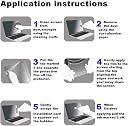
Honestly, the installation of these things is a special talent I think. I followed the (scant) directions and it is on my computer (it fits fine on a 15.6" screen) but getting the tiny little bubbles out is akin to pulling teeth. So fortunately for me, I can (mostly) overlook the little bubbles for now as the actual glare reduction makes my computer at least usable in the environment I am using it in. Still, unless you're a Cellular Sales rep who puts these things on all day, every day prepare for a challenge. Also, the corner of the protector was slightly damaged, but not so much it mattered a lot. Edit: The folks at Cooskin reached out to me and are making things right, so I am changing my review to 5 stars based on quality customer service and the products overall usefulness. They have given me more detailed instructions on how to install one of these, mainly being VERY concerned with dust particles which are VERY hard to see. This is what causes these bubbles and so it is important to closely examine the screen for any dust or other contaminant before even trying to place the protector on. Any company willing to do things like that are worth supporting IMHO and I honestly appreciate their assistance. My first received protector was slightly damaged, and the company contacted me to ask if I wanted a replacement. I said sure, so they sent me two! For the record, it is a challenge installing these things, but again the company offered great advice and my second installation with the replacement protector went flawlessly. Here's what I did: 1. Clean the screen thoroughly with a good screen cleaner to remove fingerprints, smudges, etc. 2. Acquire a can of forced air such as this: Dust-Off Compressed Gas Dusterhttp://www.amazon.com/gp/product/B00DZYEXPQ?keywords=canned%20air&qid=1450884788&ref_=sr_1_3&sr=8-3 and use the air blasts to remove the tiniest of dust particles. Look VERY closely and be sure ALL dust is gone and the screen is otherwise clean. 3. Remove the "Inner" cover ONLY FAR ENOUGH TO START PLACING THE PROTECTOR. Get it lined up correctly and then SLOWLY remove the rest of the cover, pausing as necessary to use the included card to remove any stray air bubbles. If you've been diligent about dust removal, these should be minimal and easily removed. BE PATIENT in this step. Once you have the entire "Inner" cover removed and the protector is on the screen, carefully find/remove the outer cover to leave only the screen protector on your screen. It can be a minor challenge finding/grasping the outer cover, but I used a sharp knife to GENTLY separate the cover from the protector and I was home free. There are YouTube videos out there as well if you;re more visually oriented. Once it IS installed, the cover is superb and does a great job on glare. Installing it made my nearly impossible to see Lenovo laptop actually very useful again, and I am a happy camper. Made all the difference in the world!
E**S
Good glare reduction, tricky install
Good glare reduction, tricky install The Cooskin 15.6" matte anti-glare screen protector is a simple, affordable way to cut down reflections and ease eye strain on a laptop. Once applied, the matte finish does a solid job of reducing glare from overhead lights or sunlight, and it adds a layer of scratch and fingerprint resistance. The fit is generally good for standard 15.6" 16:9 displays, and the package includes a cleaning cloth, dust stickers, and a card to help smooth out bubbles. Where this protector gets mixed marks is installation. Dust and tiny particles are your enemy—if you don’t prep the screen meticulously, bubbles and specks will show up under the film. Some buyers found it easy, while others struggled and ended up with imperfections. It also slightly softens screen clarity, especially if you’re used to a glossy, high-res panel. Touchscreen users should note that it may reduce sensitivity. Bottom line: A budget-friendly, effective anti-glare shield that does what it claims once installed properly. Great value at under $10, but be patient with installation—or buy a spare in case your first attempt isn’t perfect.
K**A
COOSKIN makes the best anti-glare protectors.
COOSKIN makes the BEST anti-glare screen protectors. I have bought two of these for two different computers. Yes, they take about 15 minutes to install and a lot of patience - all screen protectors do. It's not easy. Not everyone can do it. But if you really take the time and be careful you can install it and these work GREAT. I used to get headaches from screen glare and this helped so much. Does it make it a little blurry, well I wouldn't say "blurry" but yes, it changes the look - that's what anti-glare has to do. If you have never installed a screen protector then I suggest you order 2 or 3 as it takes some getting used to. But now I can install them the first time every time, but I've put them on about 10 phones, tablets and computers. Cooskin is by far the best, comes with everything you need - even a little sample piece so you can get used to the process. In short, you clean the screen REALLY WELL with the supplied alcohol pad. Then, wipe it clean and lint free with supplied fabric. Then, take the little blue positioning stickers and stick them on the top side, by the #2 sticker so you have more areas to hold onto without touching the sticky side. Next, remove the coating on one side (it is labled #1) to reveal the sticky. Starting at one long edge of your screen put it in place, carefully smoothing it out with the credit card like burnishing tool they give you. If you get a bubble pull back a bit and go again. If you get lint you use the little blue sticker to pull the lint off the STICKY side (push sticker stickey to screen protector sticky and it grabs the lint). Keep doing this, slowly, until you are done. When I'm done there may be one or two very small bubbles or lint, but the glare protection usually makes them unnoticeable once you turn on the computer. This one fit my 15.6 inch Dell perfectly. In the past I bought one for my HP and it was great too. Love them! Those negative reviews are people who don't know how to really take their time and do it right. If you aren't technically inclined then ask a technical friend to do it, because it is not easy, but the result has totally taken away my screen glare headaches (I work on the PC 10 hours a day, so it was an issue). Good luck!
M**L
Do not waste your time
1 star means exactly that - I hate it. Why? Because of lie everybody tells us. The truth is if you have a crappy laptop with glossy screen it is going to be still a crappy laptop with glossy screen, And if you want to have a matte screen then buy laptop with matte screen. Those "professional" reviewers of the laptops conveniently forget to mention that laptops with glossy screen are the pain to use in regular life. They should tell us that the first thing. But they don't.And you are better off. Now. It is not a review of the laptop. It is review of the protector. This one and probably other ones similar to that one as well. It is close to impossible to apply protector without air bubbles caused by the dust and scratches on the screen. Who of us have an absolute dust free environment? So you got one shot to do appliocation. And if you missed it somewhere on the screen it is going to be there to annoy you. If you pull screen protector back to correct it you will most likely get screwed because even more dust are going to get inside. Because protector attracts dust working as a powerful electrostatic magnet making sure that all dust several inches around the film in the air is going to be attracted to it screwing all your efforts.In other word do not waste your time applying the film. Live your life and remember those people that convinced you into buying laptop with glossy screen. Yes you can hire someone to professionally apply the protector. But to find the proper people is going to take your time. Plus labor cost. Its better buy a proper laptop with the matte screen. Lets support manufacturers that want to work delivering decent product for people instead of those that trying to trick us into buying whatever crap they got tricking us to believe that that laptop on the show room in the controlled environment is worth spending your money on.
S**M
GOOD Anti-Glare Screen Protector, But Difficult to Install and Grainy Screen!
PROS: • Anti-Glare works well to reduce reflection, glare, and light substantially, making it easier to look at the screen • Minimizes fingerprints • Wipes dust and smudges off easily • No affect on my touch-screen • Provided with a big, blue dust sticker to remove dust prior to installation • Good price compared to other screen protectors CONS: • Some gaps between the screen protector and the screen on my Dell Inspiron 15.6" laptop, so not a perfect fit • Very difficult to install without some dust getting stick underneath the protector • If dust is stuck underneath, it is difficult to peel off and remove the dust without damaging the screen protector or attracting more dust • Screen protector reduced screen quality, making screen graining as can be seen in last picture • Alignment needs to be just right the first time, otherwise it will not fit properly even though there were some gaps on my screen
N**S
Seriously, just what I needed to improve the crappy mirror like Glare I was dealing with! Patience makes awesome!
For the 12 dollars I have spent, this is better than the 40 dollar protectors I have bought in the past. It is simple, the card included to take out the bubbles is plastic, it's a good starting card, though I still ended up using a card from my wallet to do the final touches. I know in one review there is an image of the sticky stuff from a sticker still attached... just so you know.. that sticky stuff is only stuck to the top layer that protects the actual matte protector from getting scratched while you are attaching it to your screen. It is not actually attached to what will be left on your computer. This piece is a total of 3 clear sheets, a protector on front, the actual protector itself, and the protecting sheet on the back. Remove the back-sheet first after you have played around and feel comfortable placing it on your screen. It has a sticky tab that states "inside", pull on that to remove it and glide the protector onto your CLEANED screen. If you get bubbles while gently putting this on, use the blue sticky sheet to pull off any lint or dust or whatever , it seriously works like a charm. Once you are satisfied that you have everything on bubble free, or mostly (I had like 3 itty itty bubbles that I hardly notice... which is impressive, because I have always been really sucky putting these things on anything, tablets... phones, computers, etc. ), then you pull the sticker tab that says outside, and the top layer of protective plastic, to protect the "protector" will come off... and voila! You have a drastically glare reduced screen protector that works great with your touch screen. I applied mine to an HP Envy 360 15.6 inch. It seriously makes my computer much more tolerable to look at during the day. Before, I could see my reflection so much, that I hated doing anything on it in any kind of stronger lighting. Seriously good buy, just follow the instructions and be patient putting it on. If you take a little bit of time (took me 10 mins), it's totally worth it and looks great!
K**.
Layer 2 tab pulled the entire glare screen of my laptop display.
For the record, I'm working in the finished basement with humidity of 50%First I read the installation instructions on the outer package for the Glare Screen. Then I searched YouTube for advice. I didn't find any videos specific to this brand of glare screen but picked up some good pointers. Before starting, I carefully cleaned my work area and my laptop with glass cleaner. . I then opened the Glare Screen package. No instructions inside. However, there was alcohol prep pads, guide stickers, and blue unknowns, never mentioned in the instructions on the outer package. I clean the screen with the alcohol prep and microfiber cloth twice. So far so good. Per the packaging instructions I peel off the label No. 1 layer and apply the screen to my laptop. It was a little tricky, but I got it lined up correctly. I then use the enclosed "scraping card" to get rid of the bubbles. Good so far, Then, per instructions, I pull of Layer No. 2 using the tab. Well, not quite. - The entire glare screen came off with Layer No.2. No glare screen was remaining on the laptop. (*&%%%#&#*. I was finally able to separate Layer No. 2 from the Glare screen and reapplied the Glare Screen only to the laptop. By now it had picked up a couple of specs of dust. I carefully worked to pull up the Glare Screen using tape and removed the dust. I then used the scraping card to get rid of most of the bubbles. Some bubbles stayed behind and I gave up after 10 minutes of trying, Luckily the bubbles aren't too noticeable when the laptop is on. Its like having a day or 2 of dirt on the screen at all times. I'll try the Glare Screen "as is" with small bubbles for a while as it seems to help with the glare. I'll be a nice guy and give the product 2 stars as I was able to salvage the glare screen.
B**B
This is a great product, do not discount just because people do not read or understand directions
I hope my review will cover all the doubters out there.....I have a Lenovo Z400 IdeaPad touch screen. After doing my research I decided on the COOSKIN 15.6 inch Anti-Glare Screen Protector. I knew full well that my screen was 13.58 x 9.6 x 1.14 and COOSKIN clearly explains with a graphic that their screen protector protects 13.58 x 7.64 with a Monitor size being 15.6 in., monitors and TV's are always measured in their description on the diagonal. I knew my screen had about a 1/2 in. border around the actual screen (actual screen size is 12 x 7). If anyone has the Z400 touch they will know it is like glass, lots of fingerprints. I could not use my laptop anywhere near a window or outside, useless. I did upgrade this laptop to Windows 10 (they advise not to on this model) and there is a screen issue with brightness, Lenovo will not fix it. That means we have no control over our brightness, it stays at 50%, my laptop became more useless. I decided to get the Anti-Glare for these reasons, brightness issue, glare and fingerprints. COOSKIN did say that this protector does work with touch screen, I was skeptical, but it was cheaper then a new laptop, so I purchased, $12.95 vs. $1000. This item came in a very sturdy cardboard protective package, everything was sealed, clean and protected. No cracks, no creases, they even included a small sample you can test before trying the screen. (see pictures). I followed the directions, made perfect sense to me. I did have to clip one side (right) with a paper cutter TO MAKE IT FIT MY SCREEN. I laid my laptop on a table with the monitor laying flat. I propped the keyboard up against something for stability. I laid the anti-glare over the monitor with #1 INSIDE facing down, but before I did that I pulled back the plastic protector (cellophane) from the #1 INSIDE back about 4 inches. I laid that four inches down (left side) on my very very clean, dust free monitor with my left hand and with my right I was holding the cellophane underneath the anti-glare, both hands were stabilizing the anti-glare screen (this allowed me to use both my hands) so I can slowly pull the cellophane from under, with my right hand, while scrapping the screen with the blue plastic scratch card, with my left. If a bubble appeared I would just gently pick up the anti-glare and lay it down again while scraping the card. As soon as that section looked good I would pull some more of the cellophane from under the anti-glare and work that down until I got to the (right) edge, pulled the rest of the plastic cellophane off and "Wha La" it 's done (yes, sometimes I would switch hands so my right hand could work on the bubbles while my left hand was holding the screen in the air). After you get the screen on, peel off the #2 OUTSIDE cellophane and use your scratch card to get out any little bubbles you see hanging around. I have been using this anti-glare screen on my touch monitor for about a month and it works great with the touch monitor and no fingerprints. I sat outside at my picnic table and I was able to work all day with my laptop in a very sunny spot under an umbrella with absolutely no problems. Three reasons I gave this review. First, they sent me an email asking me to review. Second, everything I read about this product fit my needs and some more, I found nothing written about resolving fingerprints so I can tell you it worked. Thirdly, I had to laugh, a week ago I had a visitor who owns a small MacBook, I believe its the 11" . She brought me over the very same COOSKIN 15.6 inch Anti-Glare screen and told me I could have it or she was throwing it out. I asked why and she said it does not fit her screen, I could not stop laughing. Half the negative posts for this product are because the purchasers claim this product did not fit their screens. Cracked Me Up!!! I will be helping her put it on her MacBook.
E**S
Cumple con lo que promete
Cumple con lo que promete. Es más grueso de lo que pensé que sería y si difumina los reflejos de la pantalla. Lo único malo que pudiera tener es a la hora de instalar ya que pueden quedar pequeñas burbujas sin embargo eso ya depende de la práctica de quien lo instale
A**R
Very easy to install
This product went on very easily, and there were no bubbles or creases when installed, and is still fully intact. I had ordered a different brand at the same time for my iPad and it has bubbles and creases all over and cannot get them out. Very difficult to install. It is also already not sticking on the corners.
M**Z
muy práctico pero difícil de colocar
es un poco complicado de colocar y que no queden burbujas ni polvillo atrapado. Lo bueno es que reduce mucho los reflejos y la vista lo agradece. Muy contenta con la compra.
R**U
Good Buy
Easy to apply. Nice matte surface, excellent for writing on a touch screen. Value for money.
M**H
anti lap top glare film
This is a brilliant invention i dont know why they arent automatically bulit into all computor devices nowadays. I myself and those i know all get eye strain & headaches from using laptops etc ...but this DOES eliminate the harmful glare coming from the screens and protects from scratches too!, I just wish they were easier to apply and ive noticed the price creeping up too !
Trustpilot
3 weeks ago
4 days ago