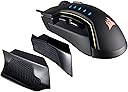
๐ฎ Elevate your game with precision, comfort, and style โ donโt just play, dominate.
The CORSAIR Glaive RGB Gaming Mouse combines a high-accuracy 16000 DPI optical sensor, customizable ergonomic grips, and ultra-durable Omron switches rated for 50 million clicks. Featuring onboard profile storage and dynamic 3-zone RGB lighting, it offers professional-grade performance and personalized comfort for extended gaming sessions. Crafted with an aluminum scroll wheel and designed for fatigue-free use, itโs the ultimate tool for gamers who demand precision and style.


| ASIN | B06Y17489M |
| Additional Features | Ergonomic Design |
| Antenna Location | Gaming |
| Best Sellers Rank | #80,321 in Video Games ( See Top 100 in Video Games ) #2,287 in PC Gaming Mice |
| Brand | Corsair |
| Button Quantity | 6 |
| Color | Aluminum |
| Compatible Devices | Personal Computer |
| Connectivity Technology | USB |
| Customer Reviews | 4.1 out of 5 stars 1,219 Reviews |
| Embellishment Feature | LED |
| Enclosure Material | Aluminum |
| Global Trade Identification Number | 00843591096126 |
| Hand Orientation | Ambidextrous, Right |
| Hardware Platform | PC |
| Included Components | GLAIVE RGB Gaming Mouse, Accessory Bag, Two Additional Thumb Grips, Warranty Card, Quick Start Guide |
| Item Type Name | Corsair CH-9302111-NA GLAIVE RGB Gaming Mouse, Backlit LED, 16000 DPI, Optical, Aluminum |
| Item Weight | 13.44 ounces |
| Manufacturer | Corsair |
| Mfr Part Number | CH-9302111-NA |
| Minimum Required Operating System Version | Windows 10 |
| Model Number | CH-9302111-NA |
| Mouse Maximum Sensitivity | 16000 dots_per_inch |
| Movement Detection | Optical |
| Movement Detection Technology | Optical |
| Number of Batteries | 2 AA batteries required. |
| Number of Buttons | 6 |
| Operating System | Windows 10, Windows 8, or Windows 7 |
| Power Source | Corded Electric |
| Range | 6.0 meters |
| Special Feature | Ergonomic Design |
| Style Name | 16,000 DPI |
| Theme | Gaming |
| UPC | 843591096126 |
| Warranty Description | 2 years |
A**R
My favorite mouse so far
I will admit I have not tried many mice before but from what I have tried this mouse has been the best so far. The biggest point for me would be the comfort, it feels amazing in the hand. I have used a Razer Mamba tournament edition for months and i always hated how it felt in my hands. My hand size is on the larger size with average finger length. I can see if someone has longer fingers they may want to look elsewhere but for my hand it is the perfect size, especially when using the included thumb rest. The soft touch plastic used on this mouse feels much more comfortable than the cold plain plastic used on the Razer Mamba. The Glaive also glides across my Razer Firefly mat which such fluid precision I never knew this was even possible as my Mamba just felt like plastic rubbing on plastic, and they are both made by Razer!! It pairs with my Razer mat better than the Razer. The only issue I have found which resulted in the mouse lag was due to plugging the USB next to another USB device sharing the connection. I recommend trying different ports if any issues arise. As others have mentioned the blue DPI Leds cannot be changed but that does not affect how I feel. Using the software I just set my preferred DPI on the lowest setting so only 1 blue light is on all the time. I think it adds a nice color contrast but others may feel different. My first impressions opening the package is that this is a quality mouse. From the build to the feel in the hand it just made me feel that I made the right choice. The braided USB cable keeps the quality going. One of the things I wish was different was the included bag could've been larger for mouse transport rather than only carrying the extra grips. I do love that the mouse can remember macros and colors even without the software. In conclusion this is my favorite mouse so far and have had no major issues such as the ones my Razer gave me (like freezing randomly) It is way more comfortable and ergonomic to my hand size. Not to mention the perfect glide, perfect weight (heavier than the Razer), and extra thumb grips. For the same price as the Razer this mouse has opened my eyes to what I have been missing all along. This is a quality mouse and I feel it will serve me well for a long time. I hope this helps anyone looking.
A**R
I needed to switch mice because I just wasn't completely happy with the MX Master's performance
Just got this today. Keep in mind this is my first "gaming mouse" Switched from a Logitech Mx Master to this Corsair Glaive. I needed to switch mice because I just wasn't completely happy with the MX Master's performance in games. The MX Master is by all means a great mouse. But I wanted something that would be a little better for gaming. And from what I have read wireless mice can be a "disadvantage" in online gaming. So far heres what I like and dislike. Pros- -Really comfortable. Admittadly I have tiny hands. For a 28 year old man sometimes I feel like the guy from the old Buger King comecericals (you know the one... lol). -Awsome customazation. With the iCue software provided by Corsair (software you'll have to download from the Corsair website) setting macros or custom keybindings are a breeze. You can even change the color of the LED's and CALIBRATE the sensor to whatever kind of mousepad your using!!! Cons- -The only con is the placement of the "Forward & Backward" keys are placed a little too far back. Even with small hands I have to make a somewhat uncomfortable thumb pivot to hit the back button. This might be a little exaggerated but I feel if you have larger hands it could be kind of a pain in the butt. (or should I say thumb)โฆ. Overall- Its a great mouse. I don't think anyone buying this is taking a gamble, so if you want it I doubt you'd be disappointed. Update- 6-17-18 After some time I love this mouse even more. The 16000 DPI is amazing. I have a 4 monitor setup and not sure how I managed to use the 1600 DPI Logitech MX Master for so long. Update- 10-19-2020 Just last night the left mouse button started to double click while I am only clicking once. I will be replacing this shortly. This mouse lasted me about 3.5 years of light to medium use (very casual FPS gaming).
M**P
Perfect gaming mouse if you dont want to spend a lot!
Awesome mouse ive been using it for a few months now with no problems. Ive always been a Logitech user for many years so this was a change for me. I experienced like some people, my initial reaction was I wasn't sure if I liked it. After playing many games with the mouse it definitely grew on me. Overall I still prefer my Logitech's but this is still a very good alternative if you're looking for something different. Pros -Comfortable after breaking it in -Adjustable thumb pieces come in handy specially if you're someone with big hands -RGB lighting is of course really nice -Simple gaming mouse that doesn't go over the top with extra buttons you probably wont ever use. -Great tracking makes movements in game very precise -Price point I feel like is fair for what you're getting if you go "Aluminum" finish -Scroll wheel has a nice griping type texture to Cons - The finish on the mouse feels slippery and cheap feeling fresh out the box imo -Scroll wheel isn't really as smooth as I prefer -Thumb adjuster pieces are awkward until you break them in -DPI switch can sometimes be problematic because of where it sits and you may hit it accidentally while in game. -The Left and Right Mouse clicks could be a little better but they're not terrible. -Not worth the extra money if you want the "black" finish
A**N
Perfect mouse, but for a few months
Edit: I contacted Corsair for RMA, they are really awesome and very good, the mouse replaced with a new one and my problem solved, actually, It was a common known issues with an old patch and should be solved with new patches, thanks a lot Corsair, back to 5 stars :) Old Review: After 8 months of use, the mouse starts facing a really bad issue like the cheap mouse, I can't drag drop anything, I can't select text, when I do the mouse start release and click by itself, I tried to update software, BIOS, and drivers nothing was helpful, when I click so hard and select the text I see no problem, I believe the mouse is really not good quality. The first review below: Awesome mouse, I don't have enough experience with it but the grip was awesome, big enough to make my hand rest on it without any issues, the middle wheel with rubber and texture is awesome, I love it.
A**2
A great mouse for large hands, with reservations
This mouse has a great amount of things going for it. The sensor is a flawless sensor with high, tunable DPI (and a variety of other parameters). A major plus for me is that with the default side grip in place, the sides are tall and flat. This means that I can pretty much use the mouse ambidextrously and always have a nice grip up front for my fourth and fifth fingers. In Sensei-styled mice, this front edge usually tapers and gives me a worse grip. The main part of the mouse is also nice and wide, allowing for my hand to be spread out and reduce cramping. I got the non-aluminum version because I wanted a lower overall weight. But if you like heavier mice, the aluminum version would be the way to go. *update after 30 days: with regular use, one of the mice I ordered started double-clicking on it's own. I confirmed this using http://unixpapa.com/js/testmouse.html to test my sanity; and the mouse. Oddly enough, I think I may have fixed the problem by simply clicking the left mouse button more towards the side where I noticed it wasn't triggering the double click as often. Now when I click in the middle or more towards the wheel, which is normal for me, the double clicking problem appears to have diminished or resolved. Still dinging a star for this odd problem. *update at 4 months: one of the mice I ordered had the scroll ring and rubber ring become unglued causing scrolling to become an issue. After reporting this to Corsair, I've had to go through a week of firmware and software troubleshooting because they seem incapable of understanding I want an RMA because physical components came unglued. Dinging another star from this review because potential buyers will have to deal with this type of insufferable customer support if they make a purchase. So much to love about this mouse, but this kind of headache makes me want to switch back to Logitech or something else.
K**V
Fantastic and Beautiful mouse!
Fantastic mouse!!! I'm going to be honest, I never used new stuff before and my old mouse used that purple circular plug and my computer was super old, but I never had the luxury of a USB mouse. Not only is this super super comfortable to use, but super easy to calibrate too when you Corsair Utility Engine. I thought it would be complicated but you click on the mouse icon, press calibrate, and then move your mouse in circles and it worked fantastically I was SO surprised! It looked intimidating at first aha. The highest speed moves too fast even on dual monitor displays so I THINK that would be a good feature for 4K displays? I'm not sure but definitely don't have it on the highest speed, you can barely see it aha. I keep mine on the second blue light. It's nice to have customization options with the sides being able to take off and put back, but the default one attached to it is the only good grippy one for me personally, the other ones don't have a grippy texture so it felt awkward. The lights are BEAUTIFUL but the mouse can feel a little warm. I thought it would be a problem but for how cold it got recently I like that it's warm since it warms my fingers aha. Recently upgrading my entire set up and room from an old hand-me-down computer from 2006 to everything I have now, I'm still surprised and amazed with how fast we moved with technology. It's a beautiful mouse, very comfortable, easy to set up and use, plug and play, customizable (except the blue lights that show the DPI, i wish those were RGB too and not plain blue), comfortable scroll wheel texture, and overall just a really amazing mouse for the price. I definitely recommend this mouse! Such a premium feel and weight to it. The threaded cable is a nice touch so it'll last a lot longer than rubber.
A**N
Updated review: Good for a while, then falls apart fast.
[UPDATED REVIEW (original review is below)] So, I've had this mouse for a while now, and I keep meaning to update this review, and just never get around to it, but today was just the breaking point for me. This mouse works great!.....for a while. After just a few weeks, the bluetooth feature would work intermittently, randomly shut off/disconnect/turn back on/start working/repeat, and then a few days after that, it stopped working completely. Ok, fine, I still had the dongle and cord, right? Well, sort of. The battery life with dongle very VERY quickly went from "good" to "ok" to "well, I guess my mouse is just corded now.". Today, however, was the final straw. I plugged it in, using the included cord, and it refused to even turn on. I tried a different USB port, unplugged both ends of the cord to check for any problems, plugged it back into the mouse before plugging the USB end into my laptop.....which immediately blue-screened upon the first click. It's such a shame that this mouse went from amazing to poo sandwich after a while, because for the price, you'd really expect it to last longer. I've had $8 walmart mice that performed better, for longer, than this expensive piece of junk. I doubt I'll ever buy another corsair product, as this is the second one of their mice that I've purchased, only to be disappointed by shoddy performance, which is such a shame, because the mice are indeed comfortable to use. [OLD REVIEW STARTS HERE - REVIEWED SOON AFTER PURCHASE] First, I have fairly small hands and short-ish fingers, and this mouse is the perfect size and shape for me. The right and left click are in the perfect position, nothing is overly heavy or awkward, and it's the most comfortable mouse I've used so far. I work in the game industry, so I spend most of my day with a mouse in my hand. While the RGB LEDs are extremely cool, and I love being able to use the included utilities to customize and play with them, I did find that with the light on the palm/logo area on the mouse tends to get a little bit warm, but I just switched off that region using the included software and it solved the problem! Overall I absolutely love this mouse and can't say enough good things about it. I've gone through so many mice, gaming and regular, that were too big or too heavy for my small hands,or caused fatigue over a short time, so I was so delighted that this one not only exceeded my expectations, but had none of the cons the rest of the mice I've tried have. Also, my boyfriend, who has fairly large hands, used it for a while and he loves it so much that he wants one too!
D**N
Disappointing
I have been using Corsair's M65 FPS mouse for years and really enjoyed it. Unfortunately, I've found that recently the mouse clicks only register if I click in a specific spot, so it was time to replace it. I found that the GLAIVE was on sale and decided to give it a chance. After a single gaming session, I've decided I'm returning it. I saw some other reviews say this mouse is large which I thought would be nice as I do have big hands. The size of this mouse feels very awkward to me. The lights inside of the mouse heat up the area right under my palm, causing my hand to sweat. The on the fly DPS switch only has one button. This means that you have to cycle through every DPS level to get what you want rather than having an up and down button like the M65 has. The cable for this mouse is also rather short and about half the length of the M65 cable. I am very disappointed with this mouse. On the bright side, the thumb attachments are really neat. They connect seamlessly with magnets, but I found myself having a hard time finding one more comfortable than the other. Hopefully I can fix my M65, otherwise I will be buying a new one of those once I return the GLAIVE. PROS: - Thumb attachments are neat and fit well onto the mouse - No problems getting the mouse working correctly CONS: - Awkwardly large for not being an MMO mouse - The lights in it heat up the mouse - DPS switch only has one button - Short USB cable
S**H
Comfy, light weight, bright colours. Love it
I actually really like the extra thumb grips! I thought they were a bit extra but was honestly pretty surprised. Mouse is very comfortable, light weight, and the lights are really nice too! Having the dpi switch is great too - my only con is that you can only cycle through the dpi with the single button (rather than making it higher or lower as you like) so if you accidentally hit it, you've gotta cycle through to get back to it. Very minor con though, tbh, would still definitely recommend, it's an awesome mouse!
M**M
Itโs nice
Love it
G**F
Quality, Comfort, Precision & Value
Absolutely amazing mouse. If you can't find a comfortable grip on this one, something is up. The changeable left-side grips should please just about anyone (unless you're left-handed, of course). The DPI settings are adjustable down to increments of 1, which is amazing, if a bit unnecessary. Software (Corsair CUE) is robust, although it can be challenging to figure out at first. RGB lighting is clean, bright and can be completely customized in three zones. Overall, a very solid choice for a gaming mouse.
M**D
Severe problems with this mouse
Mouse has this problem which randomly starts to double clicking, this problem is so severe that I had to buy another Corsair Glaive which I now regret cause the problem is still here. Don't get me wrong the mouse shape is great so is its RGB, but this problem is the main reason why you should avoid buying it, its extremely obnoxious and irritating to the point that I'd rather use a 40 Riyals mouse than this.
M**S
Un buen mouse gamer a un buen precio
Este mouse lo compre en las ofertas del prime day y tengo que decir que es muy comodo y muy hermoso por los RGB al igual de que el lag input que tiene no se puede sentir, es muy buen hardware y con la herramienta de ICUE de corsair se puede sacar aun mas provecho del mouse.
Trustpilot
2 weeks ago
1 month ago