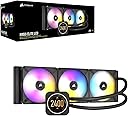



💻 Cool your CPU in style — performance meets personalized flair!
The CORSAIR iCUE H150i Elite LCD is a premium all-in-one liquid CPU cooler featuring a 360mm radiator, three magnetic levitation 120mm RGB fans, and a customizable 2.1” IPS LCD display. It offers powerful, low-noise cooling with advanced RGB lighting and real-time system monitoring, compatible with a wide range of Intel and AMD sockets. Controlled via CORSAIR’s iCUE software, it delivers both high performance and personalized aesthetics for the discerning PC builder.


| ASIN | B09HDWQKV8 |
| Air Flow Capacity | 174.3 cfm |
| Best Sellers Rank | #409 in Water Cooling Systems |
| Brand | Corsair |
| Brand Name | Corsair |
| Compatible Devices | Desktop, Graphic Cards |
| Cooling Method | Liquid |
| Customer Reviews | 4.2 out of 5 stars 2,059 Reviews |
| EU Spare Part Availability Duration | 6 years |
| Global Trade Identification Number | 00840006648147 |
| Included Components | fan |
| Item Dimensions L x W x H | 15.63"L x 1.06"W x 4.72"H |
| Item Weight | 1.17 kg |
| Manufacturer | Corsair |
| Material Type | Aluminum, Copper |
| Maximum Rotational Speed | 2100 rpm |
| Model | CW-9060062-WW |
| Noise Level | 10 db |
| Number of Items | 1 |
| Part Number | CW-9060062-WW |
| Power Connector Type | 3-Pin |
| Product Dimensions | 15.63"L x 1.06"W x 4.72"H |
| UPC | 840006648147 |
| Unit Count | 1 Count |
| Voltage | 12 volts |
| Warranty Description | 5 year manufacturer |
| Wattage | 3600 kwh |
J**B
Excellent upgrade
I recently upgraded to this newer Corsair H150i 360mm AIO from an older (~4 years approximately) Corsair 360mm AIO. I must say the improvement from the older model to this one has definitely been worth it for me and I'm not disappointed. My idle temps went from approximately 37c to 32c which is a significant drop in temperature. The room where my PC lives gets a bit warm in the summer months (~24c average) making the idle temps of my PC only 8c over ambient. Which is a significant improvement overall. I'm very pleased. My CPU is an AMD Ryzen 9 5950X using the AM4 socket, swapping out the stock configuration Intel brackets for the AM4 brackets was a breeze. I also have to say I love that the newer H150i cooler no longer uses the stock AMD brackets and instead just keeps the bracket on the back of the motherboard and adds some mounting hardware and a proper included bracket to screw into that. Much more secure and far less fiddly than my older Corsair 360mm AIO. I removed the thermal pad from the cold plate on the Corsair pump assembly and instead use Thermal Grizzly Kryonaut thermal compound. I'm not sure that's strictly necessary but I've never used the stock thermal compound on Corsair AIO going back to their first generation (I think it was first generation) of All In One water cooling solutions going back to the first generation Intel i7-940 & 960 days. Overall I'm extremely pleased with this latest showing from Corsair's AIO product line and would definitely recommend it.
E**C
Fantastic reduction in temps, very low noise if you can hear it at all
Exceeded my expectations. I've had several Corsair coolers. While all of them decent, this unit blows them away. I was getting 5.3 ghz all core on i7-13700k with previous Corsair cooler. This unit enabled me to achieve 5.5 all core with one core going to 74c as the highest core temp on CinebenchR23. I believe I could actually hit 5.6 but what's the point? I dropped it down to 5.4 all core, lowered all fans and pump to the quiet setting and I can't hear a thing. Temps barely if ever hit 65c under full load. The LCD screen is icing on the cake. Beautiful screen, huge bonus as I have GPU and CPU temps displayed. The display is as nice as the cooler itself. The 140mm fans don't have to work as hard to cool the CPU and the 420 rad makes it even better. I have the Corsair 7000D case which fits perfectly. Worth the money, best cooler I've ever had and I've had many. Make sure you have a case that will fit it.
C**D
Very nice cooler. LCD screen is beautiful!
The cooler was very easy to put on. It uses the default AMD back bracket that came with your board if you are using AMD. If its Intel, it comes with an intel back bracket. It also comes with the front brackets that you will need. The set up was pretty straight forward, it doesn't come with a paper manual, you have to scan the QR code on the inside lid of box with your phone to get to the manual. Then just follow the setup. If you are using this cooler, make sure you have iCUE V4 installed. This cooler needs iCUE V4 to run and be configured properly. Just google iCUE 4 and you should find the download. I recommend top or front mounting this and setting it up as an intake to get maximum cooling. Make sure your fans are pointed the right direction. Also make sure the top of the radiator is higher than your processor so that you can avoid any air bubbles that might be in the radiator from being sucked into the pump.
R**R
Warning please read below.
If you have the following configuration be warned. My configuration was, key word was. Gigabyte x570 Wi-Fi elite Ryzen 4 I had my system for over 2 years no problem, Yesterday may 10th 2023, I install this product, everything was easy, turn it on, all good. The huge huge problem came when I went and install the cue software, the system restarted, and nothing on the screen, I try resetting the bios every possible way Nothing, the board became useless no post I was not able to make it post, nothing on the screen, I try with the onboard hdmi, I try with another video card, and nothing. Got to the point that would just go red., the motherboard is dead. I had to order a new motherboard and cpu , sure wish I had money to sue the heck out of this people. Keep in mind I have been building systems since 1993, if I was not able to make it post well. Hope it helps,
T**T
Looks great but has few issues....
If you enjoy showcasing your "PC Master Race" hardware, then this is a must have item for your build! And I have to say it looks great! And while it does do a decent job of keeping that CPU heater in my PC under control, it does have a few minor peeves that have cropped up for me that I wish would be addressed by Corsair. Most of the problems are with the iQUE software that runs it. If you mount this any other way the the "Right" way, the display will be sideways or upside down. At the time of this writing, Corsair's iCUE software does not allow you to rotate whatever is on the display. The only slight fix is if you rotate your personal GIF's in an image editing program so that they orient properly on the screen if you mistakenly mounted it sideways or upside down. I believe that most of these issues can be fixed with updates to the iCUE software, such as adding a "ROTATE Display 90" increments option in iCUE, but that is up to Corsair. But I would not hold my breath. It can take a lot of complaining to get companies to address such issues since they tend to have a "sounds like a YOU problem" mentality. I still like how it looks inside my build. Here are my Yay's and Nay's and a Wish List for the H150I Elite LCD: Yay!: Keeps the i9-13900 heat monster under control. Comes with a 6 fan/RGB hub ad screen controller. 3 RGB Fans included! Full color high resolution LCD Screen that supports animated GIF's! Screen can be easily removed without detaching the pump from the motherboard for easy replacement. Nay: Mess of cables (6) coming out of the 3 fans! No current way to rotate the LCD screen if you mount the pump the wrong way. Can only display Fahrenheit in software mode and not hardware mode. No way to refill it ever leaks or loses fluid over time. Wish List: Include "Clutter free" aRGB fans like the Lian Li Uni Fan. Ability to display C and F temps on the LCD at the same time in both Hardware/Software modes. Ability to auto change GIF's images based on Temperature. Ability to auto change GIF's on the date and/or time.
F**T
Amazing LCD
The H150i 360mm Lcd is the largest factor for most, but Cooling played a larger part of the equation for my I9 13900k (a space heater), easy to install, and includes a Corsair commander core for up to 6 fans ( 3 included are very good quality MagLev) Positive: Design, Lcd is a Beauty with Long cables for good placement, Cooling is excellent with great RGB and fan speed control, all controlled through Icue. Negative: Price, an expensive WoW effect (but a personal choice). AIO Hoses could be a little longer for large cases.
J**.
Great looking & functioning cooler
This product is packaged extremely nicely and looks great when installed. The installation process goes exactly as every other cooler does. The LCD, pump, and copper plate are covered with plastic to protect them while mounting, and the LCD screen can be easily removed and re-added at the very end after installation. The price tag is pretty hefty compared to other coolers that would fulfill the cooling just as well. I ran into two problems while installing this cooler. 1. The commander core that came in the package did not have a functioning USB cable. I was banging my head over this problem for a while and as a troubleshooting step plugged in the commander core from another system. The new commander core immediately showed up in iCUE and I was able to mess with the fans. 2. After getting everything set up, I started up my system and the pump and fans were blinking red and were showing up as "unknown device" in iCUE. Reading through Corsair's help articles I updated my iCUE to the latest version which did not fix the issue. After some additional research and double checking my version, I discovered I had iCUE 3 when I needed iCUE 4. I would expect some additional notification that even though I'm "Up to date," there is a newer app available. After getting that new iCUE, everything worked great!
~**~
Large Cooling Monster!!
This was such a fun build for me to put together. This cooler came well packaged and on time. However Carrier threw the box onto my porch (Looking at you UPS). Pros: Instructions are very clear and came with diagrams. Came with pre-applied thermal paste. Keeps my i9-12900KS Cool!! Fans are quiet!! Like Startlingly quiet! Cons: Was a little bulky to maneuver into a mounting spot. Overall this cooler upon turning on my build kept my CPU under 20C until i installed Windows. Running 3DMark it did not rise above 55C. If you got a full tower and the money, Buy this cooler!! It is definitely worth the cost to cool your CPU!!! Kudos Corsair!!!
S**T
Decent AIO underneath that LED screen
With most Corsair stuff, you get what you pay for. You pay for the name and its reputation of being one of the top brands (ASUS, Corsair, NZXT etc) It aint cheap, but then again items like this are usually part of a decent build, with a decent chip to cool, in a decent case . Scrimping on cooling is just stupid and in the long term more expensive. The fancy LED screen is of course cool, but that doesnt contribute to what this product is mainly bought for, which is cooling. And it does this brilliantly. I have a 5800x - with a beefy 5Gz OC on it, and as the pic shows.. idles with about 10% load in the mid 30s. Under max load, Ive not seen it hit 70... Thats bloody impressive! Its premium, well built and manages hot chips with ease. Quiet too with little hum from the pump. Installation isnt super easy, but most AIOs require a bit of experience to get it right 1st time. Just Youtube it and you will get a good idea of how to set it all up. It has a Corsair Commander hub for the fans, but its super simple to do. If you manged to put square pegs in square holes at school, then you will be fine with this too. I found the swapping of brackets (It has intel as standard) to AMD was super easy compared to the last H150 I had. iCue gets better with each update too - making the customising and management of the block a lot easier too I'd score this a solid 9/10. Is it worth almost £250? No.... but it looks good doesnt it? :)
A**R
Will keep you cpu cold.
I like it pretty simple to install 👌 but make sure you plug all the plug in deep or you get the red triangle 🔺️ lol.but don't panic. Just make sure you update icue and your problems will be fixed.
M**I
Me llegó un producto que no corresponde al empaque, además de incompleto.
P**L
Works perfect on 12900k CPU
Installation was super simple and looks great, had all the brackets and screws for LGA1700 cpu along with factory thermal paste. LCD screen is a very nice to have and I find it fun but if you find that to be gimmicky the product is not for you and will be hard to justify the extra price.
J**I
Una pijadica muy recomendable
Perfecto para acompañarla con una caja Corsair 4000X. No es tan silenciosa como esperaba, pero teniendo en cuenta que la tengo instalada en la parte superior de salida de aire, cumple perfectamente su función. Mi CPU no supera casi nunca los 40 grados. En la pantalla lo que se puede poner es bastante limitado, pero se puede configurar para que vayan cambiando los campos de información. Yo por ejemplo tengo: un reloj, la temperatura de la CPU y varios GIFs que duran entre 10 y 30 segundos. No deja poner vídeo. Las luces se sincronizan perfectamente con los demás elementos de Corsair con sistema iCue
Trustpilot
4 days ago
2 days ago