

Desertcart purchases this item on your behalf and handles shipping, customs, and support to Seychelles.
🚀 Upgrade your desktop’s USB game — speed, power, and safety in one sleek card!
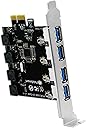
The FebSmart FS-U4-Pro is a PCIe x1 USB 3.0 expansion card that adds four 5Gbps USB-A ports to desktops, supporting high-power devices without extra power cables. Compatible with Windows 11 through XP and most Linux systems, it features built-in safety tech and broad PCIe slot compatibility, making it an essential upgrade for professionals demanding fast, reliable USB connectivity.


| ASIN | B072LS4JH7 |
| Best Sellers Rank | #8 in Internal USB Port Cards |
| Brand | FebSmart |
| Compatible Devices | Personal Computer |
| Customer Reviews | 4.3 out of 5 stars 2,256 Reviews |
| Hardware Interface | PCIE x 1, USB 3.0 |
| Item Dimensions L x W x H | 4.72"L x 2.75"W x 0.71"H |
| Item Type Name | 4X 5Gbps USB-A Ports PCIE USB 3.0 Expansion Card. |
| Item Weight | 3.04 ounces |
| Manufacturer | FebSmart Co,.Ltd |
| Mfr Part Number | FS-U4-Pro Black |
| Model Number | FS-U4-Pro Black |
| Number of Items | 1 |
| Number of Packs | 1 |
| Operating System | Windows 11, 10, 8.x, 7, Vista, XP (32/64bit) and Windows Server 2003, 2003R2, 2008, 2008R2, 2012, 2012R2, 2016, 2019, 2022 (32/64bit). Linux Kernels. |
| Product Dimensions | 4.72"L x 2.75"W x 0.71"H |
| Style | FS-U4-Pro |
| Style Name | FS-U4-Pro |
| Warranty Description | 1 Year Limited Parts Warranty. |
E**S
Seamless desktop upgrade. Who doesn't need more USB Ports?
Seamless desktop upgrade. Who doesn't need more USB Ports? I added this card to a Windows 11 machine that had far too few USB ports, and the installation couldn’t have been easier. No extra power supply hookup was needed—the card truly is self-powered, and it was recognized immediately on boot. Within minutes, I had four extra USB 3.0 ports ready to use. Performance has been excellent. Transfers to external SSDs and large capacity flash drives are fast and steady, right in line with what you’d expect from 5Gbps USB 3.0. I’ve tested it with portable hard drives, webcams, printers, and even bus-powered hubs, and all ran smoothly without glitches or power drops. The ports are well-spaced, so even bulkier devices don’t block one another, which is a small but thoughtful detail. The build quality also stands out—it feels sturdy once seated in the PCIe slot, and I didn’t notice any wobble or looseness. One small tip: make sure you seat it firmly and give the drivers a minute to install automatically. For older Windows versions, you might need the included driver disc, but in my case Windows 11 handled everything itself. I also appreciate that the card runs cool; even after long file transfers, it never gave off noticeable heat. That speaks to good design and efficiency, since some cheaper cards can run hot or become unstable. Bottom line: A reliable, plug-and-play solution that expands your USB capacity with speed and stability—well worth it if your desktop is short on ports.
K**E
Plug and Play
It didn't work in the first PCI-E slot, only charged didn't recognize phone or other device. Checked Device Manager, card was NOT in there so I tried another PCI-E slot and it registered in Device Manager and recognizes devices now. Works without drivers in Windows 10 and it works PERFECT so far. Thanks for keeping my old Pc alive and useful! Updated 9/4/21 After two months it's still working fine. I was very worried about it dying suddenly like in other reviews but only problem has been two failures that required reboot. Card stopped working while being used with no warning. No system crash, just every card on device no longer showed up. Required a reboot and worked fine after that. Updated 10/10/21 The crashes seem to be caused by multiple access demands on the USB card. If you try to play media on two drives at one time you might freeze it up requiring reboot. Otherwise everything is still okay. Updated 2/08/22 the crashes are DEFINITELY caused by multiple calls to the card causing it to overheat and crash. I was using my phone on one USB, playing music on another USB and looking around in a third USB when the crash occurred. My power supply is 800 watt, it is NOT my power supply it is the cards limited capacity to hold a current that causes a fail. An otherwise PERFECT piece of machinery that should have been shop tested more with a greater capacitor.
S**S
Works great, Easy to Install
I got this card because I wanted to connect my external storage setup to my computer without having to use a USB hub. This little sucker is entirely worth the cost. It adds (4) USB 3.0 and who doesn't need that? I intend to purchase another for a different computer because it's just so dang useful. Pros: Simple construction allows for durable product Slim design means it can fit into practically any open PCI slot Easy to install Drivers come with Card (4) USB PORTS! Cons: I had to bend the back cover place slightly because it wasn't aligned perfectly and I wasn't able to plug a male USB in. I unscrewed the plate from the card, adjusted slightly, re-attached plate to card and installed into my computer and everything works great. The back plate being the only issue, I would give this 4.75 stars because there was a slight issue and I was able to fix the problem very quickly. I would recommend this card to everyone; it's a great addition for an amazing value.
K**N
Bought for Valve Index, works fine but installation wasn't Plug and Play
I bought this card to separate my Valve Index VR headset from the USB 3.0 host controller on my motherboard, as the controller on my Aorus AX-370-Gaming 5 motherboard would always get overloaded with devices and cause the camera pass through on the Index to stop working (Or maybe it just wasn't powerful enough, or didn't have enough "USB lanes" or something, I'm not really that technical). I had the same issue on my HTC Vive, the camera wouldn't connect or function at all but the headset tracking itself would be fine. I temporarily solved the issue for my HTC Vive by plugging it into a USB 2.0 port on the front of my motherboard, so it would use the 2.0 Host Controller instead of the partially functioning 3.0 one, but that sucked because I had a cable running from the back to the front. The Index uses a lot more USB bandwidth, especially with two cameras instead of one on the headset, so it can't run on USB 2.0, and the cable wasn't long enough to reach from the split point at the back all the way to the front of my case. I bought this card to add another USB controller and alleviate the problem. Packaging was simple, came with a driver disk and the card. I read that most people were getting it to function plug and play just by slotting it in, so I did that with a PCIE-1x slot on my motherboard. However, I couldn't get it to work, it kept showing an error code 10 in Device Manager saying "This device failed to start." I tried installing the drivers on the disk and rebooting but nothing changed. Eventually, I decided to move it a slot down from the PCIE-1x slot below my GPU to an open PCIE-8x slot, just to see if anything would change. On next boot it was there and recognized right away, so I just called it good. Perhaps it was just that it wasn't seated correctly at first, or maybe it was because the slot itself is bad. I had a WiFi card plugged into that slot previously though, and that worked fine, so who knows. Maybe re-installing the card caused the drivers to initialize better. I'll never know. However, now that it's working the card is functioning great and the Index has no problems functioning from the ports provided, and the camera(s) on my Valve Index work now too.
J**N
good product
works great just out of the box. Installed in an old windows 10 desktop.
T**R
Won't work with more than 3 USB 3.0 devices - don't waste your time / money
So I bought two of these to put into two different systems. I've wasted several hours of my life this past month troubleshooting why certain USB hard drives would not show up or work. I even called Seagate on one which did not show up on either of these two cards but worked fine on my office computer to my surprise. I finally gave up today trying to get a 4th hard drive to show up on either computer. On one disk management would lock up and the computer would not read any of the drives. On the other computer I saw the 4th drive but then I realized two of the other drives just disappeared. I finally had enough, I blamed a lot of the problems on the Seagate externals and ended up getting western digitals instead but they are having the same issues so it has to be something with the card. I think rather than getting the 4 port save your money and get the 2 port. One of mine was in the return window so I'm returning it and trying two other brands. I'm really curious if one of the other two brands will work. The other card is just past the return window unfortunately so although it still works with 2, maybe 3 drives, I feel it's a waste as I bought this brand thinking it would be more stable because it did cost almost twice as much as the others. It also had the most reviews. I guess people don't use all 4 ports or something. ***Update*** So I tested two other brands of 4 port USB cards today. One of them works perfect (LTERIVER), the other wouldn't post on my computer (ELUTENG). Now by perfect this is what I mean - all 4 ports connected with a combination of Seagate and Western Digital External Drives. Normally this would cause one drive to disappear with the FebSmart. On the FebSmart I noticed yesterday with 3 drives connected and data transferring one drive would keep disappearing and disk management would not open. So for me to be able to connect 4 drives to the LTERIVER I was pretty happy. The best thing is I was transferring data to two drives overnight and not a single failure. The FebSmart would at some point stop transferring data and the whole computer would start to lock up. I kept blaming the USB drives and after a month of this nonsense I'm really angry it was the stupid FebSmart cards the whole time. Both of them in two different computers were giving all these weird random errors and I kept blaming the Seagate drives when it was the controller the whole time. By the way both the LTERIVER and ELUTENG looked to show VLI on the tiny USB chip on board but when I look in device manager on my computer it is showing a VIA USB 3.0 controller so I must have read that wrong. I don't know why the ELUTENG would not post but the LTERIVER posted right away and works perfect.
B**N
Great value, Plug-and-Play
My husband needed some extra USB ports on his desktop PC, and we decided to go this route instead of purchasing an external USB hub that needs to split the bandwidth of a single port. The price was very reasonable, too. It was actually less expensive than buying an external hub. There were no extra drivers needed, it was a simple, plug-and-play experience. The card is small, and easy to install. I like how it fits right below the GPU and it's barely even visible while looking inside the case. Unlike some other cards, this one only needs the 75 Watts delivered by the PCI-e slot, so there is no need to run an additional power cable from the PSU. These are only 5Gb/s USB ports, so if you need really high bandwidth you may want to consider another option. That was not our primary concern in this case. He just needed some extra ports for mostly USB 2.0 peripherals to free up the high-bandwidth ports on his motherboard.
R**N
plug and play for power
I had plug and play power, however it would not recognize it in my device manager. I searched everywhere and nothing but problems with driver but no way to find it or download it. I rebooted a few times to try and get my 14 year old Pentium i7 first gen system to recognize it. so, I went back in and opened about 3 or 4 different pages about Renesas and the driver pages and I left them up and did a restart with the pages up and when I rebooted and checked my device manager and it was listed 2 times as 3.0 and worked great. they should include the driver for this as I have 2 drive. 1 ssd and 1 hard drive so had to do it twice. I can't afford a gen 4 or above Pentium i7. good luck. It will work eventually. just keep trying.
S**H
It works!
Although I can't boot from the server (due to the server not being able to see any usb3), it works as advertised and have several things connected to it.
J**Y
works but noisy
the on card power supplies radiate severe noise affecting radio and TV nearby the transfer rate is fine but the power supplies had to be modified to stop RFI to TVs and radio. This card is only suitable to those who what their doing !!
E**.
Compatible con DDA
Increíble. Esa tarjeta tiene el chip Renesas. Si están buscando como yo una PCIE que te permita DDA a un equipo virtual por HyperV o VMWare está es su mejor opción.
M**T
Awesome only card that i could find that didnt need power
Works great my USB controller onboard died. I have my Blue yeti Nao, Steelseries mouse and wireless headset, works great looks great with the black PCB
L**S
Good
Great works perfect for my needs I have windows 10. I didn’t have to install anything I just put it in and it worked
Trustpilot
3 weeks ago
1 month ago