Buy anything from 5,000+ international stores. One checkout price. No surprise fees. Join 2M+ shoppers on Desertcart.
Desertcart purchases this item on your behalf and handles shipping, customs, and support to Seychelles.
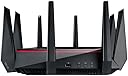
โก Dominate your digital domain with ASUS RT-AC5300 โ speed, security, and coverage redefined!
The ASUS RT-AC5300 is a premium tri-band 802.11ac router delivering a combined data rate of 5334 Mbps, powered by Broadcom NitroQAM technology. Designed for demanding households and professionals, it supports ultra-smooth 4K streaming, low-latency gaming, and stable connections for over 25 devices. With AiProtection security and customizable AiMesh networking, it offers robust performance and comprehensive coverage, making it a top-tier choice for millennial managers seeking reliable, high-speed Wi-Fi.

| ASIN | B019HH3HSI |
| Antenna Location | Gaming |
| Antenna Type | Fixed |
| Best Sellers Rank | 128,608 in Computers & Accessories ( See Top 100 in Computers & Accessories ) 1,000 in Routers 10,790 in PlayStation Legacy Systems |
| Box Contents | Free WTFast game accelerator |
| Brand | ASUS |
| Brand Name | ASUS |
| Colour | Black |
| Compatible Devices | Laptop, Personal Computer, Smart Television, Smartphone, Tablet |
| Compatible devices | Laptop, Personal Computer, Smart Television, Smartphone, Tablet |
| Connectivity Technology | Wi-Fi |
| Control Method | App |
| Controller Type | App Control |
| Coverage | extensive coverage for multiple gaming devices within a reasonable range |
| Customer Reviews | 3.8 out of 5 stars 95 Reviews |
| Data Transfer Rate | 5334 Megabits Per Second |
| Frequency | 5 GHz |
| Frequency Band Class | Tri-Band |
| Frequency band class | Tri-Band |
| Global Trade Identification Number | 04712900002454 |
| Is Modem Compatible | No |
| Item Weight | 1.84 Kilograms |
| LAN Port Bandwidth | 1 Gbps |
| Manufacturer | ASUS |
| Manufacturer Part Number | RT-AC5300 |
| Maximum Upstream Data Transfer Rate | 1778 Megabits Per Second |
| Model Name | RT-AC5300 |
| Model Number | 90IG0201-BM2G00 |
| Model name | RT-AC5300 |
| Number of Antennas | 12 |
| Number of Ports | 4 |
| Operating System | Linux,Mac,Operating System |
| Other Special Features of the Product | WTFast game accelerator |
| Security Protocol | WPA2, WPA3 |
| Special feature | WTFast game accelerator |
| Voltage | 240 Volts |
| Wireless Compability | 801.11ac |
| Wireless communication standard | 801.11ac |
A**.
Expensive but well worth the money
This is a very expensive router but, in my case, it has solved several years of WiFi issues and, as it is even compatible with the Internet channels on "BT YouView", has enabled me to completely "retire" my BT HH5 (Currently a simple firmware upgrade is required, see later). Our house is very WiFi unfriendly as all the internal walls are solid and there is a metal mesh under the rendering of the exterior walls; this severely attenuates WiFi signals (Especially 5GHz) in just 30ft or so, which is the distance from the VDSL (BT Infinity 2) master socket to all the multimedia equipment in the lounge. We also have two exterior IP security cameras. The pre ASUS set-up included a BT HH5, an Apple AirPort Extreme, a BT dual channel WiFi extender, a Netgear power line adaptor (For non-WiFi YouView box); I also needed a timer to force the IP cameras to reboot every 24hours as, even with the WiFi extender the WiFi signal to/from the IP cameras was very dodgy. I also have a 20TB QNAP NAS which backs-up tech for the whole family as well as being a multimedia server and security camera recorder. Preservation of domestic harmony has prevented me remedying the WiFi situation with several runs of Cat 6 Ethernet cable. The BT HH5 is probably one of best ISP provided modem/routers but its WiFi performance is not brilliant and the more advanced features are ether abysmal, missing or just do not work properly (UPnP for example). Due to Amazons very fair "returns policy" I thought I would try the ASUS and am glad I did. For a few days I used the router just for WiFi (Replacing the Apple Airport Extreme and WiFi extender) and found that not only did I no longer need the WiFi Extender, but the connection to my IP security cameras became more stable than ever! I also found the WiFi was signal was strong enough and fast enough to support 4K video, from Netflix and Amazon Prime, to my Smart TV, in the lounge. I was also very impressed with the 802.11n speed (Over 56MB, yes MB not Mbit) I was getting on my laptop from my NAS server. The following may be of interest to Potential buyers who are BT Infinity customers or with an ISP that uses a separate modem and router or a modem/router that can be switched to modem only, such as Virgin. Unfortunately Sky customers can probably only use this router as a super powerful WiFi extender. According to information on the Internet ASUS routers are compatible with YouView (A digital/IPTV service from BT, TalkTalk and others) the Internet channels on this service use a feature called "multicasting" which causes problems with most non-ISP provided routers. I wanted to completely replace the BT HH5; so I purchased an Openreach VDSL modem, from eBay, connected it to the VDSL socket and the WAN port of the ASUS RT-AC5300. The ASUS connection wizard quickly detected the appropriate settings, subsequently asking for a username and password, I had obtained the username from the settings page of the BT HH5 and, although the password is not used, something has to be typed into the password field. I don't know if the separate modem is better than the one built in to the BT HH5 but my connection speed has increased by around 5mb/s (To over 70mb/s) and the connection does not seem to "drop off" as much. I modified the appropriate settings on the ASUS, as recommended on Internet sites, to enable YouView compatibility but to my dismay the Internet channels on YouView did not work. I telephoned ASUS support and spoke to a very helpful gentleman who went through all the settings with me eventually coming to the conclusion that there was a "bug" in the current version of the RT-AC5300 "firmware". He said he would escalate the issue, which should be addressed in a future firmware update. He went on to say that there was third-party firmware that may solve the problem, in the meantime. ASUS does not officially support third-party firmware and he warned me the router would not be supported by ASUS whilst third-party firmware was installed and it would be down to me if the router did not work at all after the update. I decided to try this alternative firmware, which I believe is a "tweaked" version of the ASUS firmware, as it looks and behaves the same. After installing the third-party firmware and rebooting "YouView" started working and even the 4K "BT UHD Sport channel works. I was now, and still am, very happy with my purchase. Uploading firmware on the RT-AC5300 is a very simple process and I have had no problems doing it numerous times (Comparing different firmware versions) nevertheless, I am not recommending anybody else do it and, if you do, you do so at your own risk and it will be your fault if, no matter how unlikely, you turn your very expensive modem into a "brick". The third-party "YouView" friendly software is available from: (...) You need the RT-AC5300 version 380.57, the latest version (380.58 at the time of writing, 25/03/16) does not support YouView and I have emailed the developer this fact. Hopefully this review will be helpful to someone considering purchasing this very capable router.
B**P
RT-AC5300 + 2 AC2900 as Aimesh: Wonderful system but steer clear of AX as Aimesh.
I am not a gamer but I needed a fast and powerful router with excellent coverage. I have on average about 25 devices connected + guests and my previous router (ASUS87U) was struggling a bit. The AC5300 is amazing: the range is better than using two routers with one configured as an access point! It is easy to set up and has a very large number of options. Yes, it is very expensive but it genuinely is faster, so it is worth the price. The more powerful chip inside in particular speeds things up even when the measured speed of traffic remains about the same. UPDATE: Our house is very long (it is two semi-detached houses put together), so the router was struggling to cover the whole area + conservatory. I tried replacing it with an GT AX 11000 and it was a disaster. The speed dropped, even on my two ax clients (the rest are all ac), and coverage was the same. I tried to set it up as an aimesh node and it kept disconnecting, even with one of the two 5Ghz bands dedicated as backhaul. I also tried that with an AX6000, same results. Looking up Smallnetbuilders showed that AX is just not ready for Aimesh yet (nor for that much, it seems!). It is also my experience, AC is much more stable. So, I got one AC2900 (= AC 86U, newer that AC 88U contrary to what the digits suggest), made sure all firmware was upgraded and set it up as a wireless node: very easy to do (remember to connect a LAN port from the parent to the WAN of the node for easy set up). At last I had very good coverage on that side of the house (I had tried extenders before but the speed was too low), but the overall speed dropped by about 15%. Not so good! I got a second AC 86U and set it up as a wired node on the other side of the house (flat ethernet cables are really useful for that!). Excellent coverage on that side too, and the speed returned to its original figures. BUT: one or the other node would disconnect overnight and I had to reboot them to get them back on the system. Not so good either! More investigations, and I changed the following under 'Wireless' - 'Professional': Airtime fairness: disabled on all three bands Universal beamforming: disabled on all three bands Explicit beamforming: disabled on all three bands AC beamforming: enabled on 5ghz. I always had Smart Connect and Smart Roaming off as I need certain portable devices to stay on the same network as the printers, scanners etc. Since then, no disconnections, the network is rock-solid and the speed has improved again. The distribution of the devices has also improved, with about 7 on the parent router, 6 on one side and 7 on the other. Contrary to ready made mesh systems like Google, Orbi or Lyra, this system is much more customisable and offers all the advantages of the complex interface of the RT 5300. It took me a while to find all the relevant information and to optimise the settings, so I hope that this will help someone! Do let me know if it does.
J**E
Keep looking....
UPDATE (16/08/2016): 4 months of use I can say without reservation that ASUS have not got a clue what they are doing. This premium tri-band router, 2 of which are both 5.4ghz. Following a firmware update, the first 5.4ghz band delivers speeds of 30mbps on a 200mb line, the second delivers 110mbps. This router is GARBAGE. ==== First off, I am a Software Engineer and was looking to make the most out of my home network. For the money paid (ยฃ310 - when on sale!), I feel absolutely conned. I've taken some time since purchasing this before making my mind up (approx. 1 month after purchase). I will start with the positive - this is pretty easy to set up and looks great. Any technophobes wondering if it's within their capability need not worry! However..... 1) Build - this is flimsy, be warned! I am super careful with my tech gadgets and even still, I find myself wincing whenever I need to move this. The antennas don't screw in properly and "flop" side to side if you try and have them pointing upwards like in the picture. 2) Speed - there is no improvement in speeds after setting this up. I've had Asus routers in the past (cheaper ones) which did the trick, but with my Virgin Superhub 3, the speeds were actually reduced after I put it into modem mode and used the ASUS RT-AC5300 as the routing device (180mbs via wireless down to 110mbs). I understand the tri-band feature is meant to allow you to effectively "load balance" your network, but this seems to be largely redundant for home use. 3) Firmware - The router implodes periodically. I can verify this is a problem with the router and not with my ISP (used a laptop and connected to my Superhub via ethernet - all fine!). Every now and again the router just decides to go offline and you have to log into the router settings to reboot it (or go and reboot it from the mains). 4) Signal - The only good thing I can say about this router is that the signal is great - I get full signal anywhere in my 3 story townhouse, but it does not achieve anything more than other routers and for the price, it is simply not worth it. To summarise, even if it was half the price, I would look at alternative models.
D**E
This router is good. However one drawback is the smart connection which ...
This router is good. However one drawback is the smart connection which gives your 3 Wi-fi bands one SSID. The 2.4GHz when set in smart connect sets the default channel to 6 and cannot be changed. If this channels clashes with another router nearby or another device then this band disappears so as in my case and you have to stop using smart connect. ASUS hopefully will fix this in the next firmware release as this lets the router down hence 3 stars. Apart from that it is a good router with good speeds.
K**R
Good item, just watch what out what your expections are
Was buying this as my net gear beauty kept dropping out on 4K streaming and overall house throughput was lower. We have 10devices without the skyQ. Build is solid and tuning functions are good. Out of the box it's good, a little tuning for streaming in home and it was great. Overall for someone with no house/device issues it's probably the best I seen. Getting 200mb on speed test on my 5g 2nd band. Now issues for my home. 4K TV streaming Netflix and amazon had issues when Triband sharing enabled but this was TV issue and position of wifi in house. Solution: 1.split bands 2.tv selection 2.4gig 3. Everyone else split over 5gig bands Result still low 11mb, this is due to wifi signal...my house. Solution: 1.Had an old netgear wifi extender for 2.4/5gig bands, this however on my netgear killed my download speeds on the rest of the bands. On my ASUS it worked great. Not ideal, until I get the broadband building position moved, its best I will get. 2.locked TV to extended wifi 5gig and hey presto 4K streaming working, all other devices max speed. Will probably order the ASUS EXTENDER as I think it will be better than my netgear one. So expection was, it will fix my crappy house wifi, actual was it did but with a little tweaking, my netgear couldn't do it, this did. Good buy overall. Once this is bridged I think I will be very very happy, bridged over extending etc. Just make sure all your devices can take advantage of the dual 5gig bands, as some Tv's don't support these wifi bands, same for laptops/desktops. Great item overall. To get 5stars it would have needed to not require my extender but that's a house issue with positioning of incoming wifi.
P**Y
Best range, best speed
I have been on a mission for years to find the ultimate router to serve my enormous 7 person strong family in my rabbit warren of a house, which is split over three floors. Signal strength has always been an issue and the house has endless wireless black spots which have been impossible to fill, due to the lame performance of the wireless extenders that I have tried so far. I impulsively snapped this up feeling at first that I had yet again conned myself into thinking I had wasted yet more money on yet another router upgrade ... I nearly passed out when I fired up this alien device! It belted out a powerful signal from the ground floor which easily reaches all seven bedrooms, passing through thick Victorian walls and two floors to reach my bedroom in the attic, allowing me to watch Netflix in 4K on my Smart TV as if it was wired into ethernet! It's a dream router that can handle everything you could throw at it. The only limit is your internet bandwidth, which sadly in Guernsey is maxed out at 30Mbps, but even with that limitation, the QoS system on the router effortlessly prioritises either single devices, devices in an IP range or types of internet traffic. It smashes the pants off all other routers that I have ever used and I am positive that it isn't technology of an earthly origin. I have never seen anything like it and it has solved all of my problems. Get it!
A**R
Good hardware let down by buggy firmware and other issues
We have a bottleneck on our network due to a lot of network traffic, so the answer was to purchase a router with more processing power. After reviewing the market and leaning towards ASUS routers - as we already use one and have a VPN setup - we decided on the RT-AC5300. After installation within 3 hours the router developed an issue - the WAN dropped out every 15 minutes due to a bug in the firmware (it was checking for a dual WAN connection and dropping the internet). After upgrading the firmware the router was fine for another two days. For the next two days the router ran superbly - handling all the network traffic we could throw at it. On the third day the router dropped all device sharing. Causing problems with devices and shared servers. After rebooting this problem was intermittent. Swapping back to the old router all these problems went away. Unfortunately this router at this price is not fit for purpose. I would recommend a cheaper more stable router as it will provide you with less headaches and network administration.
A**R
This Router is absolutely brilliant! And it's for all the family
This Router is absolutely brilliant! It was set up and working in about 10-15 minutes and I can now connect to the wifi anywhere in my house and garden and the speed I'm getting on wifi is unbelievable. I've also connected a 3.0 hard drive to the router and I've not got a wireless server working which I can access on my mac and I can also access the hard drive on the go and anywhere in the world. Now i wasn't happy with the price when I go the router until it was set up and working and now I feel like it's work every single penny. Would I recommend this router? The answer to that is simple Yes I would Recommend this router because I'm a novice when it comes to things like this and with having the app anyone could do it. So if you want a router for the whole family then this is the router for you! My son plays on his Xbox one on line through wifi and with Virgin medias super hub 2 and 3 it would kill the speeds for the rest of the family whereas now that's all in the past.
S**I
Router 100% Working
Good router
S**A
Good
Genuine brand new authentic product. This router is amazing. Perfect speed.
A**I
Bad product
The worst router ever, bulky and drops connections all the time.not.reliable
Trustpilot
1 day ago
3 weeks ago