Desertcart purchases this item on your behalf and handles shipping, customs, and support to Seychelles.
🚀 Elevate your desk game with dual displays and lightning-fast charging!
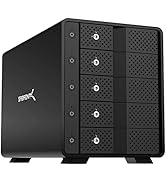
The SABRENT Docking Station DS-RICA is a versatile USB Type-C hub designed for professionals seeking to maximize productivity. It supports dual 1080p displays via HDMI and DVI, offers gigabit Ethernet connectivity, and includes 7 USB ports—featuring 2 USB 3.2 Gen 1 ports and 2 fast-charging ports delivering up to 2.4A. Built with a durable ABS shell, it ensures stable data transmission and multiple safety protections. Compatible with Windows and Mac devices, this plug-and-play dock transforms your laptop or PC into a powerful multi-monitor workstation with seamless peripheral integration.


| Asin | B013WQWCEA |
| Best Sellers Rank | 22,303 in Computers & Accessories (See Top 100 in Computers & Accessories) 219 in Docking Stations |
| Box Contents | Docking Station, Power Adapter, User Manual |
| Brand Name | SABRENT |
| Colour | Black |
| Compatible Devices | Laptop, PC |
| Customer Reviews | 4.2 4.2 out of 5 stars (930) 4.2 out of 5 stars |
| Global Trade Identification Number | 00819921012142 |
| Hardware Interface | USB Type C |
| Input Voltage | 12 Volts (DC) |
| Item Dimensions L X W X H | 13L x 6.2W x 12.1H centimetres |
| Item Type Name | DOCKING STATION |
| Item Weight | 12 Ounces |
| Manufacturer | SABRENT |
| Manufacturer Part Number | DS-RICA |
| Model Number | DS-RICA |
| Number Of Items | 1 |
| Number Of Ports | 10 |
| Product Warranty | 1 Year, 2 Years with Free Product Registration within 90 days |
| Total Hdmi Port | 1 |
| Total Usb Ports | 7 |
| Upc | 819921012142 780746400578 641275650462 |
| Wattage | 120 watts |
User
Perfect for extending dual display, even for older macs with USB 2
I've been looking for a dual display dock that works on both mac and windows and came across this. I specifically wanted to extend my display (rather than mirror) which is what this does. I'm using a 2010 MacBook Pro running sierra, and a surface book.There were two things that concerned me prior to ordering. The driver website said there may be issues on macs running sierra. Also, my mac is old and only has USB 2.I took the plunge and ordered it as I knew it would at least work on the surface book and was a much better price than their dock. I downloaded the drivers on both machines prior to arrival which took moments to do. I plugged it all in and it immediately worked with no settings or faffing about needed. Same goes for both machines. I was worried that my 2010 MacBook Pro may be too old for it to work but it is perfect. There is no lag on either machine. I can choose to extend the desktop to two monitors or mirror to two monitors.All in all, brilliant device at half the cost of the Microsoft dock, with the addition of working on mac and windows.
User
Surface Pro compatible - excellent!
Works great with the surface Pro and Bluetooth keyboard and mouse. This has been excellent to turn my Surface Pro into a desktop replacement. It was recommended to me by my colleague who also uses it with additional monitors. A great piece of kit that provides a lot more functionality than kit from leading competitors. It is chunky and not exactly sexy but comes with all the leads you need. Really easy to set up and it works. This has really assisted my work.
User
... decent dock as display link docks go and it's fine for windows but please note that it DOES NOT ...
It's a decent dock as display link docks go and it's fine for windows but please note that it DOES NOT support mac fully. OSX updates for pretty much all of 2018 to date have not been met with a suitable driver update and so only screen replication is available not extending the screen to multiple displays (there is a workaround that gives me 2 of the 3 displays but that may or may not keep working at the next OSX update)
User
Brilliant piece of kit
Worked straight out the box with little tech knowledge needed, only had a couple of issues where had to download a new drive for the software otherwise all the laptops connected to it recognised and installed everything itself. Even got it to work on my S10+ using an HDMI to USB-C adaptor. We have around 30 of these now in our offices for hot desk solutions and they are wonderful. Not sure where some of the negative comments about resolution issues etc come from as never seen anything like that unless you're mirroring your laptop resolution (say 1366x768) to an HD screen in which case alter your settings in Display Properties or set it so that when the laptop lid is closed it does nothing and goes automatically to the monitors default resolution.
User
It just works
I've been looking for a docking station with a small footprint for a while now, and spotted this cheeky little devil.I have an HP laptop, one HDMI monitor and one VGA monitor and USB devices coming out of every possible port :) Once the DisplayLink drivers had been installed the monitors just worked. The two charging ports come in very useful for charging USB devices (although my phone complains it could be faster). I have my VOIP headset and another USB 3.0 hub plugged into the two USB 3.0 ports, the USB 2.0 port has my keyboard and laptop stand plugged in.Audio rather confusingly becomes a USB device, but easily explained.I can now come home from a long days travel and rather than plug everything back into my laptop to become fully functional, it has become a matter of plugging just the docking station into the laptop and hey presto, everything just the way I like it.
User
I've seen those work beautifully on a Windows system but when I bought one ...
I've seen those work beautifully on a Windows system but when I bought one for my Mac Mini, it was terrible! The browsers wouldn't refresh without moving them. Video didn't work at all. Completely useless. I talked to tech support whom I told I was suing the latest drivers (even the beta version) and they came to the conclusion it was defective and should be returned (which I did). Now I will borrow one (from my friend's Windows machine) to see if that has the same problem on my Mac. If so, I will know it is a problem with the Mac and not a defective device.
User
Old-ish technology now but still very very useful.
Essentially a neat wee box of tricks that takes a USB2 or USB3 feed from a tablet, laptop, micro server or even an old pc and gives you fully useable twin screen (2048 x1152) capability in addition to host machine's own screen. I use it with a couple of HP Gen 7 micro servers which have just a single vga output each. Using this wee box of tricks and a USB switch, I can send outputs from either one of the micro servers to the twin screen set up on my desk. It works reliably, day in, day out. A real bargain at £30-ish
User
Expensive and flawed
All this is a hub that lets you connect peripherals from or two your laptop/pc, after loading the latest software i tried the hub, its fast but the software spoils it the sound from the headphone jack is poor and distorted.Unless you need to turn you're laptop into a server hub unit there are cheaper alternatives on amazon.
User
The complete package
Regarding USB docks, this one is my favorite. Impressive build quality, very nice design with all ports on the back (makes your workspace look neat and clean) and a place to conveniently hold your cellphone. I've experienced no sort of delay in commands (I have both my mouse and keyboard connected there), no loss of quality or any weird stuff in VGA and HDMI ports, and had no compatibility issues with any other peripherals linked there. One thing that it is important to beware of, and that caught me off guard I must admit, is that the charging ports can be used only for charging. I was hoping I could connect some other things there for the sake of comfort, but it is no big deal, 4 USB is still plenty. It still is a 5 star from me.
User
Best docking station at this price point
I recently purchased a portable 15.6" external/second monitor (amazon.com/gp/product/B07RGPCQG1) to use with my laptop. This form factor is great for use both at home and on the road. This monitor is powered by USB C (at least 2.1A) and connects via either USB C or HDMI. Using the cables which come with it is great for on the road, but a mess at home.Enter the Sabrent docking station. If I was going to design a docking station to work with this portable external monitor, I could not have done a better job than Sabrent.First, the Sabrent has a deep groove in the front of the dock. The slim external monitor sits in there perfectly, and a great viewing angle.Second, the dock has two USB A ports whose sole purpose is to deliver 2.4A of power for charging. I connected one of the ports to the USB C power port on the monitor and yahoo! it powered right up.Third, the dock has a HDMI out to connect to the monitor. It also has DVI (with a VGA adaptor) if that's your thing.I purchased 1 foot USB C and HDMI cables to make the connections, which eliminate the rats nest of cables you get using 3 foot cables.What else? Two USB 2 and two USB 3 ports. Why USB 2? Because keyboards and mice sometimes don't play well with USB 3, so you have that flexibility. Also audio in/out and an Ethernet CAT5 jack, if that's your thing.Even better, it's 100% plug-n-play. No drivers required (although up-to-date video drivers are recommended).For me, this means inserting one USB 3.0 A plug into my laptop and I get an external monitor, external audio/microphone, and connection to my external 2TB drive. No rats nest of cables. No cable swapping. It all works seamlessly.OK, what would I change? I'd love an on/off switch on the dock so I could power it off when I'm not using it (because I don't use it every time). Absolutely not a showstopper, though. I can always just unplug it power supply from the back of the dock if I want to.Again, the two features that are a game changer for me are the groove in the front and the two USB A power-only ports at 2.4A each (which can also be used to quick-charge your mobile devices).Plus, it's Sabrent. I've been using their gear for years and never had an issue.You really can't go wrong with this dock, and the price simply can't be beat.
User
veramente completo, si connette immediatamente senza difficoltà
finalmente ho potuto collegare tutti gli accessori e i monitor hdmi e svga +stampanti cellulare ricarica ecc. insomma tutto! Perchè non lo preso prima?
User
Amazing Product!
Honestly the best product to have! Works wonders and I’ve had no problems with this what so ever! Charging USB Ports, 3.0 USB Ports, 2.0 USB Ports and an HDMI Port as well as a DVI Port! You can hook up 2 more Monitors if you wanted too! Honestly best investment I’ve done this year
User
Excelente producto
Para quienes tenemos varios monitores y además varios equipos laptop, esta estación de trabajo es una excelente solución para mantener nuestro centro de trabajo organizado y movernos con fácilidad, es excelente la cantidad de puertos, el que tenga puertos para carga rápida del celular, y las salidas de vídeo han funcionado adecuadamente, es necesario que el equipo tenga un puerto USB 3.0 e instalar los drivers, después de esto sólo hay que conectar la laptop a el puerto usb 3.0 y a disfrutar el trabajo o la multimedia con todas las opciones de este producto. He quedado muy satisfecho con su calidad, su capacidad, su tamaño y su tiempo de entrega.Muy recomendable!
Trustpilot
1 day ago
1 month ago