Desertcart purchases this item on your behalf and handles shipping, customs, and support to Seychelles.
🚀 Elevate your home network to pro-level speed and coverage—because buffering is so last decade.
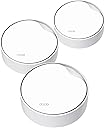
The TP-Link Deco X50-PoE (3-Pack) is a WiFi 6 mesh system delivering ultra-fast AX3000 dual-band speeds up to 3 Gbps, powered flexibly via PoE+ for versatile installation. Featuring dual 2.5 Gbps Ethernet ports, AI-driven mesh technology, and robust security with HomeShield, it covers up to 6,500 sq.ft and supports 150+ devices, making it ideal for modern smart homes demanding seamless, high-performance connectivity.


| ASIN | B0BJZ3VFP4 |
| Antenna Location | Business, Home, Indoor |
| Antenna Type | Internal |
| Best Sellers Rank | #401 in Computers & Accessories ( See Top 100 in Computers & Accessories ) #22 in Whole Home & Mesh Wi-Fi Systems |
| Brand | TP-Link |
| Built-In Media | 1 x RJ45 Ethernet cable, 3 x Deco X50-PoE, 3 x Power Adapters, Ceiling/Wall Mounting Kits, Quick Installation Guide |
| Color | White |
| Compatible Devices | Personal Computer |
| Connectivity Protocol | Wi-Fi, Ethernet |
| Connectivity Range | 6500 square_feet |
| Connectivity Technology | Ethernet, Wi-Fi |
| Control Method | App |
| Controller Type | App Control |
| Coverage | 6500 square feet |
| Customer Reviews | 4.5 out of 5 stars 405 Reviews |
| Data Transfer Rate | 3000 megabits_per_second |
| Frequency | 5 GHz |
| Frequency Band Class | Dual-Band |
| Item Dimensions L x W x H | 6.1"L x 6.1"W x 2.7"H |
| Item Highlight | Ceiling/Wall-Mountable WiFi 6 Mesh, Replaces Router/Access Point/Extender, Powered, Dual 2.5G Ports |
| Item Type Name | WiFi 6 Mesh |
| LAN Port Bandwidth | 10/100/1000 Mbps |
| Manufacturer | TP-Link |
| Maximum Upstream Data Transfer Rate | 1500 megabits_per_second |
| Mfr Part Number | Deco X50-PoE(3-pack) |
| Model Name | Deco X50-PoE(3-pack) |
| Model Number | Deco X50-PoE(3-pack) |
| Number of Antennas | 4 |
| Number of Items | 1 |
| Number of Packs | 3 |
| Number of Ports | 6 |
| Operating System | TP-Link OS |
| Other Special Features of the Product | Access Point Mode, QoS |
| RAM Memory Installed | 512 MB |
| Router Firewall Security Level | Advanced |
| Router Network Type | mesh |
| Security Protocol | WPA, WPA2, WPA3 |
| Special Feature | Access Point Mode, QoS |
| UPC | 840030707919 |
| Unit Count | 3 Count |
| Warranty Description | 2 year manufacturer |
| Wi-Fi Generation | Wi-Fi 6 |
| Wireless Communication Standard | 802.11ac, 802.11ax, 802.11b, 802.11g, 802.11n |
| Wireless Compability | 802.11ac, 802.11ax, 802.11b, 802.11g, 802.11n |
3**R
far better than expected, by a lot!
I don't write a lot of reviews except when i feel its really valid. IT hardware is no exception as I have been in IT for over 25 years now and currently an IT Infrastructure manager for one of the largest healthcare org's in the US. Needless to say I know a thing or two. As most people do they get a combo router / firewall / wifi AP all in one unit or worse get one with a modem built in. I have always been with a separate modem and router / wifi / firewall, until now. Backstory: I moved from a 1020sf house on .2 acres to a 3200sf house on 2.2 acres and due to my job I need absolutely spotless wifi in my home and around my home. At first I wanted to see how the TP-Link router would work giving me wifi across the house and even outside (Archer BE9700), it worked OK inside the house but go through the walls and it fell on it's face which is expected to a degree, but where my office is in the basement had 0-1 bars wifi and would constantly drop out plus speed tests showed 60-100mbs for internet at best but other devices were 300-600mb, something wasn't right there with reception. FWIW not mad the router wasn't cutting it for me and needed to add on AP's, actually figured I would need to knowing what i was asking of the network. Internet: Internet is 2gb provided by spectrum. Going OCD: I quickly determined I needed to put in AP's to stabilize my wifi but more so basically make it perfect signal inside the house and give me maximum throughput for the AP's etc. To keep the amount of cables down and maximum flexibility I wanted a POE powered AP, and a 2.5gb link port was nearly essential so i can backhaul using 2.5gb over copper instead of the usual 1gb (i remember 10mb networks and token rings if that tells you anything). From my switch to the BE9700 I have created a bonded pair of (2) 2.5gb cables giving me a 5gb backhaul to the router (way way way overkill but why not), this gives me huge bandwidth to the router in the event i actually ever need it. Why so OCD: I have 11 cameras on the house both outside the house, 1 in the garage, 1 covering entrance to basement from the inside, 1 in detached garage / workshop. I've also got little bits of automation things like switches and such plus (6) 3D printers that are always running and often get large files sent to them. 3D printers are on a 100/1000 switch as they do not have 2.5gb in them so it's useless to use a 2.5gb switch and I do not want to over saturate the wifi (but honestly it's likely so robust it doesn't matter, but printers are in the same room as the switches etc so why not i'm right there). Upgrades: Added 2.5gb 8 port switch with SFP ports for fiber down the road (which might go in the detached workshop garage with 10gb multi mode fiber) (2) AX3000 AP's (only 1 used at this time, likely returning one because results are stellar) (1) BE5000 AP for outside to blast that signal outside without any walls blocking the signal AP's were powered with POE on the cat6 cable to the 2.5gb switch, notice I'm using 2.5gb across the board here??? As i type this review the BE5000 AP is still inside but at a window (placing outside in the next 48 hours) and 1 of the AX3000's is on the far side of the garage on the furthest wall. Inside the house in my office i now get perfect signal and the network went from marginal to blazing fast, seriously. I created a mesh network of sorts in the house with all AP's using the same SSID and Password so it will seamlessly move around from AP to AP as needed when signals get stronger or weaker, this is how enterprise systems essentially work. In the end the BE9700 wifi has no clients on it at all, even devices that are under 10' away do not check into it and check into the AX3000 or BE5000 AP so that should tell you how well they work! The client devices are connecting to the respective AP closest to the device which is what it should be doing so the AP's essentially have half the house load of all things wireless and a huge 2.5gb backhaul (under 75' ea). Doing it this way will show in the router that these devices are "wired" but they are really wireless using the AP's and not the router for WiFi. I prefer to have my products physically wired as opposed to using wireless but the results are soo good that I am nearly sold on wireless now. You can trust me on this review, this is what i do for a living so i am really picky.
R**.
Great PoE Mesh System
Did a lot of research on best mesh systems and TP definitely has not disappointed. Covers 40+ smart devices around the house with ease and great signal even from far corners of the house. Set up was straightforward and their website had all the details I needed for any questions. The app is easy to use and manage the entire system, no hidden BS. Using for over 8 months without any issues.
R**N
Reliable, Fast, and Seamless Connectivity
The TP-Link Deco AX3000 PoE Mesh WiFi system is a total game-changer. From effortless setup to incredible coverage, this WiFi 6 mesh system delivers blazing-fast, stable connections throughout my home. The PoE-powered nodes are a brilliant addition, allowing flexible placement without worrying about power outlets. Ceiling and wall-mount options make installation super convenient while keeping things neat. With 2 PoE ports (1 x 2.5G, 1 x Gigabit), it easily handles high-speed data transfer, perfect for streaming, gaming, and working from home without lag. The mesh technology seamlessly replaces traditional routers, access points, and range extenders—eliminating dead zones and ensuring smooth handoffs between nodes. Plus, TP-Link’s user-friendly Deco app makes managing settings and security a breeze. If you’re looking for strong, consistent WiFi with the latest tech and easy installation, the Deco AX3000 PoE Mesh is a fantastic choice, Highly recommended.
I**W
Works Well, But Upgrade Process Doesn't Work
I had an existing Deco S4 network and I tried the upgrade process several times with different X50 units. Upgrade process simply does not work. I factory reset all new X50s and did an installation from scratch. This worked well and network is working very well. Specifically, wifi has much more range and handles high speed Internet much better It was also a good opportunity to separate IoT devices from main network. Great product and very reliable that I've been using for years. Make sure to keep firmware updated, especially for security.
J**N
Must use app. PoE Mounting is so-so
I've had a few mesh WiFi systems over the years. I got this one specifically because there aren't many PoE options. The Deco X50-PoE has that, and is capable of mounting on the wall or ceiling with the included hardware via an electrical outlet box. Mounting high allows better signals throughout the home. However, the included mounting brackets are pretty weak and begin to bend after a few months under the weight of the X50-PoE units. The brackets are also black, when most homes have white ceilings. I know that comes down to personal preference, but I feel like matching the most common ceiling color would make more sense. As for the Deco Mesh system itself: it's okay. You have to use the app for setup and admin, which makes things pretty seamless. Parental controls are mediocre unless you pay for the advanced controls. Then they're mediocre++. You can't block entire domains with a wildcard and have to rely on manually blocking whenever a questionable site is accessed. Something else that bothers me is the lack of MAC whitelisting. In other words, the Deco doesn't allow you to block all MAC addresses by default and allow only the ones you define. This probably isn't an issue for most users, and the simplicity and seamlessness of the app should work well for most. I still give it 4 stars because it just works. I've had a couple instances during my 1.5 years of ownership where I needed to manually restart the Decos, but otherwise they just work. You'll have whole-home wifi coverage quickly and easily if that's all you're looking for. **UPDATE 2025-05-12** I revisited the documentation and realized I installed them incorrectly: mounting to an outlet box is for wall mounting applications - not for ceiling mount. So if you already have an electrical box in place specifically for networking hardware it doesn't matter as you're still expected to drill holes into your ceiling. Keeping the 4 stars not because of the mounting but because of the limited admin tools.
C**O
Excellent POE AP Solution for a Large Home
These little guys have solved my Internet latency issue across the house. We have a two story home with a full basement, which is where the internet service is terminated. We have GB fiber and I hoped the router had a strong enough signal to cover the entire house when we had it built last year. Well, I was wrong, but the builder had installed boxes on the man and second story for APs, which was perfect. Unfortunately, no power was installed in the boxes, just ethernet cabling. After much googling, ChatGPT, etc., I decided to go with the TP-Link X50 system. I purchased a cheap powered switch and connected it to the router then plugged in the ethernet cables and voila, high speed internet throughout the entire home! It was a bit on the expensive side, but I was more than willing to pay the price since it was what solved the problem and I couldn't be happier with the outcome! I keep my system updated and use complex passwords, so I feel about as safe as I can hope for.
B**M
Good enough for an IT pro. 2 x 2.5GB ports comes with hardware version 2.6
I'm an IT pro and I've used various Deco models in my home over the years. They've always kept up with a rapidly growing household full of phones, computers, and IOT gadgets. Every once in a while I'd try something else out in the name of features and (possible enhancement to) security but I've come back to the Decos over and over again (for simplicity and reliability) and recommended them to family and friends. Currently I have three of the X50-POE devices spread throughout my home and hooked up to a Netgear 2.5GB POE switch. It's certainly nice to clean up the install by having them support power over ethernet and ethernet backhaul over the same line. I even added an X50-outdoor that I plug into an exterior outlet and let it connect wirelessly to the best available inside Deco. I originally bought the X50-POE devices a year or so ago and, as such, they came as hardware version 1.6 with a 2.5Gb and 1Gb port. This worked fine but, since I had 1.4GB Internet, it meant that I could not get maximum possible speed through the Ethernet backhaul. As of hardware version 2.6 the X50-POE ships with a slightly upgraded processor (1.3Ghz) and 2 x 2.5Gb ports. I recently purchased a single X50-POE so that I could swap out my main unit with the new one so that I had 2.5Gb ports on both sides. All is well and I can now get full 1.4Gb speed from my laptop wirelessly from any of the Decos. Depending on stock you may get hardware version 1.6 or 2.6. Either will be fine for you but, if you have higher than 1Gb Internet then you may benefit from the 2.6 version.
B**S
1 critical flaw makes it useless
1 critical flaw ruins it. This is a five star app, product, and experience except for one critical flaw. the client list does NOT update and becomes stale requiring a hard reboot. TPLink has been told about this for years and they've repeatedly tried to fix it to no avail. Google it. I cannot manage a network without a realistic view of what's connected to it. I open the app to assign a newly connected device (the app notified me of btw) to find that the device is nowhere. I eventually search by IP to find something that I haven't had for months with that IP that still shows "connected" along with none of the new devices and IPs that are definitely connected. The issue is stale caching on the main deco unit. The only solution is a hard reboot. I dealt with this waiting for a fix, but a quick Google search shows that this is not a new problem and there's zero hope of a fix. I threw them in the trash and replaced them with Eero. It's a shame because the app is great, the features are great, the devices are solid. But without a working client list it's useless to me.
B**A
Excellent produit
C'est un produit vraiment génial et ça marche vraiment tres utile pour ceux qui veulent l'avoir merci !
L**E
Mi experiencia con la instalación
Vale la pena esperar, son equipos muy buenos. Si les sirve a los demás usuario; los equipos traen eliminador de corriente pero admiten el estándar PoE, para ello tendrían que comprar un Switch PoE para no usar el eliminador y solo alimentar con Ethernet, que es lo ideal si necesitan una instalación mas limpia. Con el tema de la configuración es muy sencillo, Cualquier antena que deseen conectar primero, es la que deben darle el nombre de red (SSID), contraseña y asignarle un nombre a la ubicación (Cocina, Sala, Planta Alta, Etc), de ahi en adelante va a tomar la configuración de la antena principal y solo resta ponerle nombre a la ubicación, todo se hace desde la App (QR de descarga) puedes crear una red adicional de invitados, aislarlo de la red local, bloquear por MAC, control parental, horario de funcionamiento, y mucho mas. Saludos
A**R
سرعة في التثبيت وشبكة مستقرة
منتج جيد للاستخدام وسهل في التثبيت وشبكة مستقر خلال البيت
D**D
Happy with purchase
I'm very happy with this purchase. Speedy delivery and thoughtful placement of the package when I wasn't home. Set up was easy as well. My wifi performance is now much better than previously.
A**L
la calidad de conexion a internet en cualquier espacio del lugar donde instalas
funciona muy bien para conectar a la red de internet todos los espacion alejados de tu casa
Trustpilot
2 weeks ago
1 week ago