
Desertcart purchases this item on your behalf and handles shipping, customs, and support to Seychelles.
📼 Relive, Record, and Rewind Your Memories in Digital Brilliance!
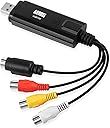
The August VGB100 is a compact USB 2.0 video capture device designed to convert analog video formats like VHS, Mini DV, and Hi8 into digital files on Windows PCs. Compatible with PAL, NTSC, and SECAM standards, it includes RCA, SCART, and S-Video inputs plus software for editing and DVD burning. Ideal for preserving old tapes or capturing retro gameplay, it’s a must-have for anyone looking to safeguard and share their nostalgic content.

| Asin | B008F0SARC |
| Best Sellers Rank | 18,796 in Computers & Accessories (See Top 100 in Computers & Accessories) 38 in External TV Tuners & Video Capture Cards |
| Box Contents | 1 x August USB 2.0 capture key 1 x Video extension cable 1 x Scart adapter 1 x Quick installation guide 1 x CD-ROM (software also available online) |
| Brand Name | August |
| Colour | black |
| Compatible Devices | PC |
| Connector Type | RCA, SCART |
| Country Of Origin | China |
| Customer Reviews | 3.8 3.8 out of 5 stars (9,147) 3.8 out of 5 stars |
| Global Trade Identification Number | 05053047000927 |
| Input Voltage | 5 Volts |
| Item Dimensions | 8.5 x 2.6 x 1.4 centimetres |
| Item Weight | 40 Grams |
| Manufacturer | August |
| Manufacturer Part Number | FBA_VGB100 |
| Model Number | FBA_VGB100 |
| Nominal Power | 10 Watts |
| Number Of Items | 1 |
| Number Of Ports | 1 |
| Package Quantity | 1 |
| Power Plug Type | No Plug |
| Product Finish Type | Matte |
| Specific Uses For Product | VHS Tapes, Camcorders, Video Recorders, Retro Game Consoles |
| Unit Count | 1.0 count |
| Warranty Type | Limited |
User
(Review includes troubleshooting for the device) A great, cheap bit of kit! I can record VHS onto PC/laptop in colour!
I bought this August VGB100 video capture cable from Amazon and it has done the trick! I can transfer the videos (from VHS tapes) that I wanted to my laptop. This works fine with Windows 8.1 on a 64 bit operating system. Installing the software was a piece of cake and plugging in the USB was too. The manual does not have enough info. in it. The programme that captures and stores the video is also really easy to use. I couldn't get any picture on the device at first (but I did get sound), then I did! The tricky bit is to get the USB device operating properly. This is what I had to do.SET UP/TROUBLESHOOTING:Put my VHS tape in a video player and set it running (when everything else is ready);Make sure the red, yellow & white phono connections on the USB stick are connected to the Output of the VCR/video player/video recorder (red to red, yellow to yellow and white to white);The settings you will need to select in the programme that is used to capture the video (the programme that came with the device) is - capture device, composite video (not S Video if you are using phonos), Analog Audio In (sound from the USB 2.0 device), regular volume (no other choice), and 4:3 (if you use 16:9 then everyone in the video will appear larger than they are); andSet the VHS going and if everything is OK then you will be able to hear sound from your USB and the video will appear OK.NO SOUND AND/OR NO PICTURE:If not OK then you need to do the following:Check the manual to see that the drivers for receiving and recording sound and video through USB 2.0 have been installed correctly (check your device manager) and that everything else is at it says in the manual; andIf it is all set up as per the above and as per the manual then you should be OK.NO PICTURE BUT SOUND IS OK:You are getting sound but perhaps not the video itself/no picture. To get the picture you need to do the following:Keep the VHS running;Open up your device manager and check which video drivers you are using. If you are using the NVidia driver or the Intel driver then you should get a picture. If one of your selected drivers is the Windows video driver then you'll need to change it to one of the ones above to get a picture (I had to do this) - device manager - video drivers - right click the driver you want, select update driver, select search for drivers on this computer, choose select driver from the list and select one of the NVidia or Intel drivers (the latest version you have) and press to install. Once it installs you will get video on the device;Open up the additional options menu on the capture page of the capture video programme;Check that you are getting a number next to the found line and found signal entries (you should be); andIf the picture is black and white with vertical lines running through it then choose another video standard. Even if the VHS is in PAL try another PAL version or try Secam. Secam worked for me even though the tape was PAL.You can get the software from here - http://www.augustint.com/en/downloadsoft-9.html - or here (later version) - http://arcsoft-showbiz.soft32.com/free-download/ .And that's it. Hope that helps. Happy video capture and transfer folks!
User
Cheap and simple way to digitise your old videos
Quick and easy way to convert your old analogue VHS and Hi-8 tapes onto your laptop. You'll need to buy the right leads to connect this device to your video machine - usually a Scart-phono plugs lead will do the trick (but use the S-video connection for Hi-8). Works perfectly on my Windows 8.1 64-bit PC.I marked it down a star because it doesn't appear as a standard video source in Windows - you have to install the (supplied) ArcSoft software - don't lose the licence key ID. You can download this if your laptop doesn't have a CD drive. But it seems a bit old-school fiddling about with licence keys, and the ArcSoft software manages to be too complicated for a complete novice, yet too limited for an advanced user - for example there's no way to change the capture bitrate (which is a very high 7 megabits per sec, so creates some file sizes far too big for grainy old VHS) or audio tracks/levels. But perhaps at this low price you can't complain too much.
User
It works, at least for me.
I bought the VGB100 after trawling through all the different offerings out there. All seemed to have mixed reviews, and I decided this one would be as good as any if I was taking a chance that it would actually work.The product came well boxed, with good instructions, it was actually better build quality than I expected.I had dusted off my old windows laptop to try and install this on. And as other reviews did mention, there was a couple of challenges to overcome. However, I had read through the trouble shooting print out, and actually they resolved my issues. Some things to note:1) It states to plug in the device before installing drivers.2) Disable antivirius.3) Make sure the scart adaptor switch is set to output.4) Find a port that the capture card actually registers on (noticed the first usb port I tried didn't pick it up).5) Change video capture to PAL-I.6) Change sound capture to the card, or the scart - for some reason I had to change this, but once I did, either option seemed to work.After all that, I was pleasantly surprised, the quality seems 'as is' on the tape, so it doesn't seem to lose what little quality there is (these are VHS so by todays standards when projected onto a big screen its very grainy, but on the phone looks good).Couple failed attempts at capture (e.g. in the settings it tells you how much of a certain format, e.g. WMA, or dvd you can record in one go), I let it go beyond this, 1hr, 09 mins, and only after realised it did not save the capture just seems to lose it. Work around this is to capture in chunks, like 30mins, and then edit them back together and saving them off as one unbroken recording. Also had to see what format my computer, phone etc. could play, ended up sticking with WMA.After recording over 10 tapes (childhood, and old basketball games) I can confirm this is working well, and getting the old footage onto the cloud to share with friends and family is good fun.Tried this as punt, to avoid having to send selected tapes to a vhs converting service, which can charge ten pounds per tape. Saved myself a lot of money, and honestly have to say, recording the old tapes and watching them, putting titles on them etc. with the editing software is good fun.I wouldn't say the software is the best out there, but it works, and at the end of the day thats the most important thing. I can also understand why some people may find this doesn't work, as it could be computer compatibility issues, or there is a step from the trouble shooting guide they missed. I work with computers, so would probably be slightly above average in terms of technical know how.Anyway, hope this review helps someone, who like me, wasn't sure if this would work for them, it did for me is all I can really say at the end of the day, and for the money was definitely worth it, will probably lend to friends after I am done!
User
THERE ARE BETTER SOLUTIONS - READ THIS...
Waste of money and time if you want a decent quality video. USB is far too slow to convert so expect jerky, poor resolution at best.I’ve had to convert a load of old MiniDV, VHSC and Video 8 formats and ended up trying all sorts. But these are the ones I found worked best after a lot of trial and error (and wasting money).CONVERTING MiniDVIf you're converting miniDV to a digital format, then you might be better off getting a IEEE 1394 firewire cable for a few quid instead assuming your miniDV camcorder has a firewire output. Most computers have a firewire input and the quality and download speed is far superior. I'm not an expert but I've just done about a dozen miniDV tapes using the IEEE 1394 cable and I'm very pleased with the results!CONVERTING VHSCIf you're converting from standard video VHSC then you're better off recording it to a DVD and then ripping the DVD itself. Just a tip for those of you with VHSC tapes and no VHSC camcorder. You'll be better off buying a VHSC cassette adapter (around £10-£15) and playing it in a normal VHS player. The adapter is simply a VHS sized cassette with a slot you can put the VHSC into (since the tape width of VHS & VHSC are identical). Then you'll need to connect the VHS player to a DVD recorder to record it. I had an old DVD recorder with built in Hard drive so I've recorded mine directly to the Hard Drive on the DVD Recorder.CONVERTING Video 8 or Hi 8Now I'm working on the Video 8 cassettes, but I had to buy a Video 8 camcorder from eBay for around £100. Seems like there's plenty of them for sale since everyone must be doing the same thing! I actually ended up buying a Hi 8 camcorder (which is a more advanced version of Video 8) so I can play video 8 and Hi 8 tapes on it. Hi 8 camcorders will play both video 8 and Hi 8 (because they are backward compatible), but Video 8 camcorders will not play Hi 8.My Hi 8 camcorder only has an s-video output so I have to buy a s-video to composite cable so I can record it onto my DVD recorder. I've added some pics of the VHSC adapter and 1394 firewire cable so you know what to look for. Pictures paint a thousand words!This is my first review ever but it wasn't meant to be negative. It was really to let everyone know what worked for me (like I said I am no expert but I have a head for electronics/gadgets) and I hope some of you find this useful. I know it's frustrating searching for answers all over the place, watching videos and reading up on everything before you start spending money hoping you get it right! That’s why I thought it would be a good idea to tell everyone what worked for me, so you don’t have to look for answers too.Another worthy tip might be to open a free Flickr account because they allow you to upload 1TB of pics and video, so it's a great place to store all your vids when you've converted if you don't want to use YouTube. And you can share the videos privately with friends or family, as well as pics. I've even downloaded the Flickr app to my phone so it automatically uploads all my pics and videos directly to Flickr, for permanent copies on the cloud. However, I think you have to open your Flickr app on your phone from time to time, otherwise it won't load them up. Not sure if there's a way to keep them uploading automatically, but it still works and better than nothing (and it's free).Hope this helps those of you looking for a solution. Good luck recording!
User
Cheap solution that does the job using the suppied drivers and software. No fiddling about required!
I took a gamble on this after reading mixed reviews however all is well and I'm glad I did.Reading the other reviews I think it is key that your PC / Laptop has sufficient performance in terms of processor, graphics card (or on board GPU) and memory and of course disk space. My Windows 7 Media PC was fine in this respect but an older, underpowered PC is going to stuggle a lot. Don't take the manufacturer's minimum specs literally, you need more power than that!Worked fine with the drivers supplied on the mini CDROM using the simple instructions provided to install the drivers and ArcSoft Video editing and DVD creation software.I am using this to transfer old Video 8 tape footage to DVD and it does this job for me just fine. Resulting Video quality is good enough. Comparible to playing the Video 8 tapes from the camcorder straight to the TV, very little quality lost (again I think this depends on how good your PC is).The ArcSoft software itself, I have used before. It is a bit clumsy and not intuative and I had to re-teach myself how to edit the caputred videos and create DVD "projects" that can then be burnt to DVD. I don't think this software would be good for complex editing and DVD creation however if you simply want to stransfer old footage to DVD with minimal editing and simple menus then this ArcSoft software is fine. If you want to do more complex editing and DVD creation then you can still use this solution to capture the footage as MPEG and then use different software to edit and create the DVDs.My only gripe is the DVD burning time looks to be "real time", i.e. 45 mins of footage takes 45 mins to burn to DVD. Zzzzzzzz!All in all I am happy with this and it has saved some old footage as old Video 8 tapes do degrade and I actually had to fix some that snapped during capturing! Great little gizmo!
User
It lasted for duration of my backup session, and then...
I bought this because it was cheap. I managed to digitise the 10-12 hours of VHS content from 20+ years ago. The installation was fine, at first the software on the mini-CD froze the computer, so I downloaded the same installation from the website and it worked fine. I couldn't get the PC to use the audio and video and quickly found it it was because I had camera and microphone disabled in the Windows 10 settings. Worked fine when resolved.I'm very please with the outcome of the quality, really clean. A little disappointed with the digital compression format options, they are a bit out dated, but fine for most people.When I went to pack away the VHS player for another 25 years, the AV cable accidentally yanked and I heard a creak. The product had snapped way beyond repair. This is where the cheapness came in to play. The plastic is very weak and provided no protection for the USB plug and circuit board.At least I got what I needed out of it, but I'll need to buy another if I were to do the same again and be more careful.In summary: It works fine, great results, just be very delicate with it, as it's particularly weak. Overall: 3/5
User
good, but i'm a novice and a learning curve is needed
The jury is out on this product. My object was to transfer old VHS footage of my family onto my pc, and it has performed that function well, so they are safely on my pc now. However the software seemed to have a mind of it's own, after putting my pc to sleep overnight, when I resumed next day it said there was no video input detected. I had to close the programme, safely remove the USB, then re insert it starting the software again and this time it recognised my input and I was able to transfer some more VHS. A little inconvenient having to do this every time.Now it comes with capture and edit software, which I'm afraid I can't fathom out yet. If I can figure it out, add titles crop and edit footage, add effects, I will add further comments at another time. If like me your old VHS player only has scart lead connections at the back, then this product will transfer your video footage via the included adaptor.REVISED MY REVIEW TO 5 STARS (13/02/18) In less than a week, by trial and error I've added scenes fading in and out where I had deleted sections, also I've been able to add captions which by default appear for approx 4 seconds, enough for my purposes, I've added audio tracks and deleted unwanted footage. This is far better than I had imagined.
User
Rough but still a diamond
Easy to use, but required a bit of fiddling about with settings to work. Still trying to find out how to get it to capture 60hz, if possible.Should be noted that the included software would only allow me to capture with one video codec, although this may be different if you don't use the CD and search for updated drivers instead. Other options were available for capture from my built-in webcam, which it can also see.There was some slight input lag but for me at least it was barely noticeable - I nearly didn't, anyhow, until I confirmed it by comparing the same game to being displayed on my TV. Ymmv, obviously. I noticed lag on the Gamecube but not the Dreamcast captures I did. Video seems sluggish during capture but playback presents no issue that I could see.Also, the quality of the image via the software included was horrendous, although sound seems fine. Included in this review should be a comparison shot of an almost identical frame, with the included software on the left and an unrelated program on the right. These images were not altered and both programs were instructed to capture at native resolution, separate from one another (one running + capturing at a time, in other words - the included software can also be used for display only, handy if your TV kicks the bucket). As for why a difference in quality, likely due to mpg versus avi. The blur is due to being in motion; this looks natural during playback.All in all, it's fine for getting started with YouTube, or just making fun videos and such, but you might want to invest in something fancier if you intend to do something like that as a business. Definitely absolutely fine for my uses, though, and I'd still recommend it.
User
Facile à utiliser
Fonctionne bien mais il faut bien lire le mode d'emploi. Facile à utiliser.
User
Top!
Geweldig om oude banden terug te zien en natuurlijk te digitaliseren.
User
bad product please retake it and give my money back
Bad bad bad product not working in any ways
User
Gut und günstig
Der Markt für Video Capture Adapter gibt Einiges her - da sich die Geräte scheinbar alle ähneln, ist man als Kunde leicht verwirrt, für welches man sich denn nun entscheiden soll.In technischer Hinsicht unterscheiden sich die angebotenen Adpater alle nicht sonderlich - es sind im wesentlichen dieselben elektronischen Komponenten verbaut. Ich habe zum Vergleich ein deutlich teureres Set von Magix herangezogen - der dort enthaltene USB-Adapter war nahezu identisch mit dem vorliegenden hier, nur viermal so teuer!Der August VGB100 Adapter hat bei mir auf Anhieb sehr gut funktioniert: Aufgabe war es, einige VHS-Videos von "Ausflügen" mit der Bundeswehr zu sichern bzw. letztendlich auf eine DVD zu bringen. Den Adapter habe ich an einem ca. 6 Jahre SONY Vaio Notebook per USB 2.0 unter Windows 7 angeschlossen. Von der Herstellerseite habe ich mit die aktuelle Software heruntergeladen und installiert. Den Adapter habe ich mit einem Thomson Videorecorder verbunden: Composite Video (gelber Cinch-Stecker) und Audio (weißer und roter Cinch-Stecker).Über das Vorschaufenster in der mitgelieferten Software läßt sich das Videobild abrufen, hier kann man auch ganz einfach die Aufzeichnung starten. In der Regel braucht man auch eine besonderen Einstellungen in der Software vornehmen - bereits mit den voreingestellten Standardwerten lassen sich gute Ergebnisse erzielen. Die aufgezeichneten Videodateien lassen sich anschließend recht bequem bearbeiten, z.B. Anfang und Ende zurechtschneiden. Auch der Weg zur DVD ist einfach und weitgehend selbsterklärend, nur die Gestaltungsmöglichkeiten etwa beim DVD-Menü sind überschaubar - aber es ist alles dabei, was man braucht. Die von mir erstellten DVDs ließen sich bisher auf jedem Player problemlos abspielen!Fazit: Ein sehr guter Video Adapter zum Sichern alter DV- oder VHS-Kassetten auf dem PC. Mit der mitgelieferten Software lassen sich die überspielten Dateien leicht auf eine DVD oder in andere gängige Videoformate bringen und somit für die Zukunft sichern. Für wenig Geld bekommt man hier alles, was man braucht, um alte VHS- oder DV-Archive zu retten.
User
Works Well
Worked pretty seamlessly for me, I used it to digitize a bunch of old 8mm tapes off of a camcorder. The software installed with no issues and it's 'fine' for just recording, I haven't tried using any third party apps though. The software has some features to edit or convert recorded video into different formats, and will even attempt to upscale the video to 720p or 1080p, but I would highly recommend against doing that since the software itself is pretty mediocre. You can use the software to just get the bare recording in 720x480 'DVD quality' and then use other applications to upscale/encode to any other format.So yeah nothing bad to say about this, it works, the video quality of recorded stuff is the same as what the camcorder/VCR would spit out when connected to a TV directly.
Trustpilot
2 weeks ago
5 days ago