🖱️ Elevate your workspace comfort — because your wrist deserves the upgrade!
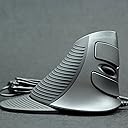
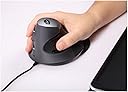
The ZeleSouris Wired Ergonomic Vertical Mouse is a right-handed, silver optical mouse designed to minimize wrist pain with its scientifically crafted vertical shape. Featuring adjustable DPI settings up to 1600 for precise control, a 160cm USB wired connection for stable performance, and a smart button layout including a thumb-accessible back button, it’s ideal for professionals seeking comfort and efficiency during extended computer use.
| ASIN | B00D84P8O8 |
| Antenna Location | Office, Home Use |
| Are Batteries Included? | No |
| Are Batteries Required | No |
| Box Contents | Wired Vertical Mouse, English instruction |
| Brand | ZKMAGIC |
| Brand Name | ZKMAGIC |
| Button Quantity | 4 |
| Colour | Wired Ergonomic Mouse |
| Compatible Devices | Laptop, Personal Computer |
| Connectivity technology | USB |
| Customer Reviews | 4.1 out of 5 stars 280 Reviews |
| Enclosure Material | Plastic |
| Hand Orientation | Right |
| Hardware Platform | Personal Computer |
| Item Weight | 0.57 Pounds |
| Manufacturer | ZeleSouris |
| Model Number | ZLCY10 |
| Mouse Maximum Sensitivity | 1600 Dots per Inch |
| Movement Detection | Optical |
| Movement detection technology | Optical |
| Network Connectivity Technology | USB |
| Number of buttons | 4 |
| Operating System | Linux, Windows 7, Windows XP |
| Power Source | Corded Electric |
| Product Features | Adapted global universal green frequency zero-latency 2.4G wireless transmission, 16 channels intelligent frequency hopping, Intelligent three power-saving mode will extend your battery lifespan;, Mouse with a power “ON / OFF” switch would be more power saving in the position “OFF” for long non-working state;, Precision engine, precise positiouction, Stong anti-interference ability |
| Special feature | Adapted global universal green frequency zero-latency 2.4G wireless transmission, 16 channels intelligent frequency hopping, Intelligent three power-saving mode will extend your battery lifespan;, Mouse with a power “ON / OFF” switch would be more power saving in the position “OFF” for long non-working state;, Precision engine, precise positiouction, Stong anti-interference ability Special feature Adapted global universal green frequency zero-latency 2.4G wireless transmission, 16 channels intelligent frequency hopping, Intelligent three power-saving mode will extend your battery lifespan;, Mouse with a power “ON / OFF” switch would be more power saving in the position “OFF” for long non-working state;, Precision engine, precise positiouction, Stong anti-interference ability See more |
| Style Name | Modern |
| UPC | 519750776184 |
| Unit Count | 1.0 count |
S**F
Comfortable and efficient
I work on a computer all day, five days a week. I take the required breaks and make sure my chair positioning is correct for the height of the desk etc., but that still didn't stop me from experiencing aches and pains when using a traditional mouse over long periods. Since I've been using this vertical mouse, all the pain has gone and I no longer experience any discomfort in my hand, wrist and arm. I find the buttons are perfectly placed and the scrolling wheel mouse button is a soft press making it comfortable and easy to use. The shield attached to the bottom means my hand is not dragging on the desktop and in all honesty, I cannot reccommend this product highly enough. It did take a little getting used to after years using a 'flat' mouse, but then that is to be expected. My husband is a 3D animator, and after using my mouse for only an afternoon, I have now ended up purchasing an additional one for him! An excellent mouse at an excellent price!
R**N
Pretty good - almost pain free use
Bought this as I was starting to get pain in fingers of mouse hand. These are now gone but another pain is apparent... the back page button is conveniently located next to thumb and an incorrect twitch had caused me to be sent to a previous web page on more than one occasion. OK if just browsing but if you have just been completing an on-line form the data is lost and it is back to square one. Probably simple fix but will need to look at it a little more. Would still recommend to those getting pains from mouse use.
P**D
A really excellent mouse, even though a really good touchpad is still better!
I had migrated a few years ago from mice, which were greatly aggravating my de Quervain's disease (a type of RSI causing wrist and thumb pain) to touchpads, and eventually settled on a Cirque Smart Cat touchpad, which has served me very well, though I preferred most of its fancy features turned off (no tapping, no gestures, but leaving scrolling intact). However, I was still not fully out of the woods with regard to the de Quervain pain, and it was gradually getting worse. Also, there were rare occasions when I found that there was some fancy drag operation that I couldn't do on the touchpad, and for which I actually did need a mouse. My further Web research pinpointed vertical mice as something to try, so I got an Urban left-handed mouse (I'm right-handed but my desk arrangement makes it easiest to have the mouse on the left). However, I then got so confused with using its left and right buttons that I thought I'd better get a right-hander mouse after all - and so, enter the ZeleSouris! I was greatly impressed with the Zele. My (right) hand felt as though the mouse had been custom made for me, with the buttons all being in just the right positions. I didn't experience any problem with the forward / back buttons that some other users had reported, but then that would depend on the exact shape and size of a person's thumb, so in no way does this observation really contradict anyone else's reports. My problem with the mouse was that I found it clumsy and awkward to use, and not as precise as I wanted with regard to pointer positioning, even at the most slow DPI setting. So, initially very disappointed, I took out the best of the standard mice that I'd previously been using (a Logitech one) and tried that instead, thinking that really I could have that connected in addition to my touchpad, and it would give me better control than the Zele for those rare operations that cannot readily be done with the touchpad. Blow me, with the Logitech mouse the pointer was all over the place, even with what I'd always previously regarded as optimal adjustment. Yes, the Zele was much better! So, I'm keeping the Zele connected for the very occasional awkward moment, but I'm sticking to the Smart Cat touchpad for all normal use. All the more so because NO mouse that I've tried scrolls anything like as smoothly and flexibly as the Smart Cat. And all the more still because, having learnt from the principle of the vertical mouse, I've made a point of keeping my hands reasonably turned outwards both when using the touchpad (easy to do), and even when typing. So I have actually benefited from my encounter with vertical mice, by taking on board their underlying principal of keeping my hands from being pronated for extended periods. Bottom line, therefore, is that of all mice that I've tried, the ZeleSouris is apparently the best (hence my five-star rating), BUT for most purposes a really good touchpad (for me the Cirque Smart Cat proved to be King), carefully configured, and used with care to minimize hand pronation, is by far the best of all.
D**N
Never mind the quality feel the weight!
Please don't read the above heading as a criticism. Just a flippant that sprung to mind. This is a quality product and is my second vertical mouse since I began to develop wrist pains some time ago. Not being sure as to how a VM would feel, my first was not very expensive so when it gave up the ghost recently, I decided to move up a stage. I didn't make a mistake. This VM not only looks good it feels good. Perfectly sculptured to fit the hand with buttons (lots of them!) positioned just about perfect and each with a good positive action. On the right-handed model, the right face has usual left/right buttons with a scroll wheel in the middle all comfortably placed. The left face has two buttons (pre-programmed for back/forward and great for flicking through the pages of documents) within easy access to the thumb. On the top there is a small "DPI" button which I haven't had call to use as of yet. Happy to say this was a good investment. But going back to my intro header - because of its angular shape it feels heavy to lift if and when you run out of mat so it's best to use it on the desktop. Just one word of caution - if you're very much into precision graphics, then you will not have the same precision of movement, This is because a standard mouse is a "finger and thumb" instrument; this VM is more "hand-driven"; that's why my wireless mouse is close to hand when I need to work in photoshop or illustrator. Sorry to have been so verbose, but this is a great gadget and I will definitely buy another (but not too soon I hope!)
A**R
Very Comfortable Mouse!!
I recently started to get pain from repetitive strain in my right arm and wrist. When you use a normal mouse your hand is twisted in an unnatural position which will eventually cause problems in your wrist.elbow,shoulder and back. I decided to try an ergonomic mouse and after a lot of research decided to plump for a cheap one as you can always upgrade to a more expensive model if desired at a later date. My mouse duly arrived 30 hours after my order was placed - well done Amazon! It plugged straight into my computer and worked immediately. The buttons all made immediate sense and it only took a couple of hours to get used the the altered use. Three days later my wrist and arm pain has gone, I have got used to my new relaxed hand postion which is very comfortable and I find there will be no need to upgrade to the £80 model after all. Some people have mentioned hand size being a problem. My hand measures 18cm from heel to end of middle finger, someone with smaller hands should reach the buttons comfortably although I can see that someone with longer/Larger hands might find the buttons fall a bit too ar back on their fingers, all I will say is order it and give it a go anyway - it's cheap enough!
A**Y
Very good, but.....
I tried this and a similar (cheaper) Anker mouse, but decided to keep the ZeleSouris mouse. I bought it to help with tendonitis/RSI symptoms - I work in IT have been using a mouse constantly, every day, for many years. This mouse is immediately more comfortable. It feels reasonbaly well-made - the buttons and wheel work well and I like the little projecting 'pad' which moves with the mouse and prevents the mild irritation of my wrist rubbing on the desk. But.. I've got average-length hands which is just about ok. If my fingers were any longer, the fingertips would reach beyond the position of the buttons. And, as others have said, the 'Forward' and 'Back' buttons, which sit above and below your thumb, are very easy to click accidentally. If my thumb was any bigger, I'd find this a real pain, as it is I don't mind too much. I returned the Anker mouse, as I found the buttons were a bit of a stretch for my fingers, and needed more effort to click. This length (base of thumb to fingertips) seems to be a critical factor for vertical mice, because you use them by grasping the whole thing with thumb and fingers wrapped round the body,and your fingertips need to be in the right place to comfortably work the buttons. So, highly recommended - if it fits.
C**N
Works mostly as described but a product on the planned obsolesce-y end
I've bought this same product twice and the same flaw has developed in both items. First it is well designed if you get RSI pain related to wrist rotation. It does relieve this well, and it's well designed in terms of how easy it is to grip. What's gone wrong though is the scroll wheel has both times started to not really work very well. It works in a jerky manner, and you have to turn the scroll wheel lots of times for it to move. I took the second one I had apart and can see it's because hair and dust get themselves wrapped around the scroll wheel mechanism after a while of use and it stops the contact applying. Easy to fix but who wants to be taking apart their mouse every few months?! In general this is a cheaper end product. It works as described but it's likely break on you after a while.
N**S
Does not work unless you have small hands
I bought this as I am beginning to get RSI. The concept is a good one, I certainly could feel less twist in my lower arm, however I am a big bloke with large hands and this is just too small for anyone with anything except small hands. the buttons and the wheel all fall under the middle bone in my fingers rather than being under my fingertips; which needs a lot of dexterity to adapt to.to get my fingertips on to the buttons I have to basically let go of the mouse and guide it using only my finger tips (palm disconnected from mouse) I was also a little surprised by the way it is packaged; the first thing I noticed when I took it out of the box was that the cable was bent 90 degrees as the cable was pushed up against the box, this means it wont last long...
Trustpilot
2 months ago
2 weeks ago