


🚀 Elevate your security game with 4K clarity and AI smarts — never miss a moment!
The Amcrest AI 4K UltraHD Night Color PoE Turret Security Camera delivers professional-grade surveillance with 8MP resolution, a super-wide 129° field of view, and advanced AI motion detection that distinguishes humans, faces, and vehicles. Its dual illumination night vision provides vivid full-color video up to 49 feet in darkness. Designed for easy PoE installation and rugged outdoor use with IP67 weatherproofing, it supports versatile storage options including MicroSD, NAS, and secure cloud backup. Compatible with Alexa and multiple platforms, it offers seamless remote monitoring and reliable, encrypted video streaming for modern smart homes and businesses.
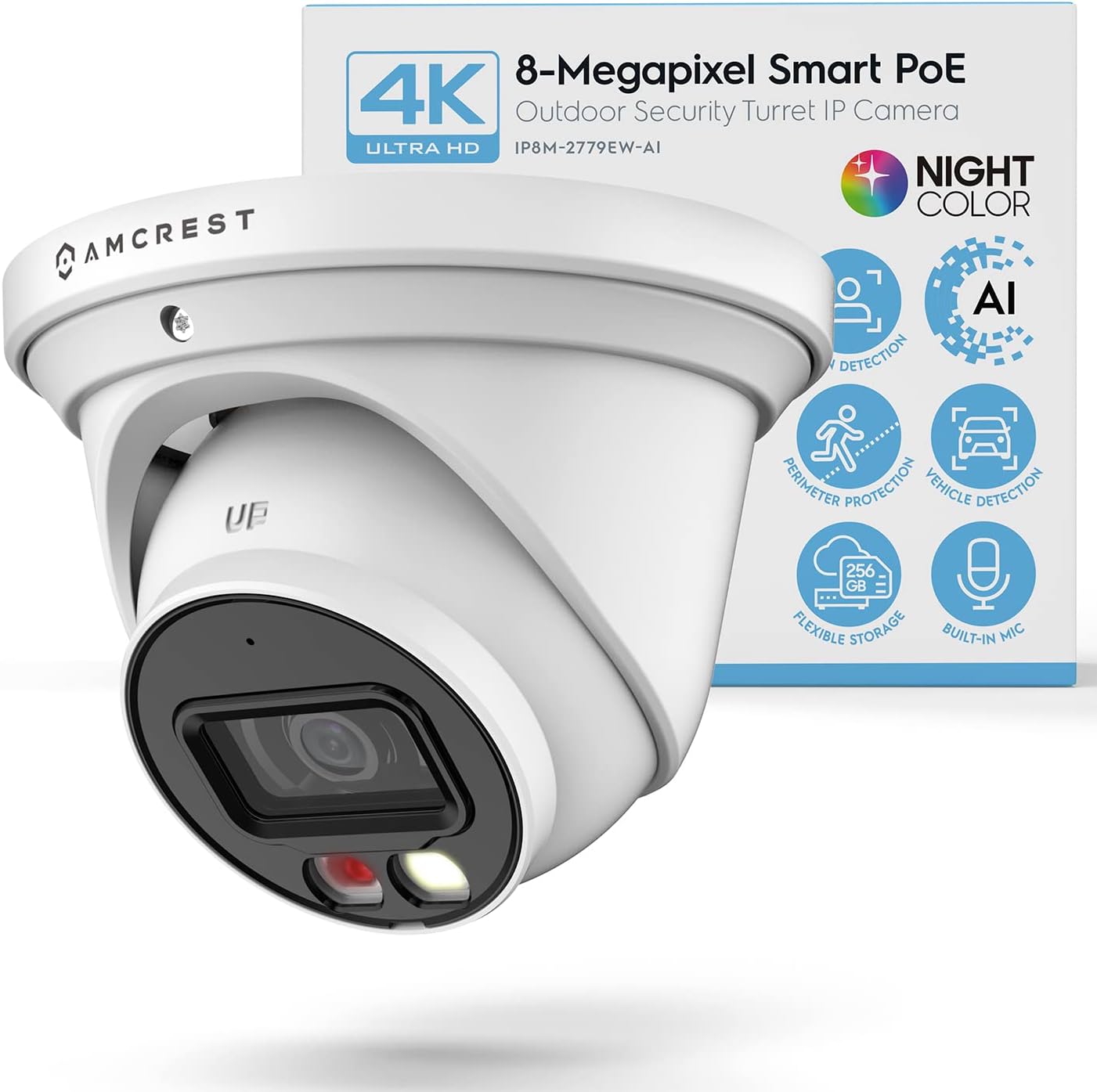


| ASIN | B0BMWFTFLS |
| Alert Type | Motion Only |
| Antenna Location | Outdoor Security |
| Best Sellers Rank | #1,054 in Dome Surveillance Cameras |
| Brand | Amcrest |
| Built-In Media | Quick Start Guide |
| Color | White |
| Compatible Devices | Smartphone |
| Connectivity Protocol | Power Over Ethernet |
| Connectivity Technology | Wired |
| Control Method | App |
| Controller Type | Amazon Alexa |
| Customer Reviews | 4.2 out of 5 stars 546 Reviews |
| Effective Still Resolution | 8 mp |
| Enclosure Material | Metal |
| Field Of View | 129 degrees |
| Form Factor | Turret |
| Frame Rate | 15 fps |
| Global Trade Identification Number | 00850024042971 |
| Indoor Outdoor Usage | Outdoor |
| Indoor/Outdoor Usage | Outdoor |
| Item Dimensions | 2.36 x 0.79 x 1.57 inches |
| Item Type Name | Security Camera |
| Item Weight | 1.6 pounds |
| Light Source | LED |
| Manufacturer | Amcrest |
| Memory Storage Capacity | 256 GB |
| Mfr Part Number | MONITORA11 |
| Model Number | MONITORA11 |
| Mount Type | Wall Mount |
| Night Vision | Night Color |
| Night Vision Range | 49 feet |
| Number of Channels | 1 |
| Number of IR LEDs | 1 |
| Number of Items | 1 |
| Other Special Features of the Product | Image Sensor, Motion Sensor, Night Vision, Portable |
| Photo Sensor Technology | CMOS |
| Power Source | Ethernet Cable / POE |
| Recommended Uses For Product | Outdoor Security |
| Room Type | Classroom, Kitchen, Living Room, Office |
| Special Feature | Image Sensor, Motion Sensor, Night Vision, Portable |
| Specific Uses For Product | Inside, Outside |
| UPC | 850024042971 |
| Unit Count | 1 Count |
| Video Capture Format | H.265/H.264 |
| Video Capture Resolution | 4k |
| Viewing Angle | 129 degrees |
| Voltage | 12 volts |
| Waterproof Rating | IP67 |
| Wattage | 7.2 watts |
| Wireless Technology | Power Over Ethernet |
J**N
Great camera with easy setup
I purchased two of these cameras so far, and have been extremely happy with the quality of the product as well as the video and images that they produce. The initial setup was fairly easy, with the most difficult part being to install the SD card into the camera. You have to physically disassemble the camera to install the SD card. It wasn't a difficult process for me; but for some, I could see that being a challenge. That being said, I feel this is a much better system for SD cards than other cameras that I looked at prior to buying these. All the other cameras made the SD card easy to get to and install; however, the downside of that is that it also would be easy for someone else will ill intentions to get access to and remove it as well. Once the SD card is installed, the remainder of the setup process goes very quickly. I recommend doing a "test setup" prior to actually mounting the cameras in their desired locations. I ran a short network cable from my switch to the camera, and it immediately booted up with no problems. The next step was to setup up the app, and associate your camera(s) with your account in the app. This is the only hiccup I had in the setup process.. You actually use the camera on your phone to scan a QR code on the camera to perform this process.. My confusion was that after reading the instructions, I thought the bar code on the exterior of the box is what needed to be scanned. There is actually a QR code on the cable attached to the camera that needs to be scanned in order to add the camera to the app.. After a few minutes to figure this out, the remainder was very easy to complete. The app asks a few other basic setup questions(name of camera, etc) and then you are fairly quickly viewing live video from the camera. While the app is rich in features and adjustments that can be made to the camera setting to finetune the image, I ultimately decided to go with the setup as it was out of the box. Somewhat because I was a little afraid that I would make it worse if I started messing with the settings, but, mainly because the picture and video quality are awesome as they were. In addition to the app, the cameras can also be viewed and adjusted on the computer. This process was also painless and straight forward. Installation in their final position was pretty simple. You just need to find a way to get an ethernet cable from the camera to your NVR and or POE network switch. It's really just that simple. I had a professional install mine just because I wanted the backyard camera mounted on my back fence, and I didn't want to dig the trench to bury the cable to that camera. After they were both installed and re-connected, I just fine-tuned the direction that the camera was pointed, and they were ready for use. One more thing to think about prior to purchasing this camera. Where will you store your video / pictures. I personally, for now, am using the SD card in the camera. I installed a 128gb(the biggest they say the camera will support), and have it recording 24/7 and it holds about 2.5 days worth of video. Eventually, I will probably go to only recording motion events, but want to keep an eye on it for the first 30 days and just make sure it's capturing all events prior to switching. I will say, so far, it has performed above expectations in that area as well. But, if you didn't want to use the on board SD card, you can also use a FTP service, a NAS, or any number of cloud based services to store your video. Amcrest also offers a cloud option, which I believe you get a free trial of. However, I knew that long term I did not want to pay for a service so I opted not to even take advantage of the free trial, so I can't speak to the functionality of that. Overall, I would highly recommend the product. It's simple to setup and use.
J**A
Great Camera and Great Upgrade from Our 5 MP Amcrest Camera
I've been using Amcrest camera's since 2018 and really enjoy the value and quality they bring for the price. We currently have 6 cameras around the house and over time slowly upgrade older models. This camera replaced an older 5 mp Amcrest bullet camera that was still doing great, but you can tell a difference between 5 mp models and 8 mp models in overall video quality and detail. I actually appreciate the wider viewing angle with this camera because this one is on the side of our house watching over our and our neighbor's backyards and now we can also see the front of their house which is where vehicles turn into our cul-de-sac so its nicer seeing more. In terms of setup and install it was pretty easy since I already had a camera previously mounted. The 8 mp Amcrest cameras have a nicer metal mounting plate or ring versus 5 mp cameras have a plastic mounting system. The plastic mounting system on the older camera was beginning to yellow slightly so long term I think that could need replacing. One complaint I would say though, and its minor, but if there is anyway to universalize the mounting hole locations on your cameras Amcrest it would be much appreciated. Almost everytime I upgrade cameras the mounting hole locations vary and I have to drill new holes. Not the biggest issue but that does add time to the install so a universal mounting system would be awesome. Camera setup otherwise is very easy thru the app. Once setup in the app (don't forget your QR code to scan the camera for setup is on the power cord), I went to my PC and was able to login to the camera thru its IP address (thank goodness no more Chrome app needed like some older models) and was able to configure my settings and update the firmware without hassle. One nice bonus feature about this camera is it does have a built in spotlight you can turn on and off and so depending on your needs this could be a little additional security which is nice. The AI features work well, but depending on your setup you may or may not need them. I personally use a Amcrest NVR and use it to record everything 24/7. The AI options offer alot of value for the money and its nice to know I could have notifications texted and emailed to me if needed. Lastly, the audio and night vision work great also. Overall I would highly recommend this camera to the individual that is looking to setup their own great home security system. Amcrest cameras have held up well and this model continues that tradition having been up and running solid for a few weeks now.
R**A
Another Amcrest product I am happy I purchased.
This is my fifth camera from Amcrest and my first PoE product. The device description and accompanying pictures online made it clear what I would be getting and I was not disappointed. Like all Amcrest dev I've had the packaging was secure and simple. Other products I've owned have had too many bags/ties/paper trash in them. Everything you need is in the box (other than the PoE injector I purchased to set it up which was inexpensive). I've never had a PoE device but the instructions I found on the Amcrest support page were very clear and I had it up and running in no time. Took less than 30 minutes to get it mounted and set up where I wanted it. The camera itself has a good heft and is very sturdy/well built. I had no doubts that it would be fine out in the elements and a few days in I was proven correct. Had a bad wind/rain storm with Tornado warnings and the camera took it with no issues and continued to operate flawlessly. I prefer to use the Amcrest View Pro app and with a little work I got it working with it so I can view all of my cameras in one place. The picture quality was beyond my expectations. The wide viewing angle was impressive and at one point I opened it on my laptop to stream to my 4k television to see how clear it was on a large svreen. Other than the slower frame rate it was almost like looking out a window. The AI functions work well but I haven't personally used them much or have had an active need for them. I'm sure in the future I will utilize it more and I will update my review. Overall I am pleased with my purchase and am happy to add it to my collection of Amcrest products.
C**S
Extremely Happy With the Camera!
Review for: Amcrest 4K Night Color AI Turret IP PoE Camera 49ft Full Color Nightvision, Security IP Camera, Built-in Microphone, Human Detection, Perimeter Protection, 129° FOV, 4K@15fps IP8M-2779EB-AI (Black) This is another amazing product from Amcrest. I already own have the 5MP Turret( IP5M-T1277EW) and this 4K version is an excellent upgrade. The cameras practically have the same features, but the IP8M-2779EB has 4K video resolution. The box says the it uses H.265 HEVC compression but you can change that to H.264 (which might be necessary to use the footage in other third party applications [Like APPLE HOMEKIT via Scrypted]). This change and lots of other settings can be done in the camera's web interface (just type the camera's IP address into the browser). I've found that the web interface is all that I really need to configure that camera settings. I have the AmcrestViewPro app on my iPhone, but it's isn't very user friendly. I typically use the app to scan the camera's QR code and (after at least one app crash) set up my login info for the web interface. Pros: - Easy to set up and use - Very solid build quality - Great picture, even at night - Very useful web interface - PERFECT for adding to APPLE HOMEKIT via Scrypted because a) the price, b) the H.264 video codec, c) You can have the main full quality video stream and set up two other sub-streams that are lower resolution. Cons: - I wish that the frame rate FPS was a bit high. It's 15 FPS, which is pretty typical for this type of 4K camera. My other Amcerst Turret ( IP5M-T1277EW) actually goes up to 20, but it isn't 4K. - I wish that the app experience was better, but the web interface is great, and there are lots of other third party software that will work with this camera. - The camera seemed to get a bit warm while I was testing it in the house. That's probably fine, since it has a metal body. - My camera came with what appears to be a small crack or a piece of debris inside of the lenses housing (see photo). It doesn't seem to impact the camera footage in any way, but this is why I deducted a star. I'm very happy with this camera and will likely get a few more and an NVR to finish out my security system.
R**T
Overall a great camera
The good: - wide angle with a sharp picture. Nightvision is color and provides a very crisp image with minimal blur. - construction feels very sturdy and I like it's waterproof design. I used this camera to replace my 4MP amcrest turret camera (which that had the same design and it's been outside non-stop in use for the last 5 years.) - AI features are really nice and work surprisingly well, which reduces false alarms. - My NVR (PC running Blueiris) detected it immediately and connected. - Amcrest Surveillance Pro Desktop App works great (windows 10/11 app) - Happy that Amcrest is a well known brand and stand behind their products. I've had a few other cameras in the past by random chinese brands and they had all sorts of issues. I have had 0 issues with amcrest products the bad: - doesn't come with a starbit, I have to dig one out of my tool chest (not a big deal) - I've noticed that the android app won't continuously show the feed, after about 1 minute the transfer rate drops to 0 KB/S. I'm not sure if that's a limitation of my phone or what. I have a samsung galaxy s21. Overall I am really happy with this purchase, especially considering the cost vs 4k quality. The nightvision is very crisp on this camera. My wife says that she feels so much more comfortable being able to check on things outside when she hears a bump in the night. Recommend!!
R**I
Excellent
The physical installation of this camera is easy as far as positioning and using the brackets is concerned. I do own several POE cameras and I know a good camera when I see one. This is a well-built camera, and it has a good spec and it lives up to the spec. I tested it with my Blue Iris software, and it was picked up easily by Blue Iris during the setup. The image quality is true 4k, very sharp and clear, and the color night vision was impressive. The 15 frame per sec worried me, but as a normal user it was more than adequate for me. I tend to go for POE cameras, so I do not have to worry about running a power line to the camera as well as a data line, my POE switch is an unbranded switch and the Amcrest UltraHD 4K camera had no issue powering up from it. The view angle is wide, and it covers my back yard completely, the adjustment of the lens was easy and felt sturdy. The price was super reasonable for a good brand name camera, and I feel it will last me a long time this camera. I would love to have such quality camera with pan and tilt capability. Overall, I would highly recommend this camera. A good purchase.
A**I
Crisp picture. A first step in AI for Amcrest. No intruder protection, so mount it high.
Instructions: The bulk of the instructions were discussing how to set up the camera. The process is very similar to other Amcrest PoE cameras, with either IP or P2P options. There was one page at the back discussing how to set up the AI features. It seems almost like an afterthought. If Amcrest is targeting a higher usage rate for the AI features, I would recommend including a dedicated section within the user manual specifically explaining how to use the IVS and other AI features, complete with step-by-step instructions on how to set up a "smart plan" with photos. The instructions should also mention that the AI features are experimental and are not 100% accurate all the time. Functionality: The 8MP 4K camera is generally the very best resolution in home security. I was very happy with it compared to the 5MP camera that I previously had. The "night color" feature is a little misleading: yes, there is a white LED on the front of the camera that can light up, and the camera will be able to see colors due to the light, but any camera can see color during the day or in a well-lit area. If it is truly nighttime and there is no light, or very little light, this camera must rely on IR and the image shows up as black and white, again which is standard. This camera, same as any other camera, cannot see color in "total darkness" as advertised. Although I did not test the audio, I would like to see Amcrest be able to integrate the audio with other more popular camera providers like the Ring doorbell. It would increase adoption and help consumers potentially unify a disparate suite of cameras from several different manufacturers on a single property. Also to note: this camera does not have enhanced protection against physical threats, like some of the other Amcrest cameras. This camera should ideally be mounted high up on a solid wall where it cannot easily be reached by intruders. Of course customers should be aware of the usual with PoE cameras: there is no automatic pan/zoom/tilt despite the circular shape and the camera must be hardwired into an Ethernet cable in order to provide power and data. For outdoor mounting this may require weatherproofing (a weatherproofing sleeve is included) to accommodate cable drops. Overall experience: The AI features were a novelty but not significant. In my testing, the AI face detection offered limited choices ("confused", "happy") and was wrong just as often as it was right. Nevertheless I think Amcrest is moving in the right direction by establishing the IVS platform and starting to incorporate AI into its products. This is extremely important for the future. The white LED feature with motion detection serves as a deterrent, which is wonderful, but standard on outdoor cameras. Overall this is a very good 4K outdoor camera with excellent resolution and many of the standard features including IR, motion detection, and lighting, including some novel exploratory "AI" features. I would like to see this camera have true, useful AI that can detect threats highly accurately. I would also like to see this camera have enhanced protection against physical threats.
M**L
Great all around camera at a great price
I currently own several cameras, but I keep on transitioning away from cloud-based solutions in favor of locally controlled cameras, especially Amcrest cameras. The Amcrest camera's I have gotten have been great and this one continues to be great. The price on it for the features especially the NightColor and AI based features, plus the 4K is great. Honestly it is a great package, especially for the price. The build quality of the camera is solid and feels good. It is very sturdy to the touch with a metal like material for the exterior. This to me is important as the camera is to be located outside in weathering, so not feeling ‘plastically’ is a great pro. The only plastic I could tell is around the IR and white light, while the area around the actual camera lens feels like glass. I appreciate that the wrench to open the camera is included this is especially useful to be able to add the microSD card for the camera. It was also a nice touch to open it up and see a nice rubber gourmet to help keep that area try and avoid future issues within the microSD slot. Once the camera was connected via POE it was able to grab an IP from my camera network. I was then able to find the camera via the app and get it setup easily. I appreciated that the camera enforced changing the password from the default ‘admin’, this is a great security feature. Amcrest could go further to enforce a different username as well, but I am happy to see IoT manufacturers slowly moving away from admin/admin! My first item to do was to make sure I had the latest firmware on the camera. There is an option to do an Online Upgrade, which is unchecked by default. I think for many people this is an option that should be checked off so that the camera is on a safe firmware. Personally, I give limited network access to my camers, so I have to do it manually. One item of improvement would be to include the model number in the upgrade or system tabs. I had to come back to my Amazon purchase to get the exact model number to find the firmware to download. It seems like a simple field that could be added to the web interface to make the life of the end user better. After the firmware update, I did another reset of the camera. This is HIGHLY recommended, so be sure to update the firmware before you do lots of changes/settings on the camera. With that said, I was impressed by the picture quality of the camera. The 4K looked good and the IR for the night vision did a great job! The spotlight on the camera was also a nice feature and gives the "NightColor" for the video. The bright light makes everything clearer! I do feel like it could be easier to activate some of the Smart Illumination features. Some of the settings do require a bit of digging around to activate so it's an area where a user guided process would make it more user friendly for the masses. Though overall it isn't to difficult to figure out where the items are, it's pretty logically set. Another interesting feature to me was the TripWire. The AI can help identify objects and it did a pretty good job. With everything said, I truly think this is a great camera especially for the price. I appreciate having the option to keep my recordings all locally stored. I recommend this for anyone that needs a camera with flexibility, great quality and a great price.
Trustpilot
5 days ago
2 weeks ago