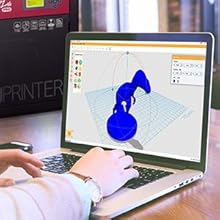
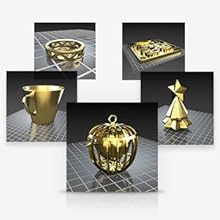
🚀 Elevate Your Making Game with XYZprinting!
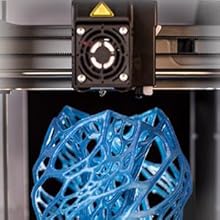
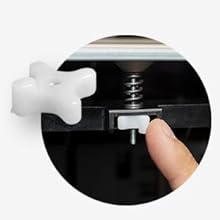
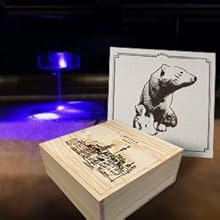
The XYZ Printing da Vinci 1.0 Pro 3D printer is a versatile, open-source machine designed for both novice and experienced makers. It features a robust aluminium print bed, a generous build volume of 20x20x20cm, and comes equipped with essential maintenance tools, ABS filament, and comprehensive modelling software. With the option to upgrade to a laser engraver, this printer is perfect for those looking to expand their creative horizons.


| Brand | XYZprinting |
| Colour | Black, Red |
| Compatible devices | Laptop |
| Item weight | 300 Grams |
| Material | Aluminium |
| Supported file format | STL |
R**B
A Brilliant printer to use straight out of the box.
I've had my Da Vinci Pro for just over 3 months now. For the price, if you're after something of good build quality, with as little work to get it ready, this is the printer for you. For the price, I think it's perfect. I spend about 5 months researching 3D printers before I made my purchase, so I already knew what I was doing when I started using it. I recommend anyone who wants to get into 3D printing to do the research first before making your choice. There are cheaper printers on the market. The majority are either smaller, you have to build them yourself, and/or they are not an enclosed system. I've had kit systems before, and they are not for me. I wanted something pre-built, and for the price I think this is the best on the market currently. The Pro model can use third party filaments without the need to "Hack" the XYZ Filament cartridges as with the other models. To some the temperature range can be limiting, But for the normal types of filaments the Beginner-Average person would be using, This would be no problem at all. I've had no major problems with my printer, That being said there's going to be things that need adjusting that can be worrying if you haven't done your research and know how to fix them when they happen. I have since upgraded several parts of my printer like the cable protectors, and added a hot end mounted filament cooling fan. The great thing about this printer is that the online community for the Da Vinci Pro is actually fairly established. There's a lot of users out there, and we all go through the same problems here and there, so there's more information online about fixing problems than from the actual manufacturers. That being said, if your printer is within warranty, Keep the box in case it needs to be sent back. You have to bare in mind that this is still classed as a low end 3D printer.. but a high end one at that. I was originally after a Zortrax M200, But they start at roughly £1500. For what I'm using the printer for, I couldn't justify spending that amount of money. I feel that the price of the Da Vinci Pro is extremely good. The print bed size is actually huge. 20x20x20 That's big. I measured everything up before ordering, and I was still surprised by how big the machine itself was. This thing is beefy, and really heavy. But I like that. It does not shake around while printing or anything. I would recommend this printer to anyone that wants to get into 3D printing. [EDITED] It's now 5 months since I bought my printer, and the Extruder was failing one me because of a really cheap bushing on the Idler Bearing (It's made from aluminum, so it just wears away) XYZ Customer services were more than unhelpful. I opened a case with them, send them videos and photos of the problem, after 4 weeks of communication, They basically got back to me and said there was nothing wrong with the machine, and closed the case. Frankly I know that their customer services were terrible to begin with, I was mainly opening a case just to see if they would send the parts out to me. In the end I found a new designed Extruder Assembly on Thingiverse, and I printed that out, and built my own Extruder Assembly, works perfectly. Still keeping this at a 5* printer review because 3D printing at this price range is basically a modding community. We're all making improvements to our printers, and over time you will feel more confident designing components yourself, which I am now doing. I've now replaced the cable snake, added cooling fans, a new print bed. At some point in the future I will be changing the hot end to the E3D-V6 Hot End, to which there is also a community created assembly model on Thingiverse.
V**S
So overall I think this printer is a great place to start if you've never done 3D printing ...
So overall I think this printer is a great place to start if you've never done 3D printing in the past. As with any new machine, before you fully understand it, it will definitely be a difficult journey. Lets start with the pros, and then move onto the cons later. PROS: 1) It's all pretty much plug and play apart from the calibration. The whole thing is literally ready to go as soon as it's calibrated, and even comes with a couple pre-installed test files which you can run without even connecting a computer. 2) Pretty straight forward set up, just put the CD in, install the drivers, and you're pretty much good to go. 3) Plenty of options to mess around with to get the print that you require, such as different qualities and speeds. 4) Comes with all the programs you might need to get started, all of which are pretty straight forward, so you don't have to dig around online when you don't even know what you're looking for. 5) It looks very aesthetically pleasing. Not like those messy DIY built out of pipes, tape and cardboard ones. So even in a very organised home it will look perfect. CONS: 1) Sadly there's pretty much no support from XYZ, some claim that they get a reply pretty quickly, but honestly the majority insist that you'll be waiting about a month for a reply, and most of the time they won't send any replacement parts or give any actual advice apart from "here's 2 minutes youtube video that might help" and then you wait another month if it didn't help. Worst case scenario they'll just ask you to send it back for inspection and repair, at your own cost (which is really, really expensive). 2) There are many much better slicing programs out there for preparing projects for print, however XYZ has decided to not allow the use of any of these, you're stuck using their version of the program, which honestly I won't say is terrible, it's really not, it does most of the things you want, not always the way you want it, but it gets it done. Sadly that means you're stuck using their software. (There are ways to Flash the entire printer and make it completely open source, which is not simple, but it is possible, sort of like "unlocking" it so you can use it to its full potential) 3) This printer is advertised as "open system filament" which honestly means nothing. XYZ has their own brand of filament, which is about 3 times as expensive as other filament, it comes in a cartridge which counts exactly how much you used. with the Da Vinci Pro 1.0 you can use a 3rd party filament, however it will constantly let you know that they don't like it, and that your prints will be bad, which in a way is kind of true, because it feels like as soon as you put a 3rd party filament in the printer, suddenly all your prints go really bad, but they work perfectly with other printers. Also there is no spool holder for 3rd party filaments, so you'll have to make your own. Overall it may sound like I have much more to say about the cons of this printer, but that's only because they're more worth noting than the pros. On the positive side, the printer works well and has a lot of potential, there's a few ways to modify it to work well for your needs if you are willing to put the time into it. In the short run, it's a really exciting piece of machinery, in the long run, you'll either be disappointed, or you'll mod it yourself to fit your needs, but keep in mind that you're on your own, together with all of us, XYZ probably won't help you. Personally, I like it.
L**E
Ive had mine for almost 2 weeks now and had trouble with it since.
Ive had mine for almost 2 weeks now and had trouble with it since. Ive not been able have much success at all and been trying so much stuff to get it to work, Kept under extruding. Ive only been able to get a couple of prints done which worked. I could have just sent it back for another but wanted to try and figure it out. Been speaking with XYZPrinting support and they have been getting me to try different things, but no go. Was about to send it back to amazon when i noticed the filament have some resistance in the extruder head. The small tube in the head and quick release coupling was kinked and bent so filament could not pass easily. So pulled that out and tried to straighten it as best i can, plus reverse in when placing it back in. But i noticed the difference straight away although not 100%, but as it never rains but it poors. Now the bowden tube that connects to the feeder gears (the part you load the filament through) pushes out when loading or even using the printer so effectively making the printer useless. Now i could send to printer back to amazon for a replacement but XYZPrinting did say they can send the replacement parts to me. So waiting to hear on that after sending a copy of amazon invoice over to them.. Apart from the big learning curve (its not plug and play none are) and the issues i have i do like the printer. It can do very good prints and the potential to do laser engraving later is a bonus. It took me a while to get use to the bed leveling as auto calibrate is hit and miss, its best to manually calibrate. The XYZWare for Pro software is an improvement but still limited and shame you can use any other software to print yet. You cant do a lot of the manual options like with other 3d printing software although the latest firmware allows Gcode import from Cura or Slic3r. I know Simplify3D are going to support this like the do with other models but thats 149 dollars when they do. Once i get this sorted im sure i would give it more stars as i can see the potential in this printer. But bare in mind this is no small printer and takes up a lot of space. I do like the choice to be able to use 3rd party filament which is great, as long as you print out a spool holder or something to use them. I would advise getting some Scotch Blue Painters Tape with this especially if you plan to use PLA. it works really well. Ive heard its not a great idea to print directly on the aluminum bed, but the masking sheets you get with it worked fine with the supplied ABS cartridge. I might add to this review as time goes on with any tips or pros and cons..
P**.
Mechanical Garbage.
Absolute piece of garbage, filament doesn't adhere to the bed (even tried build-tak, glue, hair spray, tape, spending hours adjusting the z-axis but nope), print layers don't merge leaving a loose shape of rigid filament lines in the print which can be easily picked apart. The heated bed takes an age and then some to heat up to max temp, the construction of the unit is quite shabby and the door often fails to close unless you force it shut. The printer is extremely loud and makes regular shunting noises as if some part of it is struggling to operate. Do yourself a favor and ignore this printer at any price, you're far better off with another printer in the same price range such as the CR-10.
R**E
Very quick to get up and running
I have wanted a 3D printer for quite a while but was waiting till the market settled down and the printers became more reliable. I've seen many product come and go and none of them looked that reliable. But after seeing this printer get reviewed by a number of people and getting some great reviews, I thought now was the time. I'm quite tech savy but knew there would be a steep learning curve. But after watching a few tutorials and learning from other peoples mistakes and tips. I managed to get the printer to print flawlessly within a few hours. It's not 100% perfect and after watching a number of people struggle to get the prints to stick to the bed. I did invest in some different materials to cover the build plate. I've attached some pictures below of some models I was test printing with. A nice mechanical gear cube to test the accuracy using 2 different color ABS filaments. A holder to mount my camera onto a tripod. Lastly a print of a desktop spool holder to hold some PLA filament, so I cant use some more exotic filaments.
S**R
Good printer - lousy manuals/support/software
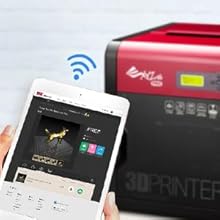
Okay, after holding off and doing research I finally bought this device as my first 3D printer. I chose it for three reasons: 1) Fully assembled, ready-to-go and designed for people who want to print rather than mess about with hundreds of settings 2) Able to use third-party filaments instead of expensive proprietary cartridges. 3) WiFi connectivity enabling placement in a remote location to avoid noise/fumes First impressions: Instructions on how to remove the device from its box are included - inside the box! The instructions on how to unpack the device are useless - little text and tiny diagrams. Watch the company videos on YouTube first! The printer itself is large and looks good but the panels are rather flimsy. The XYZware Pro software is rubbish but is required to set up the printer. Now the BIG problem: WiFi - There appears to be no easy way to find out the MAC Address (ID) of the WiFi module in the printer. This means that if your WiFi network is secured with MAC Address Filtering (as mine is) it is a pain to add its address to the list of approved devices in the router/AP. A call to the manufacturer got them looking through their own manuals (it isn't in there - I checked all the documentation before I called. There isn't a proper manual anyway, just a very superficial PDF guide that calls itself a "User Manual"). They didn't appear to know their own products at all. They suggested that I raise a technical support ticket - I did, and I am still waiting for a response 3 days later. One workaround would usually be to use an OctoPrint/OctoPi remote print server to receive the G-code over WiFi and spool it directly to the printer. Unfortunately, this printer (like all from this manufacturer!) uses non-standard commands to control it and so it is not compatible with OctoPrint - an application used by thousands of 3D printer users throughout the world. In the end I finally got it connected by WiFi (with no help from the manufacturer!) I had to temporarily disable MAC Address filtering on my router so that the printer could log on to the network, check the router's status to find out the MAC ID of the newly logged-on device (hoping it was the printer and not a hacker!), add that to the approved list and then re-enable MAC Address filtering. Hardly straightforward. (FYI, the first part of the printer's MAC ID starts 20:F8:5E). However, there still appears to be no way to assign the printer a static IP address - there is no IP address option in the settings and so it is assigned by DHCP only. So, the conclusion: From the few test pieces I have printed from a laptop connected directly to the machine the quality appears good, BUT: The printer can be used connected directly to the computer via USB but this means that you generally have to be in the same room as it. Getting it to work with WiFi is a pain with a properly secured network and still doesn't allow setting of a static IP address. You CANNOT use the standard OctoPrint/OctoPi application to manage your printer remotely. The manufacturer's "technical support" is useless and don't seem to know their own products. The "Pro" software supplied is a joke - you will likely have to pay $150 for Simplify3D which does support it (but I am having issues with WiFi connection using Linux - Simplify3D so far cannot "see" the printer so I am having email exchanges with their "tech support" too!) Now over a week with still no response to my support query from XYZPrinting...
D**S
Perfect for beginners
First printer I received was faulty but replaced immediately by Amazon. Now the replacement is up and running I can safely say that It's a great printer , although the software which comes with it is abysmal. Being to print using 3rd party filament is a huge bonus as with all the other Davinci printers you were restricted to using their cartridges which are not that readily available in the UK , well not at a decent price anyway. The bed levelling is not the best , it can have you running around in circles trying to get a perfect level. I found that setting the offset of the bed to 1.35mm then using a feeler gauge and adjusting manually worked better. All in all a great printer , ideal for novices as it only needs minor tweaks to make it run smooth as a nut .
M**L
A pleasing purchase
I started by reading up about 3d printing on the web and came across all associated problems but decided I still wanted to go ahead. I set my criteria that the printer had to have. Not to exceed the max price of £500 as its for a hobby not a business. A heated print bed of at least 200x200x200. Ability to use ABS and PLA filament. Able to use 3rd party filament. Enclosed to keep drafts off while printing. All that pointed to this printer. The Wifi is a nice to have and as its enclosed its looks better in the home than the open ones. So having received it, it was quickly unpacked and set up. After performing bed levelling and setting the Z offset I tried one of the demo prints using the provided ABS filament and yes warping occurred. More adjustments more disappointing prints. So resorted to the glue stick method. Some success. After a needed bed tape change, levelled and set the Z again . This time I checked the Z at 9 points on the bed and manually adjusted the bed and what a difference. Without any glue stick the prints stuck to the bed print after print and came off without tearing the bed tape. So lesson learned take more care when levelling and setting Z offset Changed over to 3rd party PLA, setting the heated bed to 45 degrees. Prints are sticking nicely to the bed without coming loose. A little bit of force needed to remove but comes off without tearing the bed tape. Nearly 80 hours of printing done now and only one problem with the printer where a belt was loose. Following a video on Youtube quickly had it sorted out. Some cleaning needs to be done every 25 hours of printing but cleaning wires and a brush are provided and it is an easy job. You can connect by usb or once configured by wifi and once the job is sent to the printer you can shut your computer off and let the printer to get on with it. Overall I have to say I am pleased with this printer but a word of caution it is big and heavy so make sure you have room for it.
D**S
Volume important
Dèbutant dans l'impression 3D ,Je suis satisfait de mon achat . Un temps d'adaptation est necessaire mais dans l ensemble elle est simple d'utilisation . De contruction solide à confirmer dans le temps Elle occupe un volume à prendre en considération
P**O
Muy buena impresora
Muy buena impresora y soporta filamentos de terceros
G**R
Super Drucker
Hallo ich habe mir diesen 3D Drucker gekauft für (450€) und ich bin total begeistert. Er ist super zu kalibrieren wenn man es 1-2 mal gemacht hat ist dies in weniger als 10 min passiert. Druckt sehr sauber leider hält das mit gelieferte Filament nicht so gut auf dem Tape ich nutze nur PLA von German RepRap und als Tape Flexiebles Malerband von Tesa der Druck hält Bomben fest. Das XYZ Filament richt sehr unangenehm da ABS, aber sehr schön sie legen 120 Meter Filament bei ( Rot ) W-LAN funktioniert wunderbar. Die Slicersoftware ist gut nicht perfekt aber Inordnung, soft- und Firmware sind am Anfang auf Englisch nach Update auf deutsch die Betriebsanleitung ist auf Englisch. Er hat schon 33 Stunden Betriebszeit läuft wunderbar. Fazit wer nichts aufbauen will und nicht lange kalibrieren will ist hier genau richtig der ideale Drucker. Update 27.02 nach 330 druckstunden läuft er noch problemlos
A**N
Qualità di costruzione del prodotto
Stampante 3d non per principianti qualità del prodotto ottima le guide dove scorre l ugello testina sono in acciaio con boccole di qualità e resistente all usura, testina intercambiale in due secondi si estrae tutto piatto riscaldato inserimento pla con sistema automatico di caricamento ecc ho calibrato la stampante in manuale per avere maggiore precisione il sistema possiede la calibrazione in automatico ho avviato la stampa senza PC con i file caricati in prova ottima stampa servizio del venditore ed Amazon eccellente
F**C
Très bonne imprimante, compliqué à paramètrer
L'imprimante fonctionne très bien, elle par contre compliquée à paramétrer. La mise à niveau automatique du lit d'impression semble ne pas fonctionner correctement, prévoir de le faire manuellement (tutos dispo sur youtube). Je n'ai pas réussit a imprimer de l'ABS qui n'adhère pas au lit, aucun soucis par contre avec du PLA. Il est possible d'utiliser des bobines qui ne sont pas de chez XYZ printing, Prévoyez par contre d'imprimer un support à bobine pour votre imprimante et à bricoler un peu (la encore des models sont dispos sur internet et notement chez thingiverse). Je ne recommande pas à un débutant qui aura du mal à faire fonctionner l'engin.
Trustpilot
2 weeks ago
2 weeks ago