Desertcart purchases this item on your behalf and handles shipping, customs, and support to Seychelles.
⚡ Upgrade Your Connection, Leave Buffering Behind!
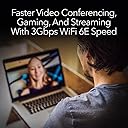
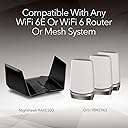
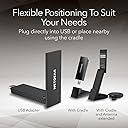
The NETGEAR Nighthawk WiFi 6E USB 3.0 Adapter (A8000) delivers tri-band AXE3000 speeds up to 3Gbps, unlocking the new 6GHz WiFi 6E band for Windows 11 PCs. Featuring a compact design with a flippable antenna, it ensures optimal signal strength and compatibility with any router or mesh system. Equipped with WPA3 security and USB 3.0 interface, it’s the ultimate upgrade for professionals demanding fast, reliable, and secure wireless connectivity.


| ASIN | B0B94R78N7 |
| Best Sellers Rank | #24,349 in Computers ( See Top 100 in Computers ) #178 in USB Computer Network Adapters |
| Brand | NETGEAR |
| Built-In Media | WiFi 6E |
| Color | Black |
| Colour | Black |
| Compatible Devices | Desktop |
| Compatible Operating System Family | Windows |
| Compatible devices | Desktop |
| Customer Reviews | 4.4 out of 5 stars 1,302 Reviews |
| Data Link Protocol | USB |
| Data Transfer Rate | 1201 Megabits Per Second |
| Data link protocol | USB |
| Hardware Interface | USB 3.0 |
| Hardware interface | USB 3.0 |
| Item Dimensions L x W x H | 9.3L x 3.1W x 1.4H centimeters |
| Item Weight | 28 Grams |
| Manufacturer | Netgear |
| Mfr Part Number | A8000-100PAS |
| Model Number | A8000-100PAS |
| Product dimensions | 9.3L x 3.1W x 1.4H centimeters |
| UPC | 606449160987 |
| Unit Count | 1.0 Count |
H**O
Get Connected No Hassle
Top shelf WIFi network adapter specially designed for Windows 11 Install software and drivers with supplied USB key that will eventually redirect you to updates if you have connection otherwise install and start connections where you could not previously reach a network Allow the application to disable the previously installed adapters for best results Suddenly "you can see the light"
P**P
It work perfectly without disconnection
This review based on past 1 month use. It works best with WIFI 6 router, no issues on watching on 4K movies on Netflix or youtube for any buffering issues. But i do not recommend connecting on very old WIFI router more than 5 years old and also depends on how the wifi router is placed with better internet speed.I even connected without the USB cradle the WIFI adaptor.I just connected the WIFI adaptor to 5 meters Active USB cable.No drop in speed in such condition.WIFI adaptor driver is a must to install,without it it won't work.
B**I
Slightly better than a non 6E dongle.
Used it for remote play gaming, connection seems more resilient than my WiFi 6 dongle(but not by much). I just bought it to confirm my router’s 6GHz abilities.
Q**N
Does what it has to do
The wifi adapter works great. It picks up the wifi from far away and makes it strong. Very happy with the performance of this thing.
H**D
Large for one of these, higher end, very good performance, fairly easy to install
TL;DR: pricy, delivers barely adequately (200 Mb/s) under desk, and but performs well when included cradle is used to move antenna higher. (connection is close to saturated for me). Do not purchase if you have only USB 2.0 connections -- most PCs within the last 7 years or so should be fine there, though. It will work, but you'll be wasting your money as a cheaper device will suffice. What I'll first cover is: 1. should you even be looking at this? What scenarios seem to make sense for buying it? 2. Setup Experience 3. Performance 1. Should you even look at this/buy this? This is expensive. If you want very basic wifi internet access for a PC/mac/other USB-capable device, then you can get reasonable quality lower performance brand-name gear in the $20-$30 range at time of writing. If you want to try your luck you can get some random unknown brand that may claim on paper to be as good as this for a third the price. While I wouldn't go the random brand approach (tech can be a pain to configure, networking doubly so, and wifi networking even more so), a good quality $25 adapter for basic internet access is not at all a bad choice. So why pay four times as much (say) for this? For me, I was used to 2.5 Gb/s and 1.0 Gb/s wired ethernet speed. When a lightning storm took out the local switch, I bought this as a temporary workaround for my wi-fi-less desktop. I'm happy. The other possibility is that you've got a good quality slightly older notebook (or NUC or desktop) that you want to use WiFi 6E on. This is a great choice in that scenario, but only if you need the added speed or different frequencies. (Possibly useful in situations where you are close to router and there is heavy WiFi use in your area, but only if your local router supports Wifi 6E. Check first.). The third scenario: you've got a basic device where the existing wifi got fried and your primary uses are light browsing and email, then I'd probably get a cheaper device unless you find the prospect of slightly slower internet just too horrible for words, and you know your local router/WAP is capable of giving you added speed via at least Wifi 6. Another scenario is that you really care about aesthetics: this is a pretty nice looking device, and while larger than very small portable adapters, it's still small, and a lot better looking than most of the "Shove a big antenna on something and see what happens" solutions. A final scenario is that you just want to future proof. Buy this for basic use today and hope to use it for something fancier in a year's time when you upgrade a router or whatever. Not crazy about that scenario since prices do come down, but I can just barely see the appeal. Certainly if you're intending only to use advanced features such as Wifi 6E in 2026 or later, I'd forget it. Prices will likely be cheaper then, barring inflation and a whole Mad-Max scenario. 2. Setup Experience IMPORTANT: Something they don't mention explicitly and should: plug into a USB 3.0 or better. 3.0 is fine; you don't need 3.1, 3.2, 3.0 gen 1 blah blah. But USB 2.0 will limit you to about a third of the potential bandwidth this device can deliver. My goodness. They included a USB thumb drive with the software (for Windows) on it. A lot of cheaper solutions don't bother with this, but obviously, if you're installing onto a computer with a precarious or non-existent internet access situation, this is worth its weight in, well, silver at least. (Admittedly it's a pretty light drive!) The documentation with my device included an English-language quickstart guide, a list of links to guides in other languages (20 all told, ranging from Finnish through Greek and Hungarian to Chinese, Korean and Japanese), and a legalistic pamphlet on warranty and disclaimers. The quickstart guide was excellent, complete with pictures and symbols. If my English was very poor, I might have struggled with it and been forced to download one of their other 19 language guides first. That said, the guide and software were aimed completely at Windows 10/11 PC's. I couldn't have completed the installation without the guide; that said, I'm pretty unfamiliar with installing Wifi (hardware and software) on a device that's never used it before. I followed the guide and it was absolutely straightforward. It would have been nice if the installer had given the same hints as the guide but this is just being lazy. 3. Performance Here is a negative. The performance was mediocre when plugged directly into a desktop underneath a desk. It was about one sixth the potential capacity. Still nice, but not worth paying for when you could get the same from a $25 brandname device. Another negative: the quite elegant cradle had a very short cable (two feet?) making it very difficult to position the device for improved performance. I managed to perch it precariously on the edge of my desk and performance improved to the point where I was saturating a half gig connection. (I can't test further at this time). That said, it definitely performs considerably better than a budget device once the cradle is used and the antenna is more exposed. So what would make it better? - wizard -- in different languages -- brought up automatically by installation software - longer cable - some means of easily testing maximum performance to router - coupled with above, an automated means of telling you where antenna was best positioned ("Hold it here for 2 seconds, now move it. etc.") Overall it met and exceeded my expectations. I would buy it again, and this is my first Netgear product ever.
D**.
My best Nighthawk WIFI 6E savor
Thus Nighthawk works very well in my room, excellent choice with WIFI 6E best buys. Recommed others to buys
D**R
Lightning fast wifi
I had recently bought a WiFi 6 Router, so decided to buy this product hoping to improve WiFi performance on my laptop. In summary: 1. Installation was very easy. Go to the Netgear website, download the drivers, run the downloaded file, plug the device in, and that was it. A bit of configuration on the Router is required (eg enable 160mhz). 2. The build quality is OK. It's made of plastic and feels a bit flimsy - but its good enough. 3. The Wifi speed I've achieve is incredible. The device is only about 4 meters from the router, but using a LAN Speedtest tool, I consistently get about 260 mbps upload and 470 mbps download. A massive improvement on my previous Wifi 4 speeds. 4. The consistency of the performance is also good. But for the main reason I bought this device - Speed - its has surpassed my expectations.
Y**K
yk
国内メーカーを購入しましたが、電波が弱くダメでした。他のパソコンで使用している今回のメーカーが価格的には 高いですが、購入しました。満足の出来る通信出来るができました。
L**N
A serious upgrade if you know how to optimize your performance on it
I almost returned this adapter after the first day because I wasn't seeing the speeds I expected. I'm glad I didn't. Before buying this, I was using an older USB Wi-Fi adapter and getting around 90 Mbps. After installing the NETGEAR A8000 and doing a little troubleshooting, I'm now consistently seeing 450-500 Mbps downloads on my desktop while connected through a wall from my router. Latency is excellent as well, averaging around 14 ms with no packet loss. Here's the important part: if you buy this adapter, plug it into a random USB port, leave the default settings alone, and immediately leave a 1-star review, you're probably not giving it a fair chance. A few things I learned: Install the latest drivers from NETGEAR. Make sure you're using a USB 3.0 port (usually blue). This was a huge difference for me. Verify you're actually connecting to the 5 GHz or 6 GHz band instead of 2.4 GHz. Disable power-saving settings for the adapter and USB ports. Use a High Performance power plan in Windows. Give the adapter a good location instead of burying it behind a metal PC case. Once I did those things, the performance completely changed. My adapter connected to the 6 GHz band on my Xfinity XB8 gateway and negotiated a 1201 Mbps link speed. Real-world performance ended up being roughly five times faster than the adapter I was replacing. The included desktop cradle is a nice touch, setup was straightforward, and the connection has been stable ever since. I was originally considering buying a mesh extender because I thought my Wi-Fi signal was the problem. Turns out my old adapter was the bottleneck. If you're looking for a plug-and-play miracle, your results may vary. If you're willing to spend 10 minutes making sure everything is configured correctly, this adapter can absolutely fly. Very happy with the purchase and definitely keeping it.
Trustpilot
5 days ago
1 month ago