


🎮 Power, Cool, Connect — Level Up Your Gaming Command Center!
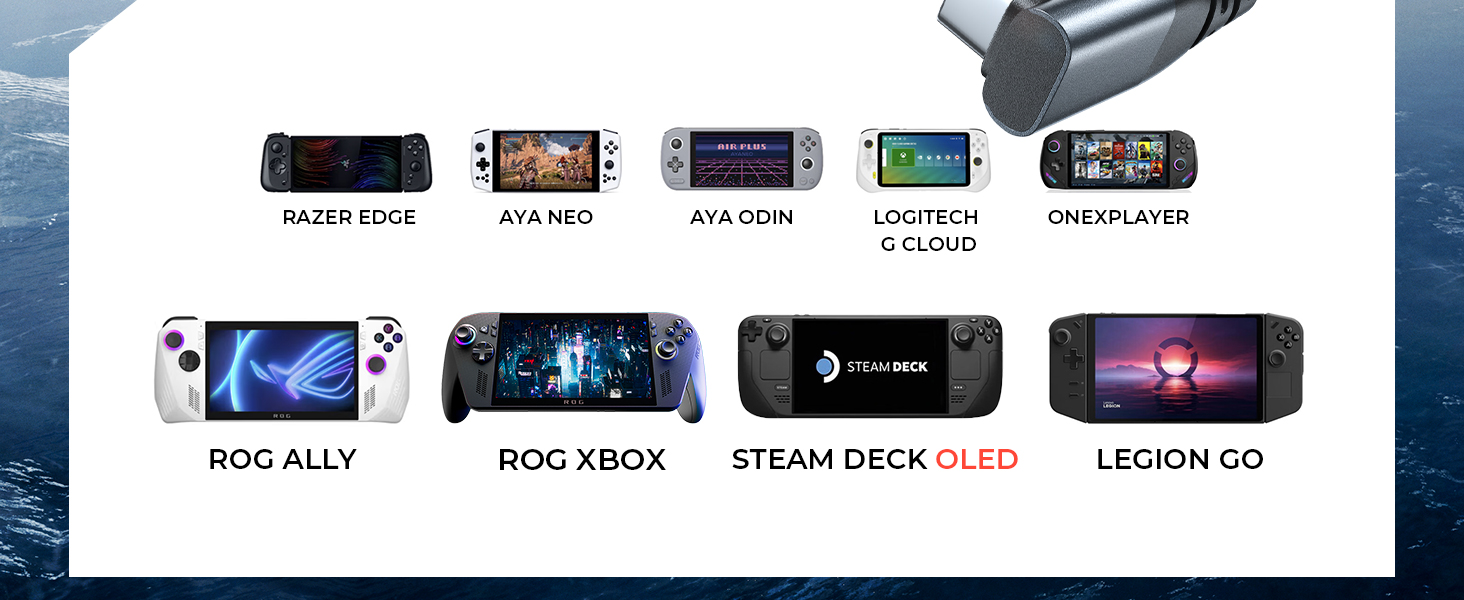
The LISEN 10-IN-1 Docking Station is a premium accessory designed for Steam Deck OLED, ASUS ROG Ally X, and Lenovo Legion Go. It offers 10 versatile ports including USB 3.0, Gigabit Ethernet, and 4K@60Hz HDMI output, paired with dual cooling fans for optimal heat management. Supporting up to 100W fast charging and featuring compatibility with ROG Ally’s 30W Turbo Mode, this dock ensures seamless connectivity, enhanced performance, and extended device longevity—all wrapped in a sleek, durable design with a 12-month warranty.




| ASIN | B0BQRB7X9V |
| Best Sellers Rank | #26,772 in Computers & Accessories ( See Top 100 in Computers & Accessories ) #1,092 in Laptop Docking Stations |
| Brand | LISEN |
| Color | Grey for Steam Deck & ROG Ally X |
| Compatible Devices | Valve Steam Deck, ASUS ROG Ally, Lenovo Legion Go,Switch OLED, iPad Pro, Android Phone |
| Customer Reviews | 4.2 out of 5 stars 1,207 Reviews |
| Hardware Interface | Ethernet, HDMI , MicroSD, USB 2.0, USB 3.0, USB Docking Station |
| Item Dimensions L x W x H | 3.27"L x 5.91"W x 12.6"H |
| Item Type Name | LISEN 13-in-1 Steam Deck Station |
| Item Weight | 340 g |
| Manufacturer | LISEN |
| Mfr Part Number | LISEN |
| Model Number | V262A |
| Number of Items | 1 |
| Number of Ports | 10 |
| Product Dimensions | 3.27"L x 5.91"W x 12.6"H |
| Total Number of HDMI Ports | 1 |
| Total USB Ports | 5 |
| Total Usb Ports | 5 |
| Warranty Description | 2 Year Manufacturer |
| Wattage | 100 watts |
A**N
Listen, as I tell you the tale of the LISEN Docking Station!
I purchased the LISEN USB C Docking Station for me to use with both my Gaming Laptops (ASUS ROG and Dell Inspiron), my Samsung Android Phones, and my other family member's Valve Steam Deck, Switch OLED, and iPad Pro. We love how it combines a 10-in-1 hub, fan cooler, and stand base so we don't need to buy them separately. Set up was really easy and the dock allows us to easily connect our devices. It's unique and clever design allows us to keep all of our devices neater and more organized on our desktops/setups. Here are the juicy details! As the Steam Deck Dock features an HDMI 2.0 output, I can view 4K resolution at 60Hz natively, which allows us to enjoy a sharp and smooth visual experiences with our games. It's a HOT view, but not a HOT mess! The Upgraded Dual Cooling Fan ensures that the heat dissipates faster from our systems... prolonging battery life and preventing those ultra-frustrating overheating errors: system crashes and frame loss! But that's not all... this LISEN 13-IN-1 Steam Deck Docking Station is a virtual utility tool like a swiss army knife [It features a Gigabit Ethernet (1000Mbps), a SD/TF Slot (U3), 2* USB3.1 Gen1 ports (5Gbps), 3* USB2.0 ports, and a USB Type C PD charging (100W) port.] That's right, the dock broadens the types of ports connecting our devices with additional USB2.0, USB3.1, and even a Gigabit port. Along the way we now have the ability to charge our devices with a USB Type C PD charging port, we really appreciate all the options. What's more, it is made to be compatible with TURBO 30W Mode, and does so perfectly. Altogether, this Docking Station allows us to explore new ways to play. But Wait... there's more!!! We especially like the added bonus of the upgraded dual cooling fan which helps to protect our electronics from system crashes or frame loss that could be caused by overheating. Plus the Extended 40Gpps Adaptor allows our Steam Deck to get maximum power through the docking station without disconnection. Plus the 4 grip caps that come with it are great for keeping our joystick free from corrosion and wear and tear. Overall, we are really impressed with the LISEN USB C Docking Station. It has everything we need without having to buy extra pieces and is sturdy, efficient, and well-designed. We can confidently use it to connect all our devices with the fast speed and excellent support that it provides. We highly recommend this product! I *will* be a repeat customer!
A**A
It worked great till it refused to charge
Update: changed from 2 to 5 stars. Company reached out rather quickly and replaced it. So far it seems to be working as advertised. I'll update with any changes. By and by it was a great dock for my legion go. It worked great for what it was advertised. The one issues I had it that the connection to my hard drive felt slow and sluggish but my main issue was that it stopped charging my legion go. I could get it to work my wiggling the cord till it stopped working. I can connect the power straight to the legion go so I know it works fine. It it's been past half a year but it was very disappointing. I don't ever unplug the power cord so I have no idea why it went bad. For almost 50 investment I hoped for a longer life for it.
A**H
Great when it works. IMPORTANT UPDATE!
Had this a month. Worked great at first, let me use my SD cards again, after the Rug Ally's known issue got the handhelds on board one. Charged no problem with Rug Ally factory charger passing power through it. Problem came with it fell 1 foot with the Ally on it. The Ally is find, completely unhurt, the LISEN Docking station stopped passoing power through it to the Ally and the Ally no longer sees the SD card. The Docking station didn't even land on the cord, but it still stopped working. 1 Foot, and it wasn't even a hard surface. Important update: Yes the first one had problems, but LISEN stood behind their product all the way and were extremely easy to do warranty claims/work through. Very happy with the replacement unit I got a few days ago, and I'm wondering if the first one I got was just a fluke of bad luck. I recommend this docking station on the ground they stand with their product. And thats why the quality of the material is marked as 1 star. Also why i marked value low.
M**K
Nice Dock
This Steam Deck Dock has a two large fans, HDMI out, five USB ports, Micro SD card, TF card, Ethernet and USB C charging port. I am using this with a 1st gen Steam Deck and it works great! I have hooked up a Xbox 1 controller, keyboard, and mouse. Leaving two other unused USB ports that can be used for something like external SSD's. The ethernet makes downloading games so much more faster than Wifi. I really like being able to play on the TV. It also lights up with changing colors in the back. The fans do a good job of cooling the Steam Deck. And it keeps the Steam Deck charged. To get my sound bar to work with it I set the Steam Deck to external sound. Also I set the Steam Deck to not go to sleep when plugged in. So all I have to do is change the input on the TV and I am good to go. Otherwise you have to unplug the power cord to the Dock, press the power button on the Steam Deck, and plug the power cord back in, as well as change the input of TV. My only complaint is I have not been able to get the Micro SD card reader to work. All in all a very nice Docking Station for the Steam Deck. I have bought other Docks but this is the best one so far, I would definitely buy it again. Update: I have had a chance to use it for a while. All though I could not get the micro SD card to work, I got the TF card reader with a adapter to works just fine. Also from time to time the screen, through the HDMI cable, goes blank for about 1 to 2 seconds. It can be frustrating when this happens and you are fighting a boss. That is two problems and I have deducted one star for these two issues. Also I have hooked up a external a 1TB SSD in a enclosure. It connects through a USB port and does not need a power cord hooked to it. You could use it to hook up a larger SSD. But it's nice because I have the hard drive, an Xbox 1 controller, keyboard, and mouse and I still have another unused USB port.
T**N
Unfortunately The Dock HDMI Port Failed In A Year
The dock went out less than a year. =.[ My HDMI port doesn't work anymore. Bought April 13th, 2024. It was already doing this. I thought it was the cable. Finally decided to test it. I'd say maybe a month or two it first did this. The green flickering. Unfortunately my only other dock is a Dell Display Link and it's not charging my device so I can't use it... I wonder if it's a driver issue that it's not... I'll look into that. But this dock has failed within a year. Value for money? No. It failed too soon. Though the Official Asus Dock I bought failed far sooner and that's $60. Same issue, the HDMI port went out... Has only an HDMI video port. If it had a Display Link I could switch to that. Has 5 USB Ports, though only 1 seemed to work for me. I never tested drivers for this dock if they have some. It fits in the case I had. The fans and colors are nice. I trust that it helped kept my device cool. I didn't use any other ports. Just 1 USB always top left when looking from back for mouse/keyboard dongle, HDMI, Ethernet, and power cable.
A**X
The Swiss Army Knife of Steam Deck Docks
Lisen knocks it out of the park with this powerful multi-purpose Steam Deck docking station. Not only has this 10-in-1 dock worked flawlessly and exceeded my expectations, but it supports a mind-melting number of plug-in devices, and unlike most other docks, has two very powerful and [actually] functional fans to keep the Deck cool while docked. These fans can be toggled on/off with the press of a button located on the back of the docking station. The cradle's depth is perfect enough that there's some breathing room between the back of the Steam Deck and the docking station to allow for proper air flow and for the fans to do their job. And even with the Spigen case on our Steam Deck, there's still room to breathe. After having tested multiple games and transferring large files, the Steam Deck never once got hot. The Lisen Docking Station also comes with a two pairs of thumb grips...and while a nice gesture, they're not necessarily needed as they're more novelty than anything. However, Lisen did think to include a rather nice 40Gbps USB-C to USB-C extension adapter that accomodates a number of different case styles. You may want to exercise a little caution taking the Steam Deck in and out of the docking station as the front corners aren't entirely covered by the inset rubber cushion, and are a bit sharp. This could lead to scratches on the screen if you're being hasty or careless with your Steam Deck. I hope that this gets addressed in a future product update or version. All of the other pros like an included Gigabit ethernet port and offering 4K/60Hz HDMI output outweigh any minor issues I had with the device. Definitely worth picking up if you own a Steam Deck or are planning on getting one in the near future. Oh, and the dock's HDMI output will also work with some tablets and mobile devices too.
J**Y
Where's the RGB Light's?
My kid love this thing. He never took his rog off the dock after I got him the monitor keyboard n mouse. He recently broke his old one - hdmi eventually stopped working. I'm here trying to find it again. Did you guys stop selling the one with rgb lights.?
D**K
Overall decent, but one huge issue
When I first got this dock I loved it. It was amazing. Did everything I wanted with more ports than I could ever need. I specifically got a slightly more expensive dock to have the improved build quality and more ports. It does all that perfectly. Great value for the price in most regards. Also super easy to use, just plug it in and you’re ready to go. It still works great over the time I’ve had it, but I no longer use it. I recently switched to a 75 inch, 4K tv, and the thing became useless. No amount of troubleshooting got it to work. I could only get the Steam Deck to register on the TV when it was in desktop mode. I traded with my mom who also has a Steam Deck, but her dock was less than half the price, made of cheap plastic and has less than half the ports. For some reason the cheaper one connected immediately to my new TV with zero issues and ran like a champ. The one I gave my mom works fine for her 1080p TV. So, if you have a 1080p television, and don’t plan on upgrading to a 4K, this is an easy recommendation, but if you have a 4K, or plan to upgrade, find a different brand
B**S
Noisy fan but customer support was amazing
I ordered one of these and it arrived promptly, however soon after I started using I noticed one of the cooling fans was overly noisy and moving it around didn't help. I didn't want to use the dock with the noisy fan. I contacted Lisen support live chat from their website and told them what was going on. I assumed I'd be hassled for information and possibly asked to return the device before discussing refunds or replacement. I was pleasantly surprised when their support simply shipped me a brand new dock, with fast shipping, no questions asked and no need to return the damaged one! You don't get this kind of service anymore, very happy to continue to use Lisen products.
R**A
CALIDAD -SOLO ES PARA USARLO COMO ESCRITORIO LA ROG ALLY - STEAM DECK
tienes una rog ally ,steam deck y las quieres usar como pc de escritorio? (asi comence yo) COMPRALO. puedes conectar pantalla, auriculares, mouse, etc. encima tiene un ventilador que puede ayudar en cierta forma a la ventilacion de la mini pc. un punto malo es que no se dobla a la mitad como el dock "original" de la marca ASUS (pero este no tiene ventilador y cuesta como el doble). Solo te lo recomiendo si tu rutina es: llegar a tu casa (dejar el dock con todo conectado) ponerle tu mini pc y jugar. al dia siguiente quitas la mini pc y te la llevas a donde vayas a ir. ahora si tienes algo para llevarte el dock con todas los accesorios pues es un plus. pero recuerda que no se dobla por lo que puede ser incomodo de transportar.
M**R
Not compatible with Lenovo legion go
I have a Lenovo legion go, which they claim it’s compatible with, and the fans are lower than the vents I have on my device, so I’m not getting much use of these fans which is the main reason I picked this one over the other docks. other than that everything is fine.
A**A
Update rog ally graphics drivers
Initially it wasn't picking the HDMI source for casting and then had searched asus rog ally helpdesk for drivers and tools options and set model name to RC71L and OS to windows 11 64 bit and installed the graphics driver. Post which, it was a smooth sailing. Works perfectly now! For the initial hiccup, giving a 4 star, wish it was all included in the setup guide.
M**I
rog ally and steam deck docking station
not working on my gor ally not charging nor HDMI connecting
Trustpilot
1 month ago
3 days ago