Buy anything from 5,000+ international stores. One checkout price. No surprise fees. Join 2M+ shoppers on Desertcart.
Desertcart purchases this item on your behalf and handles shipping, customs, and support to Seychelles.
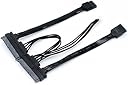
⚡ Power your dual-drive dreams with ZimaBlade’s sleek Y-Cable!
The zimaboard/ZimaBlade SATA Y-Cable is a compact, high-quality SATA cable designed to power and connect two 2.5- or 3.5-inch hard drives simultaneously. With a robust 12V/3A power supply and a space-saving 3.5-inch length, it’s optimized for ZimaBoard setups, enabling easy RAID or NAS configurations while ensuring stable, efficient data transfer in demanding environments.
| ASIN | B0BQVYW9MC |
| Best Sellers Rank | #132 in SATA Cables |
| Brand Name | zimaboard |
| Cable Length | 3.5 Inches |
| Cable Type | SATA |
| Color | Black |
| Compatible Devices | SSD |
| Compatible Phone Models | No Compatible Phone Models |
| Connector Gender | Male-to-Male |
| Connector Type | Micro HDMI |
| Customer Reviews | 4.5 4.5 out of 5 stars (175) |
| Data Transfer Rate | 1 Gigabits Per Second |
| Global Trade Identification Number | 06974755830103 |
| Indoor Outdoor Usage | Indoor |
| Item Shape | Round |
| Item Weight | 0.01 Kilograms |
| Manufacturer | zimaboard |
| Maximum Current | 1.5 Amps |
| Maximum Voltage | 12 Volts |
| Model | ZBA001 |
| Number of Items | 1 |
| Number of Pins | 22 |
| Other Special Features of the Product | Compact |
| Recommended Uses For Product | Storage system setup, RAID configurations |
| Unit Count | 1.0 Count |
S**B
Works as advertised.
Works great with a single drive. I don't have a second drive to plug in so I have no idea how it works with two drives.
J**D
Got a ZimaBlade? Want NAS? Get this.
A must have if you own a zimablade. The value and ease of installation is top notch and allowed me to attach two 2. TB solid-state drives in order to provide Nas storage. The quality and durability is much more than you would expect. I have pulled on these many times without an issue!
P**E
Great value
This item works perfectly.
S**E
Works Fine
Using with a 3.5" 12TB WD drive and 2.5" 200GB SSD. Both SATA drives work as expected.
M**X
Must have to connect two HDDs to the Zima Board.
This is a must have if you want to install two drives on a Zima Board. Please note the lenth is fairly short. Its long enough to install in a HDD caddy or a shelf. Also know the power plug is configured differently than a normal SATA connector is. It's still terminated as s normal SATA connection on the HDD side but not on the side connected to the zima board.
I**N
If you got a blade. Buy the cable.
Just buy it it’s worth it.
J**E
Just get this instead of fashioning your own
It’s much cleaner than piecing the necessary cables together. Happy with performance on 2x 3.5” 8TB HDD.
R**Y
Just want I needed
This is part of my DIY NAS build, does what it should.
M**Y
This works well. But a bit annoying that it is sold as zima board product, and in fact only zima blade is purchasable.
S**5
Ho preso questo cavo abbinato alla Zimaboard per potervi collegare due hard disk contemporaneamente ed ampliare così lo storage del sistema. Nella confezione della scheda viene consegnato il cavo per il singolo disco di memoria, quindi è necessario acquistare questo accessorio per averne due. La connessione è semplicissima, i connettori sono inconfondibili e senza rischi di errori. Una volta connessi andranno poi configurati gli hdd nel software della Zimaboard, ma questo è un passo successivo. Lo standard di connessione è, meglio precisare, è SATA e non compatibile con i vecchi dischi con standard IDE, ma non dovrebbe essere un problema visto che è un formato ormai sostituito da molti anni. Il cavo consente sia la connessione dati che l'alimentazione, il tutto tramite questo semplice connettore. Devo indicare che i cavi sono piuttosto corti, permettono di sovrapporre la Zimaboard sopra a due HDD 3,5", ma non di più, e questo comporta una sistemazione obbligatoriamente compatta. In questa configurazione però, se si utilizzano appunto HDD meccanici, una produzione di calore durante l'utilizzo, va quindi individuato un posizionamento adeguato ed eventuale ventilazione. Io l'avevo sistemato originariamente in un cassetto per mantenere tutto nascosto alla vista, ma le temperature raggiungevano i 60-70 gradi in standby, quindi ho dovuto cambiare posto ed aggiungere una ventilazione di sicurezza. Suppongo che con degli SSD non ci sia questo problema, ma è consigliabile comunque posizionarli distanziati lasciando uno spazio d'aria fra uno e l'altro così da far circolare un minimo di aria. In generale però se si usa come server i dischi più economici e sicuri sono quelli fisici. In definitiva questa non è una recensione del singolo prodotto perchè ovviamente è un accessorio della Zimaboard, però necessario solo se si intendono collegare 2 dischi, ma in questo caso il lavoro lo fa egregiamente, il resto sono avvertenze.
A**E
Non fonctionnel à fuir câble hors service et bas de gamme
A**H
Ive run it for two years and it's still going strong
C**N
Para zimabord perfecto
Trustpilot
1 month ago
5 days ago