Desertcart purchases this item on your behalf and handles shipping, customs, and support to Seychelles.
๐ง Elevate every meeting โ hear and be heard like never before!
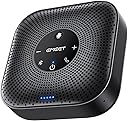
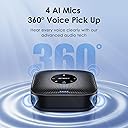
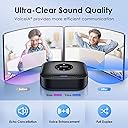
The EMEET M0 Plus Conference Speaker and Microphone is a professional-grade Bluetooth speakerphone featuring a 4-mic array with advanced AI noise cancellation for 360ยฐ voice pickup. It delivers crystal-clear 3W full duplex audio, supports seamless USB-C and Bluetooth 5.0 connections, and offers over 10 hours of battery life. Expandable via daisy chain to support up to 16 attendees, itโs optimized for hybrid workspaces, remote meetings, and on-the-go professionals seeking effortless, high-quality conferencing.


| ASIN | B0BVZLS5GZ |
| Additional Features | Built In Microphone, USB Port |
| Antenna Location | Workspace & Home Office, Huddle Room, Medium Room, Work From Anywhere |
| Audio Driver Type | Dynamic Driver |
| Audio Output Mode | Surround |
| Battery Average Life | 10 hours |
| Battery Capacity | 2600 milliamp_hours |
| Best Sellers Rank | #1,627 in Office Products ( See Top 100 in Office Products ) #1 in Telephone Audio Conferencing Products |
| Bluetooth Range | 10 meters |
| Brand | EMEET |
| Built-In Media | Speakerphone |
| Color | Black |
| Compatible Devices | Laptop, Smartphone, Tablet |
| Connectivity Protocol | Bluetooth |
| Connectivity Technology | Bluetooth, Dongle, USB |
| Control Method | Voice |
| Controller Type | Button |
| Customer Package Type | FFP |
| Customer Reviews | 4.2 out of 5 stars 1,707 Reviews |
| Enclosure Material | Plastic |
| Frequency Response | 20000 hertz |
| Input Voltage | 5 volts |
| Is Waterproof | FALSE |
| Item Dimensions D x W x H | 1.6"D x 4.6"W x 4.6"H |
| Item Weight | 0.26 kg |
| Manufacturer | Shenzhen eMeet technology Co.,Ltd. |
| Maximum Range | 10 meters |
| Model Name | M0 PLUS |
| Model Number | M0 PLUS |
| Mounting Type | Tabletop Mount |
| Number Of Circuits | 1 |
| Number of Audio Channels | 1 |
| Number of Batteries | 1 Lithium Polymer batteries required. |
| Number of Items | 1 |
| Number of Microphones | 4 |
| Number of Power Levels | 1 |
| Power Source | Battery Powered |
| Series Number | 1 |
| Signal-to-Noise Ratio | 60 db |
| Speaker Maximum Output Power | 3 watts |
| Speaker Size | 1.57 inches |
| Speaker Type | Tweeter |
| Specific Uses For Product | Meetings Conferences |
| Subwoofer Connectivity Technology | Wireless |
| Total USB 2.0 Ports | 1 |
| Tweeter Diameter | 1 inches |
| Unit Count | 1 Count |
| Warranty Description | 2 YEARS WARRANTY |
| Warranty Type | Limited |
| Water Resistance Level | Waterproof |
| Wireless Technology | Bluetooth |
T**L
Hello.....is it me you're look'n for? The EMEET MO Plus Nailed It.
Channeling a little Lionel Richie here โ because this speakerphone feels smooth. From the first call, the EMEET Conference Speakerphone MO Plus delivered clear, rich audio that made conversations effortless, whether I was on Teams, Zoom, Google Meet, or even taking calls from my cell phone. The sound quality is excellent, especially for voices that tend to come across soft or timid in meetings. Volume is strong without becoming harsh, which my โseasoned earsโ definitely appreciate. Itโs one of those devices you stop thinking about because it simply works. What impressed me most was how versatile it is for a remote small business setup. I can jump hands-free into meetings, move between devices seamlessly, and even transition from a phone call to the speakerphone without missing a beat. It feels built for everything from solo desk work to impromptu conference-room discussions while traveling. A few highlights: Compact footprint โ only about 4x4 inches on the desk Battery life appears strong enough to handle a full workday (Gonna try it poolside soon) Expandable by daisy-chaining units for larger rooms or growing teams Quick, reliable connection once powered on Smooth switching between laptop and phone audio One small thing: I'd an auto-wake feature when the laptop resumes, since I currently hold the power button for a few seconds to reconnect. That said, pairing is quick and reliable enough that it hasnโt been an issue. Overall, this feels like one of those rare tech purchases that instantly becomes part of the workflow. Clean design, excellent pickup, strong speaker volume, and genuinely easy to use. For remote work, hybrid meetings, travel, or small conference rooms, the EMEET MO Plus absolutely hits the right note.
S**M
Works perfect for Home Office
Works perfect. Crystal clear sound. Just Plug and Play. Got it for my home office. No more tangling with headphones. Great noise cancelation. Incredible product for the price.
T**N
Great for the home office
Bught this to use at my home office and am very pleased with the performance. Connected easily to my computer and phone and the sound is excellent. Great value and great product.
A**S
Works great, but not with docking station
FIX FOR DOCKING STATION USE BELOW First off, it was hard to gauge the size of this device based on other user photos. Xbox Series controller next to it for reference. I was tired of using my work provided headset(Logitech H570e) because wires are annoying and I work from home, so closed audio communication isnโt needed. I was also browsing stuff like the Jabra2 line but too costly. I have the EMEET sitting at the end of my desk and people can hear me just fine. The microphone quality is comparable to the headset. Both leagues better than the laptop microphone. The speaker is plenty loud and others cannot hear themselves when iโm talking to them on Teams, or Jabber. The product itself works great overall. Plug and play use when the usb cable is directly connected to my laptop. However, I ran into issues when I plugged the EMEET into my Dell WD19S docking station. I plug everything into it, so that way all I have to plug into my laptop is the usb-c cable. When listening to audio from a youtube video, the speaker works fine. When you try to run something that requires the speaker and microphone to both be in use(teams, jabber) the speaker will continually disconnect and reconnect over and over while also trying to find a usable audio source such as the laptop speakers, making it impossible to communicate. The microphone will work, so others can hear you, but you canโt hear them due to the speaker connection issue. I tried updating the drivers on my laptop and docking station, I tried going into advanced audio settings and not allowing other audio sources to connect, I set the EMEET as priority, I googled forums from other people experiencing issues with their docking stations and similar devices, I downloaded the EMEET software provided on their website, nothing worked. IT with my company worked on it for 30 min as well with no luck. I called EMEETโs support team and with no troubleshooting, they told me itโs likely the docking station at fault but ehhhhh I donโt know about that, chief. I did not want to plug the EMEET into my laptop just for it to work. I also did not want to run strictly bluetooth as iโd have to recharge it. That defeats the purpose of why I got this(cables, handsfree, tidy, etc) THE FIX: As stated before, when the EMEET is plugged into the docking station and iโm making a call, the microphone is the only thing that works correctly. To get the speaker to work, I paired the EMEET to my laptop via bluetooth. Since the EMEET is also still plugged into the docking station, it will show two speaker sources and two microphone sources. On windows, go to system, sound, output. It should show two sources from EMEET. One labeled Speaker, One labeled headset. The one labeled headset is your bluetooth connection. The one labeled Speaker is your wired connection. Click on the Speaker source, under general, audio, select โdonโt allowโ. This will make it to where the Speakers bluetooth connection is your output source, and the microphone wired connection is your input source. Unit is still hardwired in so you donโt have to charge it, and it resolves the connectivity issues with the docking station. Would be 5 stars if docking station compatibility were there.
M**K
Hate your zoom meetings a little lessโฆโฆโฆ.
So youโve got online meetings, make them a little less awful. The microphones pick up 8 people around a table really well, and the remote people come through the speaker great. The meeting grew to 14 in person and greater so we got a second unit and they daisy chain togeter. The performance is great with two, as well. Audio processing is magic. So much better than a dedicated microphone and room speakers.
M**K
Perfect for zoom meetings.
I purchased this for my photography group's zoom meetings with about 20 in person attendees and 8-10 people on-line. People only on the zoom call complained that they couldn't hear what was going on in the discussions. This wonderful compact devise solved the problem. People speaking on the other side of the room could be heard by the zoom listeners. The speakers worked very well so that everyone in the meeting could hear people on the zoom call.
L**S
Mediocre sound quality, not worth the price
I had decent expectations for this speaker, but the actual experience is quite average. The sound quality is mediocreโit sounds a bit flat and lacks depth. Additionally, the built-in microphone's pickup is pretty poor; when I use it for calls, the other person often says my voice is muffled. If this were a super cheap entry-level product, I could accept it, but itโs not exactly inexpensive. For this price point, there are definitely better options on the market. If you care about audio and call quality, I'd recommend looking elsewhere.
E**R
Excellent mic clarity, so-so speaker sound
I'm using this for microphone use only, the speaker is too tinny sounding for my taste. I work from home and we have VOIP for our work numbers. My older mic (part of a web cam) didn't seem to be working very well since I had folks tell me regularly that I was breaking up and they couldn't hear me clearly during calls. I figured that was just part of VOIP phone use and Internet speed/interruptions because I had similar issues hearing others using VOIP. However, after starting a new job and noticing my boss sounding clear as a bell 100% of the time during calls, I asked him what sort of microphone he used and he pointed me toward this one. Very easy hook-up and configuration with Teams and the GoTo phone app, and no more breaking up or fading in and out during calls. I still use a much better speaker because I do listen to music while I work, but this item performs so well for mic use and I am very happy with the purchase. If it was a better sounding speaker it would be five stars v four.
B**N
Klein aber oho
Ich bin sehr zufrieden mit dem Konferenzlautsprecher. Klar ist er nicht fรผr grosse Sitzungen gedacht aber fรผr so Gruppen bis 8 Leute perfekt und auch zu einem erschwinglichen Preis. Der Lautsprecher ist lautgenug und die Qualitรคt des Mikrofons ist auch gut. Die Stimme klingt zwar ganz leicht blechern auf der anderen Seite was aber nicht stรถrend wirkt auch beinlรคngerem zuhรถren. Aber da hab ich schon weit schlechtere Mikrofone erlebt auch in den hรถheren Preisklassen.
A**D
Amazing for conference calls
Very good ๐
I**M
Like it!
Pretty happy with this purchase. Easy connect (didnt have to do anything really other than plug in). Sound is good and clear, easy to operate.
T**I
Great value with cutting edge NC
For the price it is excellent quality. It has aggressive algorithms to eliminate (yes remove) background noise during calls. Quite impressive actually. Because it is aggressive you may hear a little hiss up loud but overall the sound quality is excellent and this is the 2nd unit I have purchased so must be good.
D**.
Value for money. Excellent noice cancellation.
Review based on 3montns purchase Very happy Excellent noice cancellation Good for office conference Bluetooth connectivity with phone also work seamlessly. Don't expect sound as Bluetooth speakers for music and dancing. Sound is adequate for a room of 14 x 24ft Very happy with quality of mics and long cord It has a inbuilt battery which recharges. Didn't tested it more than 2hrs so far
Trustpilot
2 weeks ago
4 days ago