Desertcart purchases this item on your behalf and handles shipping, customs, and support to Seychelles.
🎯 Dominate your game with precision, comfort, and style — the ultimate keypad for pros who refuse to settle.
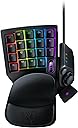
The Razer Tartarus V2 is a high-performance gaming keypad featuring 32 programmable mecha-membrane keys, an 8-way thumbpad, and customizable RGB lighting with 16.8 million colors. Designed for ergonomic comfort with a detachable palm rest and equipped with Hypershift technology, it offers double the command options. Compatible with Windows and powered via USB, it’s built to elevate your gaming precision and style.


| ASIN | B077T9391Z |
| Antenna Location | Gaming |
| Best Sellers Rank | 1,682 in PC & Video Games ( See Top 100 in PC & Video Games ) 112 in PC Gaming Keyboards |
| Box Contents | Manual, Razer Tartarus V2 |
| Brand | Razer |
| Brand Name | Razer |
| Button Quantity | 32 |
| Colour | Black |
| Compatible Amazon Tablet Models | Amazon Fire 7 12th Generation |
| Compatible Devices | Gaming Console, PC |
| Compatible Operating System Family | Windows |
| Compatible Tablet Computer Models | AAUB P30 |
| Compatible devices | Gaming Console, PC |
| Connectivity Technology | USB-A |
| Connectivity technology | USB-A |
| Customer Reviews | 4.3 out of 5 stars 4,834 Reviews |
| Enclosure Material | Plastic |
| Global Trade Identification Number | 08886419360179 |
| Hand Orientation | Ambidextrous |
| Item Dimensions L x W x H | 20.3L x 15.3W x 6H centimetres |
| Item Weight | 340 Grams |
| Keyboard Backlighting Color Support | RGB |
| Keyboard Description | Gaming |
| Keyboard Layout | QWERTY |
| Keyboard description | Gaming |
| Language | English |
| Manufacturer | Razer |
| Manufacturer Part Number | RZ07-02270100-R3M1 |
| Minimum Required Operating System Version | Windows 10 |
| Model Name | RZ07-02270100-R3M1 |
| Model Number | RZ07-02270100-R3M1 |
| Number of Items | 1 |
| Number of Keys | 32 |
| Number of Sections | 1 |
| Power Source | USB Power |
| Product Features | Mecha-Membrane Switches |
| Product Warranty | 2 year |
| Recommended uses for product | Gaming |
| Special feature | Mecha-Membrane Switches |
| Style Name | Tartarus V2 |
| Switch Type | Mecha-Membrane |
| Theme | Rainbow |
| Unit Count | 1.0 count |
P**D
Great for us older gamers too
I'm an older gamer at 63 and recently after many years in Vr ended up back flat screening with my grandson. I played Fortnite and really stared to enjoy it . However if like me you have trouble being quick fingered and sometimes forget what key does what...Get one of these. Super simple to re program the key strokes to what you want..just select the numbered key you want to copy and click the key on your main keyboard and its done ...very well thought out soft wear for simplicity itself..you can go further and more advanced but I'm happy were it got to and how simple it got there. Now set up its so easy to E open doors or chests...Run,slide or jump like a pro. The other thing is the toggle this replaces the WSAD keys stroked (well runs alongside actually ) so its a bit of a cross between a keyboard and a console controller but it works really well ( I cant do console controllers very well..tend to get a bit fingers and thumbs) . Just to add you can have a few keys do the same job...so I have two buttons that do crouch...so I can find them as both were intuitively were I figured they should be...so I made them both the same..saves forgetting in the heat of the moment . Its working for me anyways..had a few seconds in Fortnite and won a few fights I don't think I would have without this...and ran from a few too ..its easy when you can find the keys Quality wise it seems well made ...I know there is a pro version too but this is fine for me and certainly on par with my G Logic keyboard. I tried a cheaper alternative before I got this and although it worked..its wasn't anywhere near as easy to use and ergonomically no were near. If you are going for something like this..get this one the Razer ...its a bit more £££ but sometimes that's what it takes to get the job done . Happy Gameing
P**E
A winner for warzone
I migrated to pc from PS4 basically so I could play warzone with those crispy frames. However I am a lifelong controller user so the keyboard and mouse conversion was not appealing. However after a couple of months I really wanted to commit but the keyboard layout was too stifling and finger heavy, so I did some Googling and found this bad boy and it is awesome. Awesome. The best part is the full utilisation of the thumb; on keyboard it’s just for space but on this I have my thumb doing 6 things, which is a much more logical progression from controller. The stick is not a true analog stick, it clicks either up down left or right, so I assigned each direction a function. So in warzone the stick does tactical, field upgrades, plating and melee. The button above it is prone and the space bar ( button 20 ) is jump. So my left hand fingers just do movement and pings and lethals and my mouse ( a mamba elite)does the rest Once you figure out what buttons feel right then it’s really comfortable and it’s a bit like being in command of a spaceship. I have had it for about 3 months and would not look back. I play warzone 3-6 hours a day and it’s still working well . I can’t comment for other games but it’s made my warzone life much more fun. Man I want to play warzone. Hope this helps!
E**B
Could be more comfortable, but it's not bad after getting used to it
Compared to the Orbweaver, where you could change the position of various items in 3 places, this one is less suited for people with smaller hands. You can only change the position of the palm rest, and it isn't quite enough. Initially I actually hated this and thought I would not get on with it at all. I tried it a few times for a few minutes, and just instantly hated, but I persevered watching videos about people who used their own custom keybinds, just to see if there was a good idea somewhere that would fit me. The main problem for me is the thumbstick, it just is too far away, and the default space bar button is even further away and I am actually not using it all. After some videos and my other half pointing out that my main bindings didn't have to sit in the middle of the keypad, but they could be moved to the right hand side closer to the thumbstick, things started to click. I really wanted to use the thumbstick as a joystick (I know it's really a d-Pad), as there was no reason for me to treat it as a normal keyboard, as I already have a good one. So after about 1 or 2 hours of playing my main games with it, I finally started to get the hang of it. In very fast shooter games, my instincts still kick in with the old binds, so it's possible that I will be using this for games other than shooters. I'm sure that I could get used to it, but I have spent thousands of hours across my lifetime with mouse and keyboard and shooters are a very precise type of game. So whenever the pace of the game commanded split decisions, I just reverted back to normal WASD and because I wasn't using WASD it resulted in me having issues. I'll see whether I want to re-invent the wheel there or not. But for newer games like top down action RPGs, such as Path of Exile 2, this is working rather well. The main problem I have is that, even though I can sort of emulate a joystick by binding the thumbstick to WASD (so 8 directions of movement, sufficient although not quite 360 degrees), because it's a d-PAD the joystick doesn't feel completely smooth. I am finding it funny that some reviews say they can't go diagonally with it, because that's what I find easiest, whereas trying strafe laterally I find hardest, as I always move the thumbstick a little bit in between the X and Y axis, so I wind up strafing diagonally a lot. Why DO I want to use the joystick? Because I don't want to tie 3 fingers (4 if you count shift for sprinting) to movement when I can use 1. And that's actually the funny part, the movement with the thumbstick was very intuitive, but suddenly the rest of my fingers were doing nothing. So now I need to train my brain to figure out what to do while my thumbstick is doing more than pressing a space bar, and without stopping the movement with the thumb, that way I can learn do more actions at the same time. With WASD if you have to take your fingers off WASD itself to change weapons, or use skills, etc. but with a thumbstick, the idea is that you can do all that without having to stop moving. Even though I am rather quick at moving from WASD to other keys and back, I think the ability to not even need to do that can come in handy for gaming. If you are unsure about buying something like an Azeron because it costs a lot, this is a good starting point. I realise that even with an Azeron I would have to go through this learning phase, and while I believe it is superior to the Tartarus 2, the Tartarus has surprised me. I went from hating to actually liking it a lot, just because I didn't give up on it (even though I almost did). I see a lot of hate for Razer Synapse, but I actually rather like it, it works rather well. I like that I can associate also lighting profiles, which can remind me which key I bound to what, as I can separate groups of keys with different colours. You can bind just about anything, including macros. So where needed I macroed the sprint button (shift) with movement so I don't have to press a separate button to run.
S**T
Great for gaming and apps that benefit from keyboard shortcuts and macros.
I already own a Tartarus V2. Unfortunately, a microswitch failed on the D-pad after 4 years of daily use (I use that switch as "crouch" in fps games.) This was bought as a direct replacement, although I am a little concerned about how long this one will last - that key does see heavy use. Buy with that one negative point in mind. It's an otherwise excellent piece of kit. I play with the mouse and the Tartarus at elbow level on panels attached to the arms of my chair. This means I don't have space for a full keyboard there. The Tartarus is small enough to fit and with its macro, profile switching and key reassignment functions, I have every key I need for every game I play exactly where I need them without having to look at the thing ever. This is a bit of a shame, as the chroma functions are really nice, and again programmable. In terms of price, the mecha-membrane solution to gamers wanting clicky things does have the tactile feel of a mechanical keyboard without being too exoensive. The click is consistent without noticeable mushiness. In previous jobs, I wrote a *lot* and have come to prefer the feel of mechanical keyboards for better typing speed and fewer mistaken presses. While I'm not going to write War and Peace on a Tartarus v2, I still prefer its feel to the Tartarus v1, which I also own.
A**W
Highly Recommend
Fantastic for a life long controller user!! Makes movement on the D-pad so much easier than WASD. Highly recommend for anyone wanting to transition from controller to mouse and keyboard. UPDATE - D pad broke after 2 months. Don't buy
R**T
Best Gaming Keypad
had the Belkin n52e then Razer Orbweaver. Now i have this and love it. Only down side is i miss the adjustability of the Orbweaver but don't let that put you off. It's very comfortable and turns of features. I don't like using a keyboard for gaming, just prefer all buttons i need to be in one area and this is perfect. Well built as always by Razer, software easy to install and use. Take it to the next level and get one of these.
D**S
What a shame
UPDATE: Please, if you but this don't post a review immediately. It's tempting but wait. Read the other reviews. The D-Pad will most likely fail after a few months - that's when you should post a review. I'm only making this point in the vain hope that Razer do something about this sooner rather than later. I'm now on my 3rd one in less than a year. This is an excellent pieces of kit... I've had 3 so far. So why the low rating and why I have had 3? Simple... they pack up after about 2 months. The forward push membrane fails rendering it useless. Such a shame because it's brilliant in every other aspect. Responsive, easy to program, fits like a glove. Advice.. if you buy this make sure you get it replaced before the Amazon window closes to return it. Otherwise you will need to return it for a repair then, after about 3 weeks you get an email saying it can't be repaired, you get a refund and you need to order a new one. So, for at least 4 weeks you have no contoller. Trust me, 3 times but there are not other products out there to choose from
G**N
Will never touch keyboard again whilst playing
The pad is awesome regarding functionality for gaming. I don't know why companies don't make more if these things. All keys are programmable and you can setup lots of profiles and several keymaps for every profile. Potential is endless. Programming is quite simple via Synapse 3, and you can get really complex with functuons and macros. The only flaw is ergonomics, they either designed via the screen or the real test human used had immensely long fingers: it is difficult to get to the top row of keys and the bottom row is a bit awkward to get to also. But nevertheless, I would recommend to everyone who needs more customization at a hands reach. I find having this pad makes for a better combo than having a mouse with 600 buttons. Enjoy it, Alex
A**T
Une merveille
Super pour le gaming, pas évident de si habituée aux débuts mais une fois habituer c'est un pure plaisir
T**A
great product
It is a bit of a learning curve but once you get the ang of it .It is Fantastic.
M**T
Güzel
Çok farklı. Alışması zaman alacak ama ergonomik ve basış hissiyatı güzel, keyifli bir klavye. Bileği destekliyor, yormuyor.
T**I
Ergonomia i wygoda użytkowania
Dużo opcji personalizacji. Używam do skrótów i makr w programach CAD itp. Bardzo ergonomiczne i przydatne urządzenie, a do tego porządnie wykonane.
L**H
Excelente para la PS5 (y PS4)
Si echas de menos poder usar un teclado para jugar en tu PS4 o PS5, este mini teclado te va a encantar. Funciona perfectamente en ambas vídeoconsolas, reconocen todas las teclas y además dispone de otros botones que te permitirán controlar tus juegos de forma mucho más avanzada que con un mando de control convencional. Si añades un ratón es ideal para juegos como Fortnite, COD o similares. Su diseño es además muy futurista, con muchas luces que le encantan a los más “gamers”. La respuesta a tus pulsaciones es inmediata, y el tecleado muy cómodo. La posición de la mano es realmente cómoda, no hay cansancio después de varias horas de juego, y en cuanto te acostumbras a esta nueva forma de control (un par de días y ya eres un experto) no vuelves al mando de control ni loco.
Trustpilot
1 day ago
3 weeks ago